 TutorialKart.com
JavaFX RadioButton Control
A JavaFX RadioButton represents an option that can be selected or cleared. It extends ToggleButton and is commonly used when an interface must allow the user to choose one option from a small set.
Creating several radio buttons does not automatically make them mutually exclusive. To permit only one selection, assign the controls to the same ToggleGroup. This tutorial demonstrates how to create a radio button, display multiple choices, group them, set a default selection, read the selected value, and respond to selection changes.
Create and Display a JavaFX RadioButton
Create a RadioButton by passing its visible label to the constructor. The control must then be added to a JavaFX layout before it can appear in a scene.
JavaFxRadioButtonTutorial2.java
import javafx.application.Application;
import javafx.scene.Scene;
import javafx.scene.control.RadioButton;
import javafx.scene.layout.TilePane;
import javafx.stage.Stage;

public class JavaFxRadioButtonTutorial2 extends Application {

    public static void main(String[] args) {
        launch(args);
    }

    @Override
    public void start(Stage primaryStage) {
        try {
            // set title
            primaryStage.setTitle("Radio Button Tutorial - tutorialkart.com");

            //javafx radio button
            RadioButton radioButton1 = new RadioButton("Option 1");

            // tile pane
            TilePane tilePane = new TilePane();

            // add radio button to the tile pane
            tilePane.getChildren().add(radioButton1);

            //set up scene
            Scene scene = new Scene(tilePane, 400, 100);
            primaryStage.setScene(scene);
            primaryStage.show();
        } catch(Exception e) {
            e.printStackTrace();
        }
    }
}
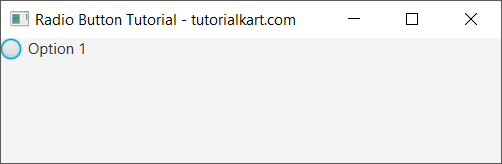
Run the application. A circular selection indicator is displayed beside the text supplied to the RadioButton constructor.
Display Multiple JavaFX RadioButtons Without a ToggleGroup
The following example adds three independent radio buttons to a TilePane. Because the controls do not belong to a shared ToggleGroup, each one maintains its own selected state.
JavaFxRadioButtonTutorial3.java
import javafx.application.Application;
import javafx.scene.Scene;
import javafx.scene.control.RadioButton;
import javafx.scene.control.ToggleGroup;
import javafx.scene.layout.TilePane;
import javafx.stage.Stage;

public class JavaFxRadioButtonTutorial3 extends Application {

    public static void main(String[] args) {
        launch(args);
    }

    @Override
    public void start(Stage primaryStage) {
        try {
            // set title
            primaryStage.setTitle("Radio Button Tutorial - tutorialkart.com");

            //javafx radio buttons
            RadioButton radioButton1 = new RadioButton("Option 1");
            RadioButton radioButton2 = new RadioButton("Option 2");
            RadioButton radioButton3 = new RadioButton("Option 3");

            // tile pane
            TilePane tilePane = new TilePane();

            // add radio buttons to the tile pane
            tilePane.getChildren().add(radioButton1);
            tilePane.getChildren().add(radioButton2);
            tilePane.getChildren().add(radioButton3);

            //set up scene
            Scene scene = new Scene(tilePane, 400, 100);
            primaryStage.setScene(scene);
            primaryStage.show();
        } catch(Exception e) {
            e.printStackTrace();
        }
    }
}
Run the application and select each control. More than one option can remain selected because the radio buttons are independent.
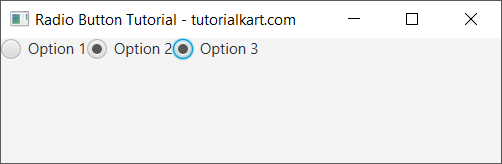
This behavior is appropriate only when multiple selections are valid. When the choices represent alternatives such as a payment method, account type, or delivery option, place the radio buttons in one ToggleGroup.
Group JavaFX RadioButtons with ToggleGroup
A ToggleGroup coordinates the selected states of its toggles. Assigning several radio buttons to the same group ensures that selecting one button clears the previous selection.
JavaFxRadioButtonTutorial.java
import javafx.application.Application;
import javafx.scene.Scene;
import javafx.scene.control.RadioButton;
import javafx.scene.control.ToggleGroup;
import javafx.scene.layout.TilePane;
import javafx.stage.Stage;

public class JavaFxRadioButtonTutorial extends Application {

    public static void main(String[] args) {
        launch(args);
    }

    @Override
    public void start(Stage primaryStage) {
        try {
            // set title
            primaryStage.setTitle("Radio Button Tutorial - tutorialkart.com");

            //javafx radio buttons
            RadioButton radioButton1 = new RadioButton("Option 1");
            RadioButton radioButton2 = new RadioButton("Option 2");
            RadioButton radioButton3 = new RadioButton("Option 3");

            //a group for radio buttons
            ToggleGroup radioGroup = new ToggleGroup();

            //to group radio buttons
            radioButton1.setToggleGroup(radioGroup);
            radioButton2.setToggleGroup(radioGroup);
            radioButton3.setToggleGroup(radioGroup);

            // tile pane
            TilePane tilePane = new TilePane();

            // add radio buttons to the tile pane
            tilePane.getChildren().add(radioButton1);
            tilePane.getChildren().add(radioButton2);
            tilePane.getChildren().add(radioButton3);

            //set up scene
            Scene scene = new Scene(tilePane, 400, 100);
            primaryStage.setScene(scene);
            primaryStage.show();
        } catch(Exception e) {
            e.printStackTrace();
        }
    }
}
When the program runs, the three controls appear as members of one radio-button group.
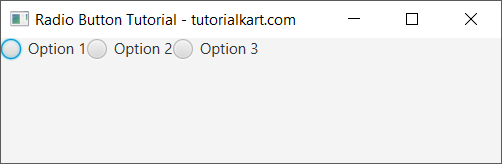
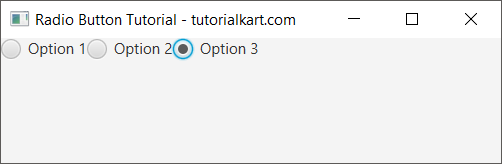
Select different options. JavaFX clears the previously selected radio button before selecting the new one. The selected control displays a filled indicator inside its circle.
Set a Default JavaFX RadioButton Selection
Use setSelected(true) when one option should be selected as soon as the interface opens. Set the default only after the radio button has been assigned to its group.
ToggleGroup deliveryGroup = new ToggleGroup();

RadioButton standard = new RadioButton("Standard delivery");
RadioButton express = new RadioButton("Express delivery");

standard.setToggleGroup(deliveryGroup);
express.setToggleGroup(deliveryGroup);

standard.setSelected(true);
Only one member of a ToggleGroup can be selected, so setting another member to true automatically clears the current default.
Check Which JavaFX RadioButton Is Selected
The isSelected() method returns true when a specific radio button is selected. The next example checks all three controls when the user clicks Submit.
JavaFxRadioButtonTutorial4.java
import javafx.application.Application;
import javafx.scene.Scene;
import javafx.scene.control.Button;
import javafx.scene.control.RadioButton;
import javafx.scene.control.ToggleGroup;
import javafx.scene.layout.TilePane;
import javafx.stage.Stage;

public class JavaFxRadioButtonTutorial4 extends Application {

    public static void main(String[] args) {
        launch(args);
    }

    @Override
    public void start(Stage primaryStage) {
        try {
            // set title
            primaryStage.setTitle("Radio Button Tutorial - tutorialkart.com");

            //javafx radio buttons
            RadioButton radioButton1 = new RadioButton("Option 1");
            RadioButton radioButton2 = new RadioButton("Option 2");
            RadioButton radioButton3 = new RadioButton("Option 3");

            //to group radio buttons
            ToggleGroup radioGroup = new ToggleGroup();

            //add buttons to the group
            radioButton1.setToggleGroup(radioGroup);
            radioButton2.setToggleGroup(radioGroup);
            radioButton3.setToggleGroup(radioGroup);

            Button button = new Button("Submit");
            button.setOnAction(action -> {
                System.out.println("Is option 1 selected: "+radioButton1.isSelected());
                System.out.println("Is option 2 selected: "+radioButton2.isSelected());
                System.out.println("Is option 3 selected: "+radioButton3.isSelected());
            });

            // tile pane
            TilePane tilePane = new TilePane();

            // add all controls to the tile pane
            tilePane.getChildren().add(radioButton1);
            tilePane.getChildren().add(radioButton2);
            tilePane.getChildren().add(radioButton3);
            tilePane.getChildren().add(button);

            //set up scene
            Scene scene = new Scene(tilePane, 400, 100);
            primaryStage.setScene(scene);
            primaryStage.show();
        } catch(Exception e) {
            e.printStackTrace();
        }
    }
}
Run the application, select a radio button, and click Submit.
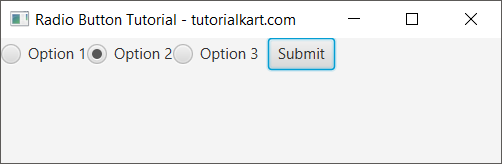
The program calls isSelected() for each control. Exactly one grouped radio button returns true when an option has been chosen.

Get the Selected RadioButton from ToggleGroup
Checking every radio button is manageable for a small example, but ToggleGroup.getSelectedToggle() is more convenient when a form contains several choices. The method returns the selected Toggle, or null when no option is selected.
RadioButton selectedButton =
        (RadioButton) radioGroup.getSelectedToggle();

if (selectedButton == null) {
    System.out.println("No option selected");
} else {
    System.out.println("Selected: " + selectedButton.getText());
}
Always handle the possible null result unless the application sets a mandatory default selection.
Store Application Values with RadioButton User Data
The label shown to a user is not always the value an application needs to store. Use setUserData() to associate a separate value with each radio button, then retrieve it from the selected toggle.
RadioButton monthly = new RadioButton("Monthly billing");
RadioButton annual = new RadioButton("Annual billing");

monthly.setUserData("MONTHLY");
annual.setUserData("ANNUAL");

monthly.setToggleGroup(billingGroup);
annual.setToggleGroup(billingGroup);

if (billingGroup.getSelectedToggle() != null) {
    Object billingCode = billingGroup.getSelectedToggle().getUserData();
    System.out.println("Billing code: " + billingCode);
}
This keeps the interface text independent from identifiers used by validation, persistence, or business logic.
Add an Action Listener to a JavaFX RadioButton
Use setOnAction() to run code when the user activates a radio button. Inside the event handler, call isSelected() when the logic depends on the control’s current state.
The following example defines one radio button and prints its selected state whenever an action event occurs.
JavaFxRadioButtonTutorial5.java
import javafx.application.Application;
import javafx.scene.Scene;
import javafx.scene.control.RadioButton;
import javafx.scene.layout.TilePane;
import javafx.stage.Stage;

public class JavaFxRadioButtonTutorial5 extends Application {

    public static void main(String[] args) {
        launch(args);
    }

    @Override
    public void start(Stage primaryStage) {
        try {
            // set title
            primaryStage.setTitle("Radio Button Tutorial - tutorialkart.com");

            //javafx radio button
            RadioButton radioButton1 = new RadioButton("Option 1");

            radioButton1.setOnAction(action -> {
                System.out.println("Option 1 selected: "+radioButton1.isSelected());
            });

            // tile pane
            TilePane tilePane = new TilePane();

            // add radio button to the tile pane
            tilePane.getChildren().add(radioButton1);

            //set up scene
            Scene scene = new Scene(tilePane, 400, 100);
            primaryStage.setScene(scene);
            primaryStage.show();
        } catch(Exception e) {
            e.printStackTrace();
        }
    }
}
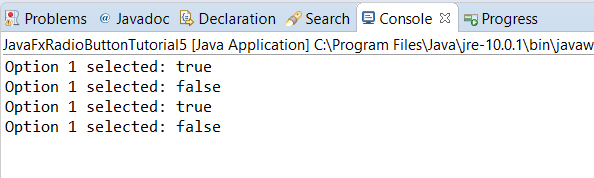
Run the application and activate the radio button. The event handler prints the current selected state to the console.
Observe JavaFX ToggleGroup Selection Changes
When the application should react to any option in a group, listen to the group’s selectedToggleProperty() instead of attaching nearly identical handlers to every radio button.
radioGroup.selectedToggleProperty().addListener(
        (observable, oldToggle, newToggle) -> {
            if (newToggle != null) {
                RadioButton selected = (RadioButton) newToggle;
                System.out.println("Selected: " + selected.getText());
            }
        }
);
The listener receives the previous and new toggles. The newToggle value can be null if the group is cleared programmatically.
Disable or Clear a JavaFX RadioButton Selection
Call setDisable(true) when an option should remain visible but unavailable. To remove the current selection from an entire group, call selectToggle(null).
radioButton3.setDisable(true);

// Clear the selected option in the group.
radioGroup.selectToggle(null);
Do not clear a group when the form requires one mandatory answer. In that case, set an initial selection and validate the selected toggle before processing the form.
JavaFX RadioButton and CheckBox Selection Difference
Use radio buttons for mutually exclusive alternatives: selecting one option replaces another. Use check boxes when each choice is independent and the user may select any number of options. Several ungrouped radio buttons can technically support multiple selections, but check boxes communicate that behavior more clearly.
JavaFX RadioButton Frequently Asked Questions
Why can I select multiple JavaFX RadioButtons?
The controls are not assigned to the same ToggleGroup. Create one group and call setToggleGroup() on every radio button that represents an alternative in that group.
How do I find the selected JavaFX RadioButton?
Call toggleGroup.getSelectedToggle(). Check for null, and then cast the returned toggle to RadioButton when you need its text or other radio-button properties.
How do I select a JavaFX RadioButton by default?
After assigning the button to its group, call radioButton.setSelected(true). Alternatively, call toggleGroup.selectToggle(radioButton).
Can a JavaFX ToggleGroup have no selected RadioButton?
Yes. A new group may start without a selection, and code can clear it with selectToggle(null). Handle this state before reading the selected toggle.
How do I get a value other than the RadioButton label?
Assign a value with setUserData() and retrieve it from getSelectedToggle().getUserData(). This is useful when visible labels differ from internal application values.
JavaFX RadioButton Tutorial Summary
In this JavaFX Tutorial, we created and displayed RadioButton controls, grouped mutually exclusive choices with ToggleGroup, set a default selection, obtained the selected toggle, stored application values with user data, and handled selection events.