 TutorialKart.com
JavaFX TextField for Single-Line User Input
The JavaFX TextField control accepts and displays a single line of editable text. Use it for values such as a name, search term, email address, quantity, or other short form input. The application can read the current value with getText(), update it with setText(), or observe changes through the control’s text property.
Create an empty JavaFX TextField with the no-argument constructor.
TextField textField = new TextField();Add the TextField to a JavaFX layout pane so that it becomes part of the scene graph. The following statement adds it to a TilePane.
tilePane.getChildren().add(textField);Read the Current JavaFX TextField Value with getText()
Call getText() to read the current contents of the TextField. A common place to do this is inside a button action handler or after the user presses Enter. The method returns an empty string when the field contains no text.
String text = textField.getText();JavaFX TextField Example with a Submit Button
The following program creates a TextField and a Submit button. When the button is clicked, the action handler reads the TextField value and prints it to the console.
JavaFxTextFieldTutorial.java
import javafx.application.Application;
import javafx.event.Event;
import javafx.event.EventHandler;
import javafx.scene.Scene;
import javafx.scene.control.Button;
import javafx.scene.control.TextField;
import javafx.scene.layout.TilePane;
import javafx.stage.Stage;

public class JavaFxTextFieldTutorial extends Application {

    public static void main(String[] args) {
        launch(args);
    }

    @Override
    public void start(Stage primaryStage) {
        try {
            // set title
            primaryStage.setTitle("TextField Tutorial");

            //javafx text field
            TextField textField = new TextField();

            Button btn = new Button();
            btn.setText("Submit");
            btn.setOnAction(new EventHandler() {
				@Override
				public void handle(Event arg0) {
					System.out.println(textField.getText());
				}
            });

            // stack pane
            TilePane tilePane = new TilePane();

            // add TextField and Button to the tilepage
            tilePane.getChildren().add(textField);
            tilePane.getChildren().add(btn);

            //set up scene
            Scene scene = new Scene(tilePane, 400, 100);
            primaryStage.setScene(scene);
            primaryStage.show();
        } catch(Exception e) {
            e.printStackTrace();
        }
    }
}
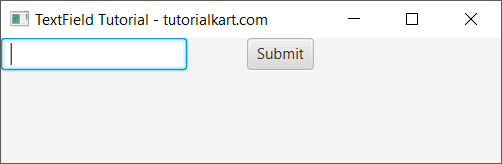
Run the application to display the TextField and Submit button.
Enter a value in the TextField and click Submit.
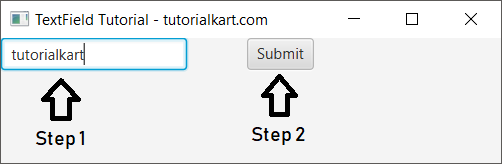
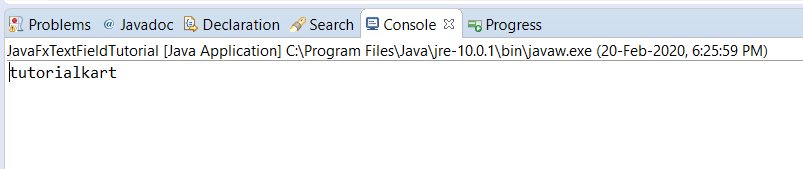
The button’s event handler calls textField.getText(). The returned string is passed to System.out.println(), so the submitted value appears in the console.
Set an Initial Value in a JavaFX TextField
Pass a string to the TextField constructor when the control should display an initial value as soon as the window opens.
JavaFxTextFieldTutorial.java
import javafx.application.Application;
import javafx.event.Event;
import javafx.event.EventHandler;
import javafx.scene.Scene;
import javafx.scene.control.Button;
import javafx.scene.control.TextField;
import javafx.scene.layout.TilePane;
import javafx.stage.Stage;

public class JavaFxTextFieldTutorial extends Application {

    public static void main(String[] args) {
        launch(args);
    }

    @Override
    public void start(Stage primaryStage) {
        try {
            // set title
            primaryStage.setTitle("TextField Tutorial - tutorialkart.com");

            //javafx text field
            TextField textField = new TextField("tutorialkart");

            // stack pane
            TilePane tilePane = new TilePane();

            // add TextField to the tilepage
            tilePane.getChildren().add(textField);

            //set up scene
            Scene scene = new Scene(tilePane, 400, 100);
            primaryStage.setScene(scene);
            primaryStage.show();
        } catch(Exception e) {
            e.printStackTrace();
        }
    }
}
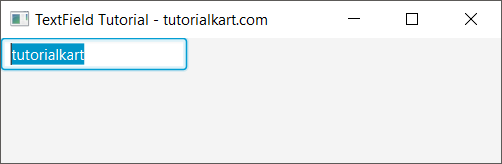
When this application runs, the TextField displays the string supplied to TextField(String).
Update JavaFX TextField Text with setText()
Use setText() when the value must be assigned or replaced after constructing the TextField. The following program creates an empty TextField and then sets its displayed text.
JavaFxTextFieldTutorial.java
import javafx.application.Application;
import javafx.event.Event;
import javafx.event.EventHandler;
import javafx.scene.Scene;
import javafx.scene.control.Button;
import javafx.scene.control.TextField;
import javafx.scene.layout.TilePane;
import javafx.stage.Stage;

public class JavaFxTextFieldTutorial extends Application {

    public static void main(String[] args) {
        launch(args);
    }

    @Override
    public void start(Stage primaryStage) {
        try {
            // set title
            primaryStage.setTitle("TextField Tutorial - tutorialkart.com");

            //javafx text field
            TextField textField = new TextField();

            //set text
            textField.setText("tutorialkart");

            // stack pane
            TilePane tilePane = new TilePane();

            // add TextField to the tilepage
            tilePane.getChildren().add(textField);

            //set up scene
            Scene scene = new Scene(tilePane, 400, 100);
            primaryStage.setScene(scene);
            primaryStage.show();
        } catch(Exception e) {
            e.printStackTrace();
        }
    }
}
Add Prompt Text to a JavaFX TextField
Prompt text is a hint displayed while the TextField is empty. It does not become the control’s value, so getText() still returns an empty string until the user enters text.
TextField emailField = new TextField();
emailField.setPromptText("name@example.com");
Use prompt text to show the expected format, but keep any permanent field label visible separately so that the form remains understandable after the user starts typing.
Handle the Enter Key in a JavaFX TextField
A TextField fires an action event when the user presses Enter. This lets a short form or search box submit without requiring a separate button click.
TextField searchField = new TextField();
searchField.setPromptText("Search");

searchField.setOnAction(event -> {
    String query = searchField.getText().trim();
    System.out.println(query);
});
The call to trim() removes leading and trailing whitespace from the submitted string. Keep the original text instead when surrounding spaces are meaningful to the application.
Observe JavaFX TextField Changes with textProperty()
Use a change listener when the application needs to react while the user types. The listener receives the previous value and the new value each time the text property changes.
TextField usernameField = new TextField();

usernameField.textProperty().addListener((observable, oldValue, newValue) -> {
    System.out.println("New value: " + newValue);
});
This pattern is useful for live validation, character counters, filtering, and enabling or disabling related controls. Avoid slow work inside the listener because it may run for every edit.
Restrict JavaFX TextField Input with TextFormatter
For input restrictions, a TextFormatter can inspect each proposed edit before it reaches the TextField. The following filter accepts digits only while still allowing the field to be cleared.
TextField quantityField = new TextField();

quantityField.setTextFormatter(new TextFormatter<String>(change -> {
    String proposedText = change.getControlNewText();
    return proposedText.matches("\\d*") ? change : null;
}));
The filter controls which characters may be entered, but the application should still validate the final value before using it. For example, an empty string contains no invalid character but is not necessarily a valid quantity.
Useful JavaFX TextField Methods and Properties
| Method or property | Purpose |
|---|---|
getText() | Returns the current text as a String. |
setText(String) | Replaces the current text. |
clear() | Removes all text from the field. |
setPromptText(String) | Displays a hint while the field is empty. |
setEditable(boolean) | Controls whether the user can edit the text. |
setPrefColumnCount(int) | Sets the preferred width in average character columns. |
setOnAction(...) | Handles the action fired when Enter is pressed. |
textProperty() | Provides an observable property for binding or change listeners. |
Clear, Disable, or Make a JavaFX TextField Read-Only
These statements cover common control-state changes.
textField.clear();              // Remove the current text
textField.setEditable(false);   // Show text but prevent editing
textField.setDisable(true);     // Disable interaction with the control
A non-editable TextField can still display selectable text, whereas a disabled TextField is placed in the disabled state and normally uses the disabled visual style.
JavaFX TextField and TextArea Difference
Use TextField for a single line of input. Use TextArea when the user must enter multiple lines, such as a description, address, or comment. Pressing Enter in a TextField fires its action event; in a TextArea, Enter normally inserts a line break.
JavaFX TextField Questions
How do I get text from a JavaFX TextField?
Call textField.getText(). The result is a String containing the field’s current value.
How do I detect when Enter is pressed in a JavaFX TextField?
Register an action handler with setOnAction(). JavaFX invokes that handler when the TextField fires its action event, normally after the user presses Enter.
How do I make a JavaFX TextField accept numbers only?
Attach a TextFormatter with a filter that rejects edits containing unwanted characters. Validate the complete value separately for range, required-field, decimal, or sign rules.
How do I clear a JavaFX TextField?
Call textField.clear(). This is equivalent to replacing the current contents with an empty string.
JavaFX TextField Tutorial Summary
In this JavaFX Tutorial, we learned how to create a TextField, read and set its value, add prompt text, handle the Enter key, observe text changes, restrict input with a TextFormatter, and choose between TextField and TextArea.
JavaFX TextField Editorial QA Checklist
- Confirm every TextField example is used for single-line input.
- Check that displayed hints use
setPromptText(), not a prefilled value that could be submitted accidentally. - Verify input filters still allow necessary edits such as clearing or replacing selected text.
- Validate the final submitted value even when a TextFormatter restricts characters.
- Keep slow processing out of text-property listeners and action handlers on the JavaFX Application Thread.