 TutorialKart.com
JavaFX Hyperlink Control
The JavaFX Hyperlink control displays clickable text with the visual behavior of a web-style link. It can trigger application logic, open a web page, change a view, display help content, or perform another action when selected.
A JavaFX hyperlink does not open a URL automatically. You must register an action handler and define what should happen when the user activates the control.
The control is represented by the javafx.scene.control.Hyperlink class. It also provides a visited property that can be used to track and style links that have already been selected.
Create a JavaFX Hyperlink
Pass the displayed text to the Hyperlink constructor.
Hyperlink hyperlink = new Hyperlink("www.tutorialkart.com");You have to import javafx.scene.control.Hyperlink to use JavaFX Hyperlink.
You can also create an empty hyperlink and assign its text later.
Hyperlink hyperlink = new Hyperlink();
hyperlink.setText("Open documentation");
JavaFX Hyperlink Constructors
The Hyperlink class supports plain text links and links that combine text with a JavaFX graphic.
| Constructor | Description |
|---|---|
Hyperlink() | Creates an empty hyperlink. |
Hyperlink(String text) | Creates a hyperlink with the specified text. |
Hyperlink(String text, Node graphic) | Creates a hyperlink containing text and a JavaFX node used as its graphic. |
Display a JavaFX Hyperlink in a Scene
In the following JavaFX application, a hyperlink is created, added to a TilePane, and displayed in a scene.
JavaFxHyperlinkTutorial.java
import javafx.application.Application;
import javafx.scene.Scene;
import javafx.scene.control.Hyperlink;
import javafx.scene.layout.TilePane;
import javafx.stage.Stage;

public class JavaFxHyperlinkTutorial extends Application {

    public static void main(String[] args) {
        launch(args);
    }

    @Override
    public void start(Stage primaryStage) {
        try {
            // set title
            primaryStage.setTitle("JavaFX Label - tutorialkart.com");

            //javafx hyper link
            Hyperlink hyperlink = new Hyperlink("www.tutorialkart.com");

            // tile pane
            TilePane tilePane = new TilePane();

            // add hyper link to the tile pane
            tilePane.getChildren().add(hyperlink);

            //set up scene
            Scene scene = new Scene(tilePane, 400, 100);
            primaryStage.setScene(scene);
            primaryStage.show();
        } catch(Exception e) {
            e.printStackTrace();
        }
    }
}
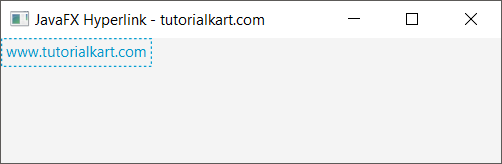
Run this application and you should see a hyperlink with the string “www.tutorialkart.com” in the window, as shown below.
Handle a JavaFX Hyperlink Click with setOnAction()
Use setOnAction() to register the code that should run when the hyperlink is selected. The action can update the interface, load another scene, display a dialog, or perform any other application task.
In the following example, clicking the hyperlink writes a message to the console.
JavaFxHyperlinkTutorial2.java
import javafx.application.Application;
import javafx.scene.Scene;
import javafx.scene.control.Hyperlink;
import javafx.scene.layout.TilePane;
import javafx.stage.Stage;

public class JavaFxHyperlinkTutorial2 extends Application {

    public static void main(String[] args) {
        launch(args);
    }

    @Override
    public void start(Stage primaryStage) {
        try {
            // set title
            primaryStage.setTitle("JavaFX Label - tutorialkart.com");

            //javafx hyper link
            Hyperlink hyperlink = new Hyperlink("www.tutorialkart.com");

            //set action listener
            hyperlink.setOnAction(e -> {
                System.out.println("Hyperlink is clicked.");
            });

            // tile pane
            TilePane tilePane = new TilePane();

            // add hyper link to the tile pane
            tilePane.getChildren().add(hyperlink);

            //set up scene
            Scene scene = new Scene(tilePane, 400, 100);
            primaryStage.setScene(scene);
            primaryStage.show();
        } catch(Exception e) {
            e.printStackTrace();
        }
    }
}
Run this application and click the hyperlink. The registered action handler runs and prints the following message.
Hyperlink is clicked.
Open a Web Page from a JavaFX Hyperlink
To open a URL in the user’s default browser, call getHostServices().showDocument() from the hyperlink action handler. The URL should include its scheme, such as https://.
Hyperlink websiteLink = new Hyperlink("Visit TutorialKart");

websiteLink.setOnAction(event ->
        getHostServices().showDocument("https://www.tutorialkart.com")
);
This code must run inside a class that extends javafx.application.Application, because getHostServices() is provided by the Application class.
Check the JavaFX Hyperlink visited Property
The visited property indicates whether the hyperlink has been activated. Read its current value with isVisited() or change it with setVisited().
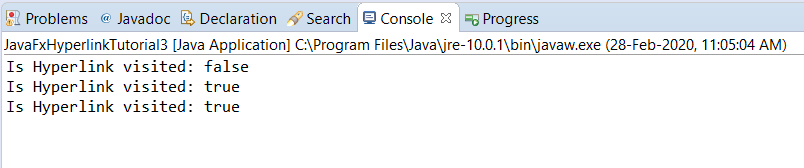
In this example, the initial visited state is printed before the hyperlink is shown. The state is printed again after the link is clicked.
JavaFxHyperlinkTutorial3.java
import javafx.application.Application;
import javafx.scene.Scene;
import javafx.scene.control.Hyperlink;
import javafx.scene.layout.TilePane;
import javafx.stage.Stage;

public class JavaFxHyperlinkTutorial3 extends Application {

    public static void main(String[] args) {
        launch(args);
    }

    @Override
    public void start(Stage primaryStage) {
        try {
            // set title
            primaryStage.setTitle("JavaFX Hyperlink - tutorialkart.com");

            //javafx hyper link
            Hyperlink hyperlink = new Hyperlink("www.tutorialkart.com");
            System.out.println("Is Hyperlink visited: "+hyperlink.isVisited());

            //set action listener
            hyperlink.setOnAction(e -> {
                System.out.println("Is Hyperlink visited: "+hyperlink.isVisited());
            });

            // tile pane
            TilePane tilePane = new TilePane();

            // add hyper link to the tile pane
            tilePane.getChildren().add(hyperlink);

            //set up scene
            Scene scene = new Scene(tilePane, 400, 100);
            primaryStage.setScene(scene);
            primaryStage.show();
        } catch(Exception e) {
            e.printStackTrace();
        }
    }
}
When the application starts, isVisited() returns false. After the hyperlink is selected, the property becomes true.
Set or Reset the JavaFX Hyperlink Visited State
You can set the visited state explicitly when the interface needs to remember or reset the link’s appearance.
hyperlink.setVisited(true);

// Reset the hyperlink to its unvisited state.
hyperlink.setVisited(false);
The visited property only describes the control’s state. It does not confirm that a web page loaded successfully or that an external operation completed.
Add an Image to a JavaFX Hyperlink
A hyperlink can display a graphic together with its text. Pass a JavaFX node to the two-argument constructor or call setGraphic() after creating the control.
Image image = new Image(
        getClass().getResourceAsStream("/images/help.png")
);
ImageView imageView = new ImageView(image);
imageView.setFitWidth(16);
imageView.setFitHeight(16);

Hyperlink helpLink = new Hyperlink("Help", imageView);
When loading a classpath resource, confirm that the file is included in the application’s runtime resources and that the path matches its package location.
Position the JavaFX Hyperlink Graphic
Use setContentDisplay() to place the graphic to the left, right, above, or below the hyperlink text. Use setGraphicTextGap() to control the spacing between them.
import javafx.scene.control.ContentDisplay;

helpLink.setContentDisplay(ContentDisplay.LEFT);
helpLink.setGraphicTextGap(6);
Disable a JavaFX Hyperlink
Call setDisable(true) when the hyperlink should remain visible but must not accept user input.
Hyperlink downloadLink = new Hyperlink("Download report");
downloadLink.setDisable(true);
A disabled hyperlink does not fire its action event. It is usually better to disable the control than to leave a clickable link that silently performs no action.
Style JavaFX Hyperlink States with CSS
JavaFX CSS can define the normal, hovered, focused, pressed, and visited appearance of a hyperlink. Add a custom style class when the rules should apply only to selected controls.
Hyperlink helpLink = new Hyperlink("Open help");
helpLink.getStyleClass().add("help-link");.help-link {
-fx-text-fill: #1f5f99;
}
.help-link:hover {
-fx-underline: true;
}
.help-link:visited {
-fx-text-fill: #6b4c8a;
}Keep sufficient visual contrast for each state, and do not rely on color alone to communicate whether a link has been visited.
Frequently Used JavaFX Hyperlink Methods
| Method | Purpose |
|---|---|
setOnAction(EventHandler) | Registers the action that runs when the hyperlink is activated. |
setText(String) | Changes the displayed hyperlink text. |
getText() | Returns the current text. |
isVisited() | Returns the current visited state. |
setVisited(boolean) | Sets or resets the visited state. |
setGraphic(Node) | Adds or replaces the hyperlink graphic. |
setContentDisplay(ContentDisplay) | Positions the graphic relative to the text. |
setDisable(boolean) | Enables or disables user interaction. |
JavaFX Hyperlink Troubleshooting Checks
- Confirm that
javafx.scene.control.Hyperlinkis imported. - Add the hyperlink to a layout that is attached to the active scene.
- Register a
setOnAction()handler when the link must perform an operation. - Include
https://or another valid scheme when opening an external URL. - Call
showDocument()through the JavaFX application’sHostServices. - Verify classpath paths when the hyperlink uses an image resource.
- Update JavaFX controls on the JavaFX Application Thread.
JavaFX Hyperlink Questions
Does JavaFX Hyperlink open a browser automatically?
No. A JavaFX Hyperlink fires an action event, but the application must decide what the event does. Use getHostServices().showDocument(url) when the link should open the default browser.
How do I detect a click on a JavaFX Hyperlink?
Call setOnAction() and provide an event handler or lambda expression containing the code that should run.
What does isVisited() mean in JavaFX Hyperlink?
isVisited() returns the current value of the hyperlink’s visited property. It normally becomes true after the control is activated and can also be changed manually with setVisited().
Can a JavaFX Hyperlink contain an icon?
Yes. Supply an ImageView or another JavaFX Node as the graphic in the constructor or assign it with setGraphic().
How do I remove the visited appearance from a JavaFX Hyperlink?
Call setVisited(false) to reset the property. You can also customize the :visited pseudo-class appearance with JavaFX CSS.
JavaFX Hyperlink Tutorial Summary
In this JavaFX Tutorial, we learned how to create and display a JavaFX Hyperlink, handle click actions, open a URL in the default browser, read and reset the visited state, add a graphic, disable the control, and style hyperlink states with JavaFX CSS.