 TutorialKart.com
JavaFX Slider Control
A JavaFX Slider is a control for selecting a numeric value from a continuous or stepped range. The thumb position represents the current value, while the track shows the available interval between the minimum and maximum values.
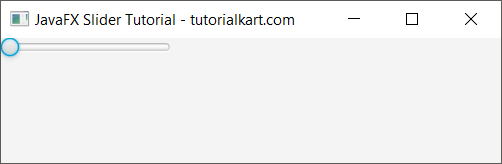
The following image shows a basic horizontal JavaFX Slider in a window.
In this tutorial, you will learn how to:
- Create and display a JavaFX Slider.
- Read the Slider value when it changes.
- Configure minimum, maximum, initial value, tick marks, and step behavior.
- Show the selected value in a label.
- Create a vertical Slider.
JavaFX Slider Constructor and Value Range
The commonly used constructor accepts the minimum value, maximum value, and initial value:
Slider slider = new Slider(minimumValue, maximumValue, initialValue);For example, the following Slider allows values from 0 through 100 and starts at 25.
Slider slider = new Slider(0, 100, 25);You can also create a Slider with the no-argument constructor and configure it with setMin(), setMax(), and setValue().
Example 1 – Display a JavaFX Slider in a Window
The following basic JavaFX Slider example creates a range from 0 to 100 and adds the control to a scene.
JavaFxSliderTutorial.java
import javafx.application.Application;
import javafx.event.Event;
import javafx.event.EventHandler;
import javafx.scene.Scene;
import javafx.scene.control.Button;
import javafx.scene.control.Slider;
import javafx.scene.control.TextField;
import javafx.scene.layout.TilePane;
import javafx.stage.Stage;

public class JavaFxSliderTutorial extends Application {

    public static void main(String[] args) {
        launch(args);
    }

    @Override
    public void start(Stage primaryStage) {
        try {
            // set title
            primaryStage.setTitle("JavaFX Slider Tutorial - tutorialkart.com");

            //javafx text field
            Slider slider = new Slider(0, 100, 0);

            // tile pane
            TilePane tilePane = new TilePane();

            // add slide to the tile pane
            tilePane.getChildren().add(slider);

            //set up scene
            Scene scene = new Scene(tilePane, 400, 100);
            primaryStage.setScene(scene);
            primaryStage.show();
        } catch(Exception e) {
            e.printStackTrace();
        }
    }
}
Run this JavaFX application. The Slider starts at its minimum value because the constructor uses 0 as the initial value.
Example 2 – Get the JavaFX Slider Value on Change
The Slider exposes its current number through getValue() and its observable value through valueProperty(). Add a change listener when your program must react while the user moves the thumb.
JavaFxSliderTutorial.java
import javafx.beans.value.ChangeListener;
import javafx.application.Application;
import javafx.beans.value.ObservableValue;
import javafx.scene.Scene;
import javafx.scene.control.Slider;
import javafx.scene.layout.TilePane;
import javafx.stage.Stage;

public class JavaFxSliderTutorial extends Application {

    public static void main(String[] args) {
        launch(args);
    }

    @Override
    public void start(Stage primaryStage) {
        try {
            // set title
            primaryStage.setTitle("JavaFX Slider Tutorial - tutorialkart.com");

            //javafx text field
            Slider slider = new Slider(0, 100, 1);

            slider.valueProperty().addListener(new ChangeListener<Number>() {

                public void changed(
                   ObservableValue<? extends Number> observableValue,
                   Number oldValue,
                   Number newValue) {
                      System.out.println(slider.getValue());
                  }
            });

            // tile pane
            TilePane tilePane = new TilePane();

            // add slide to the tile pane
            tilePane.getChildren().add(slider);

            //set up scene
            Scene scene = new Scene(tilePane, 400, 100);
            primaryStage.setScene(scene);
            primaryStage.show();
        } catch(Exception e) {
            e.printStackTrace();
        }
    }
}
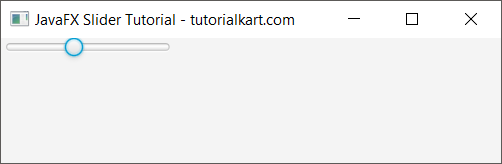
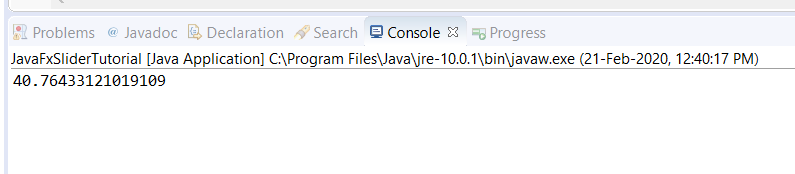
Run the application and move the thumb. Each value change invokes the listener and prints the current value to the console. Slider values are represented as double values, so the output can contain decimal places.
The following image shows sample values printed while the Slider is moved.
Show JavaFX Slider Tick Marks and Snap to Steps
Tick marks make the range easier to read. Use setShowTickMarks(true) to display marks and setShowTickLabels(true) to display numeric labels. The major tick unit controls the distance between labeled marks, while the minor tick count controls the smaller divisions between them.
Slider slider = new Slider(0, 100, 20);
slider.setShowTickMarks(true);
slider.setShowTickLabels(true);
slider.setMajorTickUnit(20);
slider.setMinorTickCount(3);
slider.setBlockIncrement(10);
slider.setSnapToTicks(true);
With setSnapToTicks(true), the selected value is adjusted to a tick position. setBlockIncrement() controls the amount used for block-style changes, such as keyboard or track interactions; it does not by itself restrict every value to whole-number steps.
Display the Selected Slider Value in a Label
A label is often more useful than console output in a graphical application. The following example updates the label whenever the Slider value changes and rounds the displayed number to an integer.
import javafx.application.Application;
import javafx.geometry.Insets;
import javafx.scene.Scene;
import javafx.scene.control.Label;
import javafx.scene.control.Slider;
import javafx.scene.layout.VBox;
import javafx.stage.Stage;

public class SliderLabelExample extends Application {

    @Override
    public void start(Stage stage) {
        Slider slider = new Slider(0, 100, 50);
        slider.setShowTickMarks(true);
        slider.setShowTickLabels(true);
        slider.setMajorTickUnit(25);

        Label valueLabel = new Label("Selected value: 50");

        slider.valueProperty().addListener((observable, oldValue, newValue) ->
            valueLabel.setText(
                "Selected value: " + Math.round(newValue.doubleValue())
            )
        );

        VBox root = new VBox(12, slider, valueLabel);
        root.setPadding(new Insets(20));

        stage.setScene(new Scene(root, 420, 140));
        stage.setTitle("JavaFX Slider Value");
        stage.show();
    }

    public static void main(String[] args) {
        launch(args);
    }
}
Use newValue.doubleValue() when calculations need the precise decimal value. Use Math.round() only when the interface should display a whole number.
Create a Vertical JavaFX Slider
A Slider is horizontal by default. Set its orientation to Orientation.VERTICAL to display it vertically.
import javafx.geometry.Orientation;
import javafx.scene.control.Slider;

Slider slider = new Slider(0, 10, 5);
slider.setOrientation(Orientation.VERTICAL);
slider.setShowTickMarks(true);
slider.setShowTickLabels(true);
slider.setMajorTickUnit(1);
Useful JavaFX Slider Properties and Methods
| Method or property | Purpose |
|---|---|
setMin(double) | Sets the minimum selectable value. |
setMax(double) | Sets the maximum selectable value. |
setValue(double) | Sets the current value. |
getValue() | Returns the current value as a double. |
valueProperty() | Provides the observable value for listeners and bindings. |
setShowTickMarks(boolean) | Shows or hides tick marks. |
setShowTickLabels(boolean) | Shows or hides numeric tick labels. |
setMajorTickUnit(double) | Sets the interval between major tick marks. |
setMinorTickCount(int) | Sets the number of minor ticks between adjacent major ticks. |
setSnapToTicks(boolean) | Adjusts values to tick positions when enabled. |
setDisable(boolean) | Enables or disables user interaction. |
JavaFX Slider Usage Notes
- Keep the minimum value lower than the maximum value.
- Do not assume the Slider returns an integer;
getValue()returns adouble. - Use a listener for immediate updates while the thumb moves.
- Use tick marks and labels when users need to understand the scale.
- Round only for display when the underlying calculation still needs decimal precision.
- For costly work, consider acting after the user finishes dragging instead of repeating the operation for every small value change.
JavaFX Slider FAQs
How do I get the current value of a JavaFX Slider?
Call slider.getValue(). It returns the current value as a double.
How do I detect changes to a JavaFX Slider?
Add a listener to slider.valueProperty(). The listener receives the old and new values whenever the selected value changes.
How do I make a JavaFX Slider use whole-number values?
Configure suitable tick units and enable setSnapToTicks(true). When reading the value, round or convert it only if the application requires an integer.
How do I show numbers below a JavaFX Slider?
Call setShowTickLabels(true) and set an appropriate major tick interval with setMajorTickUnit(). Tick marks can be enabled separately with setShowTickMarks(true).
JavaFX Slider Tutorial Summary
In this JavaFX Tutorial, we created a Slider, added it to a scene, listened for value changes, displayed the selected value, configured ticks and snapping, and changed the control to vertical orientation.