 TutorialKart.com
SAP tutorials guide you what is cost center in SAP Controlling and how to create cost centers in SAP CO using transaction code KS01. A cost center is used to collect costs for a department, function, location, or person responsible inside an organization. In Cost Center Accounting, it helps the business identify where costs are incurred and who is responsible for monitoring them.
What is a cost center in SAP Controlling
Cost center in SAP is a location where the costs are occurred inside the organization. In SAP cost center is the lowest organizational unit in controlling enterprise structure.
Cost centers are responsibility areas for costs within organization and used to capture actual costs of an organization. Costs can can be captured as per department wise, product wise, area wise, responsibility person wise, etc. Assigning the costs to cost centers determines where the costs are incurred within the organization. Each cost center in SAP can belong to one or more cost center groups.
For example, a manufacturing company may have separate cost centers for transportation, packing, plant administration, HR, stores, quality, and selling distribution. When salaries, utilities, maintenance expenses, or service costs are posted, SAP can record them against the correct cost center for reporting and analysis.
Cost center examples used for SAP KS01 creation
Here we are going to configure the following costs centers in SAP.
| Cost Center | Description |
| TK01TRNS | Transportation |
| TK01PACK | Packing |
| TK01FACA | Factory Admin |
| TK01SDST | Selling & Distribution |
| TK01PGEN | Plant general |
| TK01HRM | Human Resource |
The cost center code should be planned before creation. A good naming structure makes reporting easier. In the above examples, the code begins with the controlling area or company reference and then uses a short function name such as TRNS for Transportation or HRM for Human Resource.
Prerequisites before creating a cost center in SAP
Recommended configuration : – Before you create cost centers, you need to assign standard hierarchy in controlling area using transaction code OKKP or you will get an error as Controlling area TK01 does not have a standard hierarchy (please assign one).
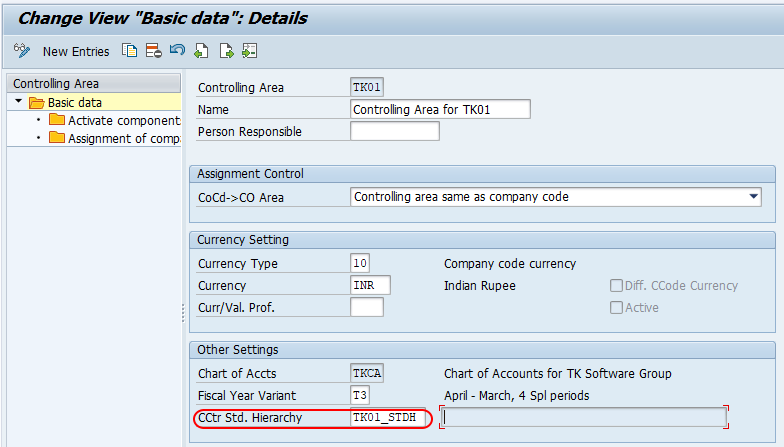
Before using KS01, check the following master data and configuration items.
- Controlling area: The controlling area must be created and assigned correctly.
- Standard hierarchy: The controlling area must have a standard hierarchy assigned.
- Valid-from date: The cost center must be created for the correct validity period.
- Cost center category: Select the correct category such as administration, production, sales, or HR.
- Company code and currency: Maintain values that match the organizational assignment.
How to create cost centers in SAP using KS01
You can create cost centers in SAP by using one of the following navigation method.
Transaction code : – KS01
SAP path : – Accounting > Controlling > Cost center accounting >> Master data > Cost center > Individual processing > Create.
Step 1 : – Enter SAP Tcode “KS01” in the SAP command field and enter.

Step 2 : – Now the system asking for entering the controlling area for which you like to create cost centers in SAP.
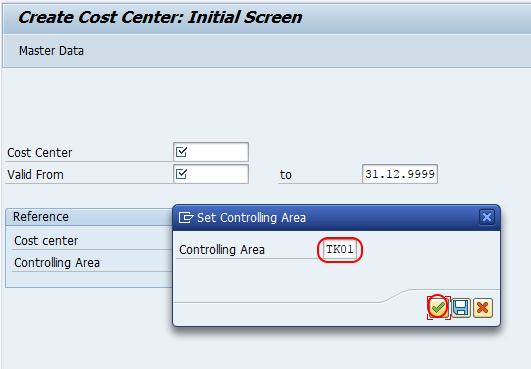
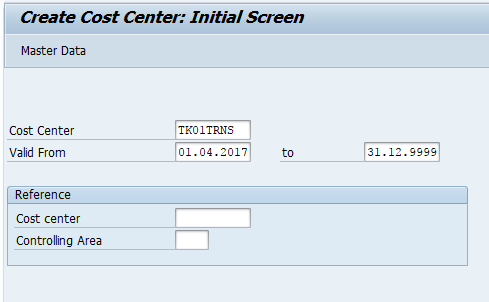
Step 3 : – On create cost center initial screen, update the following details
- Cost Center : – Enter the new key in the field cost center that you like to create in SAP.
- Valid From : – Update the valid period of cost center in SAP
- After entering the new cost center key, press enter to continue.
Step 4 : – On create cost center basic screen, update the following details.
- Name : – Enter the name of cost center that identifies in SAP
- Description : – Update the descriptive text of cost center
- Person Responsible : – User id that responsible for cost center.
- Cost center category : – Choose the cost center category from the list that applicable for cost center.
- Business Area : – Choose the business area key for cost center.
- Currency : – Update the currency of cost center.
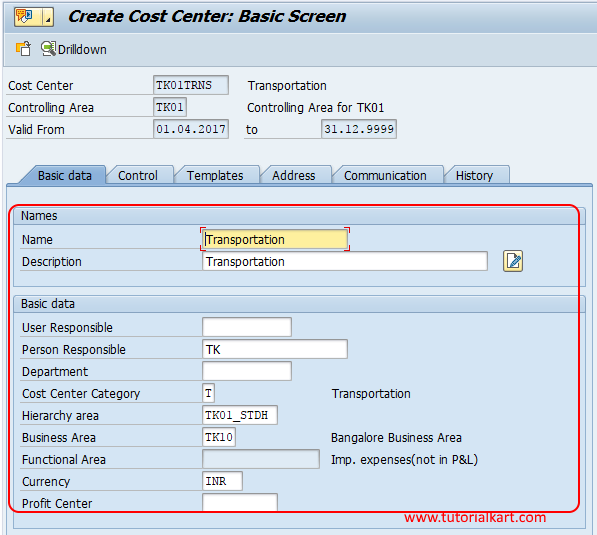
Click on save button and save the configuration details. Similarly create other cost center in SAP as per organizational requirements.
Important tabs and fields in SAP cost center master data
In KS01, the exact screen layout may vary by SAP system version and configuration, but the cost center master record generally contains basic data, control data, and organizational assignment details. Maintain each field carefully because it affects reporting, allocations, planning, and postings.
| Cost center field | Purpose in SAP CO |
|---|---|
| Cost Center | Unique key used to identify the cost center within the controlling area. |
| Valid From / To | Period during which the cost center master record is valid. |
| Name | Short name displayed in reports and master data lists. |
| Description | Longer description that explains the purpose of the cost center. |
| Person Responsible | User or responsible person who manages or monitors the cost center. |
| Cost Center Category | Classification of the cost center, such as production, administration, sales, or HR. |
| Hierarchy Area | Node in the standard hierarchy under which the cost center is placed. |
| Company Code | Company code assignment for financial reporting integration. |
| Business Area | Business area assignment, if used by the organization. |
| Currency | Currency used for cost center values and reporting. |
How cost centers are structured in SAP S/4HANA and SAP ECC
Cost centers are normally grouped under a standard hierarchy for the controlling area. This hierarchy represents how the organization wants to view internal cost responsibility. A company may structure the hierarchy by plant, department, function, location, or management responsibility.
For example, the hierarchy may contain one node for manufacturing, another for administration, and another for sales and distribution. Under these nodes, individual cost centers such as TK01PACK, TK01FACA, and TK01SDST can be assigned. This structure helps users run cost center reports at both individual cost center level and group level.
Why cost centers matter in SAP Cost Center Accounting
Cost centers matter because they connect daily postings with internal responsibility reporting. Without cost centers, expenses may be posted only at company code or general ledger level, making it difficult to know which department or function caused the cost.
- Expense tracking: Costs can be analysed by department, location, or responsibility area.
- Budget control: Planned costs can be compared with actual costs for the same cost center.
- Internal reporting: Managers can review cost center reports for their own areas.
- Allocation support: Costs collected in service or overhead cost centers can be allocated to other receivers, depending on the organization’s CO design.
- Responsibility accounting: Each cost center can have a responsible person for monitoring and review.
Common errors while creating SAP cost centers with KS01
If the cost center cannot be created or saved, check the error message first. The most common issues are related to controlling area setup, hierarchy assignment, validity dates, and missing mandatory fields.
| Issue in KS01 | Likely reason | What to check |
|---|---|---|
| Controlling area does not have a standard hierarchy | Standard hierarchy is not assigned in controlling area settings. | Maintain the standard hierarchy in OKKP before creating cost centers. |
| Cost center already exists | The same cost center key is already created for the validity period. | Use KS03 to display the existing cost center or choose another key. |
| Invalid validity period | The valid-from or valid-to date does not match the required master data period. | Enter the correct validity dates before continuing. |
| Missing cost center category | Mandatory category field is not maintained. | Select a suitable cost center category from the allowed list. |
| Hierarchy area missing | The cost center is not placed under the required hierarchy node. | Assign the correct hierarchy area in the master data screen. |
SAP cost center transactions used after creation
KS01 is used to create a cost center. After creation, users commonly need display, change, group, and reporting transactions to maintain and analyse cost center data.
| Transaction code | Use |
|---|---|
| KS01 | Create cost center. |
| KS02 | Change cost center master data. |
| KS03 | Display cost center master data. |
| KSH1 | Create cost center group. |
| KSH2 | Change cost center group. |
| KSH3 | Display cost center group. |
| KSB1 | Display actual cost line items for cost centers. |
| S_ALR_87013611 | Display cost center report with actual, plan, and variance values, depending on report selection and system setup. |
Reporting transactions do not create the cost center. They are used after master data and postings are available. For creation, use KS01 or the relevant Fiori app in systems where Fiori-based master data maintenance is enabled.
Best practices for SAP cost center master data
- Use a consistent code format: Decide the length and naming logic before creating many cost centers.
- Create only required cost centers: Too many unnecessary cost centers can make reporting and allocations difficult.
- Assign the correct hierarchy node: Wrong hierarchy assignment can affect group-level reports.
- Maintain a clear responsible person: This improves ownership of cost monitoring.
- Check validity dates: Use correct dates so that postings and reporting work for the required period.
- Review category selection: The cost center category should match the function of the cost center.
FAQ on cost center in SAP and KS01 creation
What is a cost center in SAP?
A cost center in SAP is an organizational unit used to collect and monitor costs. It usually represents a department, location, function, or responsibility area, such as HR, transportation, packing, or factory administration.
Which transaction code is used to create a cost center in SAP?
Transaction code KS01 is used to create a cost center in SAP. KS02 is used to change a cost center, and KS03 is used to display a cost center.
Why does SAP show standard hierarchy error while creating cost center?
This error appears when the controlling area does not have a standard hierarchy assigned. Maintain the standard hierarchy in the controlling area configuration before creating the cost center.
What is the difference between cost center and cost center group in SAP?
A cost center is an individual responsibility area where costs are posted. A cost center group is a collection of cost centers used for reporting, planning, or selection purposes.
Can one cost center be assigned to more than one cost center group?
Yes, a cost center can be included in different cost center groups for reporting and selection purposes. However, in the standard hierarchy, it should be placed under the correct hierarchy node for the controlling area structure.
Editorial QA checklist for SAP cost center tutorial
- Confirm that KS01 is described as the transaction code for creating a cost center.
- Verify that the tutorial explains the standard hierarchy prerequisite before cost center creation.
- Check that the controlling area, cost center key, validity dates, category, business area, and currency fields are explained clearly.
- Ensure that KSB1 and S_ALR_87013611 are presented as reporting transactions, not cost center creation transactions.
- Review all example cost center codes and descriptions for consistency with the organization’s naming structure.