 TutorialKart.com
What is SAP Cost Center Accounting (SAP CO-CCA)?
SAP Cost Center Accounting, commonly called SAP CO-CCA, is a subcomponent of SAP Controlling that helps an organization plan, collect, allocate, and analyze costs by internal responsibility area. A cost center represents a department, team, location, machine group, service function, or any other area where costs are incurred but direct revenue is not normally measured.
In practical SAP Controlling work, cost center accounting is used to answer questions such as which department consumed a cost, whether actual spending is within plan, how service department costs should be allocated to production departments, and where variances need management review.
- The main objective of cost center accounting is to plan costs, record actual costs, analyze cost variances, and support internal cost control reporting.
- When you create SAP cost center accounting structures, you define a standard hierarchy for the controlling area and assign each cost center to the appropriate hierarchy node. A cost center may also be assigned to a profit center where profit center accounting is used.
- To view cost center data together in the SAP system, you can create cost center groups and assign the relevant cost centers to those groups.
- During period-end or month-end activities, organizations often allocate service department costs to production departments or other receiver cost centers.
Where SAP CO-CCA fits in SAP Controlling
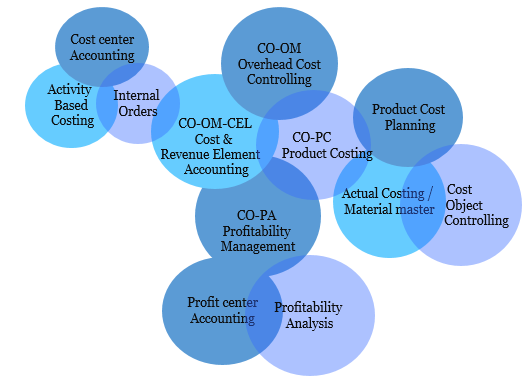
SAP Cost Center Accounting is part of the Controlling area in SAP. It works with other CO components such as Internal Orders, Product Costing, Profitability Analysis, Profit Center Accounting, and Activity-Based Costing. It also receives postings from Financial Accounting, Materials Management, Sales and Distribution, Human Capital Management, and other integrated SAP processes.
Important components of SAP CO
SAP Cost Center Accounting master data used in CO-CCA
SAP Cost Center accounting can be divided into three important master data areas: cost center master data, activity type master data, and statistical key figure master data. These master records make planning, posting, allocation, and reporting possible.
- Cost center configuration
- Activity type configuration
- Statistical key figure configuration
| SAP CO-CCA master data | Purpose in cost center accounting |
|---|---|
| Cost center | Identifies the organizational unit where costs are incurred, such as administration, production, maintenance, logistics, marketing, or IT. |
| Cost center category | Classifies the nature of the cost center and can influence planning, activity allocation, and reporting behavior. |
| Standard hierarchy | Groups all cost centers in a controlling area into one structured hierarchy for reporting and control. |
| Cost center group | Groups selected cost centers for reporting, planning, assessments, distributions, and other processing needs. |
| Activity type | Represents measurable internal activity output, such as machine hours, labor hours, repair hours, or service hours. |
| Statistical key figure | Stores quantities such as headcount, floor area, number of employees, or usage units that can be used as allocation bases. |
| Cost element or G/L account | Classifies the type of cost posted to a cost center. In SAP S/4HANA, cost elements are integrated with G/L accounts; in older SAP ERP systems they are often maintained separately. |
SAP CO-CCA configuration steps for cost center accounting
The important configuration steps of cost center accounting (CO-CCA) in SAP are listed below. The exact menu path and app name may differ between SAP ERP, SAP S/4HANA on-premise, and SAP Fiori-based systems, but the controlling concepts remain similar.
- Creation of cost center
- Creation or assignment of cost elements / G/L accounts for cost postings
- Definition of cost center categories
- Creation and maintenance of cost center hierarchy
- Creation of cost center group
- Set planner profile
- Cost center planning
- Cost center accounting planned documents
- Plan distribution cycle and assessment cycle configuration
- Activity type planning and price planning
- Statistical key figure planning for allocation bases
- Period-end allocation and reporting setup
Cost Center: – It is an organization unit within a controlling area that represents a defined location of cost occurrence. Examples include HR department, maintenance department, production line, warehouse, sales administration, quality inspection, and IT support.
Cost Center Category: – It is an indicator in the cost center master record that identifies the activities and performance of a cost center. SAP system delivers standard categories such as administration, production, logistics, marketing, development, and service-related categories. Organizations can use these categories to classify cost centers consistently.
Standard Hierarchy: – It is a tree like a hierarchy structure that groups all the cost centers (Company codes that belongs to one SAP controlling area).
Standard hierarchy and cost center groups in SAP CO-CCA
The standard hierarchy is mandatory for cost center accounting because every cost center in a controlling area must belong to it. It gives the organization a single reporting structure for all cost centers. A common design is to arrange the hierarchy by company code, plant, function, department, or management responsibility.
Cost center groups are more flexible than the standard hierarchy. You can create groups for reporting, planning layouts, distribution cycles, assessment cycles, and ad hoc analysis. For example, a company may have a cost center group for all production cost centers, another group for service departments, and another group for a specific plant or region.
Activity types and statistical key figures in SAP Cost Center Accounting
Activity types are used when one cost center provides measurable work to another cost object or cost center. For example, a maintenance department may provide repair hours to production cost centers. The activity type, activity quantity, and activity price help calculate the internal cost allocation.
Statistical key figures are used when costs need to be allocated based on measurable factors that are not financial postings. Common examples are number of employees, square footage, power consumption units, number of service tickets, or machine count. These quantities can be used as tracing factors in allocations.
How actual costs flow into SAP cost centers
Actual costs can be posted to cost centers from several business processes. Examples include vendor invoices, payroll expenses, material consumption, asset depreciation, travel expenses, manual journal entries, internal activity allocations, and settlement from internal orders. The cost center captures the responsibility area, while the cost element or G/L account explains the type of cost.
For meaningful analysis, SAP CO-CCA compares actual costs with planned costs. This comparison helps identify whether a department is under plan, over plan, or using resources differently from the planned level of activity.
Planning, allocation, and variance analysis in SAP CO-CCA
Cost center planning allows an organization to enter planned expenses, planned activity quantities, planned activity prices, and planned statistical key figures. These planned values become the baseline for controlling reports.
- Plan distribution: Transfers planned costs from sender cost centers to receiver cost centers while keeping the original cost element.
- Plan assessment: Allocates planned costs using an assessment cost element or secondary cost element.
- Actual distribution: Allocates actual posted costs from sender cost centers to receivers while retaining the original cost element.
- Actual assessment: Allocates actual costs by summarizing them under an assessment cost element or secondary cost element.
- Activity allocation: Allocates costs based on activity quantity and activity price, such as machine hours or labor hours.
Variance analysis in SAP Cost Center Accounting usually reviews plan versus actual amounts, activity quantity differences, price differences, and allocation results. This helps management understand whether the cost center consumed more resources, had a different activity level, or received additional allocated costs from other departments.
Common SAP cost center accounting transactions and reports
Many SAP systems still use classic transaction codes for cost center accounting, while newer SAP S/4HANA environments may also provide Fiori apps for similar tasks. The following table gives commonly used transaction codes for learning and reference.
| Transaction code | Use in SAP CO-CCA |
|---|---|
| KS01 | Create cost center |
| KS02 | Change cost center |
| KS03 | Display cost center |
| KS13 | Display cost centers collectively or view cost center master data list |
| KSH1 | Create cost center group |
| KSH2 | Change cost center group |
| KSH3 | Display cost center group |
| KSB1 | Display cost center actual line items |
| S_ALR_87013611 | Cost centers: actual/plan/variance report in many SAP systems |
SAP CO-CCA example: service department cost allocation
Assume an IT support cost center incurs monthly support costs. These costs need to be allocated to production, sales, and administration cost centers. The company can define a statistical key figure such as number of users, number of devices, or number of support tickets. At month end, an assessment or distribution cycle can allocate IT support costs to receiver cost centers based on that key figure.
This example shows why cost center accounting is not only a place to record expenses. It also provides a structured method for moving shared service costs to the departments that consumed those services.
Cost center, profit center, and internal order differences in SAP
| SAP object | Main controlling purpose | Typical use |
|---|---|---|
| Cost center | Tracks costs by responsibility area | Departments such as production, HR, IT, maintenance, and administration |
| Profit center | Tracks profit-oriented responsibility areas | Business units, product lines, regions, or divisions where revenue and cost are analyzed together |
| Internal order | Tracks temporary or specific activities | Projects, campaigns, repairs, events, or one-time cost collection objects |
A cost center is mainly used for ongoing responsibility-based cost control. A profit center is used where management wants a profit-oriented view. An internal order is normally used to collect and monitor costs for a specific temporary purpose before settlement or reporting.
Official SAP references for SAP Cost Center Accounting
For configuration details and product-specific behavior, refer to SAP documentation for the SAP release you are using. Useful starting points include the SAP Help documentation for Cost Center Accounting support content and the SAP S/4HANA documentation for Cost Center Accounting in SAP S/4HANA.
SAP Cost Center Accounting FAQ
What is CO-CCA in SAP?
CO-CCA stands for Controlling – Cost Center Accounting. It is the SAP Controlling component used to plan, post, allocate, and analyze costs by internal responsibility areas called cost centers.
What is SAP cost center accounting used for?
SAP cost center accounting is used for departmental cost control. It helps organizations compare planned and actual costs, allocate shared service costs, analyze variances, and report expenses by cost center, cost center group, or standard hierarchy node.
What is the KS13 Tcode in SAP?
KS13 is commonly used to display cost centers collectively. It helps users view cost center master data in list form instead of opening each cost center separately.
What are the 4 elements of cost in cost accounting?
In general cost accounting, the four common elements are direct material, direct labor, direct expenses, and overhead. In SAP CO-CCA, these costs are usually represented through cost elements or G/L accounts and assigned to cost centers or other controlling objects during posting.
What is the difference between a cost center and a profit center in SAP?
A cost center is used mainly to control and analyze costs for an internal responsibility area. A profit center is used to analyze profit-oriented responsibility areas where both revenue and cost may be reviewed together.
SAP CO-CCA editorial QA checklist
- Confirm that each cost center belongs to the correct controlling area and standard hierarchy node.
- Check that cost center validity dates, cost center category, responsible person, company code, and profit center assignments are maintained correctly.
- Verify whether the SAP system is SAP ERP or SAP S/4HANA, because cost element maintenance differs between older ERP systems and S/4HANA systems.
- Test actual postings to cost centers and review them using cost center line item and plan/actual reports.
- Check allocation cycles for sender cost centers, receiver cost centers, allocation bases, segments, and tracing factors before period-end execution.
- Review whether users need classic SAP GUI transaction codes, SAP Fiori apps, or both for the organization’s SAP release.
Summary of SAP Cost Center Accounting in CO-CCA
The implementation of cost center accounting in SAP is important for organizations that need responsibility-based cost control. SAP CO-CCA supports cost center planning, actual cost collection, internal activity allocation, service cost allocation, and variance reporting within a controlling area. A clean standard hierarchy, accurate cost center master data, well-defined cost center groups, and tested allocation cycles are essential for reliable cost center accounting reports.