 TutorialKart.com
Primary cost elements in SAP are cost elements that receive costs or revenues from outside the Controlling area. In practical terms, a primary cost element is linked to a General Ledger account in SAP Financial Accounting, so the G/L account must exist before the primary cost element can be maintained in SAP Controlling.
This tutorial explains what a primary cost element is, when it is required, and how to create primary cost elements in SAP by using the classic SAP GUI process with FS00 and the cost element maintenance screen. The screenshots below use example accounts for salaries and rent.
Before you define primary cost elements or revenue cost elements in SAP, create the corresponding G/L account in the chart of accounts and company code. The General Ledger account is then treated as a primary cost element by assigning a primary cost element category.
Primary cost element meaning in SAP Controlling
A primary cost element records costs or revenues that originate from postings in SAP FI and are then carried to SAP CO objects such as cost centers, internal orders, projects, production orders, or profitability segments. Common examples include salaries, rent, utilities, material consumption, sales revenue, and sales deductions.
The main rule is simple: if the amount comes from an accounting posting and must also be visible in Controlling, the related G/L account should be created or maintained as a primary cost element. If the amount is used only for internal allocations within Controlling, it is normally handled as a secondary cost element instead.
Primary cost element prerequisites before using FS00 or KA01
- The chart of accounts and company code should already be configured.
- The G/L account number should be available or planned, for example 400101 for salaries.
- The account group, account type, field status group, and description should be known before creating the G/L master.
- The controlling area should be active, and the account should be relevant for CO postings.
- The validity dates and cost element category should be decided before saving the cost element.
In classic SAP ECC and SAP ERP screens, primary cost elements can be created from G/L account maintenance through FS00 or directly through cost element transaction codes such as KA01. In SAP S/4HANA, cost elements are integrated with G/L account master data, so the exact screen may differ from the classic screenshots shown in this tutorial.
Primary cost element categories used in SAP CO
Cost element category determines the nature of the cost element in SAP Controlling. Once transaction data is posted to a cost element, the cost element category normally cannot be changed freely in the controlling area. Therefore, choose the category carefully before posting business transactions.
| Cost element category | Purpose in SAP CO | Typical example |
|---|---|---|
| Primary Cost / Cost Reducing Revenues | Used for expense accounts where costs are posted from FI to CO. | Salaries, rent, utilities, freight expenses |
| Revenue | Used for direct or indirect revenue accounts that are relevant for Controlling. | Sales revenue |
| Sales Deduction | Used for sales-related deductions and reductions. | Sales discounts, sales deductions |
| Settlement | Used when costs are settled from CO objects to other objects. | Internal order settlement or project settlement |
The important cost element categories are also listed below for quick reference.
- Primary Cost Element/ Cost reducing revenues : – This category will be used for maintaining all the expenses accounts related to product.
- Revenue: – This cost element category will be used for maintaining direct or indirect revenue accounts. For e.g. Sales revenue.
- Sales Deduction: – This cost element category will be used for maintaining all the sales related expenditure accounts. For e.g. sales deduction, sales discounts, etc.
- Settlement: – This category will be used for the settlement of costs from SAP CO object to SAP FI object. CO – CO = Internal settlement, CO – FI = External settlement.
Create the following G/L accounts for cost elements
| 400101 | Salaries account |
| 400300 | Rent account |
How to create primary cost elements in SAP Controlling
The cost elements can be created in two ways i.e.
- Manual Creation of Cost Elements
- Automatic creation of cost elements
Manual creation is useful when you want to create or check each G/L account and cost element individually. Automatic creation is generally used when a larger number of G/L accounts must be created as cost elements based on predefined rules.
Manual creation of primary cost element through FS00
Creation of primary cost elements includes the following steps.
Creation of primary cost elements at FI area – GL Master creation
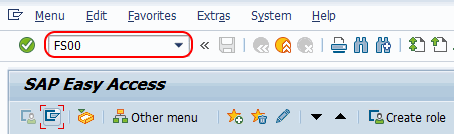
Enter SAP transaction code FS00 in the SAP command field and enter.
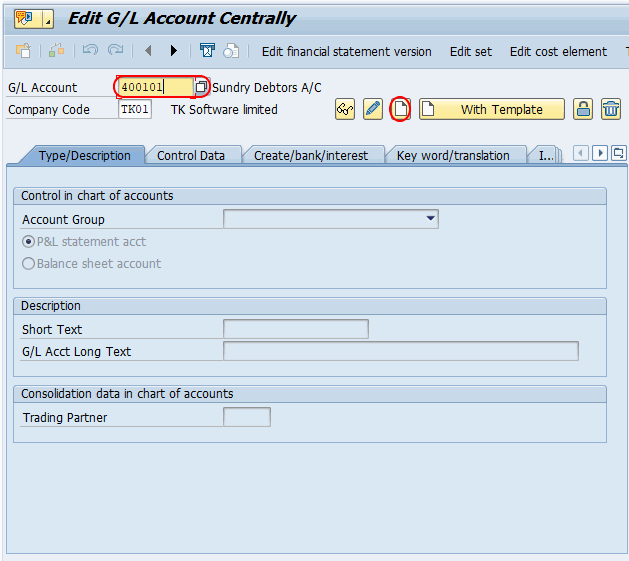
On next screen, enter general ledger account as “400101”, company code as “TK01” and click on create button for creation of new G/L account for primary customer element.
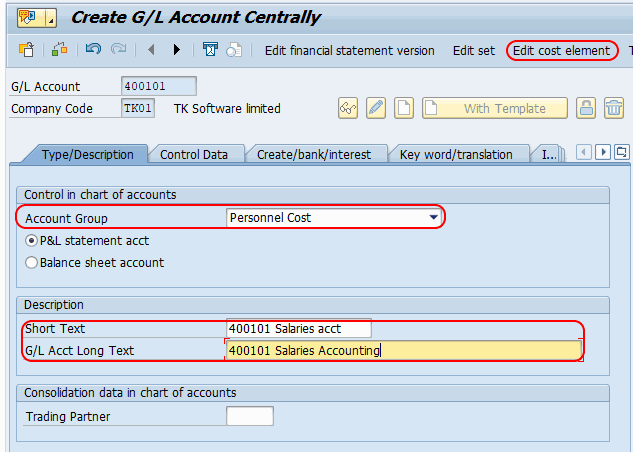
Update the following details.
- Choose Account group and account type.
- Update short text and long text as “salaries account.
- Click on create/bank/interest and updated field status group field as G004 (cost accounts).
- Then click edit cost element button for creation of cost element.
Primary cost element creation at CO area
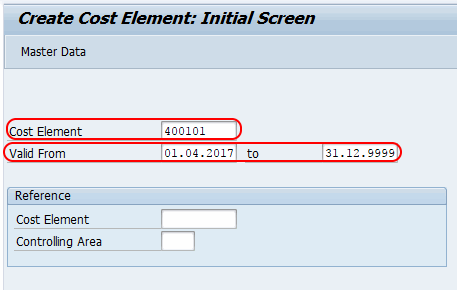
On create cost element: initial screen update the following details.
- Valid from date: – 01.06.2017
- Valid to date : – 31.12.9999 (date update automatically)
- Press enter to continue.
On create cost element : basic screen, select cost element category as 1 (Primary cost/ cost reducing revenues).
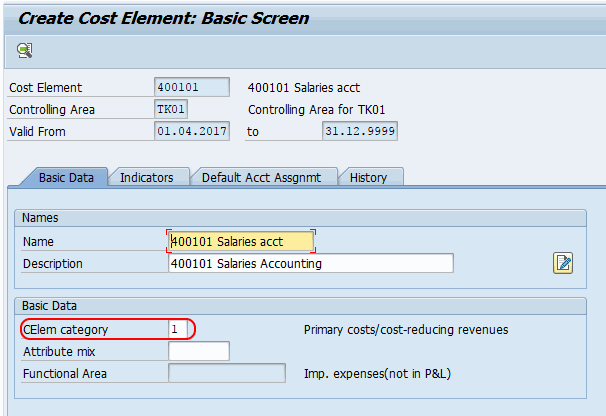
Click on save button and save the configured details. You get a message as “Cost element has been created”.
Similarly create rent 400300 G/L account and cost element account for Rent account.
SAP transaction codes used for primary cost element creation
| Transaction code | Use in primary cost element setup |
|---|---|
| FS00 | Create or change the G/L account and access cost element maintenance from the G/L master screen. |
| KA01 | Create a primary cost element directly in classic SAP CO where this transaction is available. |
| KA02 | Change an existing cost element in classic SAP CO. |
| KA03 | Display an existing cost element in classic SAP CO. |
If you are working on SAP S/4HANA, check your system process before using KA01 because cost element handling is integrated with the G/L account master. In many S/4HANA systems, users maintain the required cost element attributes while creating or changing the G/L account.
Example: salaries account as a primary cost element
Assume that salaries are posted to G/L account 400101. The salary expense comes from payroll or accounting postings in FI, but management also wants to track salary cost by cost center in CO. In this case, the G/L account should be available as a primary cost element so that the FI posting can flow to the correct controlling object.
For this account, category 1 Primary Cost / Cost Reducing Revenues is suitable because it represents an expense account. When a salary document is posted with a cost center, SAP can update both the FI ledger and the CO cost object.
Primary cost element vs secondary cost element in SAP
| Point of difference | Primary cost element | Secondary cost element |
|---|---|---|
| Source of amount | Comes from FI postings or external business transactions. | Used for internal CO allocations and settlements. |
| G/L account link | Linked with a G/L account. | Generally used within CO for internal cost flows. |
| Typical use | Salary expense, rent expense, revenue, sales deduction. | Assessment, activity allocation, overhead allocation, settlement. |
| Posting example | Vendor invoice posted to rent expense with a cost center. | Internal allocation from one cost center to another. |
Common issues while creating primary cost elements in SAP
- G/L account not created: Create the G/L account first before maintaining the primary cost element.
- Wrong account type or field status group: Check that the G/L account settings are suitable for cost postings.
- Cost element category selected incorrectly: Select the category based on whether the account is expense, revenue, sales deduction, or settlement related.
- Validity date mismatch: Make sure the cost element validity period covers the posting date.
- Category change blocked after postings: Avoid posting test documents until the cost element category has been reviewed.
Editorial QA checklist for this SAP primary cost element tutorial
- Confirm whether the target system is classic SAP ECC/SAP ERP or SAP S/4HANA before following the transaction flow.
- Verify that the example G/L account is created in the correct chart of accounts and company code.
- Check that the selected cost element category matches the business purpose of the account.
- Confirm that the cost element validity dates cover the required posting period.
- Test with a non-production client before creating or changing master data in a live SAP system.
FAQs on primary cost elements in SAP
What is a primary cost element in SAP?
A primary cost element in SAP is a cost or revenue element linked to a G/L account. It is used when costs or revenues originate from FI postings and must also be tracked in Controlling.
Which posting creates values for a primary cost element?
FI postings such as vendor invoices, salary postings, rent expenses, revenue postings, and other accounting documents can create values for primary cost elements when the related G/L account is cost-element relevant and a CO object is assigned.
What is the transaction code to create a primary cost element in SAP?
In classic SAP CO, KA01 is used to create a primary cost element. Many users also create or maintain the G/L account through FS00 and then use the Edit Cost Element option from the G/L master screen.
Can the primary cost element category be changed after postings?
After transaction data is posted, changing the cost element category can be restricted because it affects how the account behaves in Controlling. Review the category carefully before posting documents.
What is the difference between primary and secondary cost elements in SAP?
Primary cost elements represent costs or revenues coming from FI and are linked to G/L accounts. Secondary cost elements are used for internal CO allocations, assessments, activity allocations, and settlements within Controlling.