Profit Center Group in SAP | Define Profit Center Standard Hierarchy
A profit center group in SAP is used to arrange profit centers into a reporting and maintenance structure. The profit center standard hierarchy is the main profit center group assigned to a controlling area, and it works like a tree that contains the profit centers belonging to that controlling area.
Profit center standard hierarchy in SAP controlling helps group profit centers under one structured hierarchy. The standard hierarchy is required because profit center master data must be assigned to a hierarchy node. A clear hierarchy also makes reporting, reconciliation, and responsibility-based analysis easier to maintain.
Profit Center Group in SAP: Meaning and Standard Hierarchy Role
A profit center group is a collection of profit centers or lower-level profit center groups. In the standard hierarchy, the top node represents the hierarchy assigned to the controlling area, and the lower nodes represent the business structure, such as company units, regions, plants, divisions, or product lines.
The profit center standard hierarchy is a special type of profit center group. It should contain all profit centers for the controlling area. When a profit center is created later, the correct standard hierarchy node should be selected so that the profit center is included in reporting and validation checks.
Before Creating the Profit Center Standard Hierarchy in SAP CO
Before you create a profit center group with KCH1, confirm the controlling area and naming structure. This avoids common issues such as creating the group in the wrong controlling area or using a hierarchy key that does not match the controlling area setup.
The standard hierarchy key should follow your organization’s naming convention.
The top node should be stable because many profit centers may be assigned under it.
Lower-level nodes should match useful reporting levels, not temporary departments that change often.
You need authorization to create or change profit center groups in the selected controlling area.
SAP GUI Transactions for Profit Center Groups and Standard Hierarchy
The following SAP GUI transactions are commonly used while creating, checking, or maintaining profit center groups and the profit center standard hierarchy.
Transaction
Use in profit center hierarchy maintenance
KCH1
Create profit center group or the standard hierarchy group structure.
KCH2
Change an existing profit center group.
KCH3
Display an existing profit center group.
KCH5N
Display or check the profit center standard hierarchy in many SAP GUI systems.
OKKS
Set or reset the current controlling area before working with profit center master data.
KE51 / KE52 / KE53
Create, change, or display individual profit center master data.
How to Create Profit Center Group in SAP with KCH1
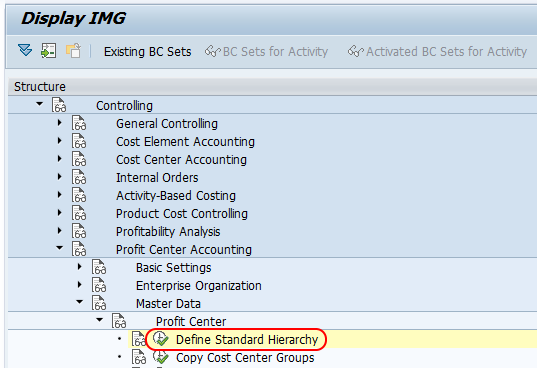
You can create a profit center group for the standard hierarchy in SAP Controlling by using transaction code KCH1 or by following the IMG menu path shown below. In classic SAP GUI, KCH1 creates the profit center group structure; the standard hierarchy assignment is controlled by the controlling area configuration.
IMG Menu Path: – Spro >> Controlling >> Profit Center Accounting >> Master data >> Profit Center >> Define Standard hierarchy.
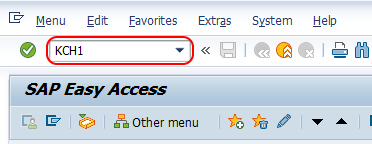
Step 1: Open KCH1 for Profit Center Group Creation
Enter SAP transaction code “KCH1” in the SAP command field and click on execute.
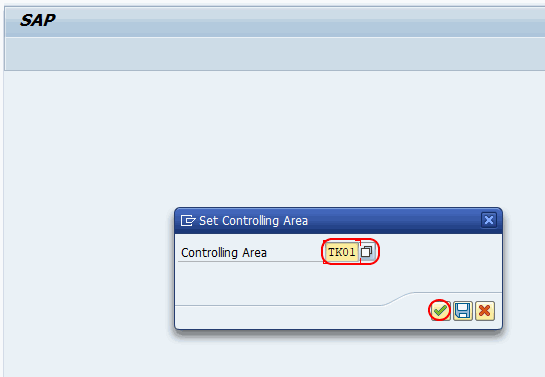
Step 2: Enter the Controlling Area for Profit Center Hierarchy Maintenance
Enter the SAP controlling area for which the profit center standard hierarchy should be created or maintained. The controlling area decides which profit centers can be assigned under this hierarchy.
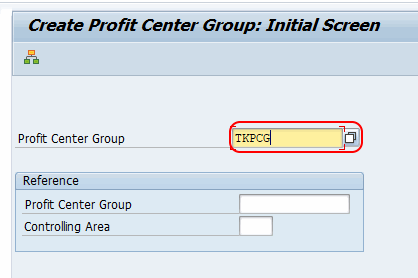
Step 3: Enter the Profit Center Group Key for the Standard Hierarchy
On the create profit center group initial screen, enter the profit center group key that will be used for the hierarchy structure. Use the key that matches the hierarchy planned for the selected controlling area.
Press enter to continue.
Step 4: Create Lower-Level Nodes and Assign Profit Centers
On the create profit center group structure screen, maintain the hierarchy details carefully. The top node should represent the standard hierarchy, and lower-level nodes should represent the reporting levels used by the business.
Enter the name or description of the profit center group.
Click the lower level option to create child nodes under the profit center standard hierarchy.
Create additional hierarchy nodes if your reporting structure needs more levels.
Assign profit centers to the correct nodes in the hierarchy.
Check the structure before saving, especially when similar profit center names or codes exist.
After updating the details, click on the save button to save the profit center group and hierarchy structure.
The profit center standard hierarchy levels are now defined for the selected controlling area. You can use display or change transactions later to verify the hierarchy and adjust nodes when the organization structure changes.
How to Display or Change a Profit Center Standard Hierarchy in SAP
After saving the hierarchy, use display and change transactions to confirm that the hierarchy is available and that profit centers are assigned to the intended nodes. In SAP GUI, KCH3 is used to display a profit center group, KCH2 is used to change it, and KCH5N is commonly used to check the profit center standard hierarchy view.
If a profit center does not appear in the expected hierarchy node, first check that the correct controlling area is active. Then verify the profit center master data and the group assignment. A profit center created in one controlling area cannot be maintained under the hierarchy of another controlling area.
SAP S/4HANA Cloud Note for Profit Center Hierarchy Maintenance
This tutorial explains the classic SAP GUI approach for creating a profit center group with KCH1. In SAP S/4HANA Cloud Public Edition, profit center hierarchy maintenance may be handled through configuration and SAP Fiori apps such as Manage Global Hierarchies or Manage Profit Center Groups, depending on the scope and system setup.
Wrong controlling area: The hierarchy is created under a different controlling area from the one used in profit center master data.
Top node not aligned: The profit center group key does not match the standard hierarchy expected for the controlling area.
Missing lower-level node: A profit center cannot be assigned cleanly because the required hierarchy node was not created.
Duplicate reporting logic: Similar nodes are created for the same business unit, making reports harder to interpret.
Profit center not assigned: The profit center exists, but it is not included in the standard hierarchy node used for reporting or validation.
Profit Center Standard Hierarchy QA Checklist
Use this checklist before closing the configuration task for a profit center group in SAP.
The correct controlling area was selected before creating the profit center group.
The top node represents the standard hierarchy planned for the controlling area.
Lower-level nodes follow a stable reporting structure such as region, division, plant, or business unit.
Profit centers are assigned only to the relevant hierarchy nodes.
The hierarchy can be displayed after saving by using the relevant display transaction or Fiori app.
New profit center master data can be assigned to a standard hierarchy node without error.
FAQs on Profit Center Group and Standard Hierarchy in SAP
What is the profit center hierarchy in SAP?
The profit center hierarchy in SAP is a tree structure that organizes profit centers under groups and lower-level nodes. The standard hierarchy is the main hierarchy assigned to a controlling area and should contain the profit centers belonging to that controlling area.
How do I create a profit center standard hierarchy in SAP GUI?
In classic SAP GUI, use transaction KCH1 to create the profit center group structure. Enter the controlling area, provide the profit center group key, create lower-level nodes, assign profit centers, and save the hierarchy.
How do I assign a profit center group to the standard hierarchy?
The group used as the standard hierarchy must be aligned with the controlling area configuration. Create or maintain the group structure in the correct controlling area, then ensure profit center master data is assigned to the appropriate standard hierarchy node.
How do I check a profit center hierarchy in SAP?
In SAP GUI, you can display profit center groups with KCH3 and check the standard hierarchy view with KCH5N in many systems. In SAP S/4HANA Cloud, use the relevant Fiori app such as Manage Global Hierarchies or Manage Profit Center Groups, based on your system configuration.
Is a profit center group the same as the profit center standard hierarchy?
No. A profit center group is a general grouping of profit centers. The profit center standard hierarchy is a special profit center group assigned to a controlling area as the required hierarchy for profit center master data and reporting structure.
 TutorialKart.com