 TutorialKart.com
How to Create Dummy Profit Center in SAP Controlling
A dummy profit center in SAP Controlling is used as a default profit center when postings cannot be assigned to a valid profit center during transaction processing. Before creating a dummy profit center in SAP, you must define the standard profit center hierarchy for the controlling area. The SAP system does not allow profit center creation without a standard hierarchy, and it may display an error such as “standard hierarchy has not been defined in controlling area TK01”.
This tutorial explains how to create a dummy profit center using transaction code KE59 and the SAP IMG path. The same basic master data concepts apply when you later display or review profit center data with transactions such as KE53.
Prerequisites for Creating a Dummy Profit Center in SAP
Before you start the configuration, check the following settings in the controlling area:
- The controlling area is already created and available for configuration.
- The standard profit center hierarchy is maintained for the controlling area.
- The profit center group that will contain the dummy profit center is available.
- The segment is available if segment reporting is used in your company code setup.
- You have authorization to maintain Profit Center Accounting master data and save customizing changes.
If the standard hierarchy is missing, first maintain the required profit center group under the standard hierarchy. Otherwise, the dummy profit center cannot be saved successfully.
Transaction Code and IMG Path for Dummy Profit Center in SAP
You can define dummy profit centers in SAP by using one of the following navigation methods.
SAP Transaction code: – KE59
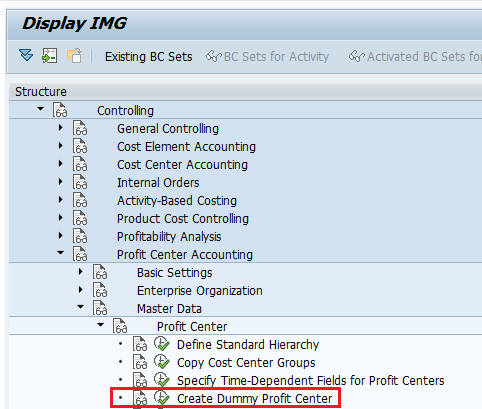
SAP IMG Path: – SPRO >> SAP Reference IMG >> Controlling >> Profit Center Accounting >> Master Data >> Profit Center >> Create Dummy Profit Center.
Step-by-Step SAP Configuration to Create Dummy Profit Center
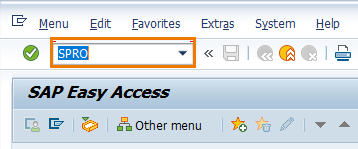
Step 1: – Enter SAP transaction code “SPRO” in the SAP command field and click on execute.
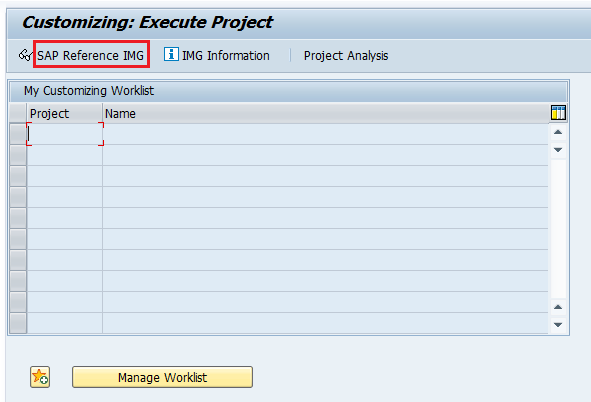
Double click “SAP Reference IMG“.
From the Display IMG screen, follow the menu tree structure Controlling > Profit Center Accounting > Master Data > Profit Center and click the IMG activity Create Dummy Profit Center.
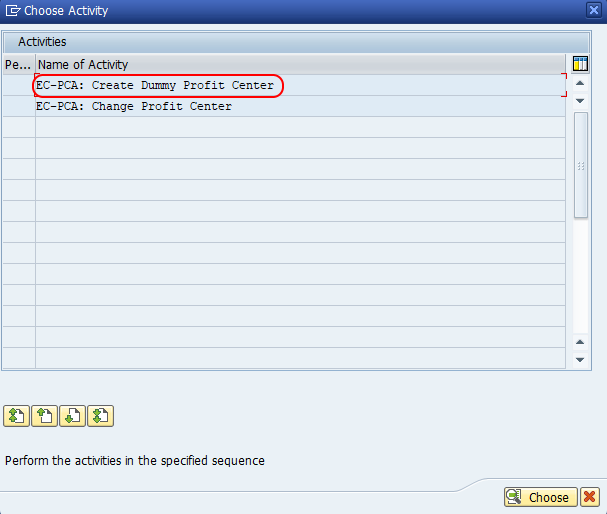
Step 2: – On the Choose Activity screen, select the EC-PCA: create dummy profit center option to create a new dummy profit center in SAP as per client requirements.
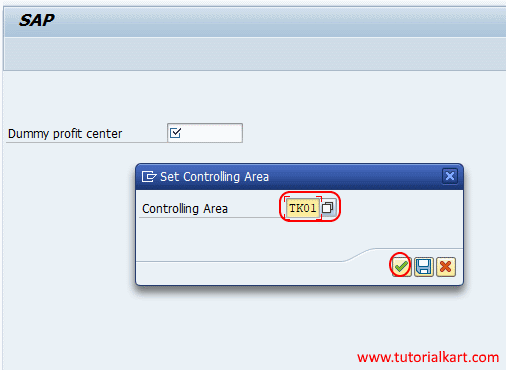
Step 3: – Update the SAP controlling area key for which you want to create the dummy profit center in SAP Controlling.
Step 4: – On the Create Dummy Profit Center initial screen, enter the profit center key that you want to create as the dummy profit center.
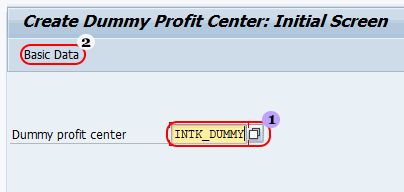
After entering the profit center key, click on the basic data option.
Step 5: – On the Create Dummy Profit Center Basic Data screen, update the following details.
- Name: – Update the name of the profit center.
- Description: – Update the descriptive text of INTK_DUMMY profit center.
- Profit Center Group: – Update the profit center group key TKPCG.
- Segment: – Update the segment key from the list as per your requirements.
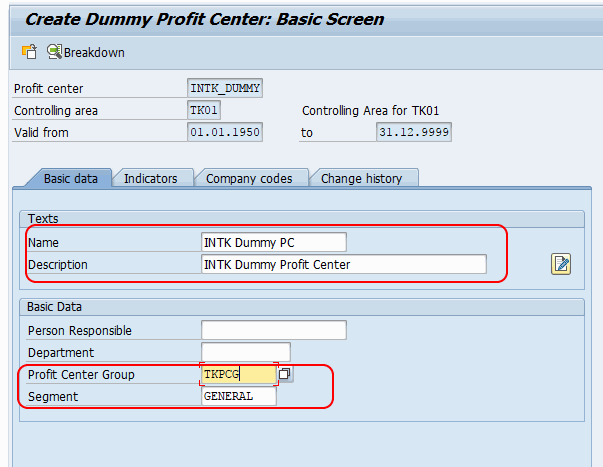
After maintaining all the required details of the dummy profit center in SAP, click on the save button, choose the customizing request, and save the configured details.
Important Fields in Dummy Profit Center Master Data
The dummy profit center should be maintained carefully because it is used when no valid profit center can be derived for a posting. The following fields are commonly reviewed during configuration:
| Field | Purpose in dummy profit center setup |
|---|---|
| Profit Center | Unique key for the dummy profit center in the controlling area. |
| Name | Short name that helps users identify the dummy profit center. |
| Description | Longer text that explains why the profit center is used as a dummy/default profit center. |
| Profit Center Group | Places the dummy profit center under the correct standard hierarchy node. |
| Segment | Used when segment reporting is active and segment assignment is required. |
How to Display or Check the Dummy Profit Center After Saving
After saving the dummy profit center, you can verify the master data using the display transaction for profit centers. Transaction KE53 is commonly used to display profit center master data. Enter the controlling area and profit center key, then review the basic data, hierarchy assignment, and segment assignment.
If you are reviewing postings assigned to profit centers, reports such as KE5Z may be used in Profit Center Accounting depending on the system setup and reporting requirement. For master data troubleshooting, first confirm that the dummy profit center exists and is assigned to the correct profit center group.
Common Errors While Creating Dummy Profit Center in SAP
The most common issue is the missing standard hierarchy for the controlling area. SAP requires a standard hierarchy before profit center master data can be created. If the hierarchy is missing, maintain the standard profit center group first and then return to transaction KE59.
- Standard hierarchy not defined: Maintain the standard hierarchy for the controlling area before creating the dummy profit center.
- Profit center group not found: Check whether the group exists under the correct hierarchy node.
- Segment field issue: Verify whether segment assignment is mandatory in your configuration.
- Authorization issue: Check whether the user has authorization for profit center master data and customizing activities.
- Transport request missing: Choose or create the correct customizing request when saving the configuration.
Dummy Profit Center Configuration Checklist in SAP
- Confirm that the controlling area entered in KE59 is correct.
- Verify that the standard hierarchy is assigned to the controlling area.
- Use a clear dummy profit center key and description, such as one that identifies it as a default or unassigned posting center.
- Assign the dummy profit center to the correct profit center group.
- Maintain the segment if it is required by your reporting structure.
- Save the configuration in the correct customizing request.
- Display the saved profit center and confirm that the basic data is complete.
FAQs on Dummy Profit Center in SAP
What is the transaction code to create dummy profit center in SAP?
The transaction code to create a dummy profit center in SAP is KE59. You can also access the same activity through SPRO under Controlling > Profit Center Accounting > Master Data > Profit Center > Create Dummy Profit Center.
Why does SAP show standard hierarchy has not been defined for the controlling area?
SAP shows this message when the controlling area does not have a standard profit center hierarchy. Define the standard hierarchy and assign the relevant profit center group before creating the dummy profit center.
What is KE53 in SAP Profit Center Accounting?
KE53 is used to display profit center master data in SAP. After creating a dummy profit center, you can use KE53 to check the profit center key, name, description, hierarchy assignment, and other basic details.
Can one controlling area have more than one dummy profit center?
The dummy profit center is maintained for the controlling area as a default assignment. In normal configuration, you maintain the required dummy profit center for that controlling area and make sure it is clearly identified for default or unassigned postings.
Why is a segment entered in dummy profit center master data?
The segment field is used when segment reporting is active. If your SAP configuration requires segment assignment for profit centers, maintain the correct segment while creating the dummy profit center.