 TutorialKart.com
Controlling area in SAP CO is the organizational unit used for internal cost accounting, profit analysis, cost center accounting, internal orders, product costing, and other Controlling activities. It defines the boundary within which SAP CO collects costs and revenues for management reporting.
In SAP, a controlling area is linked to one or more company codes. This means the relation between controlling area and company code is generally one controlling area to one or many company codes. All companies assigned to the same controlling area should use the same chart of accounts (COA) and fiscal year variant (FSV). This keeps cost accounting periods, accounts, and internal reporting consistent across the assigned company codes.
Controlling area in SAP organizational structure
The controlling area belongs to the SAP CO enterprise structure and works closely with Financial Accounting. Company code is the legal accounting unit used in FI, while controlling area is the internal management accounting unit used in CO. When a business wants cross-company cost reporting, allocations, and profitability analysis, multiple company codes can be assigned to one controlling area if the required settings match.
| SAP object | Main purpose | Typical use |
| Company code | External financial accounting | Balance sheet, profit and loss, statutory reporting |
| Controlling area | Internal management accounting | Cost centers, internal orders, product costing, profitability analysis |
For SAP reference, you can also review SAP Help content on creating a controlling area and SAP Help content on company code assignment to a controlling area.
Transaction code and IMG path for maintaining controlling area in SAP CO
- SAP Transaction code: – OKKP
- IMG Menu Path: – SPRO -> SAP Reference IMG -> Enterprise Structure > Definition > Controlling > Maintain Controlling area
Prerequisites before creating a controlling area in SAP
- The company code should be defined.
- The chart of accounts should be created and assigned as required.
- The fiscal year variant should be available.
- The controlling area currency decision should be clear.
- The assignment model should be known: one controlling area for one company code or one controlling area for multiple company codes.
- A customizing transport request should be available for saving the configuration.
Controlling area example used in this SAP CO tutorial
In this SAP FICO Tutorials, we are going to create the following controlling area in SAP.
| Controlling Area | Name | Assignment |
| TK01 | controlling area for TK01 | Controlling area same as company code |
This example uses a simple one-to-one setup where the controlling area key is the same as the company code key. In real projects, the design depends on reporting requirements, currency requirements, fiscal year variant, and whether several legal entities need common CO reporting.
Important OKKP fields for SAP controlling area configuration
| Field in OKKP | Meaning in controlling area setup |
| Controlling Area | Four-character key that identifies the CO area, such as TK01. |
| Name | Description used to identify the controlling area in configuration and reports. |
| Assignment Control | Specifies whether the controlling area is the same as company code or can contain multiple company codes. |
| Currency Type and Currency | Defines the currency logic for CO reporting and postings. |
| Chart of Accounts | Determines the accounts available for cost element and FI-CO integration. |
| Fiscal Year Variant | Controls the posting periods used for Controlling. |
How to maintain controlling area in SAP using SPRO
The controlling area in SAP can be created either by using transaction code OKKP or Implementation guide menu path.
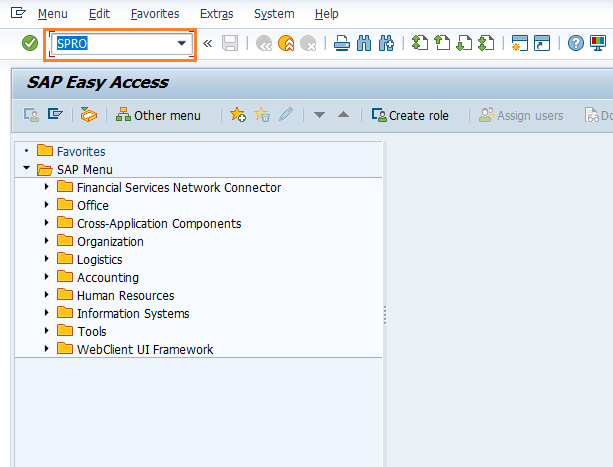
Step 1) Enter transaction code “SPRO” in the SAP command field and press enter.
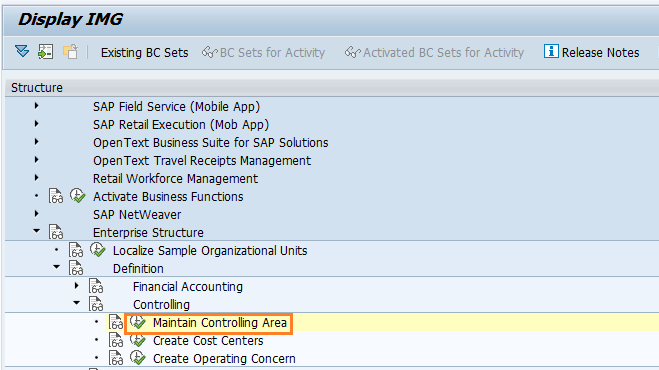
Step 2) Follow the menu path and click on IMG activity “Maintain Controlling Area”
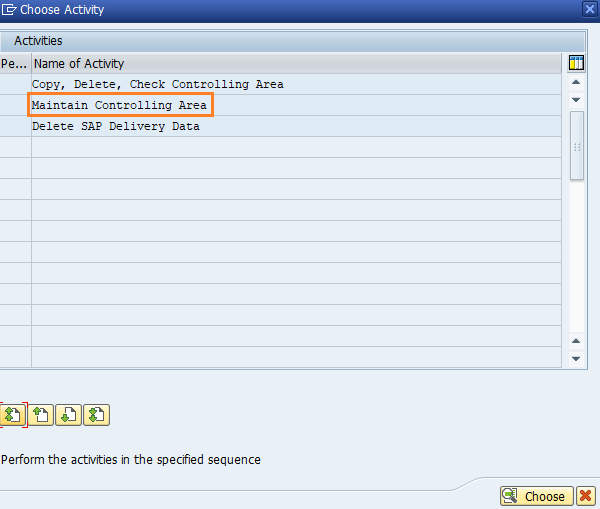
Step 3) Now the choose activity windows opens with the options
- Copy, delete, check controlling area
- Maintain Controlling area
- Delete SAP delivery date.
Double click on the option maintain controlling area.
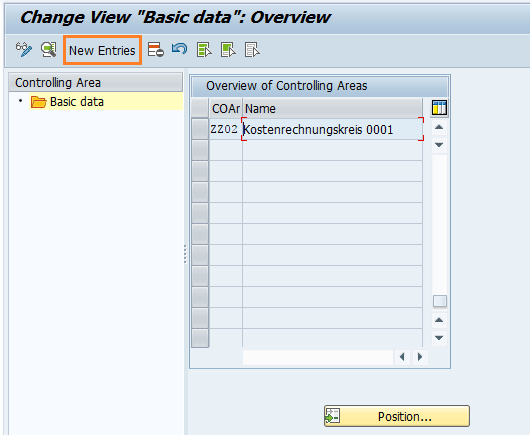
Step 4) On change view “Basic data” overview screen, click on “New Entries” button for creation of new controlling area in SAP systems.
Step 5) On SAP controlling area new entries screen update the following details.
- Controlling Area: CoArea = CCode specifies that company code key and controlling area key are same, update the company code TK01 in the field controlling area
- Name: Update the descriptive name of controlling area in SAP.
- Assignment Control: – Choose the option as “Controlling area same as Company code”,
- Currency Settings : – For currency Type choose 10 (company code currency) and Currency as INR
- Other Settings : – Update Chart of accounts key as TKCA and Fiscal year variant as T3.
For a one-company-code scenario, selecting “Controlling area same as Company code” is simple and clear. If several company codes must be assigned to one controlling area, choose the assignment control accordingly and confirm that the chart of accounts and fiscal year variant requirements are compatible.
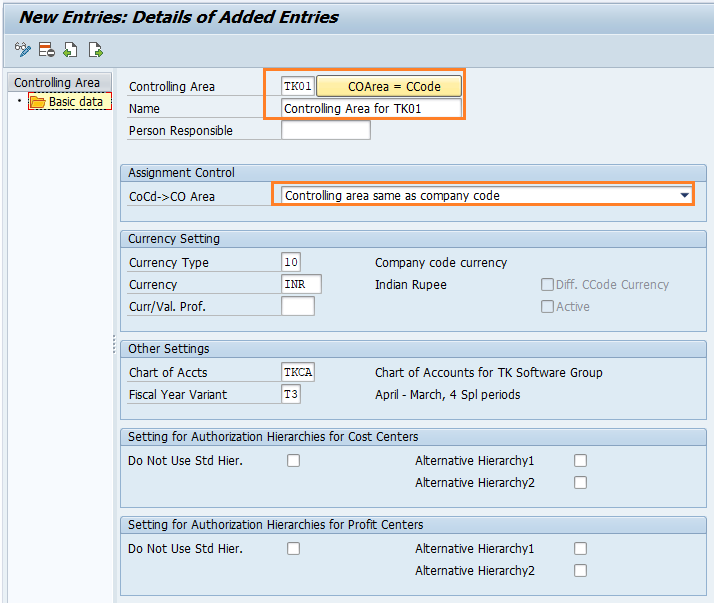
Step 6) Finally, after maintaining all the required details, click on save button to save the configured controlling area details. You are prompted for request number, choose the customizing request number and save the data
Successfully we have created controlling area in SAP.
Assign controlling area to company code in SAP
After controlling area is configured in SAP systems, you need to assign controlling area to company code. Refer below steps for assignment procedure.
Go back to main controlling area screen “change view basic data overview, and choose controlling area “TK01 and double click on assignments of company codes.
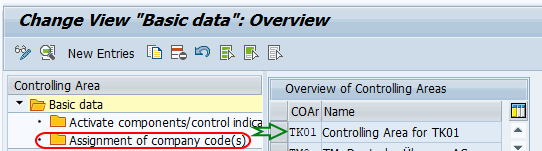
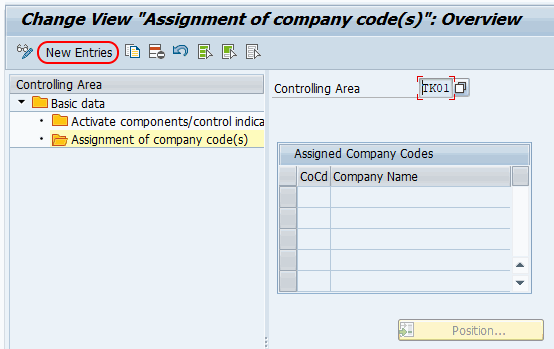
On change view “Assignment of company code(s) overview screen, click on new entries button for assigning the company code to controlling area in SAP.
On new entries assignment screen, enter company code “TK01” in CoCd field and press enter.
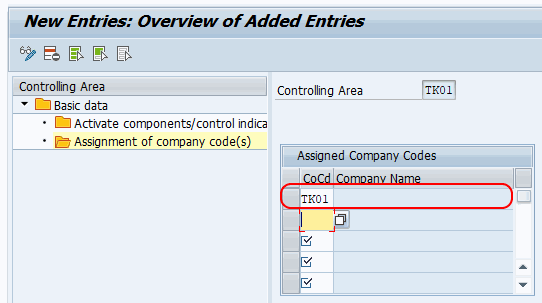
Click on save button and save the configured assignment details.
When one controlling area can contain multiple company codes
- Use one controlling area for multiple company codes when common management reporting is required.
- Use separate controlling areas when company codes have different fiscal year variants or reporting requirements that should not be combined.
- Check chart of accounts and fiscal year variant alignment before assigning additional company codes.
- Review currency settings before deciding the final design.
Common configuration mistakes in SAP controlling area setup
- Using a controlling area key that does not match the intended company code design.
- Selecting the wrong assignment control for a multi-company-code scenario.
- Trying to assign company codes with incompatible chart of accounts or fiscal year variant settings.
- Choosing currency settings without checking reporting needs.
- Saving the controlling area but not assigning the company code.
- Forgetting to transport the configuration with the correct customizing request.
Controlling area in SAP CO FAQ
What is the controlling area in SAP CO?
A controlling area in SAP CO is the organizational unit used for internal cost accounting and management reporting. Cost centers, internal orders, product costing, and other CO objects are managed within a controlling area.
Why do we create a controlling area in SAP?
We create a controlling area to define the scope of Controlling activities such as cost collection, allocations, planning, and internal reporting. It connects FI company code data with CO management accounting.
Can one controlling area be assigned to many company codes?
Yes. One controlling area can be assigned to multiple company codes when common CO reporting is required. The assigned company codes should have compatible settings such as chart of accounts and fiscal year variant.
Which transaction code is used to maintain controlling area in SAP?
Transaction code OKKP is used to maintain controlling area settings in SAP. You can also access the activity through SPRO under Enterprise Structure, Definition, Controlling, Maintain Controlling Area.
Is controlling area the same as company code in SAP?
No. Company code is used for external financial accounting, while controlling area is used for internal management accounting. In a simple setup, the controlling area key can be the same as the company code key, but the two objects have different purposes.
Editorial QA checklist for SAP controlling area tutorial
- Confirm that the tutorial clearly explains what a controlling area is in SAP CO.
- Confirm that OKKP and the SPRO IMG path are present and accurate.
- Confirm that the company code assignment step is included after controlling area creation.
- Confirm that one-to-one and one-to-many controlling area scenarios are explained without mixing FI and CO terms.
- Confirm that existing screenshots, image URLs, and internal tutorial links are unchanged.