 TutorialKart.com
In this SAP tutorial, you will learn how to maintain number ranges for controlling documents in SAP CO by using transaction code KANK. In our previous SAP FICO tutorial, we learned how to create a controlling area in SAP using transaction code OKKP.
Controlling document number ranges are required for each controlling area. When SAP creates a CO document, it assigns a document number from the relevant number range interval. A clean KANK setup helps postings, allocations, assessments, settlements, and other CO transactions receive unique document numbers without interval conflicts.
KANK number range setup for SAP CO documents
Transaction code: – KANK
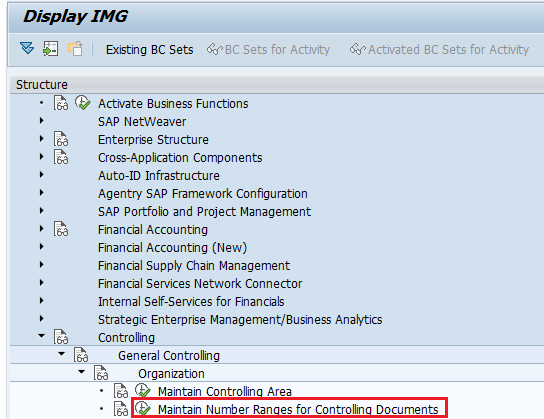
SAP Path: – SPRO -> SAP Reference IMG -> Controlling -> General Controlling -> Organization -> Maintain number ranges for controlling documents.
You can open this activity either through the SAP IMG path or directly with transaction code KANK. In implementation projects, the quickest method is often to copy the standard number ranges from controlling area 0001 to the new controlling area and then review the copied intervals.
Before maintaining number ranges for controlling documents in SAP
- Make sure the target controlling area, such as TK01, is already created and available for configuration.
- Decide whether you want to copy intervals from an existing controlling area or maintain the intervals manually.
- Check that interval numbers do not overlap when you create or change number ranges.
- Do not reset the current number in a productive system unless the impact is fully checked.
- Review whether the interval should use internal number assignment or external number assignment, based on the CO transaction requirement.
Maintain number ranges for controlling documents through SPRO
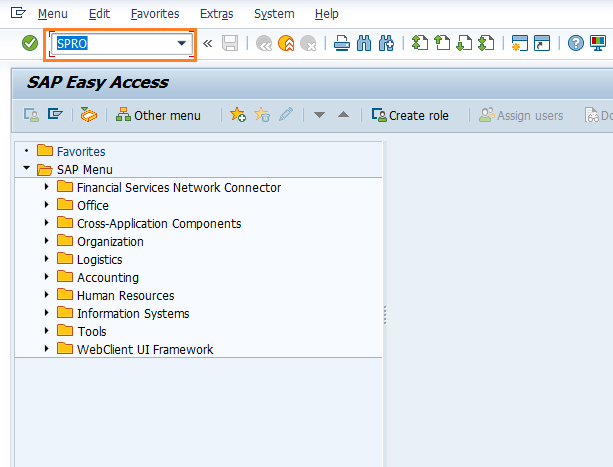
Step 1: Enter transaction code “SPRO” in the SAP command field and press Enter.
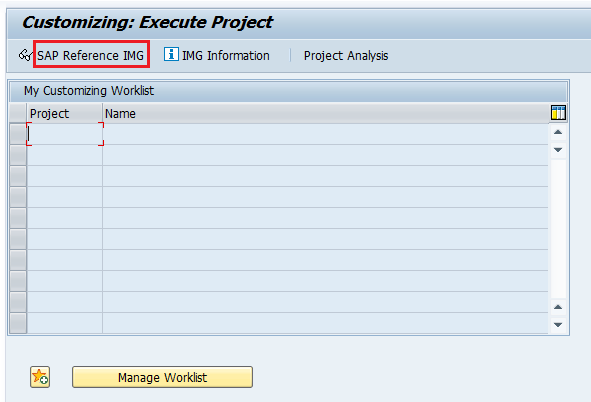
Step 2: On the Customizing: Execute Project screen, click SAP Reference IMG.
Step 3: On the Display IMG screen, follow the IMG menu path and double-click Maintain Number Ranges for Controlling Documents.
Copy CO document number ranges from controlling area 0001 to TK01
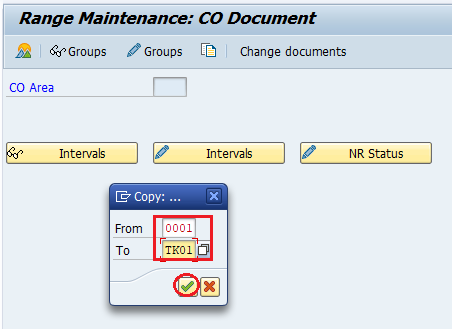
Step 4: On the Range Maintenance: CO Document screen, click the Copy icon to copy number ranges from one controlling area to another controlling area.
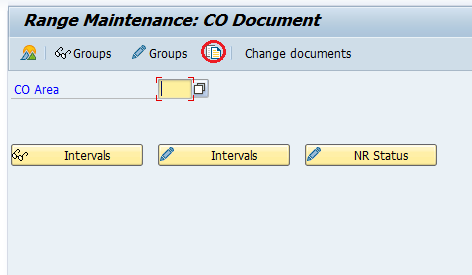
Enter source controlling area 0001 and target controlling area TK01. This copies the available CO document number range intervals from the source CO area to the target CO area.
A number range interval transport window is displayed. Read the message and press Enter to continue, or follow your project transport procedure if your system requires a transport request for number range interval changes.
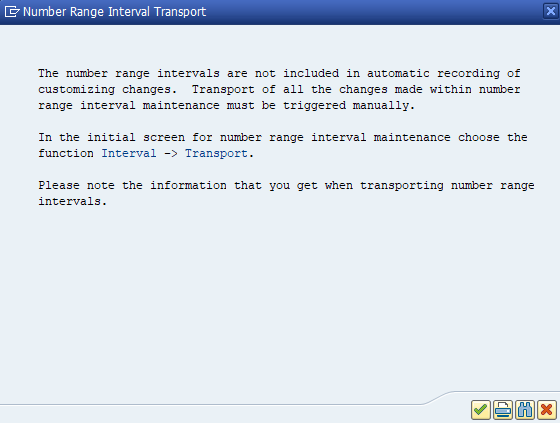
Step 5: SAP displays a confirmation message for copying number ranges from CO area 0001 to TK01.

Display copied number range intervals for controlling area TK01
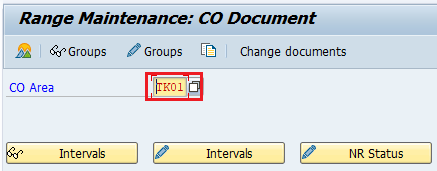
To check the copied number ranges for controlling documents, enter the CO area TK01 and click Display Intervals.
The following number ranges for controlling documents are copied to SAP controlling area TK01 in the SAP systems.
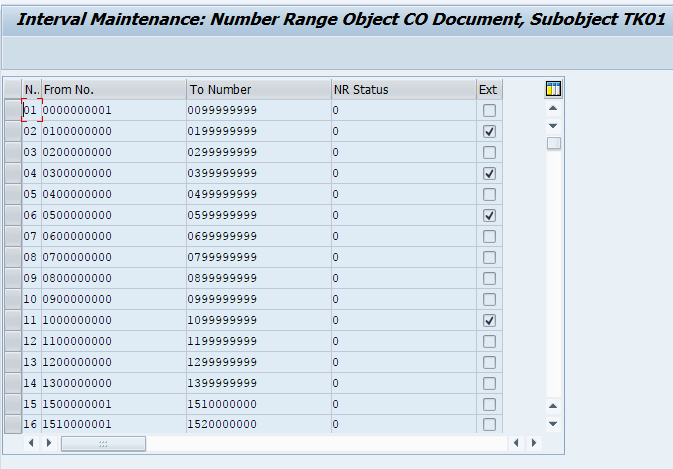
Fields to review in SAP CO document number range intervals
| Field in KANK | What it means for CO documents | Configuration note |
|---|---|---|
| Interval number | Identifies the number range interval used for CO document numbering. | Keep interval numbers clear and consistent across controlling areas where possible. |
| From number and To number | Defines the first and last document number allowed in the interval. | Avoid overlapping ranges within the same controlling area. |
| Current number | Shows the last used number or the current status of the interval. | Do not manually lower this value in production because duplicate document numbers may occur. |
| External indicator | Controls whether numbers are entered externally instead of assigned automatically by SAP. | Use external assignment only when the business process requires it. |
Maintain number range intervals manually in KANK
If you do not want to copy number ranges from another controlling area, you can maintain the intervals manually in KANK. Enter the controlling area, choose the interval maintenance option, insert the required interval, enter the From number and To number, review the external assignment setting, and save the changes.
Manual interval maintenance is useful when the new controlling area needs a different numbering design from the reference controlling area. However, copying from a model controlling area is usually safer when the client follows the standard SAP CO number range structure.
KANK checks after maintaining CO document number ranges
- Display intervals for the target controlling area and confirm that the required intervals exist.
- Check that no interval is missing for the CO transactions used by the business process.
- Confirm that internal or external number assignment is set correctly.
- Save the configuration and test a relevant CO posting or allocation in the test system.
- If a transport warning appears, follow the transport approach used in your SAP landscape.
Common issues while maintaining controlling document number ranges
| Issue in KANK | Possible reason | What to check |
|---|---|---|
| Target controlling area does not show expected intervals | Intervals were not copied or saved correctly. | Reopen KANK, enter the target CO area, and use Display Intervals. |
| Interval overlap error | The new from-to number range conflicts with an existing interval. | Change the interval limits so that each range is unique. |
| Document number assignment error during CO posting | Required interval is missing or exhausted. | Check the interval assigned for the relevant CO transaction and extend the range if required. |
| Confusion between TK01 and TKO1 | The digit zero and letter O look similar in some screens. | Use the exact controlling area key created in configuration, such as TK01. |
Successfully, we have maintained number ranges for SAP controlling documents using transaction code KANK.
FAQs on maintaining number ranges for controlling documents in SAP CO
What is the Tcode for number ranges for controlling documents in SAP?
The transaction code for maintaining number ranges for controlling documents in SAP CO is KANK. You can also reach the same activity through SPRO under Controlling > General Controlling > Organization.
How do you maintain number range intervals in controlling?
Open KANK, enter the controlling area, choose interval maintenance, create or change the required interval, define the from and to numbers, check the external assignment setting, and save the configuration.
Can I copy CO document number ranges from one controlling area to another?
Yes. In KANK, you can use the copy option to copy number range intervals from a reference controlling area, such as 0001, to a target controlling area, such as TK01. After copying, display the intervals and verify them.
Is the CO document number range assigned to an FI document type?
No. CO document number ranges maintained in KANK are for controlling documents. FI document types use separate Financial Accounting number range configuration, so do not mix FI document number ranges with CO document number ranges.
Why does SAP show a number range interval transport message?
SAP may show a message because number range intervals need careful handling across clients and systems. Follow your project transport procedure and make sure the intervals are available in the target system before testing CO postings.
Editorial QA checklist for SAP CO KANK tutorial
- Does the tutorial clearly state that KANK is used for controlling document number ranges?
- Are the controlling area examples written consistently as 0001 and TK01?
- Does the copying procedure explain both source and target controlling areas?
- Does the tutorial warn editors not to reset current numbers in production?
- Do the FAQs separate CO document number ranges from FI document type number ranges?