 TutorialKart.com
Define Cost Center Hierarchy
In this SAP CO tutorial, you will learn how to define the standard cost center hierarchy for a controlling area in SAP step by step using transaction code OKEON.
A cost center standard hierarchy is the tree structure used to arrange cost center groups and cost centers for one controlling area. It helps reporting, planning, allocations, and cost center accounting activities because cost centers can be viewed and processed under meaningful organizational nodes.
Before you create or change the hierarchy in OKEON, the standard hierarchy name must be assigned to the controlling area in OKKP. If this assignment is missing, SAP may display an error such as no standard hierarchy is created for the controlling area.
SAP cost center standard hierarchy prerequisites in OKKP
Recommended configuration:
In SAP systems, before you define standard hierarchy using transaction code OKEON, maintain CCtr Standard hierarchy in controlling area using OKKP.
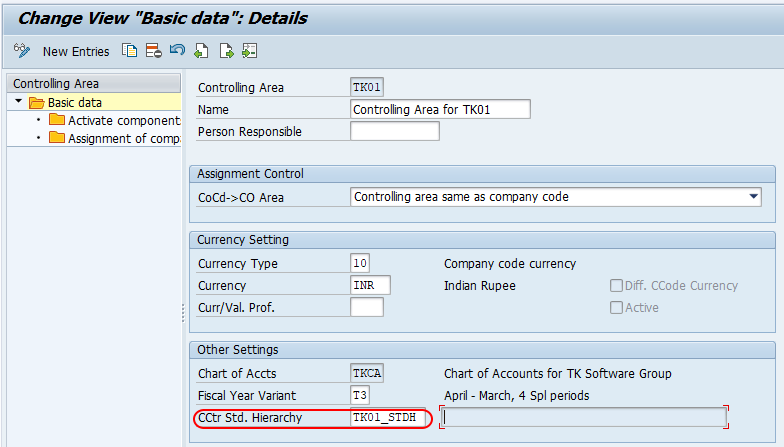
A window opens for checking the standard hierarchy in SAP. Click on the Yes button and save the data.
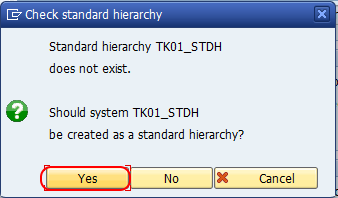
After this assignment is saved in the controlling area, you can create or maintain the actual cost center hierarchy structure in OKEON.
Navigation path for defining standard cost center hierarchy in SAP
You can define standard cost center hierarchy in SAP using one of the following navigation methods.
Transaction code : – OKEON
IMG Path : – SPRO > IMG > Controlling > Cost Center Accounting > Master Data > Cost Center > Define Standard Hierarchy.
Use OKEON when you want to create hierarchy nodes, add cost center groups, assign cost centers to the hierarchy, or change the structure of the cost center hierarchy for the selected controlling area.
Step 1: Open OKEON to maintain cost center hierarchy
Enter SAP Tcode OKEON in the SAP command field and press the Enter key from the keyboard.

Step 2: Enter the standard hierarchy key for the controlling area
If you have not maintained the standard hierarchy in the controlling area, you may get an error message such as no standard hierarchy is created for TK01. On the standard hierarchy for cost center changes screen, update the name of the standard hierarchy key.
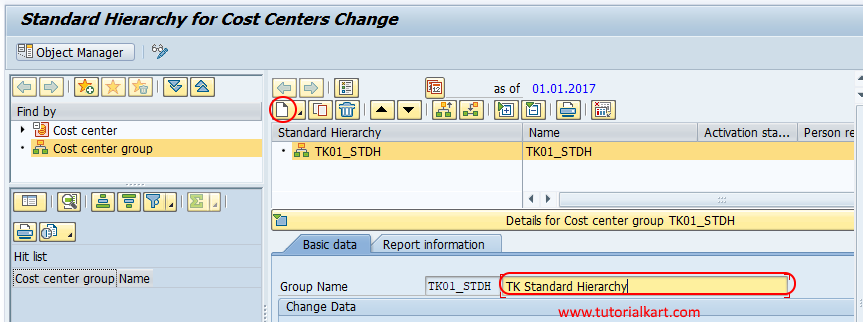
The hierarchy key should normally be meaningful for the controlling area or the organization structure. Once the key is assigned in OKKP and opened in OKEON, you can start building the hierarchy nodes and assigning cost centers.
Step 3: Add lower-level groups, same-level groups, and cost centers in OKEON
You can add new hierarchy nodes either by lower level group, group at same level or cost center by choosing the standard hierarchy key.
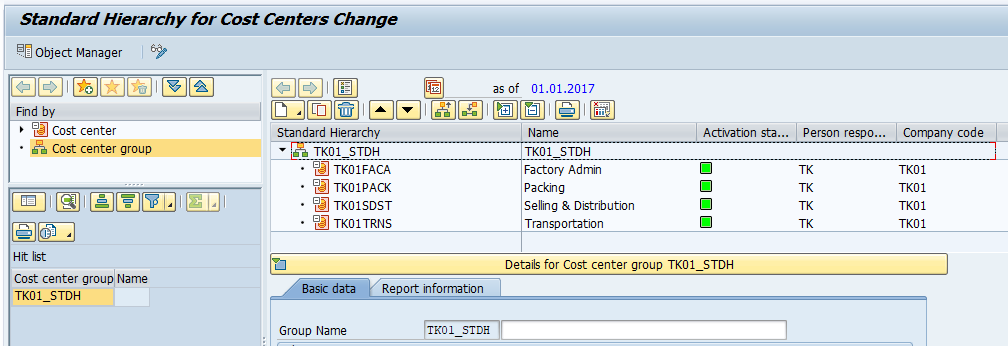
Based on the requirements, you should develop standard cost center hierarchy for controlling area in SAP.
A typical hierarchy can be arranged by company structure, department, plant, region, function, or any reporting logic that is used in cost center accounting. The exact design depends on how the business wants to analyze costs.
Cost center hierarchy node options in SAP OKEON
| Option in hierarchy maintenance | Purpose in cost center hierarchy | When to use it |
|---|---|---|
| Lower level group | Creates a child node under the selected hierarchy node | Use it when you want to divide a node into departments, plants, regions, or functions. |
| Group at same level | Creates another node at the same hierarchy level | Use it when two units should appear as parallel branches in the same reporting level. |
| Cost center | Assigns an actual cost center to the hierarchy | Use it when the cost center master record should belong to a selected hierarchy node. |
The standard hierarchy should be practical for reporting. Avoid creating too many unnecessary levels, but make sure the structure is detailed enough for cost center analysis and responsibility reporting.
Important points while creating SAP cost center standard hierarchy
- One controlling area is assigned one standard hierarchy name in the controlling area settings.
- The standard hierarchy contains cost center groups and cost centers arranged in a tree structure.
- Maintain the standard hierarchy name in OKKP before changing the structure in OKEON.
- Use meaningful node names so that reporting users can understand the cost center grouping.
- Save the hierarchy after adding or changing nodes, groups, and cost centers.
Fixing no standard hierarchy is created for controlling area error
If OKEON shows a message that no standard hierarchy is created for the controlling area, first check the controlling area settings in OKKP. The CCtr Standard Hierarchy field should contain the hierarchy name that you want to maintain.
After assigning the hierarchy name in OKKP, save the controlling area configuration. Then go back to OKEON and maintain the nodes and cost centers for the hierarchy. If the issue continues, check whether you are working in the correct controlling area and client.
How cost center hierarchy is used in SAP CO reporting
The standard hierarchy is not only a configuration object. It also supports day-to-day cost center accounting. Users can select groups or nodes in reports instead of entering each cost center manually. This makes cost center reporting easier when the organization has many departments or responsibility areas.
For example, a company may create a top node for administration, a lower node for finance, and then assign individual finance cost centers below it. Reports can then be run for the finance node instead of selecting each finance cost center one by one.
Frequently asked questions on SAP cost center standard hierarchy
What is the cost center standard hierarchy in SAP?
The cost center standard hierarchy in SAP is the main tree structure used to organize cost center groups and cost centers for a controlling area. It is used in cost center accounting configuration and reporting.
Which transaction code is used to define standard cost center hierarchy in SAP?
The transaction code used to define or maintain standard cost center hierarchy is OKEON. The hierarchy name should first be maintained for the controlling area in OKKP.
Why does SAP show no standard hierarchy is created for the controlling area?
This message usually appears when the standard hierarchy name has not been assigned to the controlling area. Open OKKP, maintain the CCtr Standard Hierarchy field, save the controlling area, and then maintain the hierarchy in OKEON.
Can cost centers be added directly under a hierarchy node in OKEON?
Yes. In OKEON, you can add lower-level groups, same-level groups, and cost centers under the selected hierarchy node according to the required reporting structure.
How should a cost center hierarchy be designed in SAP CO?
Design the hierarchy according to the way the business wants to analyze costs. Common structures are based on departments, functions, plants, regions, or responsibility areas.
QA checklist for defining cost center hierarchy in SAP
- Confirm that the correct controlling area is selected before maintaining the standard hierarchy.
- Check that the CCtr Standard Hierarchy field is maintained in OKKP.
- Verify that the hierarchy nodes follow the required business reporting structure.
- Ensure that cost centers are assigned under the correct group or node.
- Save the hierarchy and recheck it in OKEON after changes are completed.