 TutorialKart.com
This SAP CO tutorial explains what a secondary cost element is, which secondary cost element category to choose, and how to create secondary cost elements step by step by using transaction code KA06 in SAP ERP/classic SAP GUI. It also notes the SAP S/4HANA change: in S/4HANA, cost elements are maintained through G/L account master data with a cost element category, rather than as separate cost element master records.
Secondary cost elements in SAP CO: meaning and business use
In SAP, secondary cost elements are used for value flows that happen inside Controlling (CO), such as allocations, assessments, internal activity allocation, overhead calculation, and settlement between CO objects. They are not used to record the original vendor invoice, payroll expense, material issue, or other external FI posting. Those original postings normally use primary cost elements.
A secondary cost element is therefore useful when the cost already exists in CO and must be moved, absorbed, allocated, or settled from one controlling object to another. Examples include allocating administration overhead from a service cost center to production cost centers, settling an internal order to a cost center, or charging machine-hour activity from a production cost center to a production order.
In SAP S/4HANA, SAP represents cost element master data as a special type of G/L account. The cost element category is maintained in the G/L account master data and is used by Controlling. For current SAP S/4HANA systems, refer to the SAP Help pages on Cost Element Accounting and Cost Elements.
Primary cost element vs secondary cost element in SAP CO
The difference between primary and secondary cost elements is important before you choose KA01 or KA06.
| Point of comparison | Primary cost element | Secondary cost element |
|---|---|---|
| Main purpose | Records cost or revenue coming from Financial Accounting or another external source. | Records internal CO value flows such as allocation, settlement, overhead, and activity allocation. |
| Typical source | Vendor invoice, payroll posting, goods issue, revenue posting, or other FI-integrated transaction. | CO-only transaction such as assessment, internal activity allocation, overhead calculation, or internal settlement. |
| Example | Salary expense, power expense, raw material consumption, sales revenue. | Assessment cost element, overhead cost element, internal activity allocation cost element. |
| Classic SAP ERP transaction | KA01 for create, KA02 for change, KA03 for display. | KA06 for create, KA02 for change, KA03 for display. |
Secondary cost element categories in SAP: 21, 31, 41, 42 and 43
While creating secondary cost elements in SAP, you must specify the secondary cost element category. The category controls which CO transactions can use the cost element and what type of internal value flow it represents.
| Secondary cost element category | Category name | Where it is commonly used | Simple example |
|---|---|---|---|
| 21 | Internal settlement | Settlement of order or project costs to CO-internal receivers such as cost centers, orders, projects, or profitability segments. | Internal order settled to a cost center. |
| 31 | Order/project results analysis | Results analysis for orders or projects, such as work in progress and related values. | Work in progress value calculated for a production order or project. |
| 41 | Overhead rates | Overhead calculation in costing sheets and related overhead processes. | Factory overhead calculated on material or labor cost. |
| 42 | Assessment | Assessment cycles in Cost Center Accounting and other CO allocation scenarios. | Administration cost center assessed to production cost centers. |
| 43 | Internal activity allocation | Activity allocation between sender and receiver CO objects. | Machine-hour cost allocated from a production cost center to a production order. |
Choose the category according to the actual CO process. Do not use category 43 for a cost element that will be used only in assessment cycles, and do not use category 42 for an internal activity type that needs activity allocation.
Before creating secondary cost elements with KA06 in SAP
Check the following points before starting the KA06 transaction. These checks help avoid common master-data errors.
- The controlling area is already created and you know the correct controlling area key.
- The secondary cost element key follows the number range or naming convention used in your system.
- The cost element does not already exist for the same validity period.
- The cost element category matches the CO process: settlement, results analysis, overhead, assessment, or activity allocation.
- The validity dates cover the posting period in which the cost element will be used.
- For SAP S/4HANA systems, confirm whether your project uses the Fiori app or G/L account master data maintenance instead of KA06.
Secondary cost element example data for controlling area TK01
In this example, we are going to create the following secondary cost elements for controlling area TK01. The sample cost elements below are activity-related, so category 43 is used.
| Cost Element | Name | Cost Element Category |
| TKDRILLING | Drilling | 43 |
| TKBLASTING | Blasting | 43 |
| TKTRANSPRT | Transportation | 43 |
| TKMCHNRS | Machine Hours | 43 |
| TKPOWER | Power | 43 |
| TKFOH | Factory Overhead | 43 |
| TKADOHD | Administration Overhead | 43 |
If your cost element is intended for assessment, settlement, results analysis, or overhead calculation, replace category 43 with the relevant secondary cost element category from the table above.
Create secondary cost elements in SAP CO using transaction code KA06
You can create secondary costs elements in SAP Controlling by using one of the following navigation methods in the SAP Easy Access menu.
Path : – Accounting > Controlling > Cost element accounting > Master data > Cost element > Individual processing > Create Secondary.
Transaction code : KA06.
Step 1: Enter SAP transaction code “KA06” in the SAP command field and press Enter.

Step 2: Update the controlling area key for which you want to create secondary cost elements in SAP.
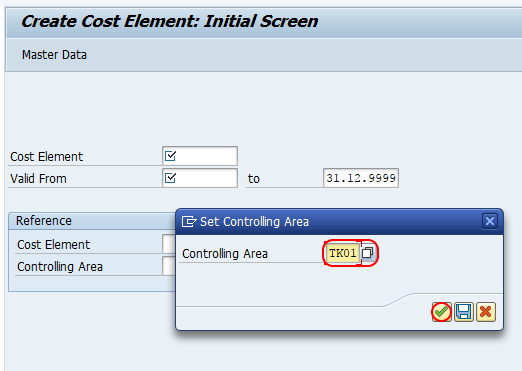
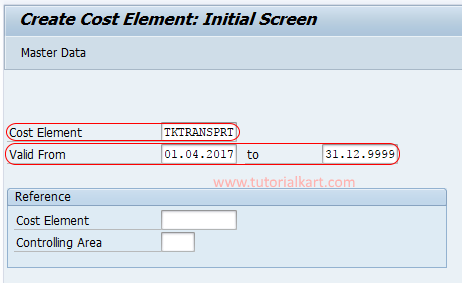
Step 3: On the create cost element initial screen, update the following details.
- Cost Element: Enter the key that identifies the secondary cost element in SAP, such as TKTRANSPRT.
- Valid From / Valid To: Update the validity dates for the cost element. Use dates that cover the period in which the cost element will be used.
- After entering the required details, press Enter to continue.
Step 4: In the next Create Cost Element screen, update the following master-data fields.
- Name: Enter a short name for the secondary cost element. In this example, enter Transportation for cost element TKTRANSPRT.
- Description: Enter a clear description so users can identify the purpose of the cost element in reports and allocation documents.
- Cost Element Category: Select the category for the secondary cost element. For this example, choose 43 for Internal Activity Allocation.
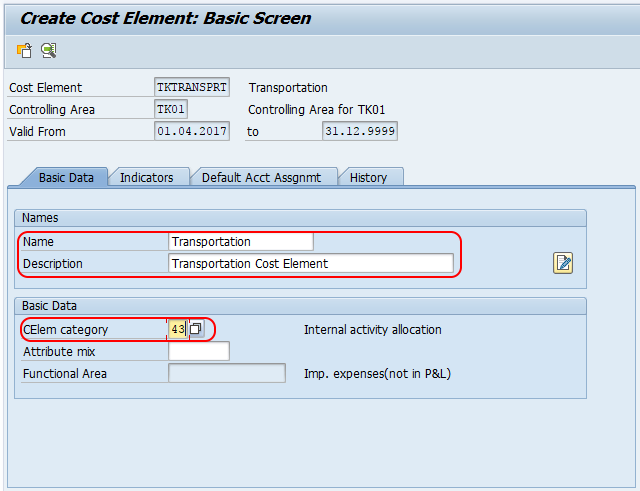
Step 5: After maintaining all the required details, click the Save button. SAP displays a confirmation message that the cost element has been created.

You can now create the remaining secondary cost elements by repeating the same KA06 steps and changing the cost element key, name, description, and category as required.
Verify a secondary cost element after creation in SAP CO
After saving the secondary cost element, verify it before using it in an allocation cycle, activity type, settlement profile, or costing sheet.
- Use KA03 to display the cost element in classic SAP ERP systems.
- Check that the controlling area, validity dates, name, and cost element category are correct.
- Confirm that the category matches the business process where the cost element will be assigned.
- For category 43, check the activity type setup if the cost element will be used for internal activity allocation.
- For SAP S/4HANA, verify the G/L account master data and the cost element category in the relevant G/L account maintenance app or transaction used by your project.
SAP S/4HANA note for secondary cost element G/L accounts
In SAP ERP, transaction KA06 is commonly used to create a secondary cost element. In SAP S/4HANA, cost elements are part of the chart of accounts and are maintained as G/L accounts. A secondary cost element is normally represented by a G/L account with a secondary cost element category such as 21, 41, 42, or 43. If KA06 is not available in your system, use the process defined for your S/4HANA release and project setup, such as the Manage G/L Account Master Data app.
This is why the same business requirement may be handled differently in different SAP landscapes: older SAP ERP systems often use KA06, while SAP S/4HANA projects maintain the account and cost element category in G/L account master data.
Common mistakes while creating secondary cost elements in SAP
| Issue | Why it happens | What to check |
|---|---|---|
| Wrong cost element category selected | The category was chosen from memory instead of the actual CO process. | Use 42 for assessment, 43 for internal activity allocation, 41 for overhead, 21 for internal settlement, and 31 for results analysis. |
| Secondary cost element expected in FI posting | Secondary cost elements are meant for internal CO value flows, not normal external FI postings. | Use the correct primary cost element or G/L account for FI-originated expenses. |
| Validity date does not cover the posting period | The cost element is created with a narrow or incorrect validity range. | Check the Valid From and Valid To dates before saving. |
| Cost element key does not follow company naming rules | The key was created without checking the chart of accounts or controlling naming convention. | Confirm the number range or naming convention with the SAP CO/FI master-data design. |
| KA06 not available in SAP S/4HANA | The system maintains cost elements as G/L account master data. | Use the S/4HANA G/L account maintenance process and maintain the secondary cost element category there. |
Secondary cost element setup checklist before saving KA06
- The controlling area is correct for the company code or cost objects that will use this cost element.
- The secondary cost element category matches the intended SAP CO transaction.
- The name and description clearly identify the allocation, settlement, overhead, or activity purpose.
- The validity dates cover the expected posting periods.
- The cost element is not being used as a substitute for a primary cost element.
- For SAP S/4HANA, the G/L account type and cost element category are checked in account master data.
FAQs on creating secondary cost elements in SAP
What is the T-code for secondary cost element in SAP?
The classic SAP ERP transaction code to create a secondary cost element is KA06. KA03 is commonly used to display a cost element, and KA02 is commonly used to change an existing cost element. In SAP S/4HANA, cost element master data is generally maintained through G/L account master data, so the exact app or transaction depends on the system release and project setup.
What is an example of a secondary cost element in SAP CO?
An example of a secondary cost element is a machine-hour activity allocation cost element with category 43. It can be used when a production cost center provides machine hours to a production order. Another example is an assessment cost element with category 42 used to allocate administration cost to receiving cost centers.
Can I post directly to a secondary cost element in SAP FI?
Secondary cost elements are normally used for internal Controlling postings, not direct FI expense postings. If the original cost comes from an external business transaction such as a vendor invoice, payroll posting, or material issue, use the relevant primary cost element or G/L account according to your SAP design.
Which secondary cost element category is used for internal activity allocation?
Category 43 is used for internal activity allocation. It is commonly assigned to cost elements that capture activity costs such as machine hours, labor hours, power usage, or similar activity-based allocations between CO objects.
How is secondary cost element creation different in SAP S/4HANA?
In classic SAP ERP, secondary cost elements can be created with KA06. In SAP S/4HANA, cost elements are part of G/L account master data, and the cost element category is maintained in the account master. Therefore, S/4HANA users should follow their system’s G/L account master data process instead of assuming that KA06 is the correct maintenance option.