 TutorialKart.com
Dynamics 365 Sales entities and the lead-to-order process
Dynamics 365 Sales entities are the data objects used to store sales information such as accounts, contacts, leads, opportunities, quotes, orders, invoices, products, competitors, and goals. In older Microsoft Dynamics CRM terminology these objects are called entities. In current Microsoft Dataverse terminology, an entity is commonly called a table, a record is a row, and an attribute or field is a column.
This tutorial explains the different Dynamics 365 Sales entities by grouping them into shared entities and sales-specific entities. It also shows how these records normally support the sales cycle from a new lead to an order and invoice. For official reference, see Microsoft Learn for Dynamics 365 Sales overview and Sales tables such as lead, opportunity, competitor, quote, order, and invoice.
What an entity means in Dynamics 365 Sales
An entity is similar to a database table, and the entity attributes correspond to table columns. An Entity in Microsoft Dynamics 365 has a set of attributes, and each attribute stores a particular type of data. For example, a Lead entity can store the topic, company name, contact name, email, phone number, lead source, rating, status, and owner.
The word entity is still useful when reading Dynamics CRM tutorials, SDK examples, plugin code, and older administrator material. In newer Dataverse screens and documentation, you may see the same concept described as a table. Both terms point to the same basic idea: a structured place where Dynamics 365 stores business data.
Shared Dynamics 365 Sales entities: Account and Contact
Shared entities are used across more than one Dynamics 365 app or module. They are not limited to the sales area. In Dynamics 365 Sales, the most common shared entities are Account and Contact.
Account entity in Dynamics 365 Sales
The Account entity represents an organization, company, customer, vendor, partner, or other business-level record. An account can be related to contacts, opportunities, activities, quotes, orders, invoices, and service records. Sales users usually use the account record to view company-level details and related sales history.
Typical account attributes include account name, phone, website, address, industry, annual revenue, owner, and relationship details. The standard New Account form in Microsoft Dynamics 365 is used to create and maintain these company records.
Contact entity in Dynamics 365 Sales
The Contact entity represents an individual person. A contact may be linked to an account and connected with opportunities, activities, emails, appointments, and service interactions. In sales work, contacts may be buyers, decision makers, influencers, evaluators, or other people involved in a deal.
Typical contact attributes include first name, last name, job title, business phone, mobile phone, email address, parent account, address, owner, and communication preferences. Because contact records are used by multiple teams, keeping contact data accurate is important.
Sales-specific Dynamics 365 entities from lead to invoice
Sales-specific entities are used mainly inside the Dynamics 365 Sales app. Important sales-specific entities include Leads, Opportunities, Competitors, Quotes, Orders, Invoices, Products, Sales Literature, Goals, and Goal Metrics.
These entities support the sales process. A lead can be qualified into an opportunity. An opportunity can move through sales stages. A quote can be created for the opportunity. If the customer accepts the quote, an order can be created. After billing, the invoice stores the billed transaction.
Lead entity in Dynamics 365 Sales
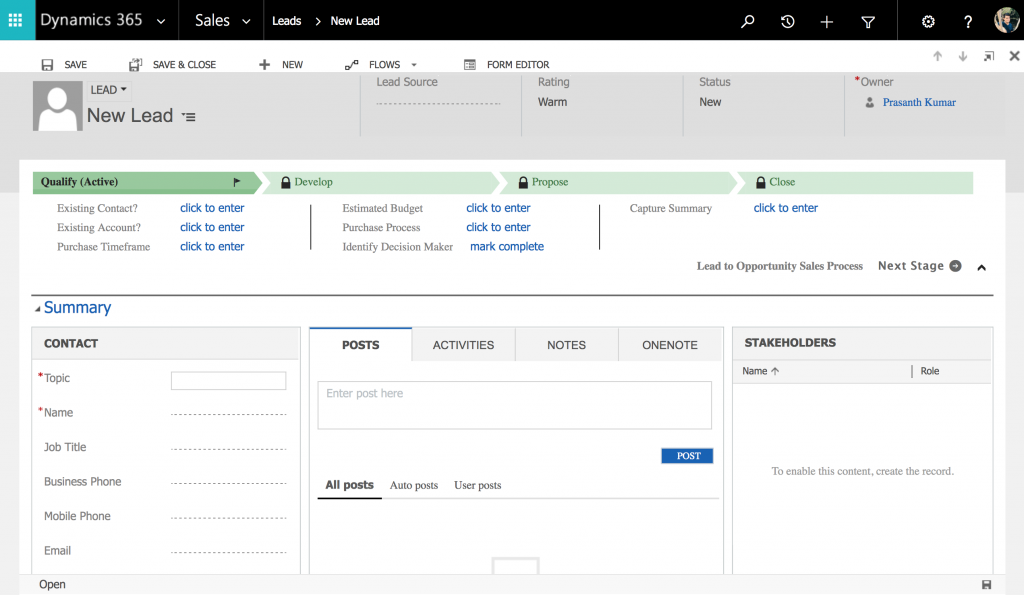
The Lead entity represents a person or organization that may be interested in the company’s products or services, but has not yet been qualified as a real sales opportunity. Leads may come from enquiries, campaigns, events, website forms, referrals, imported lists, or manual entry by sales users.
A lead record is used to collect early information, track communication, assign ownership, and decide whether the prospect should move forward. If the lead is a good fit, it can be qualified and converted into related sales records such as an account, contact, and opportunity, depending on configuration.
- The given below shows the standard New Lead form in Microsoft Dynamics 365.
Opportunity entity in Dynamics 365 Sales
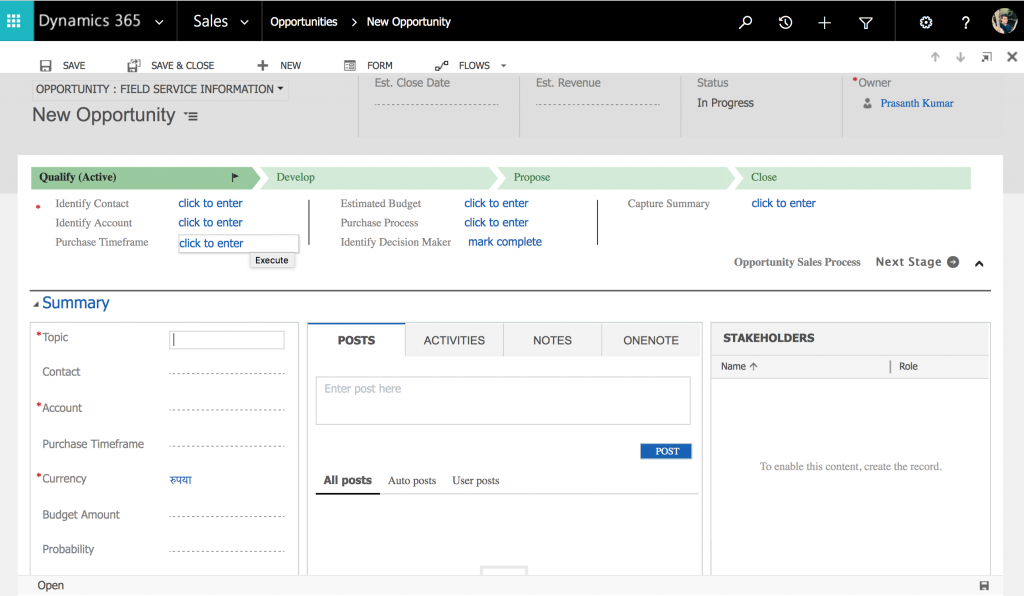
The Opportunity entity stores a potential sale to a new or existing customer. Sales teams use opportunities to manage active deals, forecast revenue, track estimated close dates, record products of interest, monitor competitors, and follow sales activities.
An opportunity can be created directly or generated when a lead is qualified. A typical opportunity includes the topic, account, contact, estimated revenue, estimated close date, probability, sales stage, owner, related products, activities, and status.
- The given below shows the standard New Opportunity form in Microsoft Dynamics 365.
Quote entity in Dynamics 365 Sales
The Quote entity represents a formal offer of products or services at a proposed price. A quote can include product lines, price lists, quantities, discounts, tax, freight amount, payment terms, and delivery information. Quotes are often created from an opportunity while the seller is negotiating with the customer.
Order entity in Dynamics 365 Sales
The Order entity, also called a sales order, represents a customer commitment to buy. In many sales processes, an order is created from an accepted quote. Orders can also be created directly if the organization’s process allows it.
Invoice entity in Dynamics 365 Sales
The Invoice entity represents products or services that have been billed to the customer. It records invoice lines, totals, customer details, and invoice status. In some implementations, invoices are created in Dynamics 365 Sales. In others, invoice data may be integrated from a finance or ERP system.
Competitor entity in Dynamics 365 Sales
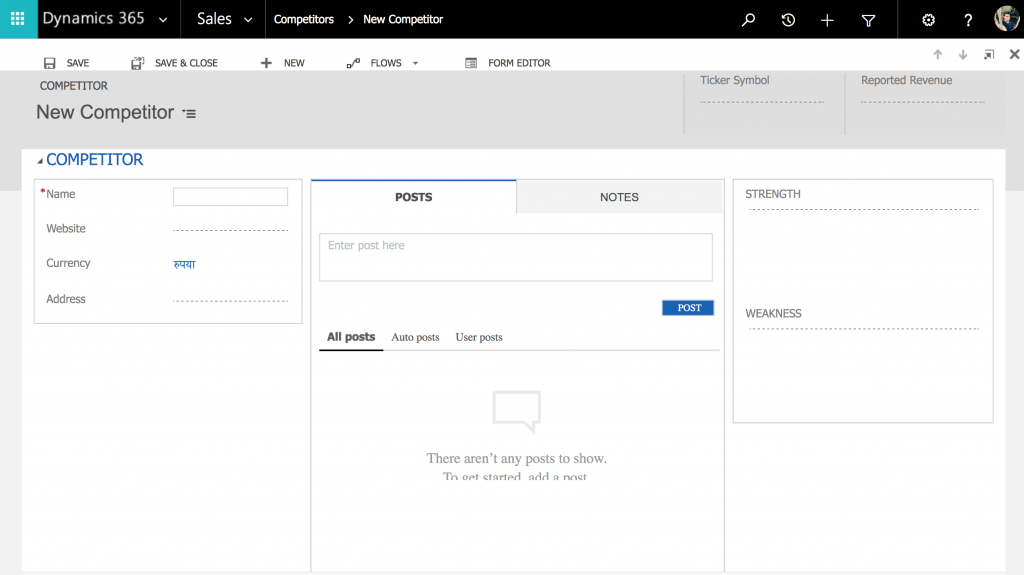
The Competitor entity stores information about other organizations that offer similar products or services. Competitor records can be associated with opportunities, products, sales literature, and win/loss analysis.
Useful competitor details may include competitor name, website, strengths, weaknesses, competing products, threat level, and notes from sales interactions. This helps managers review why opportunities were won or lost.
- The given below shows the standard New Competitor form in Microsoft Dynamics 365.
Product entity and product catalog in Dynamics 365 Sales
The Product entity represents an individual product or service offered to customers. Products are part of the product catalog and can be used on opportunities, quotes, orders, and invoices. Product records are often related to price lists, unit groups, product families, bundles, and line items.
Sales Literature entity in Dynamics 365 Sales
The Sales Literature entity stores sales collateral such as brochures, product sheets, comparison documents, proposal content, and other material used by sellers. Sales literature can be related to products or competitors so users can find supporting content during the sales process.
Sales Goal and Goal Metric entities in Dynamics 365 Sales
The Goal entity is used to track progress against a target, such as revenue, number of opportunities, or number of completed activities. The Goal Metric entity defines how the goal is measured. Together, goals and goal metrics help managers compare targets with actual or in-progress values.
Shared vs sales-specific Dynamics 365 Sales entities table
| Dynamics 365 Sales entity | Entity group | Main sales purpose |
|---|---|---|
| Account | Shared entity | Stores organization-level customer or partner details. |
| Contact | Shared entity | Stores individual person and communication details. |
| Lead | Sales-specific entity | Tracks an unqualified prospect before qualification. |
| Opportunity | Sales-specific entity | Tracks an active potential sale and pipeline value. |
| Quote | Sales-specific entity | Stores a proposed offer with products, quantities, and prices. |
| Order | Sales-specific entity | Stores the accepted customer purchase commitment. |
| Invoice | Sales-specific entity | Stores billed products, services, totals, and invoice status. |
| Competitor | Sales-specific entity | Stores competing organization details for opportunity analysis. |
| Product | Sales-specific entity | Stores products or services used in quotes, orders, and invoices. |
| Goal and Goal Metric | Sales-specific entity | Stores sales targets and measurement rules. |
Typical Dynamics 365 Sales record flow from lead to invoice
- Lead – Capture early interest from an unqualified prospect.
- Account and Contact – Store company and person details, often during lead qualification.
- Opportunity – Track the qualified potential sale and related activities.
- Product – Add products or services that the customer may buy.
- Competitor – Record competing companies when they are relevant to the deal.
- Quote – Prepare a formal price offer.
- Order – Record the accepted purchase commitment.
- Invoice – Record the billed transaction.
This sequence can vary. Some organizations create opportunities directly without using leads. Some use external quoting tools. Some create invoices in an ERP system and synchronize them with Dynamics 365. The important point is to understand the purpose of each entity and how records relate to each other.
Dynamics 365 Sales entity customization notes for administrators
Administrators can customize Dynamics 365 Sales entities by adding columns, changing forms and views, creating business rules, configuring business process flows, setting security roles, and creating relationships. Before creating a custom table, check whether the requirement already belongs in a standard sales entity such as Account, Contact, Lead, Opportunity, Quote, Order, Invoice, Product, Competitor, or Goal.
For integrations, plugins, and custom development, verify the current Dataverse table names, logical names, relationships, and supported messages in Microsoft Learn before writing code. This avoids errors caused by using outdated CRM terminology or assuming that every organization has the same sales process.
Frequently asked questions about Dynamics 365 Sales entities
What are the different types of entities in Dynamics 365 Sales?
For sales learning, the useful grouping is shared entities and sales-specific entities. Shared entities include Account and Contact. Sales-specific entities include Lead, Opportunity, Quote, Order, Invoice, Competitor, Product, Sales Literature, Goal, and Goal Metric.
What are entities in Dynamics CRM and Dynamics 365?
Entities are structured data objects used to store business information. In older Dynamics CRM terminology, an entity is similar to a database table. In Dataverse terminology, entities are commonly called tables, records are rows, and attributes are columns.
Is a Lead the same as an Opportunity in Dynamics 365 Sales?
No. A Lead is an unqualified prospect or early expression of interest. An Opportunity is a qualified potential sale that the sales team is actively working. A lead can be qualified into an opportunity when it has enough value and fit to continue.
Do Dynamics 365 Sales licenses change the meaning of sales entities?
Licenses can affect which app features, automation, insights, or advanced capabilities are available to a user, but they do not change the basic meaning of entities such as Lead, Opportunity, Quote, Order, Invoice, Account, and Contact. Check the current Microsoft licensing guide for feature availability.
Is Microsoft Dynamics CRM discontinued or renamed?
The old standalone Microsoft Dynamics CRM branding has been replaced by the Dynamics 365 family of business applications. For sales functionality, the current product area is Dynamics 365 Sales. Older tutorials and code examples may still use the term Dynamics CRM.
Editorial QA checklist for this Dynamics 365 Sales entities tutorial
- Confirm that entity, table, record, row, attribute, and column terminology is clear for both older CRM and current Dataverse readers.
- Check that Account and Contact are described as shared entities used beyond the Sales app.
- Check that Lead, Opportunity, Quote, Order, Invoice, Competitor, Product, Sales Literature, Goal, and Goal Metric are described with sales-specific use cases.
- Verify that the lead-to-invoice flow is presented as a common process, not as a rule for every organization.
- Review Microsoft Learn links periodically for current Dynamics 365 Sales entity and licensing references.
Summary of different Dynamics 365 Sales entities
Dynamics 365 Sales entities provide the structure for managing customer and sales data. Shared entities such as Account and Contact hold reusable customer information. Sales-specific entities such as Lead, Opportunity, Quote, Order, Invoice, Competitor, Product, Sales Literature, Goal, and Goal Metric support the sales cycle from early prospecting to billing and performance tracking.