 TutorialKart.com
What is Microsoft Dynamics 365?
Microsoft Dynamics 365 is a family of cloud business applications from Microsoft for customer relationship management (CRM) and enterprise resource planning (ERP). It helps organizations manage sales, service, marketing, finance, operations, supply chain, commerce, projects, and customer data through connected applications that can be used separately or together.
In simple terms, Dynamics 365 is not one single application. It is a set of business apps that share Microsoft’s cloud platform, security model, data services, analytics, and integration options. A company can start with one Dynamics 365 app, such as Sales or Business Central, and later add other apps when the business process needs to expand.
The current Microsoft positioning describes Dynamics 365 as a set of AI-powered ERP and CRM applications for managing sales, service, finance, and supply chain operations. For official product information and documentation, you can refer to Microsoft Dynamics 365 overview and Microsoft Learn for Dynamics 365.
Microsoft Dynamics 365 in the Microsoft Cloud business applications stack
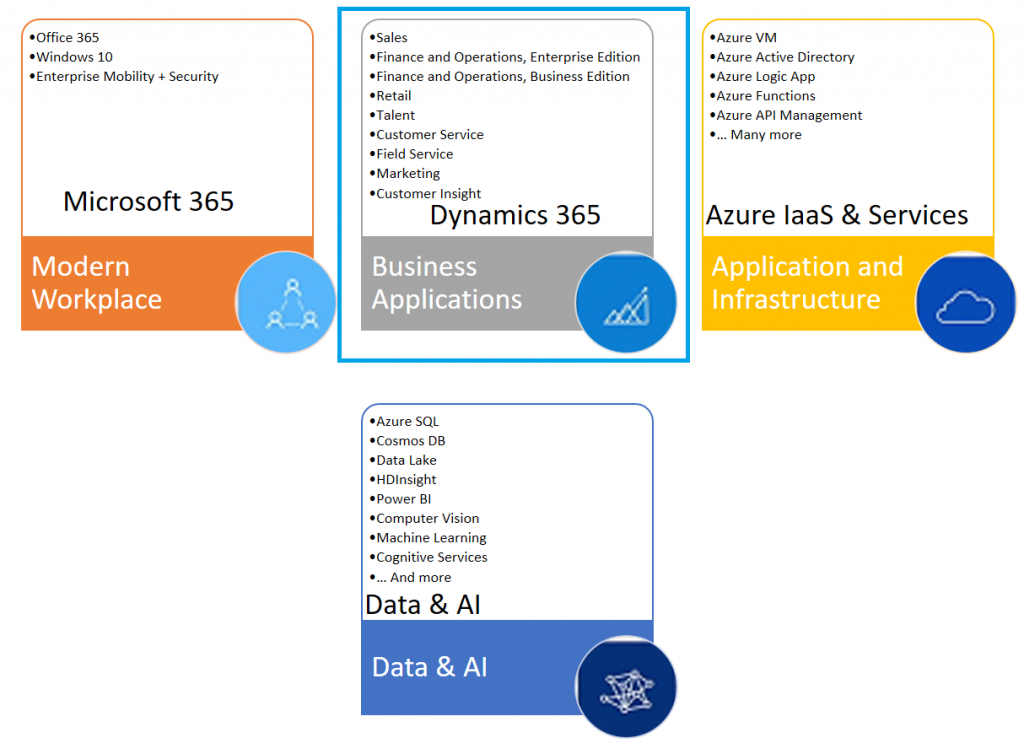
To understand Microsoft Dynamics 365, it helps to place it inside the broader Microsoft Cloud. Microsoft organizes its business technology offerings around productivity, business applications, cloud infrastructure, data, and AI. Dynamics 365 belongs mainly to the business applications area, while it integrates closely with Microsoft 365, Azure, Microsoft Power Platform, Microsoft Teams, Outlook, Excel, Power BI, and Microsoft Dataverse.
- Modern Workplace: Microsoft 365, Teams, Outlook, Office apps, Windows, and security services used for communication and productivity.
- Business Applications: Dynamics 365 apps for CRM and ERP business processes, together with Microsoft Power Platform for low-code apps, automation, reporting, and portals.
- Application and Infrastructure: Azure services used for hosting, integration, identity, storage, development, and enterprise cloud infrastructure.
- Data and AI: Analytics, data services, machine learning, Copilot features, and business intelligence tools that help users work with operational data.
Each of these categories comprises of multiple applications and services as shown below.
Is Microsoft Dynamics 365 an ERP or CRM system?
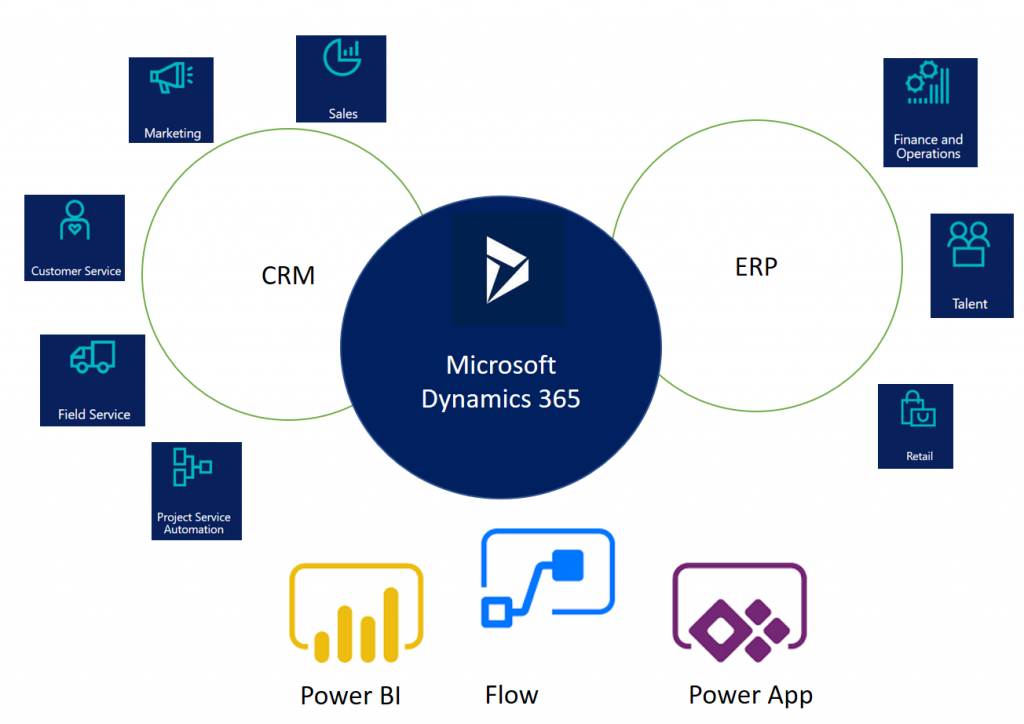
Dynamics 365 includes both ERP and CRM applications. The CRM side focuses on customer-facing processes such as sales, marketing, customer service, field service, and customer insights. The ERP side focuses on finance, supply chain, operations, commerce, projects, human resources, and business management.
This is why the answer to “Is Dynamics 365 an ERP or CRM?” is: it can be either, or both, depending on which Dynamics 365 apps a business uses. A sales team may use Dynamics 365 Sales as a CRM. A finance team may use Dynamics 365 Finance as an ERP. A mid-sized business may use Dynamics 365 Business Central as a complete business management system. A larger organization may combine several Dynamics 365 apps to connect customer data with operational and financial data.
| Dynamics 365 area | Business purpose | Example apps |
|---|---|---|
| CRM | Manage customer relationships, leads, opportunities, cases, journeys, service requests, and customer data. | Sales, Customer Service, Contact Center, Field Service, Customer Insights |
| ERP | Manage finance, procurement, inventory, manufacturing, supply chain, projects, commerce, and core operations. | Finance, Supply Chain Management, Commerce, Project Operations, Business Central |
| Shared platform | Connect data, automate workflows, build apps, report on performance, and integrate with Microsoft services. | Dataverse, Power Apps, Power Automate, Power BI, Teams, Azure |
Microsoft Dynamics 365 apps and what each application is used for
The Microsoft Dynamics 365 approach to business applications unifies Microsoft’s current CRM(Customer Relationship Management) and ERP(Enterprise Resource Planning) cloud solutions into one cloud service with purpose-built business applications that work together to help you manage specific business functions. The available app names have changed over time, so older names such as Dynamics 365 for Talent, Retail, and Project Service Automation may appear in older tutorials, while the current product family uses names such as Human Resources, Commerce, and Project Operations.
| Dynamics 365 app | Main users | Typical use |
|---|---|---|
| Dynamics 365 Sales | Sales teams and sales managers | Lead tracking, opportunities, accounts, contacts, sales forecasting, and seller productivity. |
| Dynamics 365 Customer Service | Support agents and service managers | Case management, knowledge articles, queues, routing, service-level tracking, and customer support operations. |
| Dynamics 365 Contact Center | Contact center teams | Omnichannel customer engagement, voice and digital channels, agent assistance, and service operations. |
| Dynamics 365 Field Service | Field technicians, dispatchers, and service planners | Work orders, scheduling, resource dispatch, mobile service execution, and onsite service management. |
| Dynamics 365 Customer Insights | Marketing, data, and customer experience teams | Customer data profiles, segments, journeys, real-time marketing, and customer engagement analytics. |
| Dynamics 365 Finance | Finance departments | General ledger, accounts payable, accounts receivable, budgeting, financial reporting, and compliance processes. |
| Dynamics 365 Supply Chain Management | Operations and supply chain teams | Inventory, procurement, manufacturing, warehouse, demand planning, and supply chain operations. |
| Dynamics 365 Project Operations | Project-based service businesses | Project planning, resource management, project accounting, time, expenses, and project profitability. |
| Dynamics 365 Commerce | Retail and commerce teams | Store operations, ecommerce, point of sale, customer orders, and commerce management. |
| Dynamics 365 Human Resources | HR teams | Employee records, benefits, leave, compensation, and workforce processes. |
| Dynamics 365 Business Central | Small and mid-sized businesses | Finance, sales, purchasing, inventory, projects, service management, and business operations in one system. |
Microsoft Dynamics 365 Sales for lead, opportunity, and account management
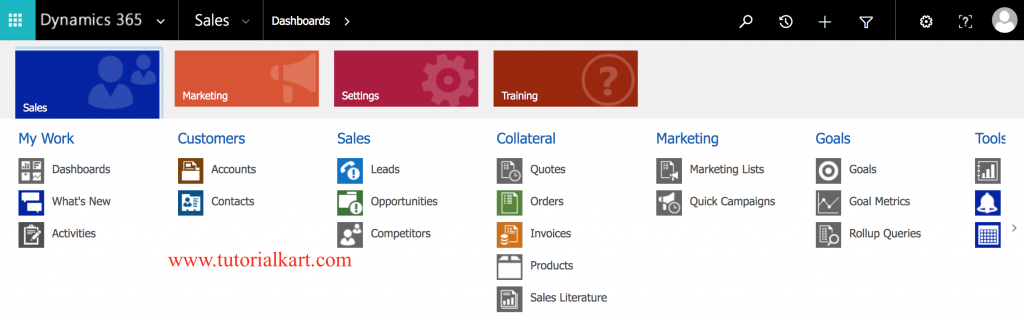
Dynamics 365 Sales helps sales teams manage leads, accounts, contacts, opportunities, quotes, activities, and forecasts. It gives sellers a structured sales process and helps managers track pipeline, sales activity, customer interactions, and expected revenue. Depending on the license and configuration, users may also get AI-assisted recommendations, relationship insights, and productivity features connected with Outlook, Teams, and Microsoft 365.
Dynamics 365 Customer Insights and marketing journeys
Dynamics 365 Customer Insights is used to work with customer data and customer engagement. It includes capabilities for unifying customer profiles, building segments, understanding customer behavior, and running personalized customer journeys. In older content, you may see the name Dynamics 365 for Marketing. Microsoft now positions these customer data and journey features under the Customer Insights family.
Dynamics 365 Customer Service and Contact Center for support operations
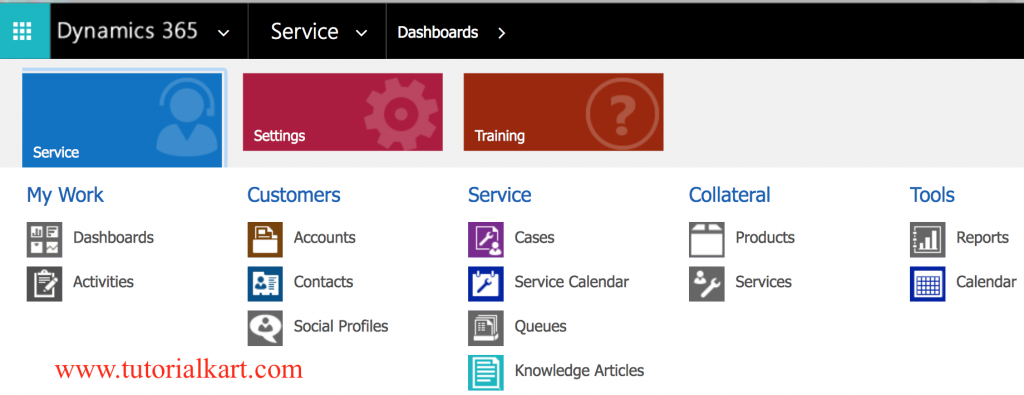
Dynamics 365 Customer Service helps support teams manage cases, queues, service-level agreements, knowledge articles, routing, and customer communication. It is commonly used by service desks, customer support teams, and helpdesk operations that need a consistent way to track customer issues and resolutions.
Dynamics 365 Contact Center extends customer service operations across digital and voice channels. It is designed for organizations that need contact center capabilities such as agent workspaces, channel routing, conversation history, and assistance for service agents.
Dynamics 365 Field Service for onsite service work orders
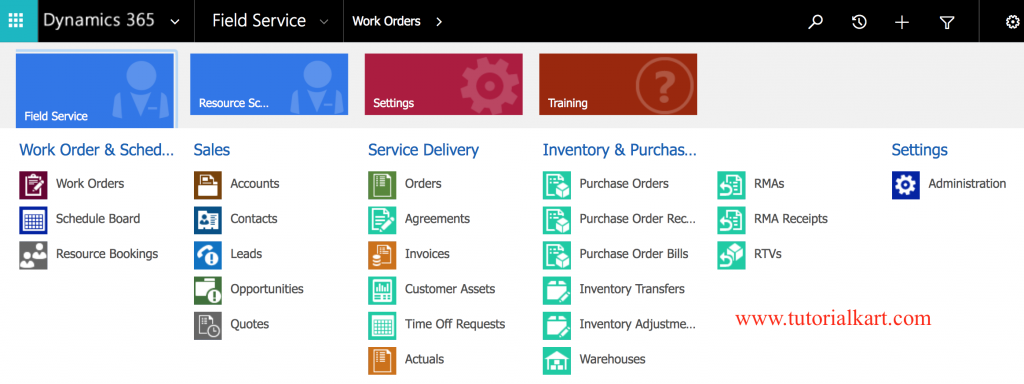
Dynamics 365 Field Service is used when an organization sends technicians, engineers, or service workers to customer locations. It helps manage work orders, schedules, dispatching, service tasks, inventory used during service, and mobile access for field workers. Typical users include equipment service companies, utilities, facility management teams, healthcare service providers, and any organization with onsite service operations.
Dynamics 365 Project Operations for project-based businesses
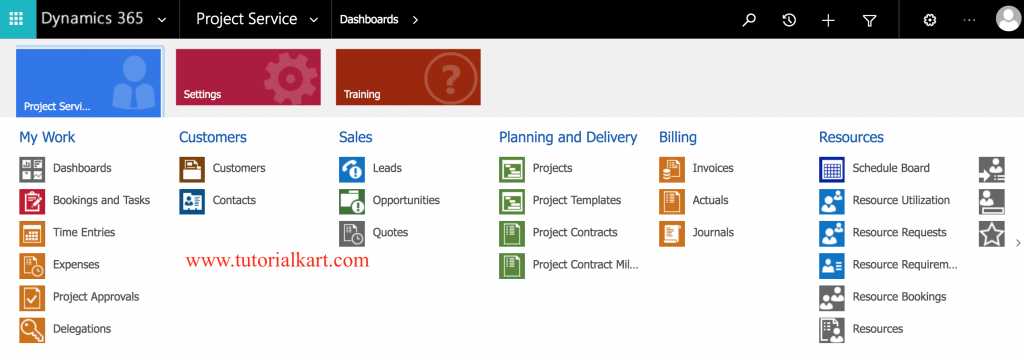
Dynamics 365 Project Operations is used by project-based organizations that need to manage sales, planning, resourcing, delivery, time, expenses, billing, and project accounting. Older Dynamics 365 content may refer to Dynamics 365 Project Service Automation. Project Operations is the newer product direction for connected project service processes.
Dynamics 365 Finance and Supply Chain Management for ERP operations
Dynamics 365 Finance supports finance operations such as general ledger, budgeting, accounts payable, accounts receivable, fixed assets, tax, financial reporting, and compliance processes. It is usually used by larger or more complex organizations that need enterprise-level finance management.
Dynamics 365 Supply Chain Management supports procurement, inventory, warehouse operations, manufacturing, asset management, planning, and supply chain visibility. Organizations often use it with Dynamics 365 Finance when they need finance and operations processes to work together.
Dynamics 365 Business Central for small and mid-sized business management
Dynamics 365 Business Central is an ERP application for small and mid-sized businesses. It combines finance, purchasing, sales, inventory, projects, service management, and reporting in one application. It is often considered when a business has outgrown basic accounting software but does not need the full scale of Dynamics 365 Finance and Supply Chain Management.
Dynamics 365 Commerce and Human Resources app changes from older names
Some Dynamics 365 product names have changed since the early Dynamics 365 releases. Dynamics 365 for Retail is now generally discussed as Dynamics 365 Commerce. Dynamics 365 for Talent is now generally discussed through Dynamics 365 Human Resources and related workforce capabilities. When reading older tutorials, always compare the old app name with the current Microsoft product page or Microsoft Learn documentation.
Benefits of Microsoft Dynamics 365 for business processes
A Dynamics 365 implementation decision should be based on business process fit, integration needs, user adoption, reporting requirements, licensing, data migration, security, and long-term support. The common benefits come from using connected applications rather than keeping important business data in separate systems.
- Connected CRM and ERP data: Sales, service, finance, and operations teams can work from related customer and transaction data.
- Modular adoption: An organization can start with the app it needs first and add more Dynamics 365 applications later.
- Microsoft 365 integration: Many Dynamics 365 scenarios connect with Outlook, Teams, Excel, SharePoint, and Microsoft 365 identity.
- Power Platform extension: Teams can extend processes with Power Apps, Power Automate, Power BI, and Power Pages where appropriate.
- Reporting and insights: Operational data can be used for dashboards, analytics, forecasting, and business review.
- Role-based business applications: Users work in apps designed for sales, service, finance, operations, commerce, or project roles instead of one generic system.
Microsoft Dynamics 365 salient features.
What makes Microsoft Dynamics 365 stand apart from standalone business systems is its combination of modular business applications, shared data services, Microsoft security, and close integration with Microsoft cloud tools.
- Cloud-based business applications accessed through a browser and mobile apps, depending on the product and role.
- Separate apps for specific business functions such as sales, service, finance, supply chain, projects, commerce, and customer data.
- Integration with Microsoft 365 apps such as Outlook, Teams, Excel, and SharePoint in many business scenarios.
- Use of Microsoft Dataverse and related data services for many customer engagement and Power Platform scenarios.
- Analytics and reporting options through built-in dashboards, Power BI, and exported data where configured.
- AI and Copilot capabilities in supported Dynamics 365 apps, depending on license, region, configuration, and product availability.
- Security roles, business units, permissions, and identity integration to control access to business data.
How Dynamics 365 works with Power Platform, Teams, Outlook, and Azure
Dynamics 365 is often implemented together with other Microsoft services. Power Apps can be used to build custom apps that extend business processes. Power Automate can automate approvals, notifications, and data movement. Power BI can provide dashboards and reports. Teams and Outlook can help users work with customer and operational data in the communication tools they already use. Azure services may be used for integration, identity, data storage, application development, and enterprise architecture.
This integration is one of the main reasons companies compare Dynamics 365 with other ERP and CRM products. The decision is not only about app features; it is also about how well the system fits the organization’s existing Microsoft environment, data model, security needs, and reporting approach.
How to choose the right Microsoft Dynamics 365 application
Choosing Dynamics 365 should start with the process you want to improve, not with the product name. Identify the business area, the data that must be managed, the users who will work in the system, and the systems that need to integrate with it.
| Business need | Dynamics 365 app to consider | Decision note |
|---|---|---|
| Track leads, accounts, opportunities, and sales forecasts | Dynamics 365 Sales | Best fit for structured sales pipeline and CRM processes. |
| Manage customer support cases and knowledge articles | Dynamics 365 Customer Service | Best fit for helpdesk and customer service operations. |
| Run omnichannel contact center operations | Dynamics 365 Contact Center | Best fit when voice, digital channels, routing, and agent workspaces are required. |
| Schedule technicians and manage onsite service | Dynamics 365 Field Service | Best fit for work orders, dispatching, mobile workers, and service visits. |
| Manage enterprise finance | Dynamics 365 Finance | Best fit for larger finance operations and compliance requirements. |
| Manage manufacturing, warehouse, inventory, and procurement | Dynamics 365 Supply Chain Management | Best fit for complex supply chain and operational processes. |
| Run a small or mid-sized business on one ERP system | Dynamics 365 Business Central | Best fit when the organization needs finance plus business operations in a simpler ERP footprint. |
| Manage project-based delivery and accounting | Dynamics 365 Project Operations | Best fit for professional services and project-based businesses. |
| Unify customer data and run customer journeys | Dynamics 365 Customer Insights | Best fit for customer data profiles, segments, and marketing journeys. |
Microsoft Dynamics 365 implementation points to check before adoption
Dynamics 365 is configurable, but the project still needs careful planning. Before adoption, review the following points with business users, IT teams, finance teams, and implementation partners.
- Process scope: Decide which processes will move into Dynamics 365 and which will remain in existing systems.
- Data migration: Identify customer, vendor, product, finance, service, project, and transaction data that must be cleaned and migrated.
- Security roles: Define who can view, create, update, approve, export, and delete business records.
- Integrations: List systems that must exchange data with Dynamics 365, such as ecommerce, payroll, banking, logistics, or custom applications.
- Licensing: Match users with the correct app licenses, team member access, and add-ons.
- Reporting: Decide which dashboards, KPIs, Power BI reports, and operational exports are required.
- Change management: Train users on the new process, not only on the screen navigation.
Dynamics 365 compared with traditional CRM and ERP systems
Traditional CRM and ERP systems are often deployed as separate applications, with separate data models and separate reporting. Dynamics 365 can still be implemented in modules, but it is designed to connect business processes across applications. For example, sales data can connect with customer service history, field service work orders can connect with inventory and finance, and project delivery can connect with billing and resource planning.
This connected approach is useful, but it also means that design decisions matter. A poorly planned configuration can still create duplicate data, unclear ownership, and reporting gaps. A good Dynamics 365 project should define record ownership, master data rules, integration flows, and governance before heavy customization begins.
Editorial QA checklist for a Microsoft Dynamics 365 overview
- Does the article explain that Dynamics 365 includes both ERP and CRM apps?
- Does it distinguish current app names from older names such as Talent, Retail, and Project Service Automation?
- Does it avoid saying that every organization needs every Dynamics 365 application?
- Does it explain where Sales, Customer Service, Field Service, Finance, Supply Chain Management, Business Central, and Customer Insights fit?
- Does it mention Microsoft Power Platform, Microsoft 365, Azure, and Dataverse only in relevant integration context?
- Does it advise readers to verify current licensing, region availability, and feature availability from Microsoft before purchase or implementation?
Frequently asked questions about Microsoft Dynamics 365
What is Microsoft Dynamics 365 used for?
Microsoft Dynamics 365 is used to manage business processes such as sales, customer service, field service, finance, supply chain, commerce, projects, marketing journeys, and customer data. The exact use depends on which Dynamics 365 applications the organization implements.
Is Dynamics 365 an ERP or CRM?
Dynamics 365 includes both ERP and CRM applications. Sales, Customer Service, Field Service, Contact Center, and Customer Insights are mainly CRM-focused. Finance, Supply Chain Management, Commerce, Project Operations, Human Resources, and Business Central are mainly ERP or operations-focused.
Can a company use only one Dynamics 365 app?
Yes. Dynamics 365 apps can be adopted separately. A company may start with Dynamics 365 Sales, Customer Service, Business Central, or another single app, and later add more applications if the business process requires it.
What is the difference between Dynamics 365 and Microsoft 365?
Microsoft 365 is mainly for productivity and collaboration, including apps such as Outlook, Teams, Word, Excel, and SharePoint. Dynamics 365 is for business processes such as CRM, ERP, sales, service, finance, and operations. They can integrate, but they solve different needs.
Is Dynamics 365 suitable for small businesses?
It can be, depending on the requirement. Dynamics 365 Business Central is commonly considered for small and mid-sized businesses that need ERP capabilities beyond basic accounting software. Larger Dynamics 365 apps may be better suited to more complex enterprise processes.
Microsoft Dynamics 365 reference links for current product details
Because product names, licensing, and AI features change over time, use current Microsoft pages when making a purchase or implementation decision. Helpful starting points include Microsoft Dynamics 365 products, Microsoft explanation of ERP, Microsoft explanation of CRM, and the Dynamics 365 documentation on Microsoft Learn.
Microsoft Dynamics 365 overview summary
Microsoft Dynamics 365 is a cloud-based business applications suite that covers both CRM and ERP needs. It includes applications for sales, customer service, contact center, field service, customer insights, finance, supply chain, project operations, commerce, human resources, and business management. Its main value is in connecting business processes, users, and data across Microsoft’s cloud ecosystem. The right Dynamics 365 choice depends on the business process, scale, licensing, integration needs, and implementation plan.