 TutorialKart.com
Android Indeterminate ProgressBar in Kotlin
Android Indeterminate ProgressBar – Kotlin Example : In this Android Tutorial, we shall learn to indicate the progress of a task whose exact progress cannot be measured. An indeterminate ProgressBar does not show 10%, 50%, or any other numeric value. It only tells the user that a background operation is still running.
This is useful for actions such as loading a page, waiting for a network response, preparing data, or starting a file operation where the app does not know how much work is left. If your app can calculate the completed amount, use a determinate progress bar instead.
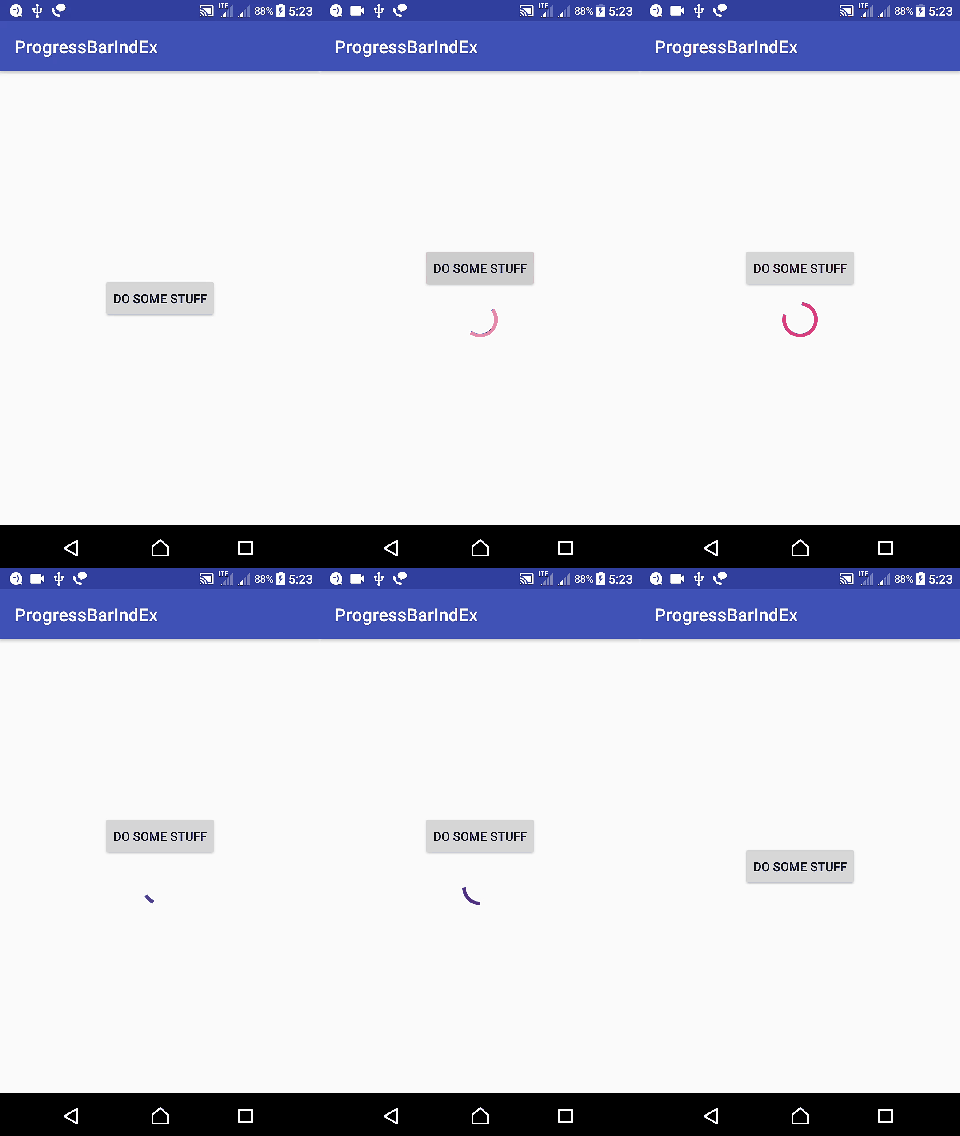
How indeterminate ProgressBar visibility works in Android
Usually an indeterminate ProgressBar is added to the layout but kept hidden at first. When the long-running task starts, the ProgressBar is made visible. When the task completes, fails, or is cancelled, the ProgressBar is hidden again.
Indeterminate mode is the default behavior for the basic Android ProgressBar. For an indeterminate loader, do not set progress values such as android:progress or progressBar.progress = 50. The view should only communicate that work is in progress.
In this tutorial, we first use the original thread-based example to mimic an indeterminate task. Later in the page, you can also find a modern AndroidX Kotlin example that uses View Binding and coroutines.
Android app details for this Kotlin ProgressBar example
Following are the details of the Android Application we created for this example.
| Application Name | ProgressBarIndEx |
| Company name | tutorialkart.com |
| Minimum SDK | API 21: Android 5.0 (Lollipop) |
| Activity | Empty Activity |
Create an Android Application with Kotlin Support with above details and keeping rest to default. Replace activity_main.xml and MainActivity.kt with the following content.
activity_main.xml with hidden indeterminate ProgressBar
activity_main.xml
<?xml version="1.0" encoding="utf-8"?>
<LinearLayout xmlns:android="http://schemas.android.com/apk/res/android"
    xmlns:tools="http://schemas.android.com/tools"
    android:layout_width="match_parent"
    android:layout_height="match_parent"
    android:orientation="vertical"
    android:gravity="center"
    tools:context="com.tutorialkart.progressbarindex.MainActivity">

    <Button
        android:id="@+id/button1"
        android:layout_width="wrap_content"
        android:layout_height="wrap_content"
        android:text="Do some stuff" />

    <ProgressBar
        android:id="@+id/progressBar1"
        android:layout_width="match_parent"
        android:layout_height="wrap_content"
        android:padding="10dp"
        android:visibility="gone"/>

</LinearLayout>
The ProgressBar is present in the layout, but android:visibility="gone" keeps it hidden when the screen first opens. The button click will later change this visibility to View.VISIBLE.
MainActivity.kt to show and hide indeterminate ProgressBar
MainActivity.kt
package com.tutorialkart.progressbarindex

import android.os.Bundle
import android.support.v7.app.AppCompatActivity
import android.view.View
import android.widget.ProgressBar
import kotlinx.android.synthetic.main.activity_main.*

class MainActivity : AppCompatActivity() {

    override fun onCreate(savedInstanceState: Bundle?) {
        super.onCreate(savedInstanceState)
        setContentView(R.layout.activity_main)

        // get the references from layout file
        val btnStartProgress = this.button1
        val progressBar: ProgressBar = this.progressBar1

        // when button is clicked, start the task
        btnStartProgress.setOnClickListener { v ->

            // task is run on a thread
            Thread(Runnable {
                // dummy thread mimicking some operation whose progress cannot be tracked

                // display the indefinite progressbar
                this@MainActivity.runOnUiThread(java.lang.Runnable {
                    progressBar.visibility = View.VISIBLE
                })

                // performing some dummy time taking operation
                try {
                    var i=0;
                    while(i<Int.MAX_VALUE){
                        i++
                    }
                } catch (e: InterruptedException) {
                    e.printStackTrace()
                }

                // when the task is completed, make progressBar gone
                this@MainActivity.runOnUiThread(java.lang.Runnable {
                    progressBar.visibility = View.GONE
                })
            }).start()
        }
    }
}
What the Kotlin ProgressBar code does
The button click starts a background thread. Before the work begins, the ProgressBar is shown on the UI thread. After the dummy work finishes, the ProgressBar is hidden again on the UI thread.
View.VISIBLEdisplays the ProgressBar.View.GONEhides the ProgressBar and removes the space it occupied.runOnUiThreadis used because Android views must be updated from the main UI thread.- The loop in this example is only used to simulate a long-running operation. In a real app, replace it with your actual background work.
Modern AndroidX Kotlin indeterminate ProgressBar example
The earlier sample uses older Android support imports and Kotlin synthetic view access. In current Android projects, AndroidX, View Binding, and coroutines are a cleaner option. The following example keeps the same idea: show the indeterminate ProgressBar before work starts, do the work away from the main thread, and hide the ProgressBar when the work is complete.
Enable View Binding in your module-level Gradle file.
android {
    buildFeatures {
        viewBinding = true
    }
}
Use this Kotlin Activity pattern with the same activity_main.xml layout ids.
package com.tutorialkart.progressbarindex

import android.os.Bundle
import android.view.View
import androidx.appcompat.app.AppCompatActivity
import androidx.lifecycle.lifecycleScope
import com.tutorialkart.progressbarindex.databinding.ActivityMainBinding
import kotlinx.coroutines.Dispatchers
import kotlinx.coroutines.delay
import kotlinx.coroutines.launch
import kotlinx.coroutines.withContext

class MainActivity : AppCompatActivity() {

    private lateinit var binding: ActivityMainBinding

    override fun onCreate(savedInstanceState: Bundle?) {
        super.onCreate(savedInstanceState)

        binding = ActivityMainBinding.inflate(layoutInflater)
        setContentView(binding.root)

        binding.button1.setOnClickListener {
            lifecycleScope.launch {
                binding.progressBar1.visibility = View.VISIBLE
                binding.button1.isEnabled = false

                withContext(Dispatchers.IO) {
                    // Replace this delay with your actual network, file, or database work.
                    delay(3000)
                }

                binding.progressBar1.visibility = View.GONE
                binding.button1.isEnabled = true
            }
        }
    }
}
This version avoids a manual Thread and keeps UI updates easy to read. The UI is changed before and after withContext(Dispatchers.IO), while the simulated long-running operation runs away from the main thread.
Horizontal indeterminate ProgressBar in Android XML
If you want a horizontal indeterminate bar instead of the default circular loader, use the horizontal ProgressBar style and keep android:indeterminate="true".
<ProgressBar
    android:id="@+id/progressBarHorizontal"
    style="?android:attr/progressBarStyleHorizontal"
    android:layout_width="match_parent"
    android:layout_height="wrap_content"
    android:indeterminate="true"
    android:visibility="gone" />
Use a horizontal indeterminate ProgressBar when the screen design needs a thin loading bar, such as below a toolbar or above a list. Use a circular indeterminate ProgressBar when the loading state belongs to the center of a screen, dialog, or button area.
Common mistakes with Android indeterminate ProgressBar
- Setting progress values: Do not set
progress,max, or percentage text for an indeterminate ProgressBar. - Blocking the main thread: If the long task runs on the main thread, the ProgressBar may not animate smoothly or may not appear until the task is already finished.
- Forgetting to hide it on failure: Hide the ProgressBar in success, error, and cancellation paths.
- Using invisible instead of gone without planning:
View.INVISIBLEhides the view but keeps its space.View.GONEhides it and removes its space from the layout. - Starting the same task repeatedly: Disable the button while the task is running if repeated clicks could start duplicate work.
Android indeterminate ProgressBar troubleshooting
| Problem | Likely reason | Fix |
|---|---|---|
| ProgressBar does not appear | The task is blocking the main thread | Move the work to a background thread, coroutine dispatcher, or another async API. |
| ProgressBar appears but never hides | The hide code is not called for errors | Hide it after success and inside error or finally handling. |
| Horizontal bar looks like a spinner | The horizontal style is missing | Add style="?android:attr/progressBarStyleHorizontal". |
| Layout jumps when loading starts | View.GONE removes layout space | Use View.INVISIBLE if you want to reserve the same space. |
FAQ on Android Indeterminate ProgressBar in Kotlin
What is an indeterminate ProgressBar in Android?
An indeterminate ProgressBar is a loading indicator used when the app knows that work is running but cannot calculate the exact completed percentage. It animates continuously until the task is finished.
How do I show an indeterminate ProgressBar in Kotlin?
Add a ProgressBar in XML, keep it hidden initially with android:visibility="gone", and set its visibility to View.VISIBLE from Kotlin when the task starts. Set it back to View.GONE when the task ends.
Should I set progress value for an indeterminate ProgressBar?
No. An indeterminate ProgressBar should not use a progress value. If you can calculate progress values, use a determinate ProgressBar instead.
How can I create a horizontal indeterminate ProgressBar?
Use the horizontal ProgressBar style in XML and set android:indeterminate="true". For example, use style="?android:attr/progressBarStyleHorizontal" on the ProgressBar view.
Why does my ProgressBar not animate while the task is running?
The most common reason is that the task is running on the main UI thread. Move the long-running work to a background thread, coroutine dispatcher, or async API, and update the ProgressBar visibility from the main thread.
Editorial QA checklist for this Android ProgressBar Kotlin tutorial
- Confirm that the ProgressBar is hidden when the Activity first opens.
- Verify that the ProgressBar becomes visible before the long-running operation starts.
- Check that Android views are updated only from the main UI thread.
- Make sure no determinate progress values are used for the indeterminate loader.
- Test the success and error paths so the ProgressBar is always hidden when work stops.
Reference links for Android ProgressBar
Summary of Android indeterminate ProgressBar in Kotlin
An indeterminate ProgressBar is the right loading view when the app cannot measure exact progress. Add the ProgressBar to your XML layout, keep it hidden initially, show it when the task starts, and hide it when the task ends. For modern Kotlin projects, prefer AndroidX with View Binding and coroutines instead of older synthetic view access and manual thread handling.