 TutorialKart.com
Android runOnUiThread in Kotlin
Android runOnUiThread in Kotlin is used when code running on a background thread needs to update a view on the main UI thread. Android views are not thread-safe, so text changes, visibility changes, progress updates, adapter updates, and other UI operations must happen on the thread that owns the view hierarchy.
Following is a quick code snippet of how to use runOnUiThread() method :
this@MainActivity.runOnUiThread(java.lang.Runnable {
    progressBar.visibility = View.GONE
})
The code above posts the UI update to the activity’s UI thread when it is called from another thread. If the current code is already running on the UI thread, the action is executed immediately.
Android runOnUiThread Example
Android runOnUiThread Example – In this Android Tutorial, we shall learn how to use runOnUiThread with an Example Android Application.
runOnUiThread runs the specified action on the UI thread. If the current thread is the UI thread, then the action is executed immediately. If the current thread is not the UI thread, the action is posted to the event queue of the UI thread.
If you try to touch view of UI thread from another thread, you will get Android CalledFromWrongThreadException.
This is common when a worker thread finishes a long-running task and then tries to change a TextView, hide a ProgressBar, enable a button, or display the result on screen. The background work can run outside the main thread, but the final view update should be passed back to the UI thread.
When to use runOnUiThread in an Android Kotlin app
Use runOnUiThread() when you are inside an Activity and a background thread needs to make a small UI update. It is a direct Activity method, so it is most convenient in activity-based examples and older code.
| Background-thread task | UI update that should use the main thread |
| Downloading or reading data | Show the result text or hide a loading indicator. |
| Running a long calculation | Update a progress message or final value. |
| Waiting in a separate thread | Enable a button after the waiting work is complete. |
| Processing a file | Display success, failure, or progress in the activity UI. |
Do not put the long-running work itself inside runOnUiThread(). Only place the UI operation inside it. Heavy work on the UI thread can freeze the app and may lead to an Application Not Responding problem.
Following is an example Android Application demonstrating the usage of runOnUiThread() method.
Create the Kotlin Android project for runOnUiThread
Create Android Application with Kotlin Support with following details and rest values to default.
| Application Name | runOnUiThread Example |
| Company name | tutorialkart.com |
| Minimum SDK | API 21: Android 5.0 (Lollipop) |
| Activity | Empty Activity |
In current Android Studio versions, choose an Empty Views Activity if you want to follow this XML layout example directly. The sample code below keeps the older support library and Kotlin synthetic view access unchanged, because the purpose here is to understand runOnUiThread(). In new Android projects, you can use AndroidX and View Binding, but the main-thread rule remains the same.
activity_main.xml layout for the runOnUiThread Kotlin example
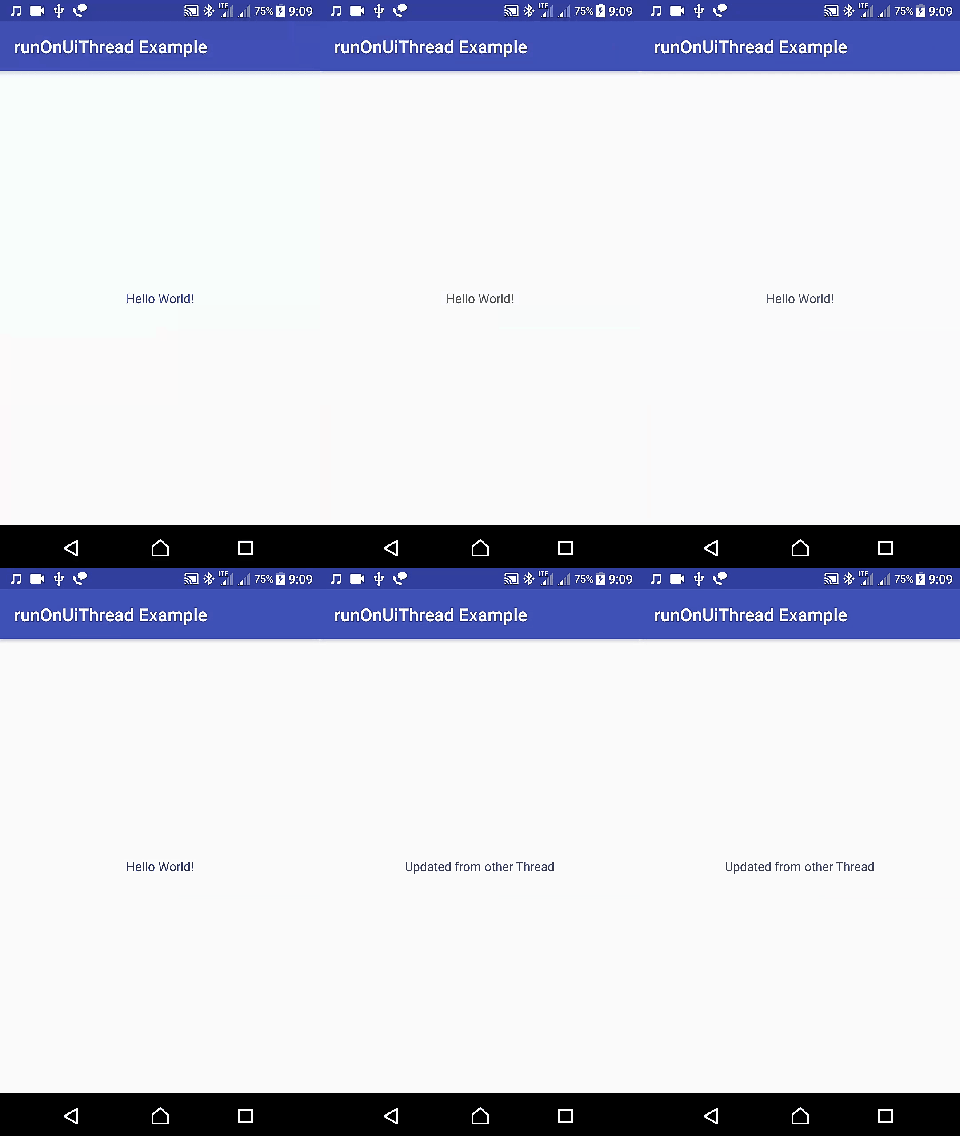
The layout contains one TextView. The app starts with Hello World! and later changes the text from a worker thread by using runOnUiThread().
activity_main.xml
<?xml version="1.0" encoding="utf-8"?>
<LinearLayout xmlns:android="http://schemas.android.com/apk/res/android"
    xmlns:tools="http://schemas.android.com/tools"
    android:layout_width="match_parent"
    android:layout_height="match_parent"
    android:gravity="center"
    tools:context="com.tutorialkart.runonuithreadexample.MainActivity">

    <TextView
        android:id="@+id/textview_msg"
        android:layout_width="wrap_content"
        android:layout_height="wrap_content"
        android:text="Hello World!" />

</LinearLayout>
MainActivity.kt code using runOnUiThread from a background thread
The activity starts a dummy background thread. After the time-taking loop finishes, the code calls this@MainActivity.runOnUiThread and changes the text of textview_msg. The this@MainActivity part is used to refer to the activity instance from inside the nested Runnable.
MainActivity.kt
package com.tutorialkart.runonuithreadexample

import android.support.v7.app.AppCompatActivity
import android.os.Bundle
import kotlinx.android.synthetic.main.activity_main.*

class MainActivity : AppCompatActivity() {
    override fun onCreate(savedInstanceState: Bundle?) {
        super.onCreate(savedInstanceState)
        setContentView(R.layout.activity_main)

        // start some dummy thread that is different from UI thread
        Thread(Runnable {
            // performing some dummy time taking operation
            var i=0;
            while(i<Int.MAX_VALUE){
                i++
            }

            // try to touch View of UI thread
            this@MainActivity.runOnUiThread(java.lang.Runnable {
                this.textview_msg.text = "Updated from other Thread"
            })
        }).start()
    }
}
How this Android runOnUiThread Kotlin example works
The important part of the example is not the dummy loop. The loop only represents work that should not run on the UI thread. The important part is the handoff from the worker thread back to the UI thread before touching textview_msg.
| Line or block in the Kotlin example | What happens in the Android thread flow |
Thread(Runnable { ... }).start() | Starts a separate worker thread. |
while(i<Int.MAX_VALUE) | Simulates a time-consuming operation outside the UI thread. |
this@MainActivity.runOnUiThread(...) | Schedules the enclosed UI action on the activity’s main thread. |
textview_msg.text = ... | Updates the TextView safely on the UI thread. |
The final text displayed on the screen is:
Updated from other ThreadrunOnUiThread with Kotlin lambda syntax
Kotlin can make the call shorter by using lambda syntax. The following snippet is equivalent in intent to the quick snippet at the beginning of this tutorial.
runOnUiThread {
    textview_msg.text = "Updated from other Thread"
}
Use the explicit this@MainActivity.runOnUiThread { ... } form when you are inside nested scopes and want to make it clear that the Activity method is being called.
runOnUiThread in a Fragment using Kotlin
runOnUiThread() belongs to Activity. A Fragment does not directly own this method, so call it through the attached activity or use a view-based posting approach. Make sure the Fragment is still attached before using the activity reference.
requireActivity().runOnUiThread {
    textView.text = "Updated from Fragment"
}
If you are updating a specific view, you may also post to that view. This is useful when the update is tied to the view itself.
view?.post {
    textView.text = "Updated on the UI thread"
}
runOnUiThread versus Handler.post in Android Kotlin
runOnUiThread() and Handler.post() can both run code on the main thread, but they are used in slightly different places. runOnUiThread() is an Activity convenience method. Handler(Looper.getMainLooper()).post { ... } can be used from classes that do not have direct access to an Activity.
| Android main-thread option | Best fit in Kotlin code |
runOnUiThread { ... } | Simple UI update from an Activity. |
requireActivity().runOnUiThread { ... } | Small UI update from a Fragment that is attached to an Activity. |
view.post { ... } | UI update related to a specific View. |
Handler(Looper.getMainLooper()).post { ... } | Main-thread callback from a non-Activity class, service helper, or utility class. |
val mainHandler = android.os.Handler(android.os.Looper.getMainLooper())

mainHandler.post {
    textview_msg.text = "Updated using Handler.post"
}
runOnUiThread and Kotlin coroutines on Android
In modern Kotlin Android code, coroutines are often used for background work and main-thread updates. With coroutines, you can do the long operation on a background dispatcher and switch to Dispatchers.Main for the UI update. This is an alternative pattern, not a required replacement for every small runOnUiThread() example.
lifecycleScope.launch(Dispatchers.IO) {
    val message = "Updated from coroutine"

    withContext(Dispatchers.Main) {
        textview_msg.text = message
    }
}
This coroutine snippet requires the appropriate lifecycle and coroutine dependencies in the project. It is included to show the modern thread-switching idea: background work stays off the UI thread, and view updates happen on the main thread.
Common Android runOnUiThread mistakes in Kotlin
- Running heavy work inside
runOnUiThread(): Keep database work, network calls, file processing, and long loops outside the UI thread. - Updating views after an Activity is destroyed: A background callback may finish late. Check lifecycle state or cancel background work when the screen is closed.
- Calling Fragment activity too early or too late: Use
requireActivity()only when the Fragment is attached, or use safer lifecycle-aware patterns. - Using runOnUiThread from every layer: Keep UI-thread code near the UI layer. Repository and utility classes should not depend on Activity unless there is a clear reason.
- Ignoring modern Kotlin options: For larger asynchronous flows, consider coroutines with
Dispatchers.Maininstead of manually creating raw threads.
Android runOnUiThread editorial QA checklist
- The tutorial clearly explains that Android views must be updated on the main UI thread.
- The existing Kotlin example keeps the background work outside
runOnUiThread()and only updates theTextViewinside it. - The article explains why
this@MainActivityis used inside the nested thread code. - The Fragment section does not imply that Fragment has its own direct
runOnUiThread()method. - The comparison with
Handler.post()and coroutines is practical and does not replace the original sample code.
Android runOnUiThread Kotlin FAQs
What is runOnUiThread in Android Kotlin?
runOnUiThread() is an Activity method that runs the given action on the Android UI thread. It is commonly used when a background thread needs to update a view after finishing some work.
When should I use runOnUiThread in Android?
Use runOnUiThread() when code running outside the main thread needs to perform a small UI update, such as changing a TextView, hiding a ProgressBar, or enabling a button.
What happens if I update Android views without runOnUiThread?
If a background thread tries to update a view directly, Android may throw CalledFromWrongThreadException because only the original UI thread should touch the view hierarchy.
What is the difference between runOnUiThread and Handler.post?
runOnUiThread() is a convenient Activity method. Handler(Looper.getMainLooper()).post { ... } is more general and can be used from classes that do not directly have an Activity method available.
Can I use runOnUiThread in a Fragment?
A Fragment does not directly provide runOnUiThread(). Use requireActivity().runOnUiThread { ... } when the Fragment is attached, or use view?.post { ... } for updates tied to a specific view.
Summary of Android runOnUiThread in Kotlin
In this Android runOnUiThread Kotlin example, a worker thread performs a time-taking operation and then updates a TextView safely on the UI thread. The key rule is simple: keep slow work away from the main thread, and switch back to the main thread only for view updates. For Activity code, runOnUiThread() is straightforward. For Fragments, utility classes, or modern asynchronous code, view.post, Handler.post, or Kotlin coroutines with Dispatchers.Main may be a better fit.