 TutorialKart.com
How to Create Purchase Info Record in SAP MM Using ME11
A purchase info record in SAP MM stores purchasing information for a vendor and material combination. It helps SAP propose default values such as planned delivery time, purchasing group, standard quantity, net price, purchase order text, and other vendor-specific purchasing details when you create documents such as RFQs, purchase orders, contracts, and scheduling agreements.
The purchase info record can be maintained for a specific purchasing organization and plant, or it can be kept at purchasing organization level depending on the business requirement. In this tutorial, you create a standard purchasing info record manually by using transaction code ME11.
Purchase info records can be created manually, or they can be updated automatically in the background when you create purchasing documents such as quotations, purchase orders, or outline agreements by selecting the Info Update option.
Purchase Info Record Types in SAP MM
Info records can be maintained for different procurement scenarios. The info category you choose controls the type of purchasing relationship that SAP stores for the vendor and material.
| Info Record Type | Used For |
|---|---|
| Standard | Normal external procurement from a vendor using purchase orders. |
| Pipeline | Pipeline materials such as utilities or continuous supply items. |
| Consignment | Vendor-owned stock kept at the company location until consumption. |
| Subcontracting | Procurement where components are sent to a vendor and the vendor returns the finished material. |
For a normal material purchase from a vendor, choose Standard as the info category.
ME11 Transaction Details for Creating a Purchase Info Record
You can create a purchase info record manually by using the following SAP transaction code and menu path.
| Transaction code | ME11 |
| SAP Menu Path | SAP Menu > Logistics > Material Management > Purchasing > Master data > Info records > Create. |
Step 1: Open ME11 Purchase Info Record Creation Screen
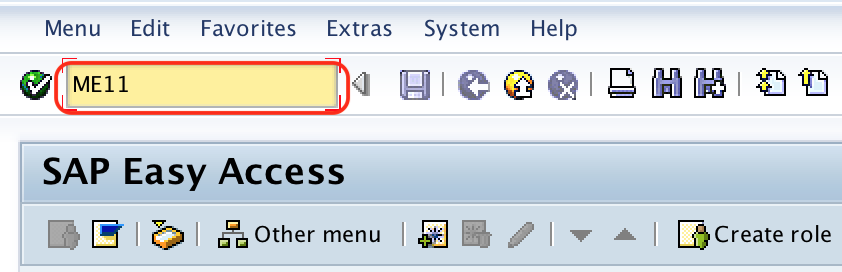
Execute t-code ME11 in the command field from the SAP Easy Access screen.
Step 2: Enter Vendor, Material, Purchasing Organization and Plant in ME11
On the Create Info Record: Initial Screen, maintain the basic key fields for the vendor-material purchasing relationship.
- Vendor: Update the vendor account number in the vendor text box.
- Material: Update the material number (material code) in the material text box. The material field allows you to create a purchase information record with a material number or without a material number.
- Purchasing Org: Update the purchase organization of the material.
- Plant: Update the plant key that receives the ordered goods.
- Info Record: Leave the info record field blank if number assignment is internal. The SAP system automatically assigns the number to the information record when it is saved.
- Info Category: Choose the required info category. For normal procurement, choose Standard.
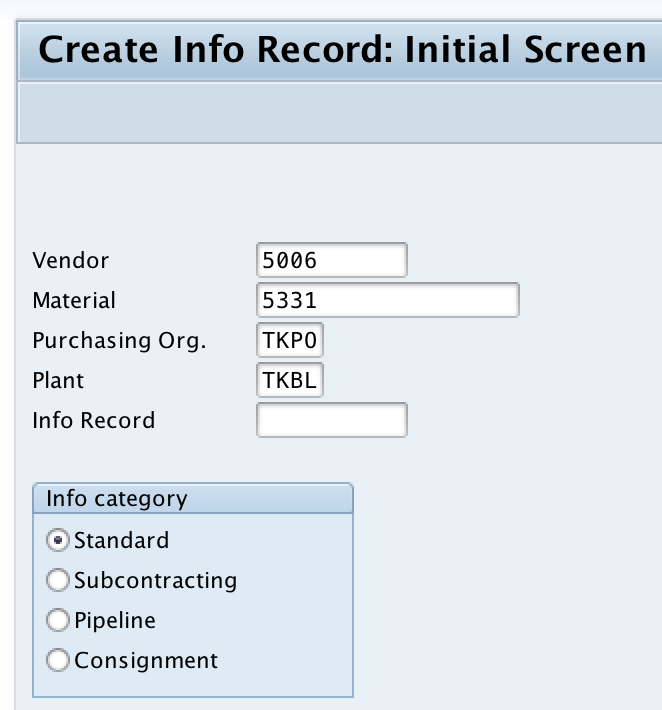
After entering the required values, press Enter to continue. SAP may display messages if the vendor, material, purchasing organization, or plant is not valid for the selected company setup.
Step 3: Maintain General Data in the SAP Purchase Info Record
On the Create Info Record: General Data screen, update the common vendor-material information. This area is useful for details that are not limited only to one plant or one purchasing organization view.
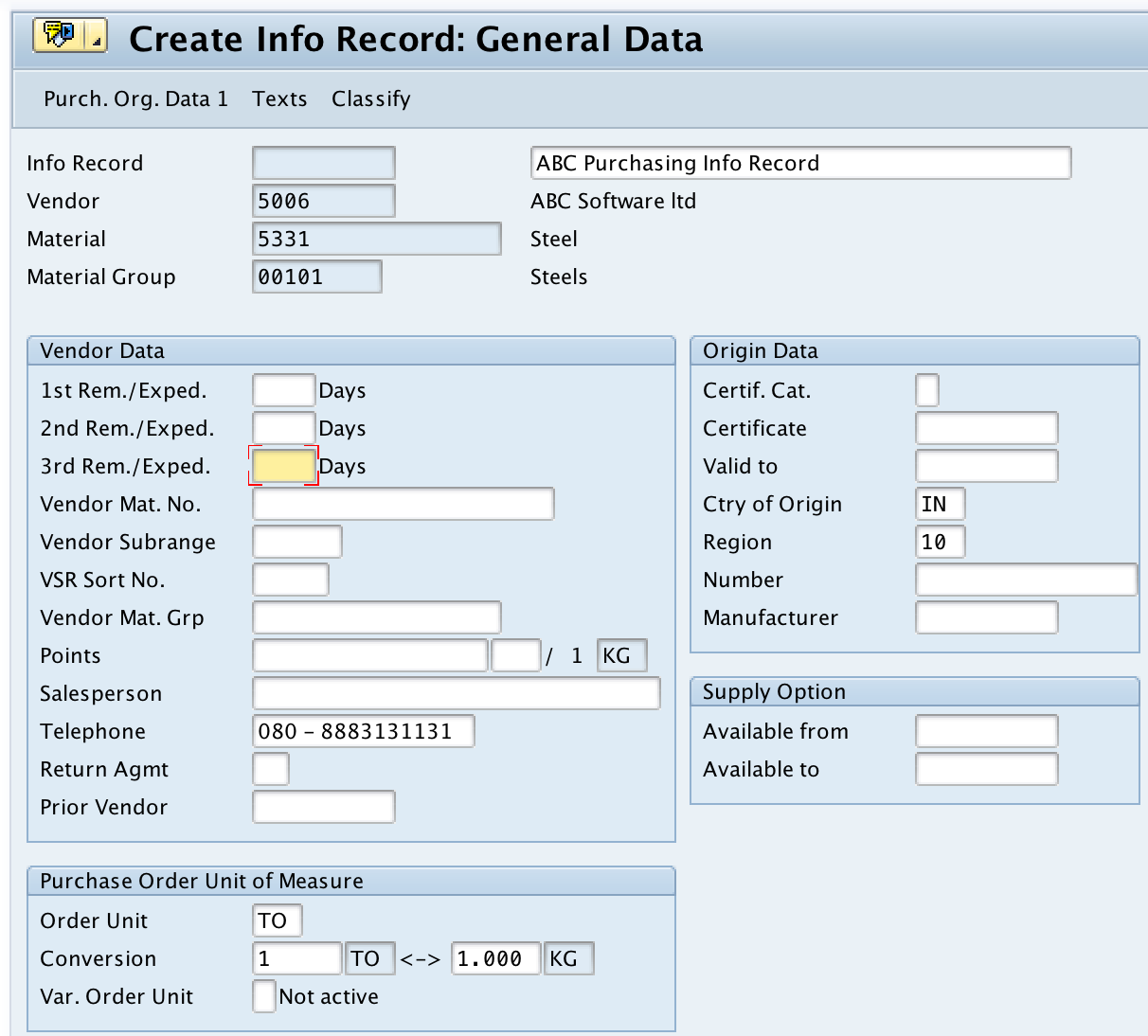
Maintain the required information as per your organization process and press Enter to continue. The fields available on this screen may vary depending on the SAP configuration, material type, vendor master data, and purchasing setup.
Step 4: Enter Purchasing Organization Data 1 for the Info Record
On the Create Info Record: Purchasing Organization Data 1 screen, maintain the purchasing values that SAP can copy into future purchasing documents.
- Planned delivery time: Number of calendar days normally required by the vendor to deliver the material.
- Standard quantity: Usual order quantity used for procurement from this vendor.
- Net price: Vendor-specific price for the material, maintained for the purchasing organization and plant combination where applicable.
- Purchasing group: Buyer or purchasing group responsible for the procurement activity, if required.
- Tax code and other controls: Maintain these only if they are relevant in your system configuration and purchasing process.

These values are important because SAP uses the purchase info record as a source of default data when a buyer creates a purchase order for the same vendor, material, purchasing organization, and plant combination.
Step 5: Maintain Purchase Order Text and Info Record Memo
On the Create Info Record: Text Overview screen, update text that should be available for purchasing documents.
- Info memo: Internal note for buyers or purchasing users.
- Purchase order text: Text that can be adopted into purchase order items when the info record is used.
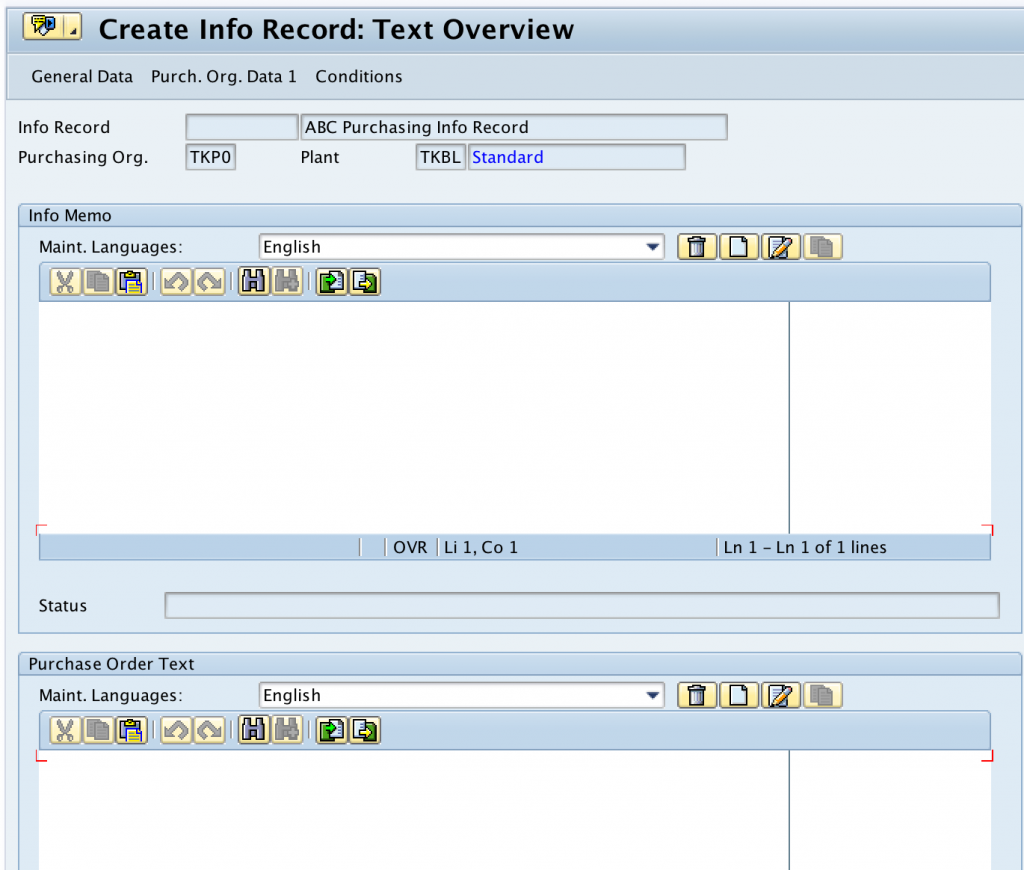
Click the Save button to save the configured purchase info record details.

The SAP system displays a confirmation message after the purchase info record is created successfully. Note the info record number if you need to display or change it later.
Useful SAP T-Codes for Purchase Info Records
After creating the record, you may need to display, change, or review it during purchasing master data maintenance.
| Transaction Code | Purpose |
|---|---|
| ME11 | Create purchase info record |
| ME12 | Change purchase info record |
| ME13 | Display purchase info record |
| ME1L | Display info records by vendor |
| ME1M | Display info records by material |
SAP Tables Used for Purchase Info Record Data
In SAP MM, purchase info record data is stored across related tables. Functional users usually maintain the data through ME11, ME12, and ME13, while technical teams may refer to the tables for reporting, debugging, or integration analysis.
| SAP Table | What It Stores |
|---|---|
| EINA | General data of the purchasing info record. |
| EINE | Purchasing organization data of the purchasing info record. |
The exact pricing and condition records connected to purchasing can depend on the pricing procedure and condition technique configuration used in the SAP system.
Manual Creation vs Info Update for Purchase Info Records
Manual creation through ME11 is useful when the purchasing team wants to maintain vendor-material data before creating purchase orders. Automatic update is useful when the organization allows purchasing documents to update info record data during normal procurement processing.
| Method | When to Use |
|---|---|
| Manual creation using ME11 | Use when master data should be created and reviewed before purchase documents are entered. |
| Automatic update using Info Update | Use when purchasing document data should update or create info record details based on business rules. |
Checks Before Saving a Purchase Info Record in SAP MM
Before saving the purchase info record, verify the key fields carefully. Wrong values can flow into purchase orders and create pricing, delivery, or reporting issues.
- Confirm that the vendor number is correct and valid for purchasing.
- Confirm that the material number is the correct material to be procured.
- Check whether the purchasing organization and plant combination is correct.
- Select the correct info category, such as Standard, Consignment, Pipeline, or Subcontracting.
- Review planned delivery time because it can affect procurement planning and expected delivery dates.
- Check the net price, currency, and unit of measure before saving.
- Maintain purchase order text only when it is useful for buyers or vendors.
Common Issues While Creating Purchase Info Record in ME11
If SAP does not allow you to save the record, review the message shown at the bottom of the screen. Most issues are caused by missing master data, incorrect organizational assignment, or incomplete purchasing values.
| Issue | What to Check |
|---|---|
| Vendor is not accepted | Check whether the vendor master exists and is extended for purchasing. |
| Material is not accepted | Check whether the material master exists and is valid for the plant. |
| Purchasing organization or plant error | Check the enterprise structure assignment and authorization. |
| Price or unit error | Check the order unit, currency, and pricing fields maintained on the purchasing organization data screen. |
| Duplicate or existing info record warning | Use ME13 to display the existing record or ME12 to change it if required. |
FAQ on SAP Purchase Info Record Creation
What is a purchase info record in SAP MM?
A purchase info record is SAP MM master data that stores vendor-specific purchasing information for a material. It helps default data such as price, planned delivery time, purchasing group, and purchase order text into purchasing documents.
What is the t-code for purchase info record creation in SAP?
The t-code to create a purchase info record in SAP is ME11. You can use ME12 to change an existing purchase info record and ME13 to display it.
What is ME11 used for in SAP?
ME11 is used to create a purchasing info record. It stores purchasing details for a vendor and material combination for a purchasing organization and, if required, a plant.
What are the main SAP tables for purchase info records?
The main SAP tables for purchase info records are EINA and EINE. EINA stores general info record data, while EINE stores purchasing organization data.
Can SAP create purchase info records automatically?
Yes. Depending on configuration and document settings, SAP can update purchase info record data automatically when the Info Update option is used in purchasing documents such as quotations, purchase orders, and outline agreements.
Editorial QA Checklist for This SAP Purchase Info Record Tutorial
- Confirm that ME11, ME12, and ME13 are described with the correct purchase info record purpose.
- Verify that the tutorial explains vendor, material, purchasing organization, plant, and info category fields clearly.
- Check that the Standard, Pipeline, Consignment, and Subcontracting info record types are listed correctly.
- Ensure the EINA and EINE table descriptions are limited to purchase info record data and do not overstate condition storage.
- Confirm that screenshots remain in the original order and the existing image URLs are unchanged.
Successfully, we have created a purchase info record in SAP MM using transaction code ME11.