 TutorialKart.com
In this SAP MM Tutorial, you will learn how to define purchase group in SAP using transaction code OME4. A purchasing group represents a buyer or a group of buyers responsible for procurement activities such as communicating with vendors, creating purchasing documents, and following up on purchasing tasks.
What is purchase group in SAP MM?
A purchase group, also called a purchasing group in SAP, is an organizational key used to identify the buyer or buying team responsible for purchasing activities. It is commonly used in purchase requisitions, purchase orders, source determination, reporting, approvals, and buyer-wise tracking.
Purchasing organization consists various buyers or group of buyers dealing with materials that are being purchased in the company. For implementing the activities of purchasing organization, you can define purchase group in SAP.
Purchase group transaction code OME4 and SAP IMG path
Use the following navigation details to create or maintain a purchasing group in SAP MM customizing.
| Transaction code | OME4 |
| SAP Menu Path | SPRO > IMG > Enterprise Structure > Definition > Material Management > Purchase Group. |
Sample purchasing group values for SAP MM configuration
Before creating a new purchasing group, decide the three-character key, description, and contact details. The key should be meaningful for your project because users will see it in purchasing documents and reports.
| Purchasing group | Description | Telephone No. |
| TKP | TK Purchasing Org | 080-88888 |
How to define purchase group in SAP using OME4
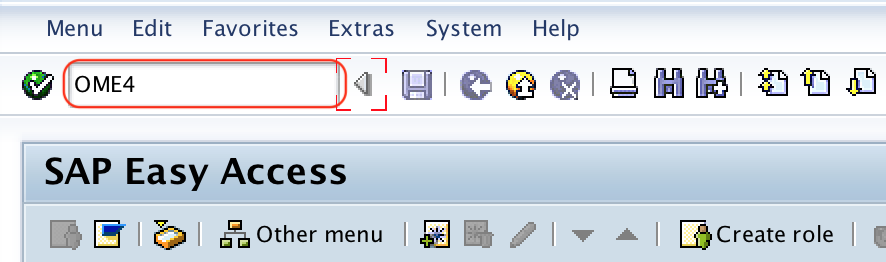
Step 1 : – Execute t-code “OME4” in command field from SAP easy access screen.
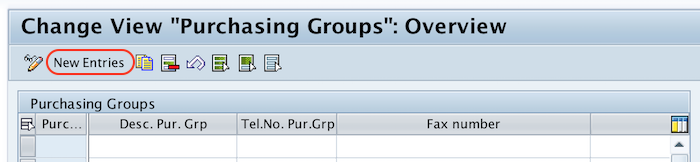
Step 2 : – On change view “Purchasing groups” overview screen, choose new entries button to create new purchase group in SAP as per requirements of project.
Step 3 : – On new entries purchasing group overview screen, enter the following details.
- Purchasing group : – Enter the new key that defines as purchasing group in SAP.
- Desc. pur. Grp : – Enter the description of purchase group
- Telephone no : – Update the telephone number of purchasing group.
- Fax number : – Enter the fax number of purchase group
- E-Mail : – Update the e-mail address.
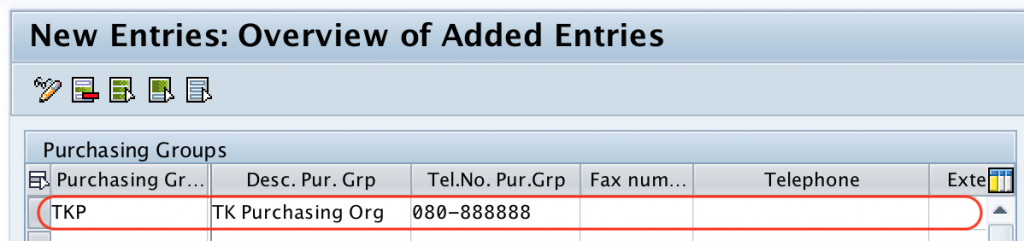
After maintaining the required details of purchase groups, choose save icon and save the configured purch.group key in SAP.
Successfully we have created purchase group in SAP MM.
Important fields used while creating purchasing group in SAP
| Field | Purpose in purchasing group setup | Example |
|---|---|---|
| Purchasing group | Three-character key that identifies the buyer or buying team. | TKP |
| Description | Name or description displayed to users in purchasing transactions and reports. | TK Purchasing Group |
| Telephone number | Contact number of the buyer or purchasing team. | 080-88888 |
| Fax number | Optional fax contact detail if used by the organization. | Blank or project value |
| Email address of the buyer or purchasing team. | buyer@example.com |
Purchasing group vs purchasing organization in SAP MM
Purchasing organization and purchasing group are different SAP MM organizational elements. A purchasing organization is responsible for procurement at an organizational level, while a purchasing group identifies the buyer or buyer team handling day-to-day purchasing activities.
| Point of comparison | Purchasing organization | Purchasing group |
|---|---|---|
| Main purpose | Represents the procurement organization that negotiates and procures for plants or company codes. | Represents the buyer or group of buyers responsible for purchasing work. |
| Typical configuration | Defined and assigned in enterprise structure settings. | Defined as a buyer group using OME4. |
| Example | Domestic purchasing organization, import purchasing organization, central purchasing organization. | Raw material buyer, services buyer, spare parts buyer. |
| Usage | Used in vendor purchasing data, purchasing documents, pricing, and organizational control. | Used in purchase requisitions, purchase orders, reporting, follow-up, and buyer responsibility. |
How purchasing group is assigned or used in SAP documents
In the purchasing group definition step, you create the purchasing group key and contact details. In many SAP MM processes, the purchasing group is then entered or defaulted in master data and purchasing documents rather than being assigned directly to a purchasing organization in the same OME4 screen.
- Material master: A purchasing group can be maintained in the purchasing view of a material, depending on business design.
- Purchase requisition: The purchasing group identifies the buyer responsible for converting or processing the requisition.
- Purchase order: The purchasing group shows the buyer or team responsible for the order.
- Reports: Purchasing documents can be filtered by purchasing group to review buyer-wise workload and procurement activity.
- Release strategy and approvals: Some projects use purchasing group as one of the classification or control fields for approval design.
Best practices for creating purchase group keys in SAP MM
- Use a clear three-character key that users can recognize easily, such as a buyer team, commodity group, or region code.
- Avoid creating too many purchasing groups for minor differences, because it can make reporting and maintenance difficult.
- Use consistent naming rules across plants, purchasing organizations, and business units.
- Maintain email and telephone details if buyers use SAP outputs or document communication workflows.
- Confirm whether the purchasing group should represent a person, a team, a commodity, or a procurement function before creating it.
Common issues while maintaining purchasing group in SAP
| Issue | Likely reason | What to check |
|---|---|---|
| Purchasing group is not visible in a document | The key may not be saved correctly or user input help may be restricted. | Check OME4 entry and user authorization. |
| Wrong buyer appears in purchase requisition | Default value may come from material master, user parameter, or custom logic. | Check material purchasing view and project-specific enhancements. |
| Save request asks for a transport | Purchasing group is customizing data. | Save the entry in the correct customizing request as per project practice. |
| Duplicate purchasing groups exist | No naming rule was followed during setup. | Review buyer responsibility and merge or block unused keys where appropriate. |
Purchase group in SAP MM editorial QA checklist
- Verify that the tutorial clearly states OME4 as the transaction code for defining purchasing group in SAP.
- Check that the SAP IMG path matches the screenshots and purchasing group customizing screen.
- Confirm that the article explains the difference between purchasing organization and purchasing group.
- Ensure the configuration example uses a three-character purchasing group key and realistic contact details.
- Review the FAQ answers for OME4, purchasing group assignment, and SAP MM usage.
FAQs on purchase group in SAP MM
What is the T code for purchasing group in SAP?
The transaction code for defining or maintaining a purchasing group in SAP MM is OME4. You can also reach the same configuration through SPRO under Enterprise Structure > Definition > Material Management > Purchase Group.
What is a purchasing group on SAP?
A purchasing group in SAP is a buyer or buyer team responsible for purchasing activities. It helps identify who handles purchase requisitions, purchase orders, vendor follow-up, and procurement reporting.
How to assign a purchasing group in SAP?
First create the purchasing group in OME4. Then use the purchasing group in relevant SAP MM master data and transaction documents, such as material master purchasing view, purchase requisitions, and purchase orders. The exact defaulting logic can vary by project configuration.
What is the difference between purchasing organization and purchasing group in SAP?
A purchasing organization is an enterprise structure unit responsible for procurement at organizational level. A purchasing group is the buyer or group of buyers responsible for operational purchasing activities.
Can one purchasing group be used for different materials or services?
Yes. A purchasing group can be used for different materials or services if the same buyer or buyer team is responsible for those procurement activities. Many companies design purchasing groups by buyer responsibility, material category, service category, or region.