 TutorialKart.com
In SAP MM, material type controls how a material master record behaves for number ranges, allowed views, procurement, valuation, quantity update, value update, and account assignment-related settings. This tutorial explains what a material type is, lists common SAP material types, and shows how to define attributes of material types using transaction code OMS2.
What is material type in SAP MM?
In SAP MM, material types are the materials which are having the similar attributes are categorized together and assigned to a material type. It is a classification of allowed material into material types based on attributes.
When a user creates a material master record, the selected material type tells SAP which business rules apply to that material. For example, a raw material, finished product, service material, spare part, packaging material, and non-stock material do not need the same procurement, valuation, and inventory settings. Material type helps SAP apply the correct controls from the beginning of material creation.
In material master, material type controls the following functions
- Number range assignments i.e. External or Internally.
- Field selections i.e. which fields are mandatory, optional, hide and display.
- Quantity and values basis
- External procurement or internal procurement
- Which value classes are to be allowed
In addition to the above, material type settings also influence which user department views can be maintained, whether a material can be procured externally or produced internally, whether quantity and value are updated for valuation areas, and which account category reference is used for valuation class determination.
Common SAP material types used in material master
The important material types in SAP as follows
| Material Type | Description |
| DIEN | Service |
| ERSA | Spare Parts |
| FERT | Finished Products |
| HALB | Sem-finished products |
| PIPE | Pipeline Material |
| ROH | Raw Material |
| CONS | Consumable Material |
| VERP | Packaging |
| NLAG | Non Stock Materials |
The exact material types available in a system can vary based on SAP version, industry solution, and project configuration. In most implementation projects, standard material types are copied and adjusted instead of changing SAP-delivered material types directly.
Important attributes controlled by material type in SAP
Before creating a new material type, it is useful to understand the major attributes maintained in OMS2. These settings affect how the material behaves during creation, procurement, inventory management, accounting, and other business processes.
| Material type attribute | Purpose in SAP MM |
|---|---|
| Material type key and description | Defines the short code and text used to identify the material type. |
| User departments | Controls which material master views are allowed, such as Basic Data, Purchasing, MRP, Sales, Accounting, and Costing. |
| Number assignment | Determines whether material numbers are assigned internally by SAP or externally by the user. |
| Internal and external procurement | Controls whether the material can be produced internally, procured externally, or both. |
| Quantity update | Determines whether stock quantities are updated for the material type in a valuation area. |
| Value update | Determines whether stock values are updated for the material type in a valuation area. |
| Account category reference | Restricts the valuation classes that can be used for materials of this material type. |
| Price control | Defines whether standard price or moving average price is proposed, depending on the configuration and material scenario. |
| Field selection | Works with field selection settings to make fields required, optional, hidden, or display-only. |
How to define new material types in SAP using OMS2
Configuration steps
Perform the following configuration steps to define new material types in SAP.
| SAP Menu Path | SPRO > IMG > Logistics – General > Material Master > Basic Settings > Material Types > Define attributes of material types |
| Transaction code | OMS2. |
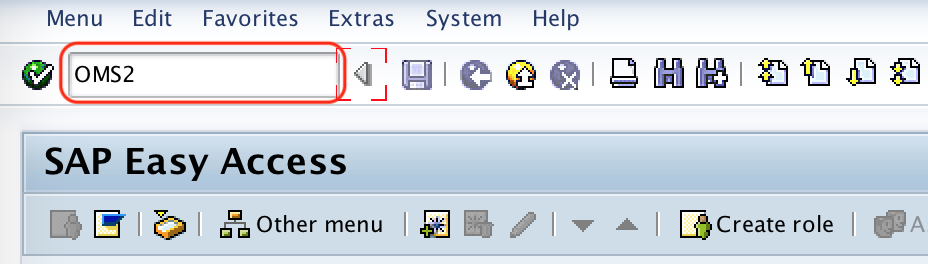
Step 1 : – Execute t-code “OMS2” in command field from SAP easy access screen.
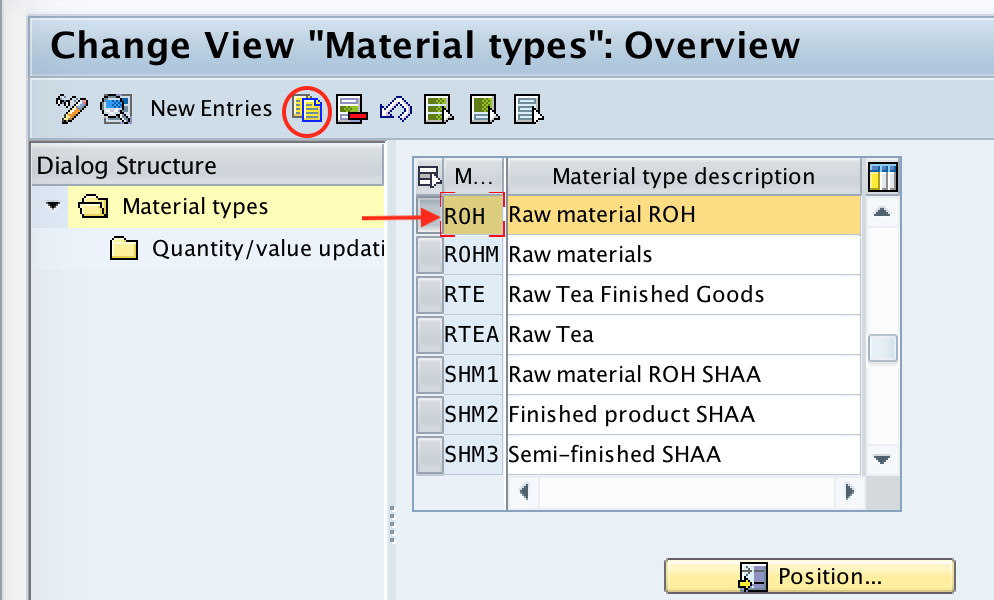
Step 2 : – On change view “Material Types” overview screen, list of defined material types displays with description. From this screen you can create new material type using copy as function or new entries function. For easy method, you can choose copy as option, so that all the values of material type copy to new material type.
Choose the existed material type ROH and click on copy as option.
Step 3 : – On change view “Material Types” Detail of Selected Set screen, update the following details.
- Material Type : – Update the new material type key as ZROH and update the description of new material type.
- User Department : – In the user department sub-screen, choose the required views which are relevant to this new material type ZROH.
- Internal/External purchase orders : -Update the Ext. purchase orders as 2 and internal purchase order as 0.
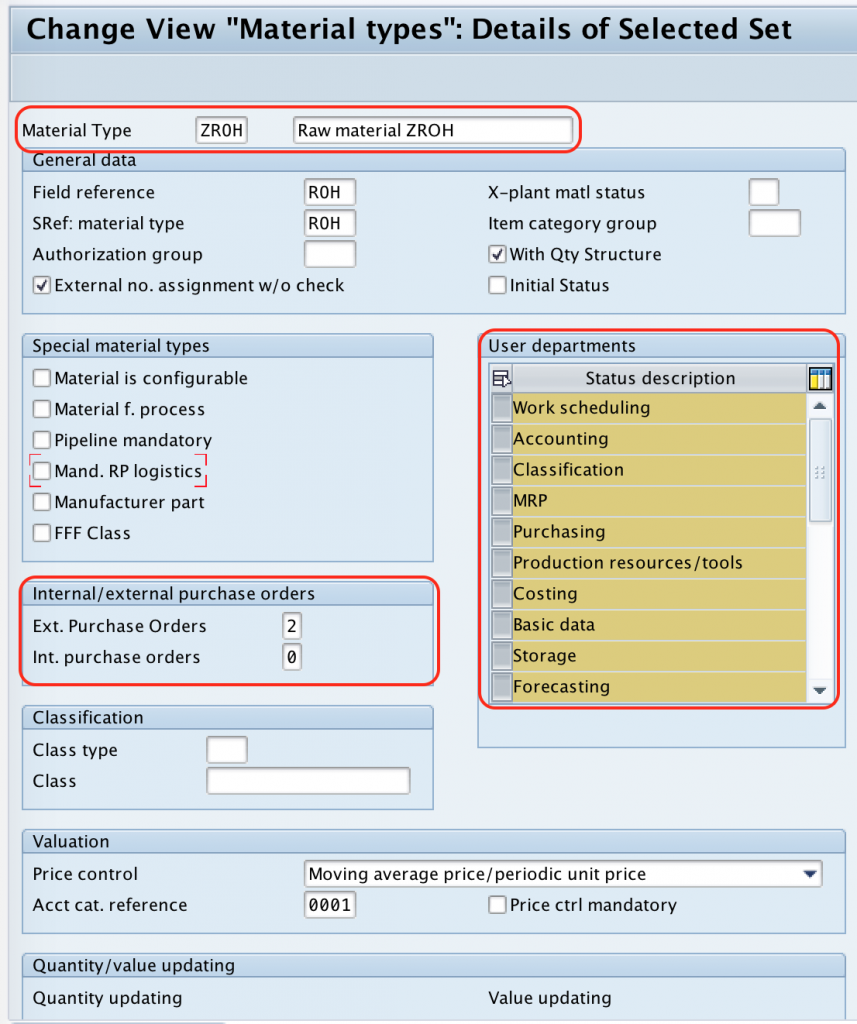
After maintaining all the required details for new material type in SAP, choose save icon and save the configured details.
Successfully we have defined new material type in SAP.
Recommended checks before saving a new SAP material type
When you copy an existing material type, SAP copies many dependent settings from the reference material type. Review these settings carefully before saving the new entry, because copied values may not match the business purpose of the new material type.
- Material type key: Use the customer namespace, commonly starting with
ZorY, for custom material types. - Description: Maintain a clear description so users can select the correct material type while creating material master records.
- User departments: Select only the material master views required for this material type.
- Number assignment: Confirm whether material numbers should be internal, external, or both depending on the project design.
- Procurement type controls: Check whether the material should support external procurement, internal production, or both.
- Quantity and value update: Review the valuation area settings because these affect stock and accounting updates.
- Account category reference: Assign the correct account category reference so that only relevant valuation classes are allowed.
- Transport request: Save the configuration in the correct customizing transport request if the system asks for one.
Material type, material group, and material characteristics in SAP
Material type, material group, and material characteristics are related to material master classification, but they are not the same.
| SAP term | Meaning | Example |
|---|---|---|
| Material type | Controls the main behavior of the material master, such as views, number range, procurement, and valuation. | ROH, FERT, HALB, DIEN |
| Material group | Groups materials for reporting, purchasing analysis, or business classification. | Electrical items, packing material, office supplies |
| Material characteristics | Describe specific classification values of a material when classification is used. | Size, color, grade, thickness |
A material type is selected at the time of creating a material master and has strong configuration impact. A material group is mainly used for grouping and reporting. Characteristics are used when the business needs more detailed classification values for products or materials.
Changing material master data after material type configuration
After a material type is configured, users create or maintain material master records using transactions such as MM01, MM02, and MM03, depending on the authorization and system version. If many existing material records need changes, SAP provides mass maintenance options such as MM17 for selected fields. However, MM17 is not used to define material types; defining material type attributes is done in customizing through OMS2.
Be careful when changing configuration for a material type that is already used by many materials. Changes to quantity update, value update, account category reference, or allowed views can affect downstream processes such as purchasing, inventory management, accounting, and reporting.
Common issues while defining attributes of material types in SAP
The following checks help resolve common problems during or after material type configuration.
| Issue | Likely reason | What to check |
|---|---|---|
| Required material master view is not available | User department view is not selected for the material type. | Check the user department settings in OMS2. |
| Material number assignment does not work as expected | Number range or internal/external assignment is not aligned. | Check the number assignment settings for the material type. |
| Valuation class is not available | Account category reference does not allow the required valuation class. | Review the account category reference and valuation class configuration. |
| Stock value is not updated | Value update may not be active for the relevant valuation area. | Check quantity/value update settings in material type configuration. |
| Material cannot be procured as expected | External or internal procurement setting is not suitable. | Review internal/external purchase order indicators. |
SAP material type configuration FAQ
How do you define a material type in SAP?
You define a material type in SAP using transaction code OMS2 or through the IMG path Logistics – General > Material Master > Basic Settings > Material Types > Define attributes of material types. A common approach is to copy a standard material type and create a custom material type with a Z or Y key.
What is the definition of material type in SAP MM?
A material type is a configuration key that groups materials with similar attributes and controls how material master records behave. It affects views, number assignment, procurement settings, quantity update, value update, and valuation-related settings.
Which transaction code is used to define attributes of material types?
The transaction code used to define attributes of material types is OMS2. This is a customizing transaction, so changes usually need to be saved in a transport request in configured SAP landscapes.
What is MM17 used for in SAP material master?
MM17 is used for mass maintenance of selected material master fields. It is not used to create or configure material types. Material type configuration is maintained through OMS2.
How are material characteristics different from material type?
Material type controls the main configuration behavior of a material master record. Material characteristics are classification values such as size, color, grade, or thickness that describe a material in more detail when classification is used.
QA checklist for SAP MM material type attributes
- Confirms that OMS2 is the transaction code for defining attributes of material types.
- Explains what material type controls in SAP MM material master configuration.
- Preserves the SAP IMG path for defining material type attributes.
- Lists common material types such as ROH, FERT, HALB, DIEN, ERSA, VERP, PIPE, CONS, and NLAG.
- Explains the difference between material type, material group, and material characteristics.
- Clarifies that MM17 is for mass maintenance of material master fields, not for defining material types.
- Includes practical checks for user departments, number assignment, procurement, quantity update, value update, and account category reference.
Summary of defining attributes of material types in SAP MM
Material type is one of the key controls in SAP MM material master configuration. It determines how a material is created, numbered, viewed, procured, valued, and updated in inventory and accounting processes. To define attributes of material types, use transaction code OMS2, copy a suitable standard material type when appropriate, maintain the required controls, and save the settings in the relevant customizing transport request.