 TutorialKart.com
In this SAP MM tutorials, you will learn how to maintain company code for material management, also called activating the company code for material management.
How to maintain company code for material management in SAP MM
Maintaining company code for material management is a required SAP MM configuration step before inventory-related transactions can run correctly for that company code. This setting maintains the current posting period and fiscal year for materials management and controls whether postings to the previous period are allowed.
If you have not maintained company code for material management in SAP, you may get an error while creating a material master record, such as “The company code does not exist or has not been fully maintained”. The error normally means that the company code exists in the enterprise structure, but the MM-specific period settings have not been maintained.
OMSY transaction for maintaining company code in SAP MM
You can maintain company code for material management by using the following navigation method.
| Transaction code | OMSY |
| SAP Menu Path | SPRO > IMG > Logistics – General > Material Master > Basic settings > Maintain company code for material management. |
Use OMSY to maintain the MM period data for a company code. This setting is especially important during initial SAP MM configuration or when a new company code is added to an existing SAP system.
Prerequisites before activating company code for material management
Before you maintain company code for material management, check the following items. These checks help avoid period mismatch, posting errors, and incomplete MM configuration.
- Company code is defined: The company code should already be created in SAP FI using the enterprise structure configuration.
- Fiscal year variant is assigned: The fiscal year variant should be assigned correctly to the company code.
- Current MM period is known: Confirm the current posting period and fiscal year to be used for materials management.
- Posting policy is decided: Decide whether inventory postings to the previous period should be allowed.
- Authorization is available: The user should have authorization to change configuration settings in OMSY.
Do not enter a posting period casually in a live system. The MM posting period affects goods movements, material documents, inventory valuation, and month-end processing.
Step 1: Execute OMSY to maintain company code for material management
Step 1 : – Execute t-code “OMSY” in command field from SAP easy access screen.
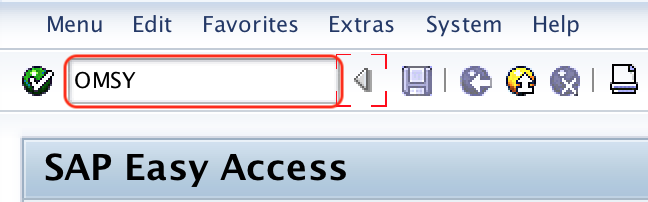
After executing OMSY, SAP opens the maintenance view for company codes in materials management. This screen lists company codes and their current MM period settings.
Step 2: Position the required company code in MM company code view
Step 2 : – On change view “Material Management View on Company Codes ” overview screen, choose position button and enter you company code in the given field. So your company code displays on top of the screen, so you can easily activate material management for your company code.
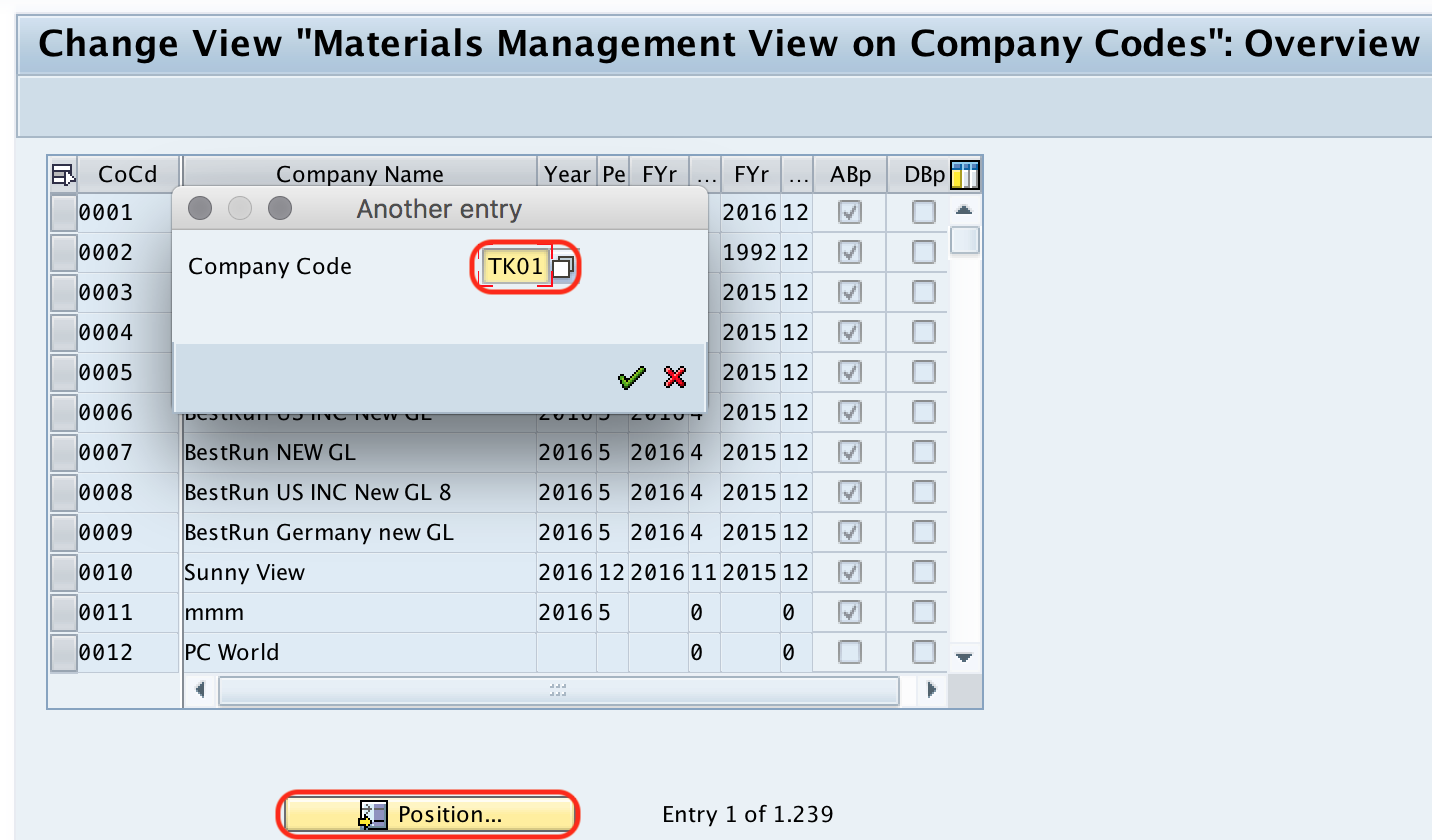
The position option is useful when the list contains many company codes. Once the required company code is displayed, maintain the MM fiscal year, posting period, and backposting indicators as required by the business process.
Step 3: Enter current year, current period, ABP, and DBP in OMSY
Step 3 : – In the next screen, enter current year and current period, press enter.
- ABP allows to post inventory transactions to the previous period. If you don’t want to allow postings to previous period, uncheck the ABP indicator if checked.
- DBP prevents posting to previous period after posting period changes.
The current year and current period define the active MM posting period for the company code. The ABP indicator is used when postings to the previous period should be permitted. The DBP indicator is used to restrict backposting after the period has changed, depending on the organization’s period control policy.

Step 4: Save OMSY settings for the SAP MM company code
After you maintain all the required details, choose save icon and save the configured details.
Successfully we have maintained company code for material management in SAP.
After saving, test the configuration by checking whether material master creation, goods movement, and other MM transactions recognize the company code without the earlier maintenance error.
Fields maintained for company code in SAP MM OMSY
| OMSY field | Purpose in material management | What to check |
|---|---|---|
| Company Code | Identifies the legal accounting unit for which MM period data is maintained. | Use the correct FI company code. |
| Fiscal Year | Defines the fiscal year for the current MM posting period. | Match it with the company code fiscal year setup. |
| Current Period | Defines the active material management posting period. | Use the period agreed for MM postings. |
| ABP | Controls whether posting to the previous period is allowed. | Enable only if previous-period inventory posting is permitted. |
| DBP | Controls restriction of backposting after period change. | Set based on the period closing policy. |
Why OMSY company code maintenance is required in SAP MM
Company code maintenance for material management connects the FI company code with MM posting period control. Without this setting, SAP cannot correctly determine whether inventory transactions are allowed for the company code and posting period.
- It enables material management posting period control for the company code.
- It supports inventory postings in the current period and, if allowed, the previous period.
- It helps prevent postings in closed or unintended periods.
- It avoids common configuration errors during material master and goods movement processing.
- It provides the base setting used later during MM period closing activities.
Related SAP MM transaction codes for company code and material settings
The following transaction codes are often used around company code maintenance, material master configuration, and MM period control.
| Transaction code | Use in SAP MM or enterprise structure |
|---|---|
| OMSY | Maintain company code for material management. |
| MMPV | Close the current MM posting period and move to the next period. |
| MMRV | Check or maintain settings related to previous-period posting in materials management. |
| MM01 | Create a material master record. |
| MM02 | Change a material master record. |
| MM03 | Display a material master record. |
| MM17 | Perform mass maintenance for selected material master fields. |
| OMS2 | Configure material types and related controls. |
| OX15 | Define company in the enterprise structure. |
These transaction codes serve different purposes. OMSY is for maintaining the company code in material management, while OX15 is related to defining a company in enterprise structure, and OMS2 is related to material type configuration.
Common errors while maintaining company code for SAP MM
- Wrong posting period entered: This can block valid material postings or allow postings in an unintended period.
- Company code not defined correctly: Maintain the FI enterprise structure before maintaining MM period settings.
- Incorrect ABP setting: Allowing previous-period posting without business approval can affect period-end controls.
- Changing live-period settings without review: Period settings should be checked carefully in production systems.
- Confusing OMSY with MMPV: OMSY maintains the company code and starting/current MM period settings, while MMPV is used for period closing.
- Missing authorization: Configuration access may be restricted to authorized SAP consultants or support users.
Editorial QA checklist for OMSY company code configuration tutorial
- Confirm that OMSY is clearly identified as the transaction code to maintain company code for material management.
- Check that the SAP menu path points to Logistics – General > Material Master > Basic settings.
- Verify that the tutorial explains current fiscal year and current posting period in the MM context.
- Ensure that ABP and DBP are described as previous-period posting controls, not as material master fields.
- Check that the error message about company code not being fully maintained is connected to missing MM company code maintenance.
- Confirm that related transaction codes such as MMPV, MMRV, MM17, OMS2, and OX15 are described separately from the OMSY step flow.
FAQs on maintaining company code for material management in SAP MM
How to maintain company code for material management in SAP?
Use transaction code OMSY. Open the company code entry, maintain the current fiscal year and current posting period, set ABP or DBP if required, and save the configuration.
Why is OMSY required in SAP MM?
OMSY is required to maintain MM posting period data for a company code. Without this setting, SAP may not allow material-related transactions for that company code and may show an error that the company code has not been fully maintained.
What is MM17 used for in SAP?
MM17 is used for mass maintenance of material master data. It is not used to activate a company code for material management; for that task, use OMSY.
What is OMS2 in SAP MM?
OMS2 is used to configure material types in SAP MM. Material type settings influence number assignment, allowed views, quantity update, value update, and other controls used when creating material master records.
What is OX15 in SAP?
OX15 is used to define a company in the SAP enterprise structure. It is different from OMSY, which maintains company code settings for material management posting periods.
Summary of OMSY company code maintenance in SAP MM
To maintain company code for material management in SAP MM, execute OMSY, position the required company code, enter the current fiscal year and posting period, set the previous-period posting indicators as required, and save the configuration. This setting enables MM period control for the company code and helps avoid errors during material master creation and inventory postings.