 TutorialKart.com
In this SAP MM tutorial, you will learn how to define number ranges for RFQ (Request for quotation) and quotation in SAP by using transaction code “OMH6”. RFQ and quotation numbers help identify purchasing documents uniquely, so the interval should be created carefully before it is assigned to the relevant RFQ document type.
Define Number Ranges for RFQ and Quotation in SAP MM
In this activity, you define number ranges for RFQ (Request for Quotation) and quotation documents. These intervals are maintained for purchasing documents at client level. The system can use an internal number range to generate RFQ numbers automatically, or an external number range when users enter the document number manually.
For most RFQ document types, internal number assignment is preferred because it avoids duplicate document numbers and keeps document creation consistent across purchasing users. External number assignment is used only when the business process requires a manually entered reference number.
Where OMH6 Fits in RFQ Configuration
Transaction code OMH6 is used to maintain the number range intervals. After the interval is available, the relevant RFQ or quotation document type must use the correct number range key. If the interval exists but the document type is not assigned correctly, the system may not generate the expected RFQ number during document creation.
If you are also configuring document types, refer to the related tutorial on define document types for RFQ in SAP MM.
SAP Menu Path and Transaction Code for RFQ Number Range
You can define number ranges for RFQ by using one of the following navigation methods.
| SAP Transaction Code | OMH6 |
| SAP IMG Path | IMG > Material Management > Purchasing > RFQ/ Quotation > Define number ranges. |
RFQ Number Range Fields Used in OMH6
Before creating or changing an interval, understand the meaning of the fields that appear in the number range maintenance screen.
| Field | Purpose in RFQ number range configuration |
|---|---|
| No | Number range interval key used to identify the interval. |
| From No. | Starting number of the RFQ or quotation number interval. |
| To Number | Last number allowed in the RFQ or quotation number interval. |
| NR Status | Current number range status. For a new interval, this is normally kept as 0. |
| Ext | Indicator for external number assignment. Leave this blank for internal number assignment. |
Configuration Steps to Maintain RFQ Number Ranges in SAP
Perform the following configuration steps for maintaining the number ranges for request for quotation in SAP MM.
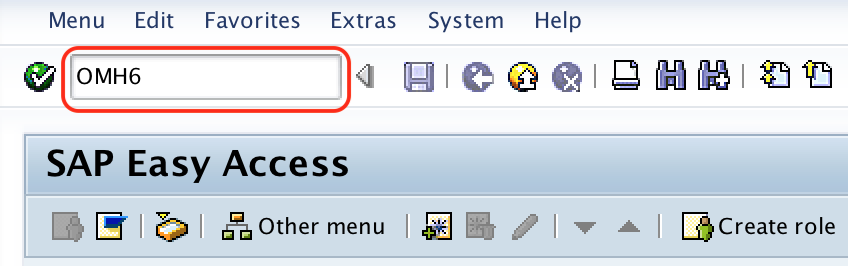
Step 1 : – Execute SAP t-code “OMH6” in command field from SAP easy access screen.
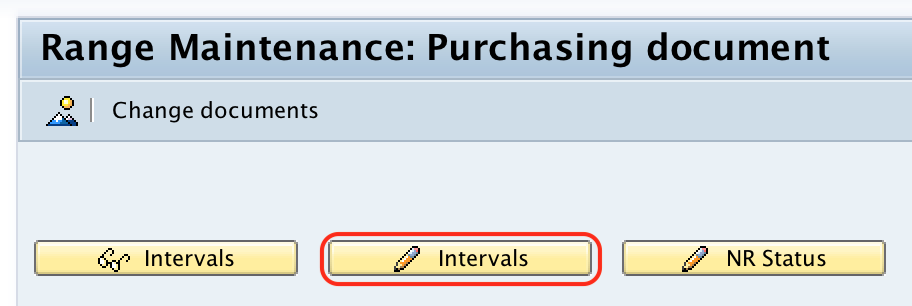
Step 2 : – On range maintenance purchasing document screen, choose change interval icon.
Step 3 : – On maintain intervals : purchasing document for RFQ, click on insert link icon (Function Key F6).

Step 4 : – Now update the following details
- No: – Update the key that identifies as number range interval key for RFQ.
- From No : – Update starting number of number range interval of Request for quotation
- To Number : – Update last number of number range interval of RFQ.
- NR Status : -By default NR status is 0
- Ext : – If you choose Ext option, than the this number range interval is applicable external number assignment, leave this field as blank so the system automatically generate document number as interval number range.
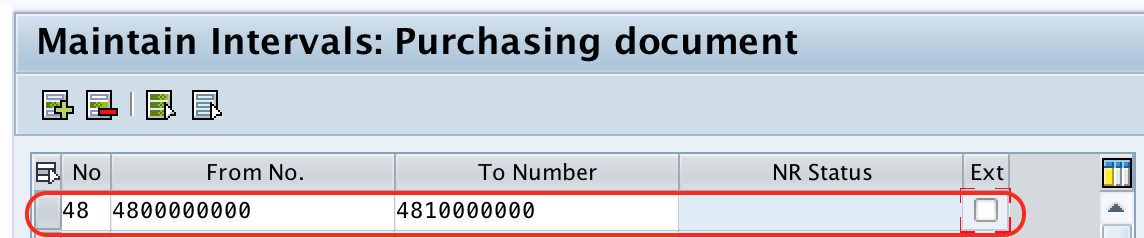
After maintaining the required details for number ranges, choose save icon and save the configured details.
Internal and External Number Assignment for RFQ Documents
When the Ext checkbox is blank, SAP uses internal number assignment. This means the next available document number is generated automatically from the interval during RFQ creation. This is the common setting for standard RFQ processing.
When the Ext checkbox is selected, SAP allows external number assignment. In that case, the user must enter a valid RFQ or quotation number that falls within the configured interval. Use this only when manual numbering is required by the business process.
Similarly maintain number ranges for external purchasing document and it is recommended to maintain 10 digits number for al external purchasing documents in SAP.
RFQ Number Range Validation Before Saving Transport
Before saving the RFQ number range configuration, verify the following points.
- The interval key is not already used for another conflicting purchasing document requirement.
- The From No. and To Number values are large enough for expected RFQ volume.
- The number range does not overlap with another interval.
- The Ext indicator matches the required internal or external number assignment process.
- The RFQ document type uses the correct number range key after the interval is created.
Common Issues in RFQ Number Range Configuration
If RFQ document numbers are not generated as expected, check the number range interval first and then check the document type assignment.
| Issue | Likely cause | What to check |
|---|---|---|
| RFQ number is not generated automatically | External number assignment may be active | Check whether the Ext checkbox is selected for the interval. |
| Error during RFQ creation | Number range may not be assigned to the RFQ document type | Check the document type configuration and number range key. |
| Number interval is exhausted | The current number has reached the upper limit | Review the NR Status and create a suitable new interval if required. |
| Duplicate or invalid number entry | Manual number entered outside the external interval | Confirm that the entered number is inside the allowed external number range. |
Editorial QA Checklist for SAP MM RFQ Number Range Tutorial
- Confirm that OMH6 is shown as the transaction code for maintaining RFQ and quotation number ranges.
- Confirm that the IMG path points to RFQ/Quotation number range configuration under Purchasing.
- Check that internal number assignment is explained with the Ext field left blank.
- Check that external number assignment is explained with the Ext field selected.
- Verify that the tutorial reminds the reader to connect the number range interval with the RFQ document type configuration.
FAQs on RFQ Number Ranges in SAP MM
How do you define number range for RFQ in SAP MM?
You define the number range for RFQ in SAP MM by using transaction code OMH6. In the interval maintenance screen, create or change the number range key, enter the from number and to number, keep the number range status as required, and decide whether the interval is internal or external.
What is the SAP transaction code for RFQ and quotation number ranges?
The transaction code is OMH6. It is used to maintain number range intervals for RFQ and quotation purchasing documents.
Should the Ext checkbox be selected for RFQ internal number assignment?
No. For internal number assignment, leave the Ext checkbox blank. SAP then generates the RFQ number automatically from the maintained interval.
Why is the RFQ number range maintained at client level?
The RFQ number range interval is maintained at client level so that the configured interval is available consistently within the client for the relevant purchasing document setup.
What should be checked if an RFQ number is not generated?
Check whether the interval exists in OMH6, whether the interval is exhausted, whether external numbering is active, and whether the RFQ document type is assigned to the correct number range key.
Successfully we have defined number ranges for RFQ/ quotation in SAP MM.