 TutorialKart.com
Create number ranges for vendor accounts in SAP
In this SAP FICO tutorial, you will learn how to create number ranges for vendor accounts in SAP using transaction code XKN1. Vendor account numbers are assigned from number range intervals when vendor master records are created through transactions such as XK01. The interval can be internal, where SAP proposes the next available number, or external, where the user enters the vendor number manually within the allowed range.
A vendor number range is only one part of vendor master configuration. After creating the interval, assign it to the relevant vendor account group so that SAP knows which range to use for domestic vendors, foreign vendors, one-time vendors, or other vendor categories used in your company code.
What vendor account number ranges control in SAP FICO
Vendor account number ranges define the permitted number interval for vendor master records. This helps keep vendor numbers consistent across account groups and prevents users from creating vendor accounts outside the approved numbering design.
- Number interval: The lower and upper limit from which vendor account numbers can be selected.
- Internal assignment: SAP assigns the next available vendor number automatically when the vendor master is saved.
- External assignment: The user enters the vendor number manually, but it must fall within the maintained interval.
- Account group assignment: The vendor account group determines which number range interval is used during vendor creation.
In SAP S/4HANA environments where suppliers are created through Business Partner transactions, supplier numbering may also need to be aligned with Business Partner grouping and Customer/Vendor Integration settings. In classic vendor master configuration and many compatibility scenarios, XKN1 remains the vendor number range maintenance transaction.
XKN1 navigation path for vendor account number ranges
| Transaction Code | XKN1 |
| SAP IMG Menu | SPRO > IMG > Financial Accounting > Accounts Receivable & Accounts Payable > Vendor Accounts > Master Data > Create Number Ranges for Vendor Accounts |
| Used For | Creating, changing, displaying, and deleting vendor account number range intervals |
| Related Configuration | Assign the created interval to vendor account groups in vendor master account group configuration |
Example vendor number range intervals for SAP account groups
The following example intervals can be used for training or sandbox configuration. In a real project, confirm the numbering design with Finance, Procurement, master data governance, and any migration team before saving intervals in a client used for productive customizing.
| No | From No. | To Number | NR Status | Ext | Typical Use |
| T1 | 0000005000 | 0000005999 | Internal assignment for one vendor account group | ||
| T2 | 0000006000 | 0000006999 | Internal assignment for another vendor account group | ||
| T3 | 0000007000 | 0000007999 | Internal assignment for a separate vendor category | ||
| T4 | 0000008000 | 0000008999 | X | External assignment when users enter the vendor number manually |
NR Status shows the current number range status. For a new internal interval, it is normally left initial unless there is a controlled migration or cutover requirement. The Ext checkbox should be selected only when external number assignment is required.
Step-by-step XKN1 configuration to create vendor number ranges
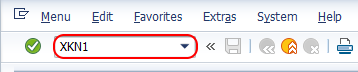
Step 1: Open transaction XKN1 for vendor number range maintenance
Enter SAP transaction code XKN1 in the command field and press Enter to continue.
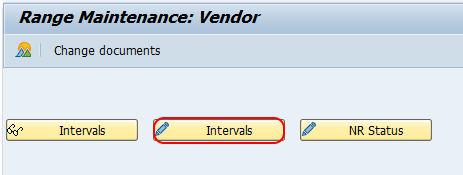
Step 2: Choose Change Intervals in the Range Maintenance Vendor screen
On the Range Maintenance Vendor screen, click Change Intervals to maintain new number ranges for vendor accounts in the SAP system.
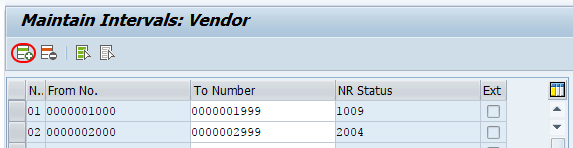
Step 3: Insert a new vendor number range interval
On the Maintain Intervals: Vendor overview screen, click Insert Line or press F6 to add a new number range interval.
Step 4: Enter the vendor number range key, interval, and assignment type
On the Maintain Interval Vendor screen, update the following details for the new interval.
- No: Enter the two-character key that identifies the vendor account number range interval in SAP, for example T1.
- From No: Enter the starting number of the interval, for example 0000005000.
- To Number: Enter the last number of the interval, for example 0000005999.
- NR Status: Leave it blank for a new interval unless the project requires a specific starting status.
- Ext: Select this option only when the interval is for external vendor number assignment.
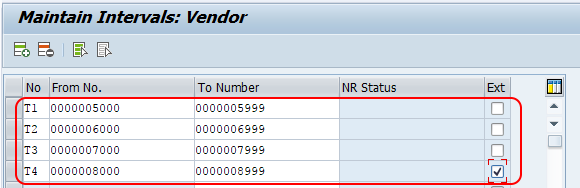
After maintaining all required details, choose Save and save the configured vendor number range interval.
Assign the vendor number range interval to an account group
Creating the number range interval in XKN1 does not by itself decide which vendors will use the interval. The interval key must be assigned to the required vendor account group. During vendor creation, the account group controls important master data behavior such as number range, field status, and whether the vendor is a one-time account.
- Use separate account groups when different vendor categories require different numbering rules.
- Use internal assignment when users should not decide the vendor number.
- Use external assignment only when the business process requires manually entered vendor numbers.
- Check that the number range key assigned in the vendor account group exists in XKN1.
How to delete a vendor number range interval in SAP
Select the vendor number range interval and click the delete line option, or press function key F7.
You are not allowed to delete vendor number range intervals if vendor accounts are already created under that interval. The system allows deletion only when the status is initial.
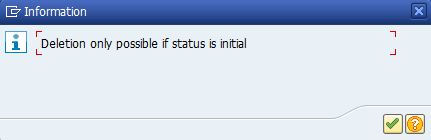
If the interval is already used, do not try to reuse or overwrite it for a different vendor category. Create a new interval, assign it to the correct account group, and keep the used interval for audit consistency.
Common XKN1 errors when maintaining vendor account number ranges
| Issue | Likely Cause | What to Check |
| Vendor number is not proposed during XK01 | The account group may not be assigned to the correct internal number range | Check the number range key assigned to the vendor account group |
| User cannot enter a vendor number manually | The selected interval is internal, not external | Check whether the Ext checkbox is selected for the relevant interval |
| Number range interval cannot be deleted | The interval status is not initial or vendors already exist in that range | Review NR Status and existing vendor master records |
| Overlap error while saving interval | The new From/To range overlaps an existing vendor number range | Use a unique interval that does not intersect with any existing range |
Difference between XKN1, XK01, FK06, and general SAP number range transactions
XKN1 is used to maintain number ranges for vendor accounts. XK01 is used to create vendor master records in classic vendor master processing. FK06 is used to mark a vendor for deletion in accounting views; it is not used for deleting a number range interval. For general number range object maintenance, SAP also has number range object transactions such as SNRO, but vendor account number ranges are maintained directly through XKN1.
FAQ on creating number ranges for vendor accounts in SAP
What is the transaction code for vendor account number ranges in SAP?
The transaction code for maintaining vendor account number ranges is XKN1. You can also reach it through the SAP IMG path for Accounts Receivable and Accounts Payable vendor master data.
How do I create a number range in SAP for vendor accounts?
Open XKN1, choose Change Intervals, insert a new line, enter the two-character interval key, From No., To Number, and external assignment flag if required, and then save the interval.
Why is the vendor number range not working when I create a vendor?
The most common reason is that the number range interval was created in XKN1 but was not assigned to the vendor account group. Check the account group configuration and confirm that the correct number range key is assigned.
Can I delete a vendor number range interval after vendors are created?
No. A used vendor number range interval cannot normally be deleted because the status is no longer initial. Create a new interval for future use instead of deleting a used one.
What is the difference between internal and external vendor number assignment?
In internal assignment, SAP automatically assigns the next available vendor number from the interval. In external assignment, the user manually enters the vendor number, and SAP checks that it falls within the configured interval.
Editorial QA checklist for this SAP vendor number range tutorial
- Confirm that the tutorial clearly separates XKN1 interval creation from vendor account group assignment.
- Verify that internal and external number assignment are explained with the Ext checkbox behavior.
- Check that all example intervals are non-overlapping and use consistent 10-digit vendor number formatting.
- Ensure the delete interval warning mentions the initial status requirement.
- Confirm that S/4HANA Business Partner numbering is mentioned only as a related consideration, not as a replacement for every system.