 TutorialKart.com
How to Define Screen Layout at Document Level for RFQ in SAP MM
In this activity, you define screen layout at document level for RFQ (Request For Quotation) in SAP MM. The configuration controls the field status for RFQ and quotation screens by using a field selection key.
For purchasing documents and purchase requisitions, field selection settings decide whether selected fields are required, optional, display-only, or hidden. In the RFQ process, this helps keep quotation entry consistent when users create RFQs and maintain vendor quotations.
The definition of screen layout at document configuration method is same as screen layout at document level for PR, but the IMG activity is available under Request for Quotation.
RFQ Screen Layout at Document Level: SPRO Path and Purpose
You can maintain screen layout at document level for request for quotation by using the following navigation method.
| Transaction Code | SPRO |
| SAP IMG Path | IMG > Material Management > Purchasing > Request for Quotation > Define screen layout at document level. |
| Related RFQ transaction | ME41 is commonly used to create an RFQ, and ME47 is used to maintain a quotation against an RFQ. |
| Main configuration object | Field selection key for RFQ / Quotation screen layout. |
SAP learning material on purchasing field selection explains that purchasing document fields can be controlled with field selection keys. In SAP Customizing, the RFQ and Quotation node has its own activity for defining screen layout at document level.
SAP Learning – Setting Up Field Selection in Purchasing Documents
What the RFQ Field Selection Key Controls in SAP MM
The RFQ field selection key controls input attributes for field groups in the RFQ and quotation screen. You do not normally maintain every screen field one by one. Instead, SAP groups related fields, and you set the status for each group.
| Field status | Meaning in RFQ screen layout |
|---|---|
| Required entry | The user must enter a value before the RFQ or quotation can be processed successfully. |
| Optional entry | The user can enter a value, but the field is not mandatory. |
| Display | The field is visible but cannot be changed by the user. |
| Suppress | The field is hidden from the RFQ or quotation screen where the setting applies. |
Use required entry only for fields that the business process really needs. If too many fields are made mandatory, users may enter placeholder values just to complete the document. If important fields are optional, reporting and follow-up purchasing work may become inconsistent.
Before You Change RFQ Screen Layout in SAP MM
- Check which RFQ document type and quotation process the business uses.
- Review whether a standard key such as
ANAis already assigned and suitable for copying. - Identify the exact fields that should be required, optional, display-only, or hidden.
- Test the change in a development or quality client before transporting it.
- Confirm that the setting does not conflict with other field selection controls, such as field selection by document type, transaction, item category, account assignment, or authorization settings.
Configuration Steps to Define Screen Layout at Document Level for RFQ
Perform the following configuration steps for defining the screen layout at document level for RFQ.
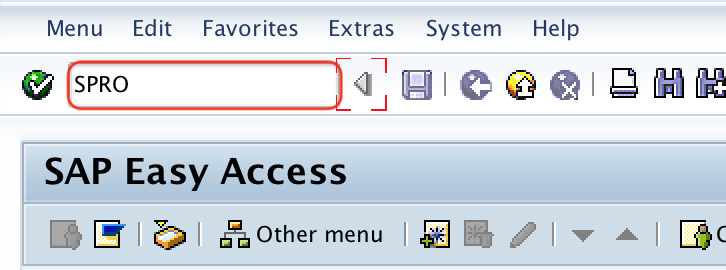
Step 1 : – Execute t-code “SPRO” in SAP command field as shown below image.
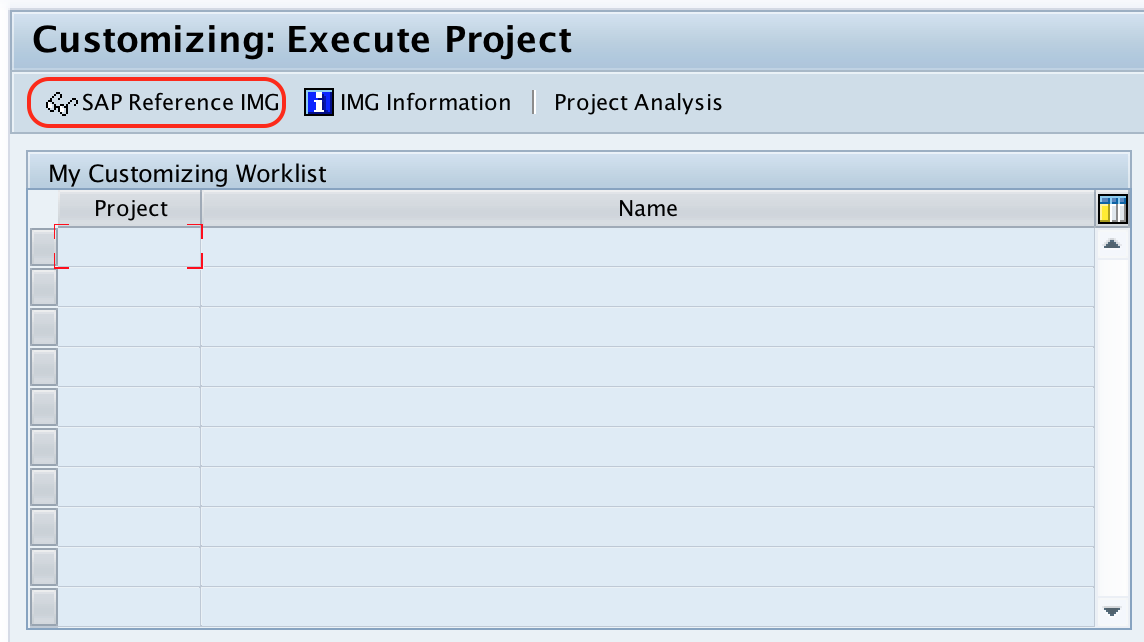
Step 2 : – Choose “SAP Reference IMG” from execute project screen.
Step 3 : – Follow the navigation path: Material Management – Purchasing – Request for Quotation and choose img activity define screen layout at document level.
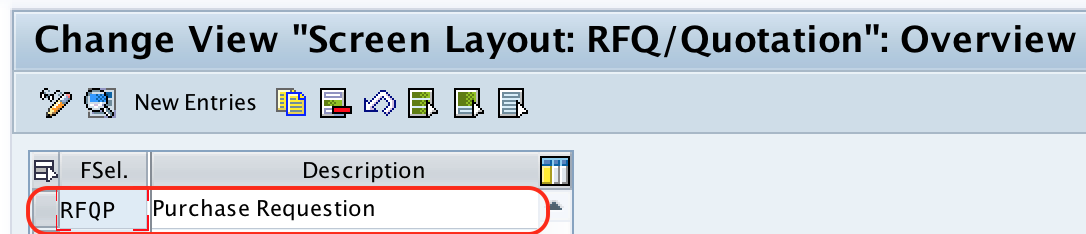
Step 4 : – On change view “Screen layout: RFQ/ Quotation” overview screen, choose standard field selection “ANA” and click on copy as icon.
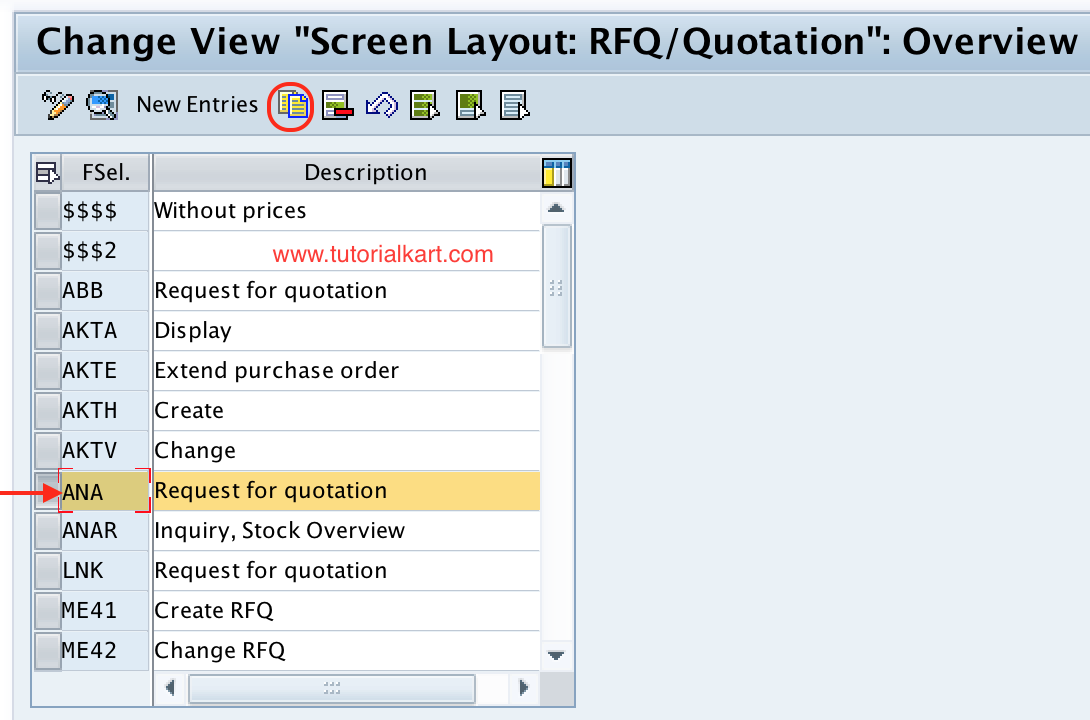
Copying an existing SAP standard field selection key is usually safer than creating the settings from a blank entry, because it preserves the standard grouping and lets you change only the required field statuses.
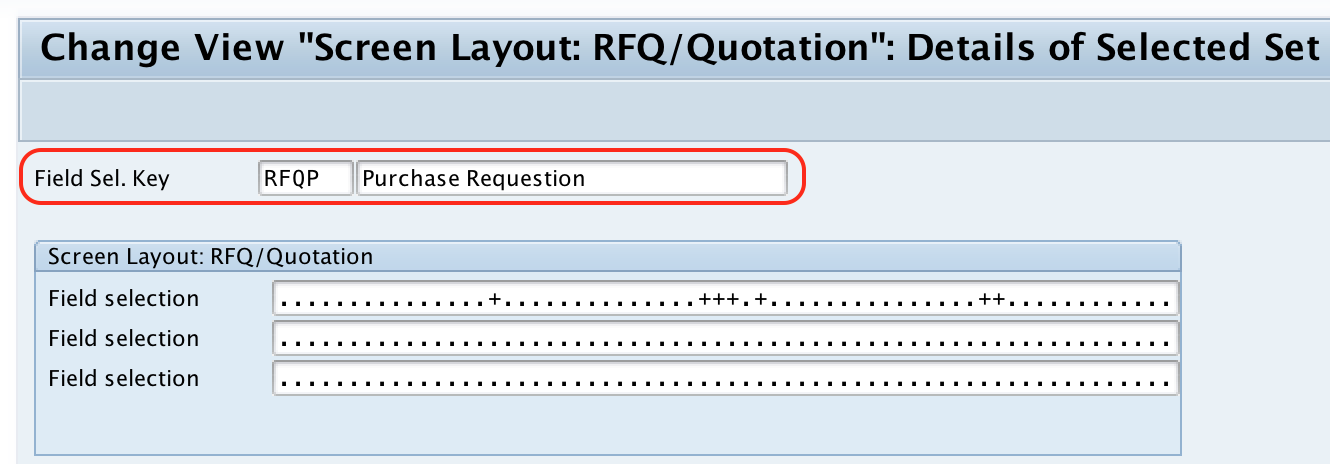
Step 5 : – On change view “screen layout RFQ/ Quotation details of selected set” rename the field selection group from ANA to new key and description as per the requirements of project. After you update the details, press enter to continue.
Step 6 : – Now double click on newly created field selection group key.
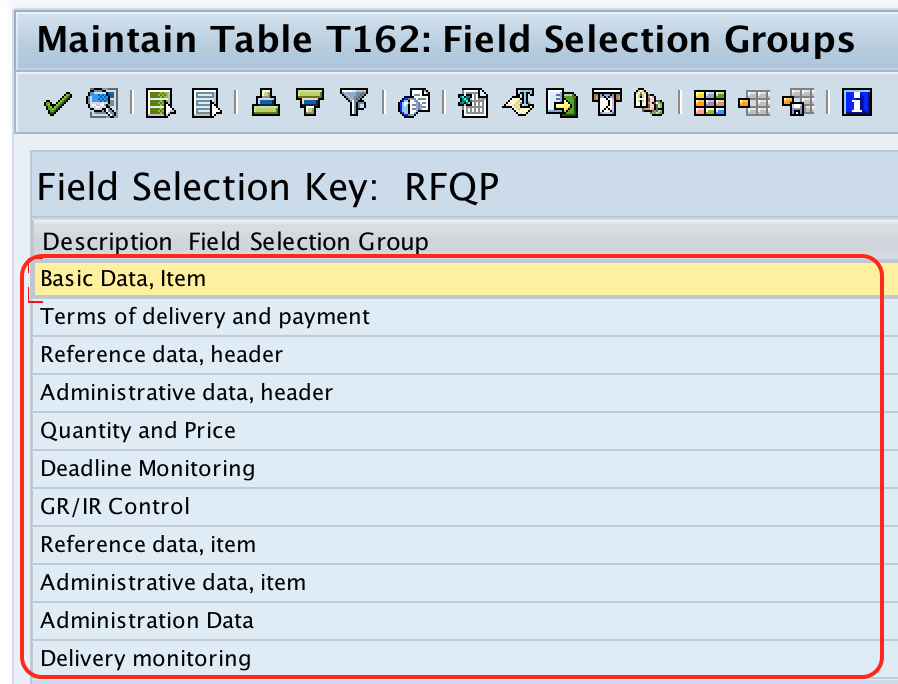
Step 7 : – On Maintain Table T162: Field selection groups, choose the required field selection group to update the required details.
Step 8 : – After you choose the field selection group, make the required change for required entry, optional entry and display.
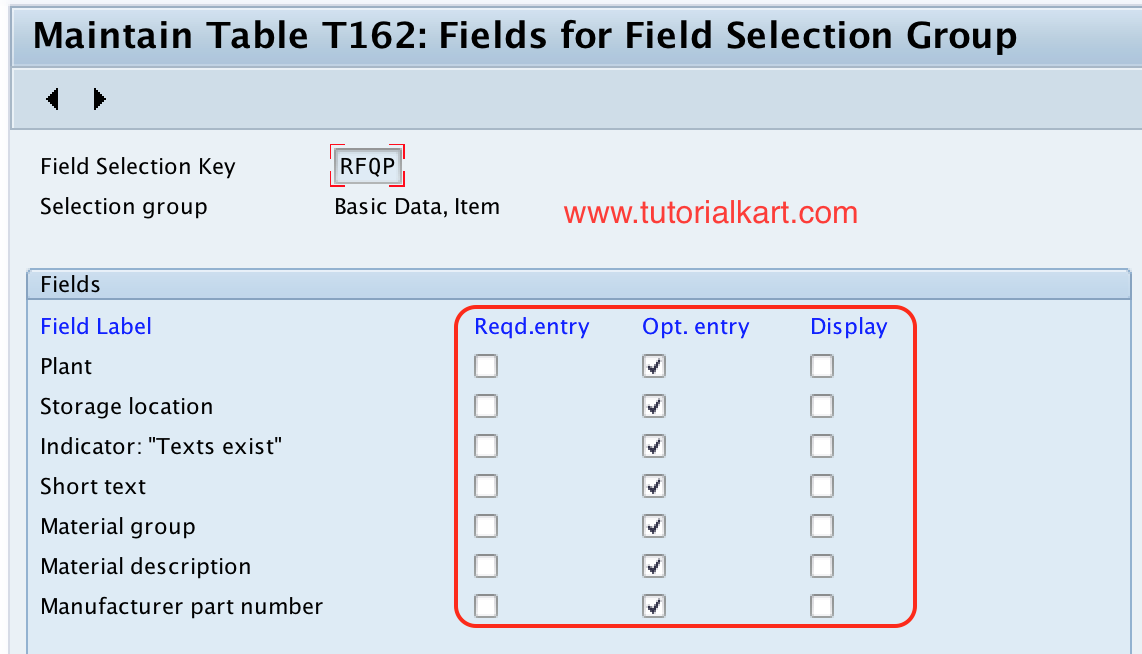
Similarly make the changes for other field selection group and save the configured details.
Testing the RFQ Screen Layout in ME41 and ME47
After saving the configuration, test the field behavior with the RFQ and quotation process. Create or change a test RFQ and check whether the intended fields behave as configured.
- Open the relevant RFQ transaction, such as
ME41, for RFQ creation. - Enter the document type and basic RFQ details used in your project scenario.
- Check whether required fields stop the user when left blank.
- Check whether optional fields are editable.
- Check whether display-only fields cannot be changed.
- Check whether suppressed fields are not visible on the screen.
- If quotation maintenance is part of the requirement, test quotation entry using
ME47.
Common RFQ Screen Layout Mistakes in SAP MM
- Changing the standard key directly: copy the standard field selection key and maintain a project-specific key where possible.
- Making fields required without process confirmation: validate mandatory fields with purchasing users before transport.
- Testing only one transaction: test both RFQ creation and quotation maintenance when both are used.
- Ignoring other field selection controls: field status can be influenced by more than one configuration layer.
- Suppressing fields used by reports or follow-up documents: check downstream purchasing and reporting impact before hiding fields.
RFQ Screen Layout QA Checklist for SAP MM Editors and Consultants
- The article shows the exact SPRO path for RFQ screen layout at document level.
- The difference between required, optional, display, and suppress is explained clearly.
- The standard field selection key is copied before project-specific changes are made.
- Testing includes RFQ creation and quotation maintenance where applicable.
- The content warns that other field selection settings can also affect the final field behavior.
- The screenshots and existing SAP MM navigation remain aligned with the step-by-step procedure.
FAQs on SAP MM RFQ Screen Layout at Document Level
How do you define screen layout at document level in SAP MM for RFQ?
Use transaction SPRO and follow IMG > Material Management > Purchasing > Request for Quotation > Define screen layout at document level. Copy a suitable field selection key, maintain a project-specific key, update the required field groups, and save the configuration.
Which field attributes are controlled by RFQ screen layout in SAP MM?
The RFQ screen layout can control whether field groups are required entry, optional entry, display-only, or suppressed. The exact result can also depend on other field selection settings in the purchasing configuration.
What is the transaction code for creating an RFQ in SAP MM?
ME41 is commonly used to create an RFQ in SAP MM. ME42 is used to change an RFQ, ME43 is used to display an RFQ, and ME47 is used to maintain a quotation.
Should the standard RFQ field selection key ANA be changed directly?
In most project configurations, it is better to copy the standard key and maintain a new project-specific key. This keeps the original standard setting available for comparison and reduces the risk of unintended changes.
Why is a field still not editable after changing RFQ screen layout?
The field may be controlled by another field selection layer, document type setting, item category, account assignment category, authorization, or transaction-specific behavior. Check the complete purchasing configuration before assuming the RFQ document-level setting is the only control.
Successfully we have defined screen layout at document level for RFQ in SAP MM. This configuration should now be verified in the relevant RFQ and quotation transactions before it is moved to production.