 TutorialKart.com
A purchase organization in SAP MM is the organizational unit responsible for procuring materials and services for plants or company codes. In SAP Customizing, you define the purchasing organization first, and then assign it to the required company code, plant, or purchasing setup based on the procurement model used by the business.
This tutorial explains how to define purchase organization in SAP by using transaction code OX08. It also explains the important assignment rules, purchase organization types, and the SAP table used to store the configuration.
Purchase organization in SAP MM: role in procurement structure
In SAP MM, the purchasing organization represents the procurement responsibility for purchasing activities such as vendor negotiation, purchase order processing, and procurement conditions. It is part of the enterprise structure and must be designed carefully because it affects purchasing documents, vendor purchasing data, info records, source determination, and plant-level procurement control.
A purchasing organization may be used for one plant, several plants, one company code, or more than one company code depending on the configuration. The assignment design should match the real purchasing responsibility in the company.
Types of purchasing organization in SAP MM
The different types of purchasing organizations in SAP are:
- Plant specific or local purchase organization
- Cross plant purchase organization
- Cross company code purchase organization
- Central purchase organization at company code level.
- Reference Purchase organization
- Standard purchase organization
| Purchase organization type | How it is normally used in SAP MM |
|---|---|
| Plant-specific or local purchase organization | Used when a plant has its own purchasing responsibility and local procurement team. |
| Cross-plant purchase organization | Used when one purchasing organization procures for multiple plants, usually within the same company code. |
| Cross-company-code purchase organization | Used when one purchasing organization supports plants that belong to different company codes. In this design, plant assignment becomes important. |
| Central purchase organization at company code level | Used when purchasing is centralized for one company code and supports multiple plants under that company code. |
| Reference purchase organization | Used to make centrally negotiated contracts, conditions, or purchasing data available to other purchasing organizations. |
| Standard purchase organization | Used as the default purchasing organization for a plant in specific procurement scenarios, including centrally controlled or stock-transfer-related purchasing processes. |
For a company-code-specific setup, one purchasing organization is assigned to one company code, and one company code can have one or more purchase organizations in SAP. For cross-company-code purchasing, the purchasing organization is normally designed through plant-level assignment rather than being restricted to one company code.
Configuration note: Defining a purchasing organization in OX08 creates the organizational key and description. It does not complete the full enterprise structure setup. After definition, the purchasing organization must be assigned according to the procurement design, for example to a company code, plant, or as a standard/reference purchasing organization where required.
How to create purchase organization in SAP with transaction OX08
In this SAP MM tutorials, you will learn how to define purchase organizations in SAP step by step.
For this example, we are going to create the following purchasing organization.
| Purch.Organization | Description |
| TKPO | TK Software Purchase Organization |
The key TKPO is only an example. In a real SAP system, use the naming standard approved for the client project, because the purchasing organization key is used in purchasing configuration and transaction data.
OX08 navigation path to maintain purchase organization in SAP
You can maintain purchase organization in sap by using one of the following navigation method.
- Transaction code: – OX08
- Menu Path: – SPRO -> SAP Customizing Implementation Guide –> Enterprise Structure -> Definition –> Materials Management -> Maintain Purchase Organization.
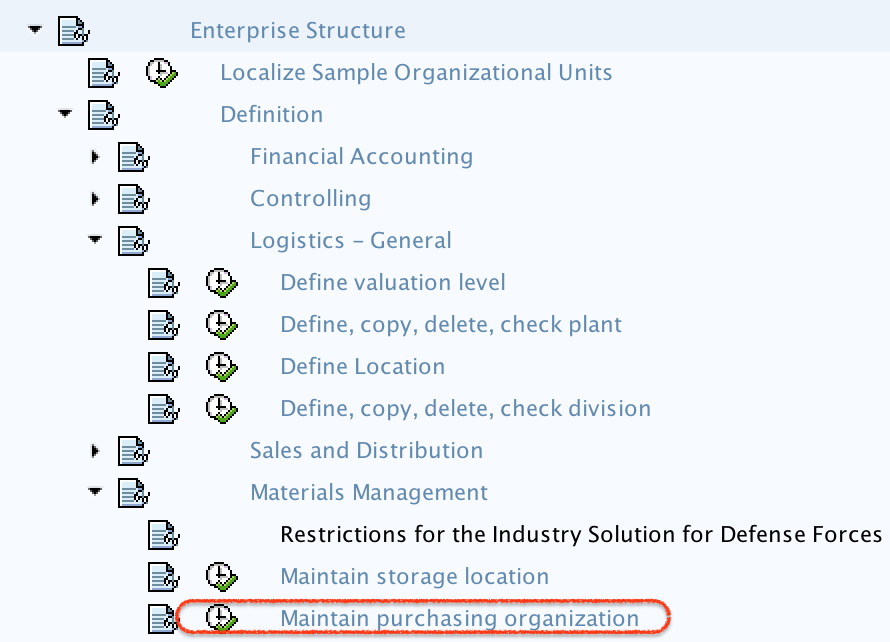
Step-by-step OX08 configuration to define purchase organization in SAP
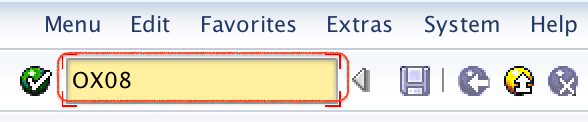
Step 1) Enter T_code “OX08” in command field and enter.
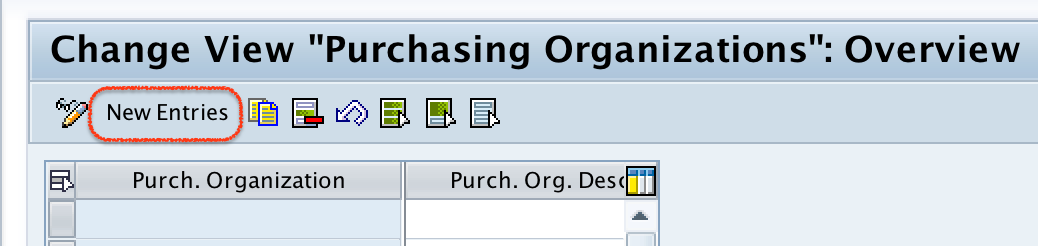
Step 2) On change view purchase organizations overview screen, click on new entries button to define new purchase organization as per company requirements.
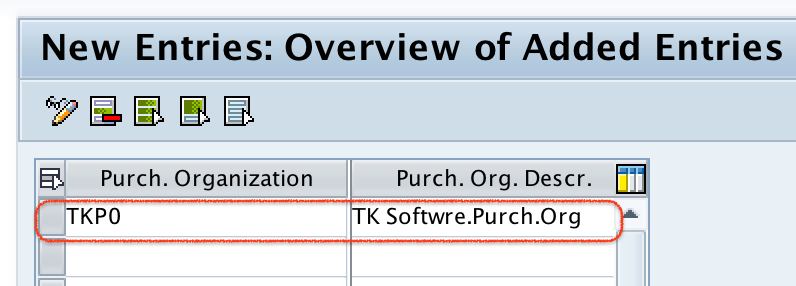
Step 3) On new entries purchasing organization screen, update the following details.
- Purch.Organization: – Enter the key that identifies the purchase organization in SAP.
- Purch.Org.Descr: – Update the detailed description of purchase organization.
Step 4) After creating the purchase organization as per the company requirement, click on save button.

Now choose the customizing request and click on continue option to save the configured organization data.
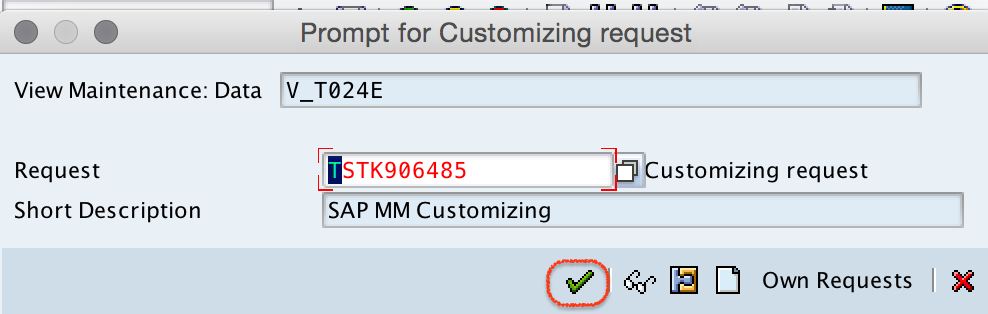
Successfully we have created purchase organization in SAP systems.
SAP table T024E for purchase organization configuration
When a purchasing organization is saved in SAP, the definition is stored in table T024E. This table contains purchasing organization configuration data such as the purchasing organization key and its description.
| SAP object | Purpose |
|---|---|
| T024E | Stores purchasing organization definitions. |
| EKORG | Purchasing organization key. |
| EKOTX | Description of the purchasing organization. |
Table T024E is useful for consultants when they need to verify whether a purchasing organization already exists. However, configuration should be maintained through the IMG activity or transaction OX08, not by directly changing table entries.
After defining purchase organization: assignment activities to check
After creating the purchase organization, check the required assignment activities. The exact assignments depend on whether the business uses local, central, cross-plant, or cross-company-code purchasing.
- Assign purchasing organization to company code when procurement is controlled at company-code level.
- Assign purchasing organization to plant when the purchase organization should procure for a specific plant.
- Assign standard purchasing organization to plant when a default purchasing organization is required for plant-related procurement scenarios.
- Maintain reference purchasing organization assignment when one purchasing organization should use centrally maintained contracts or conditions.
If these assignments are missing, the purchasing organization may exist in configuration but may not be available as expected during purchase requisition, purchase order, source list, or info record processing.
Purchase organization and purchasing group difference in SAP MM
A purchase organization and a purchasing group are not the same. A purchasing organization represents procurement responsibility in the enterprise structure, while a purchasing group usually represents a buyer or group of buyers responsible for purchasing activities.
| Point of difference | Purchasing organization | Purchasing group |
|---|---|---|
| Role | Organizational unit for procurement responsibility. | Buyer or group of buyers responsible for purchasing follow-up. |
| Configuration example | Maintained with OX08. | Maintained separately in purchasing group configuration. |
| Common table | T024E | T024 |
| Usage | Controls purchasing at plant/company-code procurement level. | Used in purchasing documents for buyer responsibility and reporting. |
Common OX08 mistakes while creating purchase organization in SAP
- Using an unclear purchasing organization key: Follow the project naming convention before creating the key.
- Creating OX08 entry but missing assignments: Define the purchase organization first, then complete company code or plant assignments as required.
- Confusing purchase organization with purchasing group: OX08 is for purchasing organization, not the buyer group.
- Transport request not selected correctly: Since this is Customizing, save it in the correct transport request for movement to quality and production systems.
- Wrong central purchasing design: Confirm whether the business needs local, cross-plant, cross-company-code, standard, or reference purchasing organization before configuration.
OX08 purchase organization questions students usually ask
How to define purchasing organization in SAP?
Use transaction code OX08 or follow SPRO > SAP Customizing Implementation Guide > Enterprise Structure > Definition > Materials Management > Maintain Purchase Organization. Choose New Entries, enter the purchasing organization key and description, then save the entry in a customizing request.
How to create purchase org in SAP MM?
To create a purchase org in SAP MM, use OX08 and maintain the purchasing organization code and description. After saving it, complete the required assignments such as company code assignment, plant assignment, standard purchasing organization assignment, or reference purchasing organization assignment based on the procurement design.
What is T024E in SAP?
T024E is the SAP table that stores purchasing organization definitions. The purchasing organization key is stored in field EKORG, and the description is stored in field EKOTX.
How to define purchase group in SAP MM?
A purchase group, usually called a purchasing group in SAP MM, is maintained separately from purchasing organization configuration. Purchasing organization is maintained with OX08, while purchasing group configuration is maintained in its own IMG activity and is commonly stored in table T024.
Can one purchasing organization be used for multiple plants?
Yes. A purchasing organization can support multiple plants when the enterprise structure is configured for cross-plant or central procurement. The required plant and company-code assignments should be maintained according to the business procurement model.
Editorial QA checklist for SAP MM purchase organization tutorial
- Confirm that transaction code OX08 is shown only for defining or maintaining purchasing organizations.
- Check that the example purchasing organization key TKPO is clearly marked as an example, not a mandatory SAP standard value.
- Verify that all screenshots still match the OX08 flow: IMG path, command field, overview screen, new entries screen, save, and customizing request.
- Make sure table T024E is described only as the storage table for purchasing organization definitions.
- Confirm that the tutorial explains the follow-up assignment activities because OX08 alone does not complete the enterprise structure setup.