 TutorialKart.com
In this SAP PM tutorial, you will learn how to create cycle sets in SAP step by step using t-code IP11Z. Cycle sets are mainly used in preventive maintenance planning when a multiple counter plan needs reusable cycles for different measurement or time-based intervals.
How to create cycle sets in SAP PM using IP11Z
In this activity you create cycle sets in SAP PM which are used for multiple counter based maintenance planning. A cycle set contains one or more cycles, and each cycle represents a maintenance interval such as operating hours, operating days, production quantity, distance, or another counter unit used by the maintenance plan.
Cycle sets help maintenance planners keep the cycle definition separate from the individual maintenance plan. After a cycle set is created, it can be assigned where the preventive maintenance process requires a predefined group of cycles. This is useful when similar technical objects follow the same counter-based maintenance pattern.
When cycle sets are used in SAP PM preventive maintenance
A cycle set is useful when maintenance is not controlled by only one fixed calendar interval. It is often used with multiple counter maintenance plans where more than one measurement point or counter can influence when maintenance is due.
- Multiple counter plan: Used when maintenance scheduling depends on more than one counter, such as operating hours and running days.
- Reusable cycle definition: The same set of cycles can be used for similar assets that follow the same maintenance rules.
- Counter-based maintenance: Cycles can be maintained with units such as hours, days, kilometers, pieces, or other relevant units configured in the system.
- Clear maintenance planning: Package numbers and short texts make it easier to identify which cycle is used in the maintenance plan.
Cycle set in SAP PM compared with maintenance strategy and single cycle plan
Cycle sets are sometimes confused with maintenance strategies and single cycle plans. They are related to preventive maintenance, but they are not the same configuration object.
| Object | Used for | Typical example |
|---|---|---|
| Cycle set | Grouping cycles for multiple counter planning. | 500 operating hours and 90 operating days. |
| Maintenance strategy | Grouping packages for strategy-based preventive maintenance. | 1M, 3M, 6M, and 12M maintenance packages. |
| Single cycle plan | Scheduling one recurring cycle for one maintenance item. | Inspection every 30 days. |
If your requirement has only one recurring interval, a single cycle plan may be enough. If your requirement has multiple packages in a strategy task list, use a maintenance strategy. If the requirement is based on multiple counters or a predefined group of cycles for counter-based planning, create a cycle set.
Navigation to maintain cycle set in SAP PM
You can maintain cycle set in SAP PM by using one of the following navigation method.
| Transaction Code | IP11Z |
| SAP Menu Path | Logistics > Plant Maintenance > Maintenance Planning > Cycle sets > Change |
Depending on the SAP release and menu personalization, the menu text may appear with slight wording differences. The direct transaction code for maintaining cycle sets is IP11Z.
Details required before creating a cycle set in SAP PM
Before you create a cycle set, confirm the cycle logic with the maintenance planning team. The cycle set should reflect the real maintenance trigger, not just a convenient naming pattern.
| Required detail | Purpose in the cycle set |
|---|---|
| Cycle set name | Identifies the cycle set in SAP PM configuration and later maintenance planning steps. |
| Description | Explains the equipment group, planning rule, or counter logic for the cycle set. |
| Package number | Sequential number used to identify each cycle line in the set. |
| Cycle length | Defines the interval value, such as 500 hours or 90 days. |
| Unit | Defines the unit of measure for the cycle length. |
| Cycle short text | Short identifier used during assignment and review. |
| Maintenance cycle text | Readable explanation of the cycle, such as operating hours or operating days. |
Configuration steps to create cycle sets in SAP PM
Perform the following configuration steps for creating the cycle set in SAP plant maintenance module.
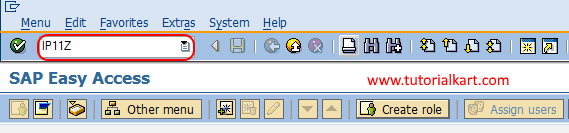
Step 1 : Execute t-code “IP11Z” in SAP command field as shown below image.
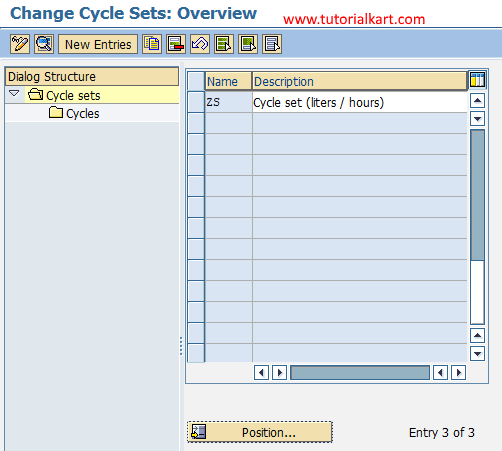
Step 2 : On change cycle sets overview screen, click on new entries button to create new cycle set as per the requirements of an organization.
Step 3 : On change cycle sets details screen, update the following details.
- Name : Update the name of cycle set and its description in the given fields.
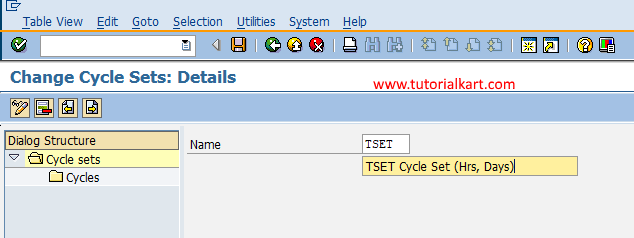
Use a meaningful cycle set key and description. For example, a cycle set for pumps may describe the counter rule used for operating hours and operating days. This helps planners identify the correct cycle set later.
Click on save button and save the configured cycle set in SAP.
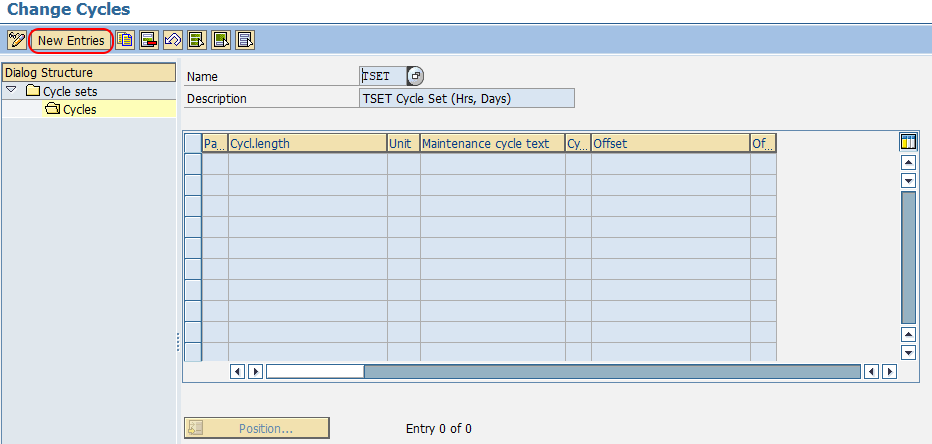
Step 4 : Now double click on cycles folder which is on left side under dialog structure. On change cycle overview screen, click on new entries button.
Update the following details.
- Package No : Update the package number with the serial number as 1, 2, ,3… etc.
- Cycle Length : It refers to the cycle period, you can update the cycle length in days and hours.
- Unit : Unit of cycle length.
- Maintenance cycle text : Update the short text of cycle like operating hours, operating days, etc.
- Cycle Short text : Update two digits key that defines as cycle short text and can be used for assignment.
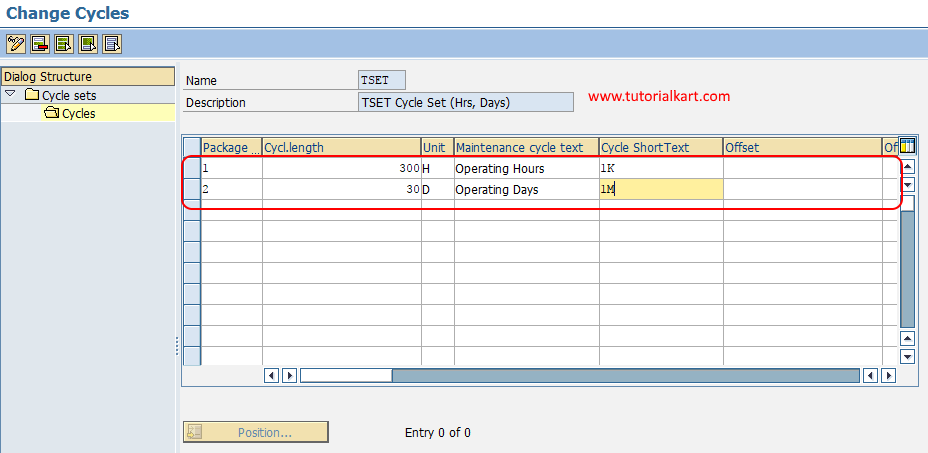
After maintaining all the required details for cycle set in SAP, choose save icon and save the configured data.
Successfully we have maintained cycle set in SAP PM module.
Example cycle set entries for a multiple counter maintenance plan
The following example shows how a cycle set can be structured when maintenance is controlled by operating hours and calendar days. The exact values should be based on the maintenance policy for the equipment.
| Package no. | Cycle length | Unit | Cycle short text | Maintenance cycle text |
|---|---|---|---|---|
| 1 | 500 | H | OH | Operating hours cycle |
| 2 | 90 | D | OD | Operating days cycle |
| 3 | 10000 | KM | KM | Distance-based cycle |
This type of cycle set is useful when the equipment may reach one counter limit before another. For example, a machine may reach the operating-hours cycle before the calendar-days cycle, depending on actual usage.
How cycle set data is used after IP11Z configuration
Creating the cycle set does not by itself generate maintenance orders. The cycle set becomes useful when it is used in the maintenance planning process, especially with multiple counter maintenance plans and maintenance items.
- Create or change the relevant maintenance plan according to the planning requirement.
- Assign the cycle set where the plan type and maintenance planning process require it.
- Maintain the technical object, maintenance item, and measurement point or counter details.
- Enter scheduling parameters such as start date, scheduling period, and call horizon as required.
- Schedule the maintenance plan and review the generated calls before using it in production.
T351P table and cycle set package data in SAP PM
The SAP table name T351P is commonly associated with maintenance package or cycle-related configuration data in SAP PM. Functional users normally maintain this information through transactions such as IP11Z instead of editing database tables directly.
Use table information only for display, troubleshooting, reporting, or technical analysis when you have the required authorization. Configuration changes should be made through the relevant SAP PM maintenance transactions so that checks and dependent settings are handled correctly.
Common mistakes when maintaining cycle sets in SAP PM
- Creating a cycle set for a single simple interval: If only one recurring interval is needed, check whether a single cycle plan is more suitable.
- Using unclear cycle short texts: Short texts should clearly identify the cycle, such as OH for operating hours or OD for operating days.
- Entering the wrong unit: A cycle length has meaning only when the unit is correct. Review units before saving the cycle set.
- Mixing unrelated cycles: Do not combine cycles for different planning logic in one cycle set unless they belong to the same maintenance requirement.
- Skipping scheduling tests: Always test the cycle set in a maintenance plan to confirm that the expected maintenance calls are generated.
QA checklist for SAP PM cycle set configuration
- Confirm that the IP11Z cycle set name follows the naming convention used in the SAP PM system.
- Check that the cycle set description clearly explains the counter or planning purpose.
- Verify that each package number is unique and sequential within the cycle set.
- Confirm that every cycle length is entered with the correct unit of measure.
- Review cycle short texts for clarity before assigning them in planning transactions.
- Test the cycle set with a sample multiple counter maintenance plan and review generated calls.
- Confirm that users are not confusing the cycle set with a maintenance strategy or a single cycle plan.
FAQs on cycle sets in SAP PM
What is a cycle set in SAP PM?
A cycle set in SAP PM is a group of cycles used in preventive maintenance planning, especially for multiple counter maintenance plans. Each cycle in the set defines an interval such as operating hours, days, kilometers, or another unit.
Which transaction code is used to create cycle sets in SAP?
Transaction code IP11Z is used to create and maintain cycle sets in SAP PM.
How do you create a cycle in SAP PM cycle set?
Open IP11Z, create or select the cycle set, double click the cycles folder, choose new entries, and maintain details such as package number, cycle length, unit, maintenance cycle text, and cycle short text.
What is the difference between a cycle set and a maintenance strategy in SAP PM?
A cycle set is used mainly for grouped cycles in multiple counter maintenance planning. A maintenance strategy is used for strategy-based maintenance packages, usually with package short texts assigned to task list operations.
Does creating a cycle set generate maintenance orders automatically?
No. A cycle set is only a configuration object. Maintenance calls or orders are generated after the cycle set is used in the relevant maintenance plan and the plan is scheduled.