 TutorialKart.com
In this SAP PM tutorial, you will learn how to create measurement document in SAP by using transaction code IK11. A measurement document records the actual reading for a measuring point or counter, such as temperature, pressure, operating hours, mileage, or a qualitative inspection result.
In SAP Plant Maintenance, measurement documents are useful when maintenance decisions depend on recorded condition data. For example, a counter reading can support performance-based preventive maintenance, while a measuring point reading can document the condition of equipment or a functional location.
Create measurement document in SAP using transaction code IK11
In this activity you create measurement document for measuring point and Counter.
Before you use IK11, make sure that the measuring point or counter already exists for the relevant technical object. If the measuring point is not available, first create it from the measuring point master data activity.
IK11 navigation path for creating SAP measurement document
You can create measuring document by using the following navigation method.
| Transaction Code | IK11 |
| SAP Menu Path | Logistics >Plant Maintenance > Management of technical objects > Equipment > Measurement documents > Create. |
Measurement document details entered in IK11
| Field or area | What it means in SAP PM |
|---|---|
| Measuring Point | The measuring point or counter number for which the reading is being recorded. |
| Measurement Time | The date and time of the reading. SAP normally proposes the current date and time. |
| Read by | The person or user who recorded the measurement reading. |
| MeasRdg | The actual measurement reading, counter reading, or valuation entry depending on the measuring point category. |
| Text | Optional note that explains the reading, inspection result, or operating condition. |
Steps to create measurement document for measuring point in SAP PM
Perform the following configuration steps for creating the measuring documents for counter and measurement point in SAP.
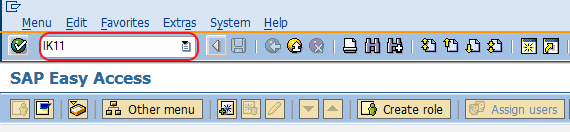
Step 1: Execute t-code “IK11” in command field from SAP easy access screen.
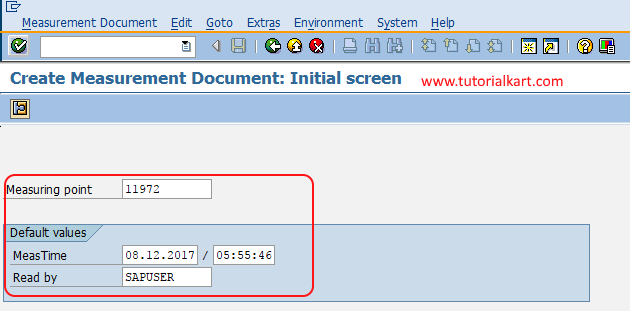
Step 2 : On create measurement document initial screen, update the following details.
- Measuring Point : Update the corresponding measuring point for the equipment.
- Default values : The SAP system automatically update the values of measurement time and read by.
Check the proposed measurement date, measurement time, and reader details before continuing. If you are recording an earlier field reading, enter the actual reading time instead of leaving an incorrect current timestamp.
Step 3 : On create measurement document general data screen, update the following details.
- MeasRdg : Update the measurement reading for the measuring position.
If the measuring point is a counter, enter the counter reading in the unit assigned to the counter. If it is a normal measuring point, enter the measured value or selected valuation code according to the measuring point setup.
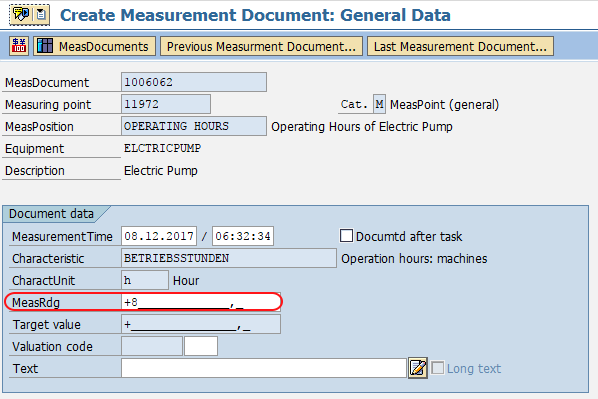
Choose save icon and save the configured details.
Successfully we have created measurement document for measurement point in SAP.
Measuring point and measurement document difference in SAP PM
A measuring point is master data. It defines where and how a value is measured for a technical object, including details such as the characteristic, unit of measurement, counter indicator, and allowed values. A measurement document is transactional data. It stores one actual reading entered for that measuring point or counter.
| Item | Measuring Point | Measurement Document |
|---|---|---|
| Purpose | Defines the location or counter to be measured | Stores a specific reading for that point |
| Data type | Master data | Transaction data |
| Common transaction | IK01, IK02, IK03 | IK11, IK12, IK13 |
| Example | Temperature point on a motor | Temperature reading of 80 °C on a given date |
Useful SAP PM transaction codes for measurement documents
The following transaction codes are commonly used when working with measuring points, counters, and measurement documents in SAP PM.
| Transaction code | Use |
|---|---|
| IK11 | Create measurement document |
| IK12 | Change measurement document |
| IK13 | Display measurement document |
| IK01 | Create measuring point or counter |
| IK02 | Change measuring point or counter |
| IK03 | Display measuring point or counter |
| CUNI | Maintain units of measurement, where authorized |
Checks before saving a measurement document in SAP
- Confirm that the correct measuring point or counter number is entered in IK11.
- Verify that the measurement reading is entered in the expected unit of measurement.
- For counter readings, check that the new reading follows the expected sequence and does not create an unintended counter overflow situation.
- Use the actual measurement date and time when readings are collected earlier and entered later.
- Add a short text if the reading needs operational context, such as abnormal noise, shutdown condition, replacement, or inspection remarks.
Common SAP IK11 entry issues and practical fixes
| Issue in IK11 | What to check |
|---|---|
| Measuring point is not accepted | Check whether the measuring point exists and is active for the correct equipment or functional location. |
| Reading is rejected | Check the unit, format, decimal places, and permissible value range defined for the measuring point. |
| Counter reading looks incorrect | Review the last measurement document and confirm whether the counter rolled over, was replaced, or was entered with the wrong value. |
| User cannot save the document | Check authorization for measurement document creation and whether required fields are missing. |
| Wrong date or time appears | Manually enter the actual reading date and time before saving the document. |
Measurement document FAQ for SAP PM users
What is the T code for measurement document in SAP?
The main T code to create a measurement document in SAP PM is IK11. You can use IK12 to change a measurement document and IK13 to display a measurement document.
What is the difference between measuring point and measurement document?
A measuring point is master data that defines what is measured for equipment or a functional location. A measurement document is the saved reading recorded for that measuring point at a specific date and time.
What is the T code for measuring point in SAP?
The common T code to create a measuring point or counter is IK01. IK02 is used to change it, and IK03 is used to display it.
Can SAP create measurement documents from sources other than IK11?
Yes. Depending on the business process and system setup, readings can also be entered from maintenance processing, mobile applications, external systems, or collective measurement entry. IK11 is the direct manual transaction for creating a single measurement document.
How is unit of measurement handled for SAP measurement readings?
The unit is controlled by the measuring point or counter setup. If a required unit is missing or incorrectly defined, an authorized user may need to maintain units of measurement in SAP before the reading can be recorded correctly.
Editorial QA checklist for this SAP PM IK11 tutorial
- Confirms IK11 as the transaction code for creating a measurement document.
- Explains the difference between a measuring point and a measurement document.
- Preserves the original SAP screen images and existing TutorialKart internal links.
- Includes related SAP PM transaction codes for create, change, and display activities.
- Answers the main search questions about IK11, measuring point T codes, and units of measurement.