 TutorialKart.com
In this SAP PM tutorial, you will learn how to create and maintain a maintenance planning plant in SAP step by step. A maintenance planning plant is the plant that plans, prepares, and manages maintenance activities for one or more maintenance plants.
This configuration is part of the enterprise structure settings for SAP Plant Maintenance. It is normally completed before assigning a maintenance planning plant to a maintenance plant and before using maintenance plans, maintenance items, task lists, and work orders in daily maintenance processing.
What is a maintenance planning plant in SAP PM?
A maintenance planning plant in SAP PM is responsible for planning maintenance work. It represents the location or organizational unit where maintenance tasks are planned, scheduled, and prepared.
Do not confuse it with a maintenance plant. A maintenance plant is the plant where technical objects such as equipment and functional locations are physically maintained. A planning plant is the plant that handles maintenance planning. In many companies, both can be the same plant, but SAP also allows one planning plant to plan maintenance for multiple maintenance plants.
When do you maintain a maintenance planning plant in SAP?
You maintain a maintenance planning plant when you set up the SAP PM organizational structure for maintenance planning. This setting is needed when maintenance orders, maintenance plans, and maintenance items must be controlled by a specific planning plant.
- Use it when the same plant plans and performs its own maintenance work.
- Use it when a central planning team plans maintenance work for several plants.
- Use it before assigning the planning plant to a maintenance plant in SAP PM configuration.
- Use it before creating maintenance plans that depend on planning plant data.
Navigation path for maintaining maintenance planning plant in SAP PM
You can define a maintenance planning plant in SAP PM by using the following IMG navigation method.
| Transaction code | SPRO |
| SAP IMG path | IMG > Enterprise Structure > Definition > Plant Maintenance > Maintain maintenance plant |
The activity name may appear as a maintenance plant or planning plant related IMG activity depending on the SAP release and system menu text. The configuration screen used here maintains the planning plant entry that SAP PM uses for maintenance planning.
Steps to create maintenance planning plant in SAP PM
Perform the following configuration steps for maintaining the maintenance planning plant in SAP.
Step 1: Open SPRO from the SAP Easy Access screen
Execute transaction code SPRO in the command field from the SAP Easy Access screen.

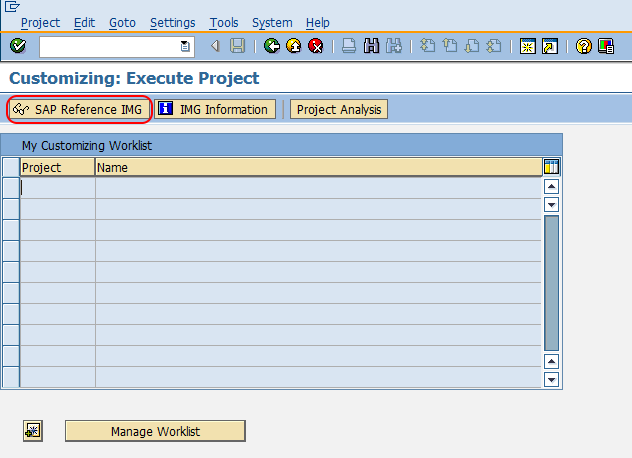
Step 2: Choose SAP Reference IMG
On the customizing screen, choose SAP Reference IMG to open the IMG configuration menu.
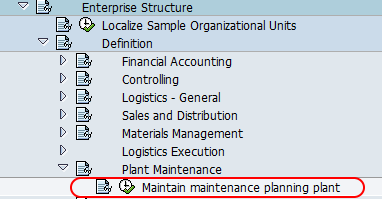
Step 3: Open the SAP PM activity for maintaining the planning plant
Follow the navigation path Enterprise Structure > Definition > Plant Maintenance and choose the IMG activity Maintain maintenance plant.
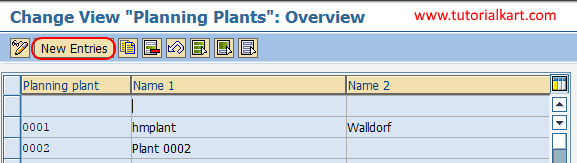
Step 4: Choose New Entries for SAP PM planning plant setup
On the Change View Planning Plants: Overview screen, choose the New Entries button to create a new maintenance planning plant in the SAP system.
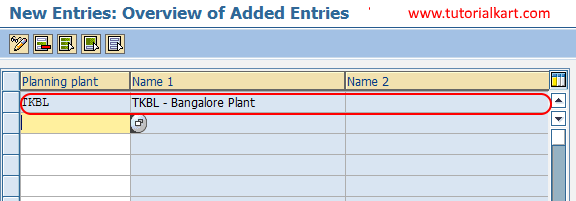
Step 5: Enter the planning plant key and plant name details
On the new entries screen, update the following details.
- Planning plant: Enter the plant key that is to be used as the maintenance planning plant in SAP PM.
- Name 1 / Name 2: These fields are automatically updated with the name of the plant after you enter a valid plant key and press Enter.
After you enter the planning plant key, press Enter. Check that the plant description is displayed correctly before saving.
Choose the Save icon and save the configured planning plant details. If the system prompts for a customizing request, select or create the appropriate transport request as per your project procedure.
Successfully, you have maintained the maintenance planning plant in SAP PM.
Maintenance planning plant vs maintenance plant in SAP PM
The difference between a maintenance planning plant and a maintenance plant is important during SAP PM configuration.
| Area | Maintenance planning plant | Maintenance plant |
|---|---|---|
| Main purpose | Plans and organizes maintenance work | Represents the plant where technical objects are maintained |
| Used for | Maintenance order planning, maintenance items, and planning responsibility | Equipment, functional locations, and physical maintenance location |
| Business example | A central maintenance office planning work for multiple factories | A factory where pumps, motors, or production lines are installed |
| Can both be same? | Yes, the same plant can be the planning plant | Yes, the same plant can also be the maintenance plant |
What to check after maintaining the SAP PM planning plant
After you save the maintenance planning plant, check the next dependent settings before using it in maintenance processing.
- Confirm that the plant exists in the enterprise structure and is assigned correctly to the company code.
- Assign the maintenance planning plant to the relevant maintenance plant if planning is done from another plant.
- Check that planner groups are created for the planning plant if your maintenance process uses planner groups.
- Verify that maintenance work centers are available for the plant where work will be executed.
- Test the configuration by creating or checking a maintenance item, maintenance plan, or maintenance order that uses the planning plant.
SAP PM planning plant table and related transaction codes
In SAP PM configuration, planning plant related settings are stored in customizing tables. The table T351P is commonly associated with maintenance planning plant assignment data. Functional users usually do not update this table directly; they maintain the setting through SPRO customizing activities.
| Requirement | Common SAP transaction or path |
|---|---|
| Maintain maintenance planning plant configuration | SPRO customizing path shown above |
| Create maintenance plan | IP01 |
| Change maintenance plan | IP02 |
| Display maintenance plan | IP03 |
| Create maintenance item | IP04 |
The maintenance plan transaction codes are different from the configuration step for maintaining a planning plant. First complete the plant-related PM configuration, and then use maintenance plan transactions such as IP01 when creating preventive maintenance plans.
Common errors while maintaining maintenance planning plant in SAP
- Entering an invalid plant key: The planning plant must already exist as a valid plant in the enterprise structure.
- Confusing planning plant with maintenance plant: The planning plant handles planning responsibility, while the maintenance plant represents the physical plant where technical objects are maintained.
- Skipping assignment checks: If a maintenance plant is planned by another plant, the planning plant assignment must be maintained correctly.
- Missing transport request: In development and quality systems, save the customizing change under the correct transport request.
- Testing only the save step: After saving, check whether the planning plant appears correctly in maintenance orders, maintenance items, and maintenance plans.
Editorial QA checklist for SAP PM maintenance planning plant tutorial
- Does the tutorial clearly explain the difference between maintenance planning plant and maintenance plant?
- Is the SPRO navigation path for the SAP PM planning plant activity shown before the step-by-step screenshots?
- Are the planning plant field, plant name fields, and save step explained in practical SAP configuration terms?
- Does the article mention that dependent assignments and planner group settings may be required after maintaining the planning plant?
- Are maintenance plan transaction codes such as IP01, IP02, and IP03 kept separate from the planning plant configuration activity?
FAQs on maintenance planning plant in SAP PM
What is a maintenance planning plant in SAP PM?
A maintenance planning plant in SAP PM is the plant responsible for planning maintenance activities. It is used for preparing and organizing maintenance work, including work related to maintenance orders, maintenance items, and maintenance plans.
What is the difference between maintenance plant and planning plant in SAP?
A maintenance plant is the plant where technical objects are installed or maintained. A planning plant is the plant that plans the maintenance work. They can be the same plant, or one planning plant can plan maintenance work for multiple maintenance plants.
What is the transaction code for maintaining a maintenance planning plant?
The configuration is maintained through transaction code SPRO using the SAP IMG path under Enterprise Structure and Plant Maintenance. Maintenance plan processing uses different transaction codes such as IP01, IP02, and IP03.
What is the T351P table in SAP PM?
T351P is a SAP PM customizing table related to maintenance planning plant assignment data. In normal configuration work, users maintain the setting through SPRO instead of directly changing table entries.
How do you assign maintenance items to a maintenance plan in SAP?
Maintenance items are assigned while creating or changing a maintenance plan using maintenance plan transactions such as IP01 or IP02. The planning plant configuration should already be available so that the maintenance plan and item can use the correct planning responsibility.