 TutorialKart.com
Create Equipment in SAP PM with Transaction Code IE01
Equipment in SAP PM is an individual technical object that you maintain, install, inspect, repair, or track separately. Examples include a pump, motor, machine, gearbox, measuring device, vehicle, or any asset for which maintenance history, manufacturer data, location, and cost assignment must be stored independently.
In this activity, you create an equipment master record in SAP PM. The equipment master contains details such as the equipment category, description, object type, manufacturer information, maintenance plant, planner group, work center, cost center, and installation structure.
IE01 Navigation Path for Creating Equipment in SAP PM
Use transaction code IE01 when you want to create a new equipment master record. You can also open the same activity from the SAP Easy Access menu.
| Transaction code | IE01 |
| SAP Menu Path | Logistics > Plant Maintenance > Management of tech objects > Equipment > Create |
Data Needed Before You Create an Equipment Master in SAP PM
Before using IE01, collect the basic technical and organizational details for the asset. This helps avoid incomplete equipment records and later corrections in IE02.
- Equipment category such as machine, vehicle, production resource/tool, or other category configured in your SAP system.
- Equipment description that clearly identifies the asset for maintenance users.
- Object type used to classify similar technical objects.
- Manufacturer details such as manufacturer name, model number, serial number, country, and part number.
- Maintenance plant and planning plant responsible for maintenance processing.
- Location and plant section where the equipment is physically installed or used.
- Main work center and planner group responsible for maintenance tasks.
- Cost center or business area for cost assignment, if required by your organization.
- Functional location if the equipment is to be installed in an existing technical structure.
For SAP reference, equipment is part of the technical object structure used in Plant Maintenance and Asset Management. SAP Help and SAP Learning pages describe equipment as a maintainable technical object and explain related settings such as equipment categories and number ranges: SAP Help – Technical Objects and SAP Learning – Equipment Categories.
Step-by-Step Procedure to Create Equipment in SAP PM
Step 1: Start IE01 from the SAP Easy Access Screen
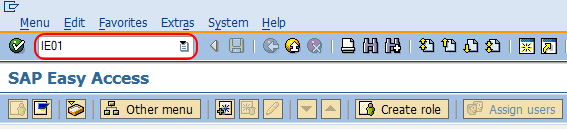
Execute transaction code IE01 in the command field from the SAP Easy Access screen.
Step 2: Enter Equipment Number, Validity Date, and Equipment Category
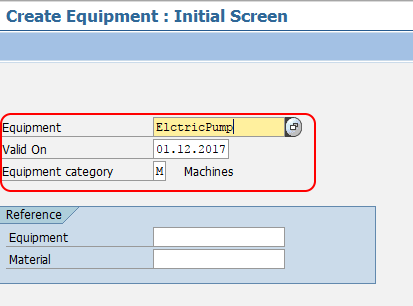
On the Create Equipment: Initial Screen, update the following details.
- Equipment: Enter the equipment number if your SAP system uses external number assignment. If the equipment category uses internal number assignment, the system generates the equipment number when you save.
- Valid on: Enter the start validity date from which the equipment master record is valid.
- Equipment Category: Enter the category to which the equipment belongs, for example M – Machine.
- Reference: Use an existing equipment number or material as a reference when the new equipment has similar master data. In many business scenarios, users create new equipment with reference to an older equipment record to reduce repeated entry.
Step 3: Maintain General Data for the SAP Equipment Record
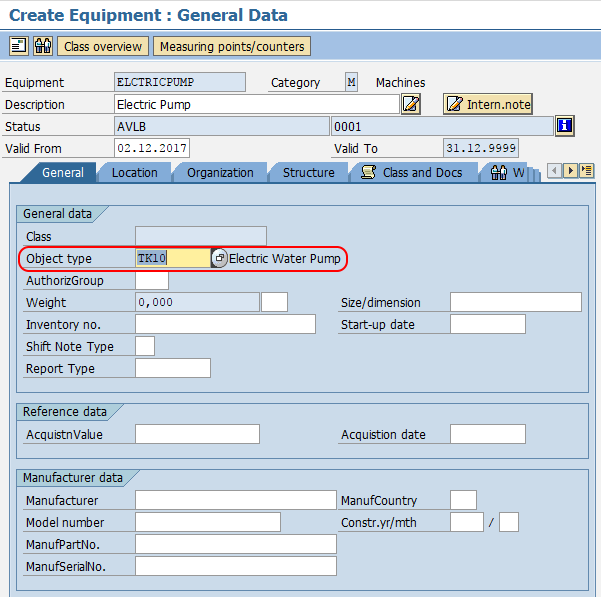
On the Create Equipment: General Data screen, maintain the technical identification details for the equipment.
- Description: Update the descriptive text of the equipment. Use a clear name that maintenance planners and technicians can identify.
- Object type: Enter the technical object type used to classify similar equipment.
- Manufacturer data: Update the required manufacturer details such as manufacturer, model number, manufacturer country, manufacturer part number, and serial number.
Step 4: Assign SAP PM Location Details for the Equipment
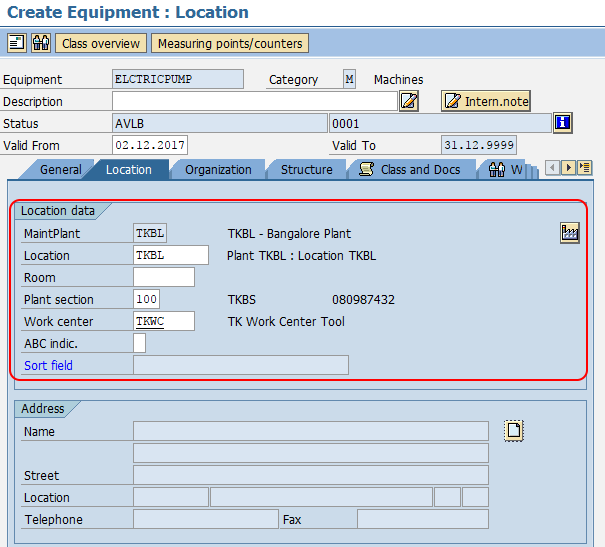
Choose the Location tab and update the required details of maintenance planning plant, Location, Plant Section, Work center, and other location fields required by your SAP PM process.
Step 5: Maintain Organization Data for Planning and Cost Assignment
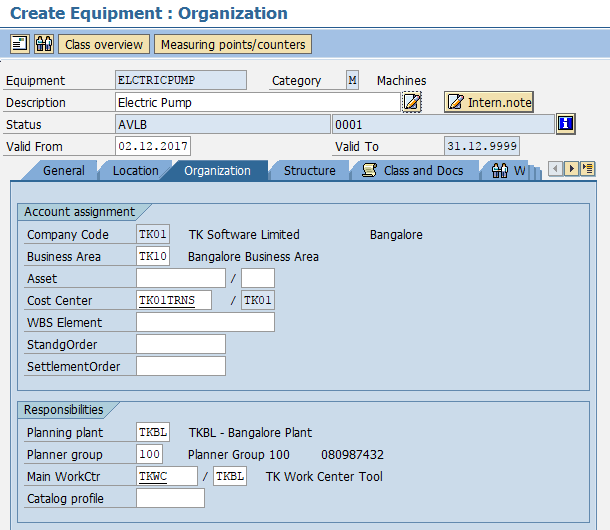
Choose the Organization tab. The company code and planning plant details are generally picked up based on the maintenance plant selection. Update the required details of Business area, Cost center, Planning group, Main work center, and other organizational fields used for maintenance processing.
Step 6: Install the Equipment in a Functional Location Structure
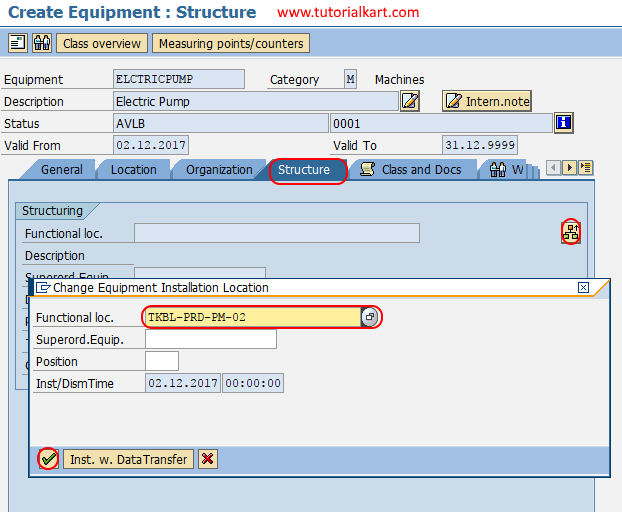
Finally, place this equipment into a technical structure. Choose the Structure tab and click the install location icon. Select the appropriate functional location key and press Enter to continue.
After maintaining the required details, choose the Save icon to save the equipment master record. The system displays the equipment number after the record is created.
Successfully, you have created equipment in SAP PM using transaction code IE01.
Using Reference Equipment While Creating Equipment in IE01
The reference option is useful when a new asset has the same or similar technical details as an existing equipment master. For example, if a plant has several identical pumps, you can create the first pump with complete details and then use it as reference for the next pump records.
After copying data from a reference equipment, review all copied fields carefully. Change the description, serial number, location, cost center, functional location, and any manufacturer-specific details that are unique to the new equipment.
SAP PM Equipment Number Range and Equipment Category Notes
The equipment category controls important behavior for the equipment master, including number assignment and field selection. If your system expects an externally assigned number, you must enter the equipment number on the IE01 initial screen. If internal number assignment is configured, SAP assigns the equipment number during save.
Number ranges and equipment categories are configuration activities. They are not created directly inside IE01. If users cannot enter an equipment number or the system does not generate one, check the equipment category and number range assignment in SAP PM customizing. SAP also provides guidance for assigning number ranges to equipment in the S/4HANA best practice content: Assign Number Ranges to Equipment.
Common Issues When Creating Equipment in SAP PM
| Issue in IE01 | Likely cause | What to check |
|---|---|---|
| Equipment number cannot be entered | The equipment category may use internal number assignment. | Save the record and let SAP generate the number, or check number range configuration. |
| Equipment number is not generated | Number range may not be assigned to the equipment category. | Check equipment category and number range settings in customizing. |
| Required fields are missing | Field selection settings or business process rules require more data. | Review required fields in General, Location, Organization, and Structure tabs. |
| Functional location cannot be assigned | The functional location may not exist, may not be valid, or may be unsuitable for the equipment structure. | Check the functional location master and validity before assignment. |
| Cost center or work center is rejected | The entered master data may be invalid for the selected plant or controlling area. | Verify cost center, work center, maintenance plant, and planning plant assignments. |
Equipment Creation in SAP PM: Quick Review
- Use IE01 to create a new SAP PM equipment master record.
- Choose the correct equipment category before entering detailed equipment data.
- Maintain general, location, organization, and structure data carefully.
- Use a reference equipment only when the new equipment has similar master data.
- Install equipment in a functional location when it must be part of a technical object hierarchy.
- Use IE02 to change an existing equipment record and IE03 to display it.
FAQs on Creating Equipment in SAP PM
What is the Tcode for equipment creation in SAP PM?
The transaction code for creating equipment in SAP PM is IE01. You can also use the SAP menu path Logistics > Plant Maintenance > Management of tech objects > Equipment > Create.
What is an equipment in SAP PM?
Equipment in SAP PM is an individual technical object that can be maintained and tracked separately. It stores details such as description, manufacturer data, location, planning responsibility, cost assignment, and installation structure.
Can equipment be created in SAP PM using a reference equipment?
Yes. In IE01, you can use reference equipment or material data to create a new equipment master more quickly. After copying reference data, update asset-specific fields such as description, serial number, location, cost center, and functional location.
How does equipment number range affect IE01 equipment creation?
The equipment number range determines whether the equipment number is entered manually or generated by SAP. If internal number assignment is configured, the system assigns the equipment number when you save the record. If external number assignment is configured, you enter the number on the initial screen.
Is an equipment task list created in transaction IE01?
No. IE01 creates the equipment master record. Equipment task lists are maintained separately in SAP PM and can be assigned or used later for planned maintenance activities.
Editorial QA Checklist for This SAP PM Equipment Tutorial
- Confirm that IE01 is clearly identified as the transaction code for equipment creation.
- Check that the article explains equipment category, number assignment, and reference equipment without mixing them with unrelated SAP PM configuration steps.
- Verify that General, Location, Organization, and Structure tabs are explained in the same order a user sees during equipment creation.
- Ensure that existing SAP PM internal links for maintenance planning plant, plant section, work center, business area, cost center, and planner group remain unchanged.
- Review FAQ answers to make sure they answer common SAP PM equipment creation questions directly.