 TutorialKart.com
How to Create Equipment Task List in SAP PM with IA01
In this SAP PM tutorial, you will learn how to create a task list for equipment in SAP using transaction code IA01. An equipment task list stores planned maintenance operations for a specific equipment master record, so the same set of inspection, cleaning, repair, or replacement activities can be reused in maintenance planning and work order processing.
Use this procedure when the maintenance steps belong to one particular equipment. If the same operations can be reused for many technical objects, create a general task list using IA05 instead and assign it where required.
IA01 Navigation for Creating an Equipment Task List in SAP PM
You can create task list in SAP by using one of the following navigation method.
| Transaction Code | IA01 |
| SAP Menu Path | Logistics > Plant Maintenance > Preventive Maintenance > Work scheduling > Task lists > For Equipment. |
Before starting IA01, keep the equipment number ready. If you need to search for the equipment first, use the equipment list transaction such as IE05 or search help from the Equipment field, depending on the access available in your SAP system.
Prerequisites Before Maintaining an SAP PM Equipment Task List
- The equipment master record should already exist and should be valid for maintenance processing.
- The planning plant, planner group, work center, and maintenance plant data should be maintained as required for the equipment.
- The required task list usage, status, system condition, work centers, control keys, and units of measure should be available in the system.
- If components are to be assigned to operations, the required material code should be available.
- If the task list will be used in preventive maintenance, confirm the required strategy, package, or maintenance plan design before assigning intervals.
Step-by-Step SAP PM IA01 Configuration for Equipment Task List
Perform the following configuration steps to create the task lists for equipment in SAP PM.
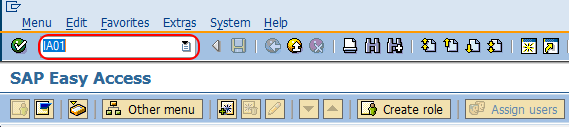
Step 1 : Execute t-code “IA01” in command field from SAP easy access screen.
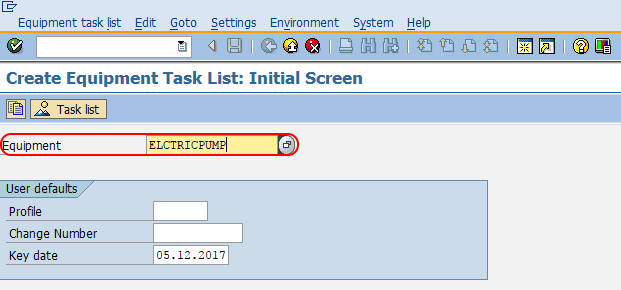
Step 2 : On create equipment task list: initial screen, enter the equipment number in the given field Equipment and press enter to continue.
Step 3: On create Equipment task list : header general view screen, update the following details.
- Usage : – Click on drop down list and choose the option 4 (Plant Maintenance).
- Status : – Choose the option released.
- System condition : – Choose the system condition from the list.
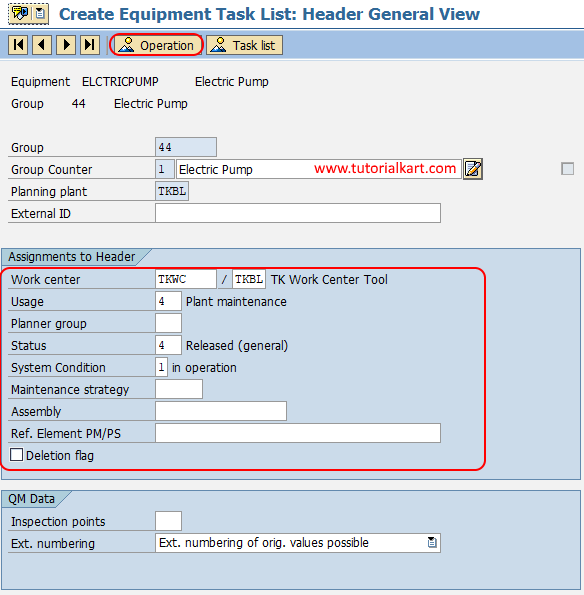
After updating all the required details in header general view, choose operation icon.
The header data controls how the equipment task list is used. For a normal plant maintenance task list, the usage is commonly Plant Maintenance and the status should allow the task list to be used in planning or order processing. System condition indicates whether the equipment can be in operation, shut down, or in another condition while the maintenance activity is performed.
Step 4 : On create equipment task list operation overview screen, you need to maintain activity or operation that need to be perform on the machine. For e.g. maintenance, cleaning, repairing, etc.
Under operation description update the operations that to be done per line and than select the operation line where the values are updated and click on interval button.
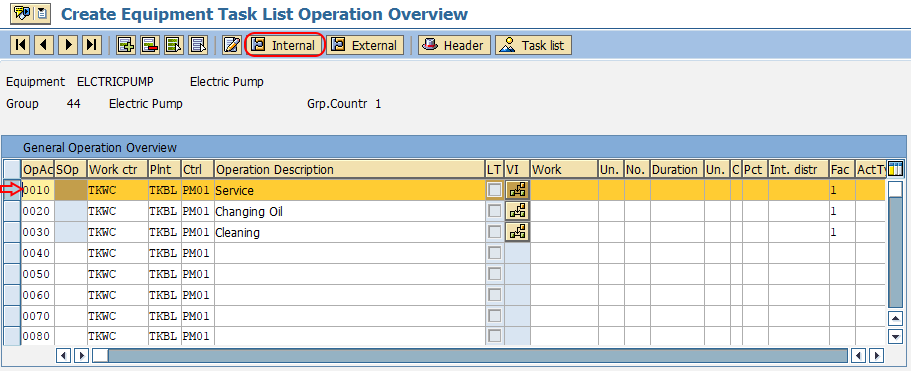
Maintain each operation in a logical sequence. For example, an equipment task list can include inspection, cleaning, lubrication, bearing check, calibration, and final test operations. Each operation should have a clear description so that the technician can understand the work without depending only on local notes.
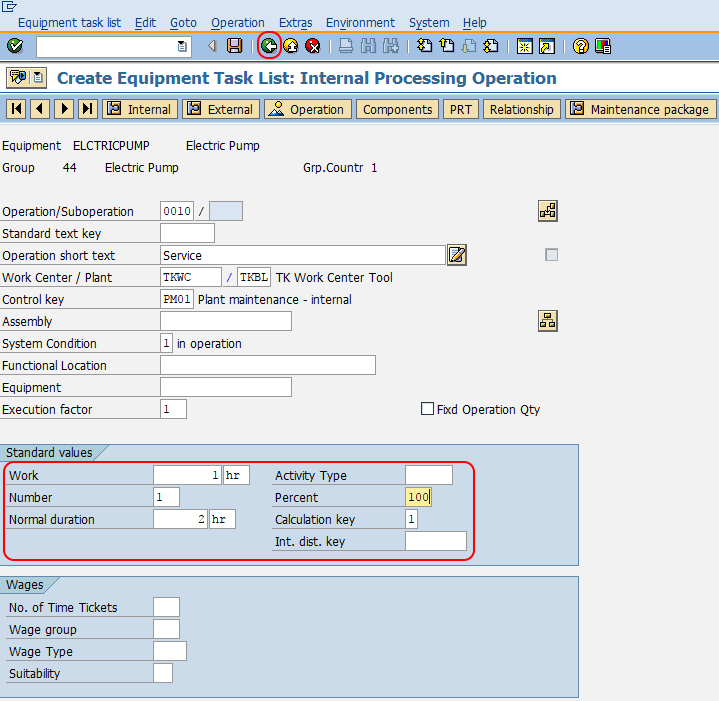
Step 5 : On create equipment task list internal processing operation screen, update the details of standard values such as work, number, Normal duration, percent, calculation key, etc.
Similarly update the internal details for other operational services.
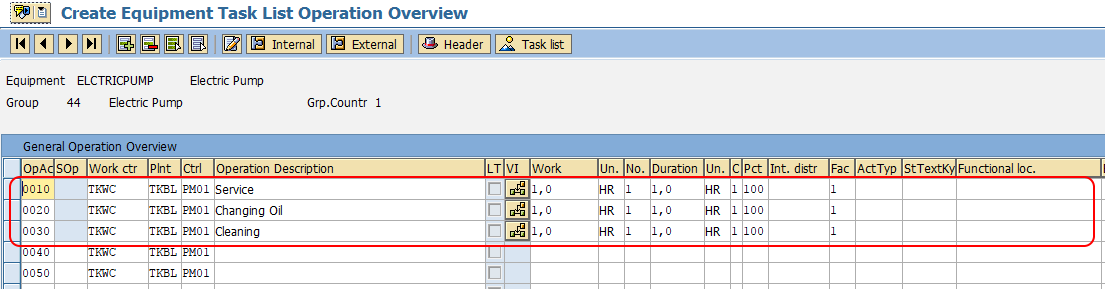
For each operation, maintain the work center, control key, work, duration, and unit values as required by your maintenance process. These values help SAP calculate capacity requirements, operation timing, and planned labor details when the task list is used later.
So during this operation any components like spare parts, oil, bearings, etc is required, for this you need to update required material. Choose the operation activity number, and click on components.
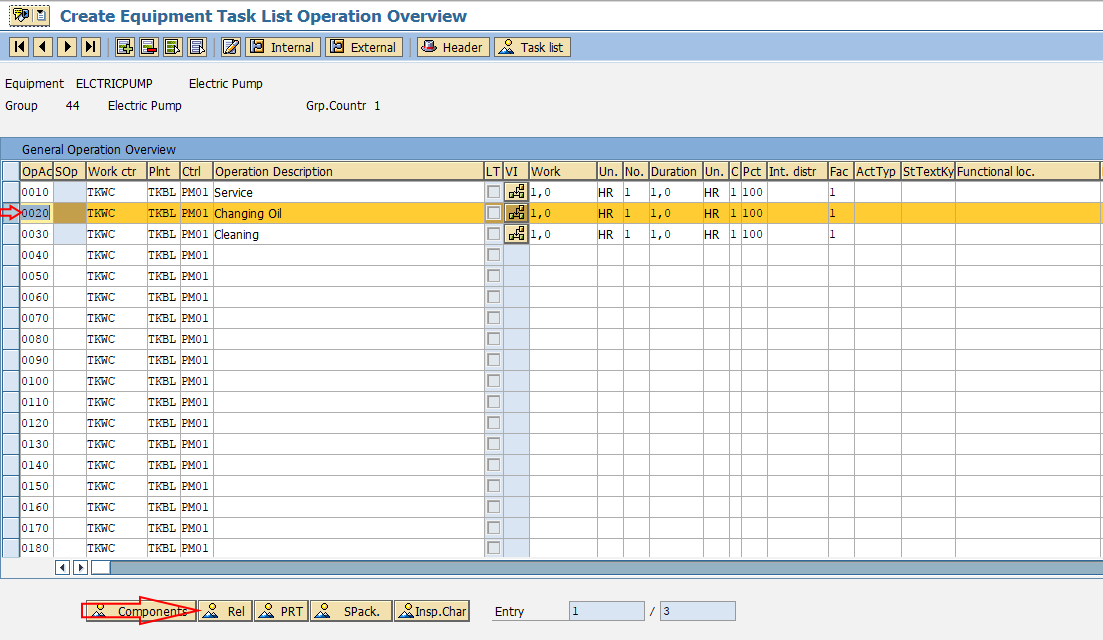
Now update the material code, quantity and units in the given fields and press back button to continue.
Click on save button and save the configured equipment task list in SAP.
Successfully we have created task list for equipment in SAP PM.
Important Fields in SAP PM Equipment Task List IA01
| Field or Area | Purpose in Equipment Task List |
|---|---|
| Equipment | Identifies the technical object for which the task list is created. |
| Group and Group Counter | Task list identification used by SAP to group and distinguish task list alternatives. |
| Usage | Defines the business usage of the task list, such as Plant Maintenance. |
| Status | Controls whether the task list can be used in maintenance processing. |
| System Condition | Shows the expected operating condition of the equipment during maintenance. |
| Operation | Defines the individual maintenance activity to be performed. |
| Work Center | Indicates the responsible maintenance work center for the operation. |
| Control Key | Controls operation processing, such as internal processing or external service handling. |
| Components | Lists spare parts or materials required for an operation. |
Equipment Task List IA01 vs General Task List IA05 in SAP PM
IA01 and IA05 are both task list transactions, but they are used for different maintenance design needs.
| Transaction | Task List Type | When to Use |
|---|---|---|
| IA01 | Equipment task list | Use when the operations are specific to one equipment master record. |
| IA05 | General task list | Use when the same operations can be reused for multiple equipment, functional locations, or maintenance scenarios. |
| IA11 | Functional location task list | Use when the operations are specific to a functional location. |
For example, a compressor with a special inspection routine can have an equipment task list in IA01. A common lubrication checklist used across many similar machines can be maintained as a general task list in IA05.
Useful SAP PM Task List Transaction Codes
| T-Code | Use in SAP PM Task List Processing |
|---|---|
| IA01 | Create equipment task list. |
| IA02 | Change equipment task list. |
| IA03 | Display equipment task list. |
| IA05 | Create general maintenance task list. |
| IA06 | Change general maintenance task list. |
| IA07 | Display general maintenance task list. |
| IE05 | Display or search equipment list, depending on authorization and selection criteria. |
Assigning Components to Operations in Equipment Task List
Components should be assigned at the operation level when a spare part or consumable is required for a specific maintenance step. This makes the task list clearer and helps the maintenance order carry the right material requirement when the task list is used.
- Assign lubricants to lubrication operations.
- Assign bearings, belts, or seals to replacement operations.
- Maintain the correct quantity and unit of measure.
- Check whether the component is stock or non-stock according to your plant process.
- Review component assignments before releasing or using the task list in a maintenance plan.
Common Errors While Creating Equipment Task List in SAP PM
While creating a task list for equipment in SAP PM, users commonly face issues because of missing master data or incomplete operation details. Check the following points before saving the task list.
- If the equipment number is not accepted, confirm that the equipment master exists and that you are using the correct plant or authorization.
- If the task list cannot be used later, check whether the status allows use in maintenance processing.
- If capacity or duration calculation is incorrect, review work center, work, duration, and calculation key values.
- If components are not copied correctly to maintenance orders, verify component assignment at the correct operation level.
- If the wrong task list type was created, decide whether the requirement is for IA01 equipment task list, IA05 general task list, or IA11 functional location task list.
QA Checklist for SAP PM Equipment Task List Article Review
- Does the tutorial clearly state that IA01 is used to create an equipment task list?
- Does the article explain when to use IA01 instead of IA05 general task list?
- Are equipment number, usage, status, system condition, operations, standard values, and components covered?
- Are the existing SAP screen images placed near the matching steps?
- Does the procedure mention that components are assigned at operation level when spare parts are required?
- Does the article include useful related T-codes such as IA02, IA03, IA05, and IE05?
FAQs on Creating Equipment Task List in SAP PM
What is the T-code to create an equipment task list in SAP PM?
The T-code to create an equipment task list in SAP PM is IA01. You enter the equipment number, maintain header data, add operations, maintain standard values, assign components if required, and save the task list.
What is the difference between IA01 and IA05 in SAP PM?
IA01 is used to create an equipment task list for a specific equipment. IA05 is used to create a general maintenance task list that can be reused for multiple maintenance objects or scenarios.
How do I find the equipment list before creating a task list?
You can use equipment search help from the Equipment field or use an equipment list transaction such as IE05, based on your SAP system setup and authorization. After identifying the correct equipment number, use it in IA01.
Can components be assigned in an SAP PM equipment task list?
Yes. Components such as spare parts, oil, bearings, belts, or other consumables can be assigned to specific operations in the equipment task list. Maintain the material code, quantity, and unit of measure carefully.
Can an equipment task list be changed after saving?
Yes. You can change an equipment task list using transaction IA02, if you have the required authorization. Use IA03 when you only need to display the existing equipment task list.
Summary of SAP PM Equipment Task List Creation
To create a task list for equipment in SAP PM, use transaction IA01, enter the equipment number, maintain header data, add maintenance operations, enter standard values, assign components where required, and save the task list. Use IA01 for equipment-specific maintenance instructions, and use IA05 when the same operations should be maintained as a reusable general maintenance task list.