 TutorialKart.com
Assign Sales Office to Sales Area in SAP is an SAP SD enterprise structure assignment where a Sales Office is linked to a valid Sales Area. A Sales Area is the combination of Sales Organization, Distribution Channel, and Division. After this assignment is saved, the Sales Office can be used consistently in customer master data, sales documents, reporting, and responsibility-based sales processing for that Sales Area.
In this tutorial, you will learn the SPRO path, required fields, step-by-step configuration screens, related SAP tables such as TVKBZ, and the checks to perform after saving the assignment.
Sales Area and Sales Office Relationship in SAP SD
A Sales Office represents a regional office, branch, territory office, or business-facing sales unit. It is not assigned directly to a company code. In SAP SD, the usual organizational flow is:
- Sales Organization is assigned to a company code.
- Distribution Channel and Division are combined with the Sales Organization to form a Sales Area.
- Sales Office is assigned to the Sales Area.
- Sales Group, if used, is assigned to the Sales Office.
This assignment is useful when the same Sales Organization handles different distribution channels or divisions but needs separate sales office responsibility, analysis, or default values for each Sales Area.
| SAP SD unit | Meaning in this configuration | Example use |
|---|---|---|
| Sales Organization | Main selling legal or business unit | Domestic sales organization |
| Distribution Channel | How products or services reach customers | Wholesale, retail, online |
| Division | Product or service line | Electronics, services, chemicals |
| Sales Office | Regional or branch-level sales responsibility | South region office, city branch |
Prerequisites Before Assigning Sales Office to Sales Area in SAP
Before you create the assignment, check that the required enterprise structure objects already exist. Missing prerequisite settings are a common reason why values do not appear in the assignment screen.
- The Sales Organization is defined.
- The Distribution Channel is defined and assigned to the Sales Organization.
- The Division is defined and assigned to the Sales Organization.
- The valid Sales Area combination has been set up.
- The Sales Office is defined in SAP SD enterprise structure.
- You have authorization to change customizing and save the entry in a Customizing Request.
If your project uses Sales Groups, complete the Sales Office assignment first and then assign the Sales Group to the Sales Office in the next configuration activity.
SPRO Path to Assign Sales Office to Sales Area in SAP SD
You can maintain this assignment from SAP Customizing using the following navigation path:
- Transaction Code:
SPRO - Menu Path:
SPRO > SAP Customizing Implementation Guide > Enterprise Structure > Assignment > Sales & Distribution > Assign Sales Office to Sales Area
In some SAP systems, the same maintenance activity may also be available through a direct transaction such as OVXM or OVXMN. If the direct transaction is not available in your system, use the SPRO path because it is the standard navigation method for this configuration.
Step-by-Step Configuration to Assign Sales Office to Sales Area
Step 1: Open SAP Customizing with SPRO
- Log in to SAP.
- In the Command Field, enter
SPROand press Enter. This opens the SAP Customizing entry point.
Step 2: Open SAP Reference IMG for Enterprise Structure Settings
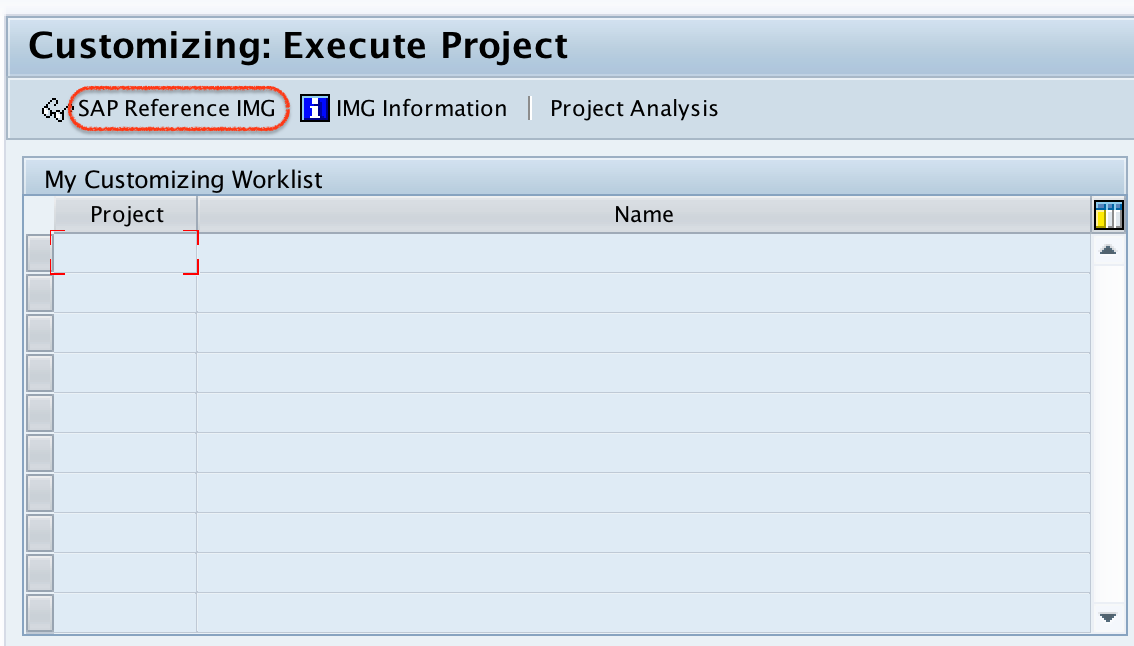
- On the Execute Project screen, double-click SAP Reference IMG. This opens the full customizing tree where enterprise structure assignments are maintained.
Step 3: Navigate to Assign Sales Office to Sales Area
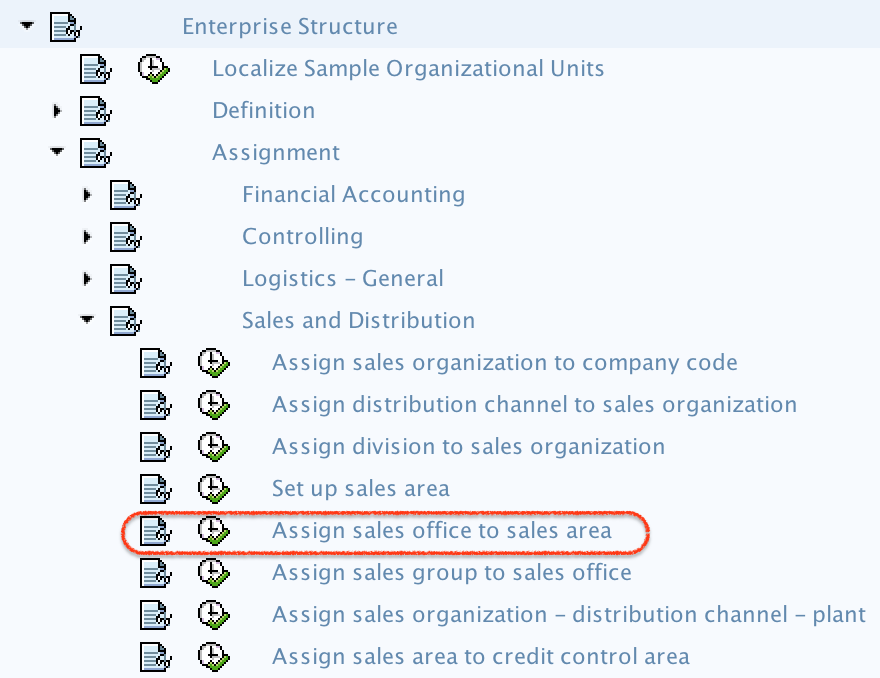
- Follow this path:
Enterprise Structure > Assignment > Sales & Distribution > Assign Sales Office to Sales Area. - Double-click Assign Sales Office to Sales Area to open the assignment maintenance screen.
Step 4: Create a New Sales Office and Sales Area Assignment
- On the Change View: Assignments Sales Office – Sales Area Overview screen, choose New Entries.

Use New Entries when you are creating a fresh assignment. If you need to review or correct an existing record, search for the Sales Organization, Distribution Channel, Division, and Sales Office combination in the overview list instead of creating a duplicate entry.
Step 5: Enter Sales Organization, Distribution Channel, Division, and Sales Office
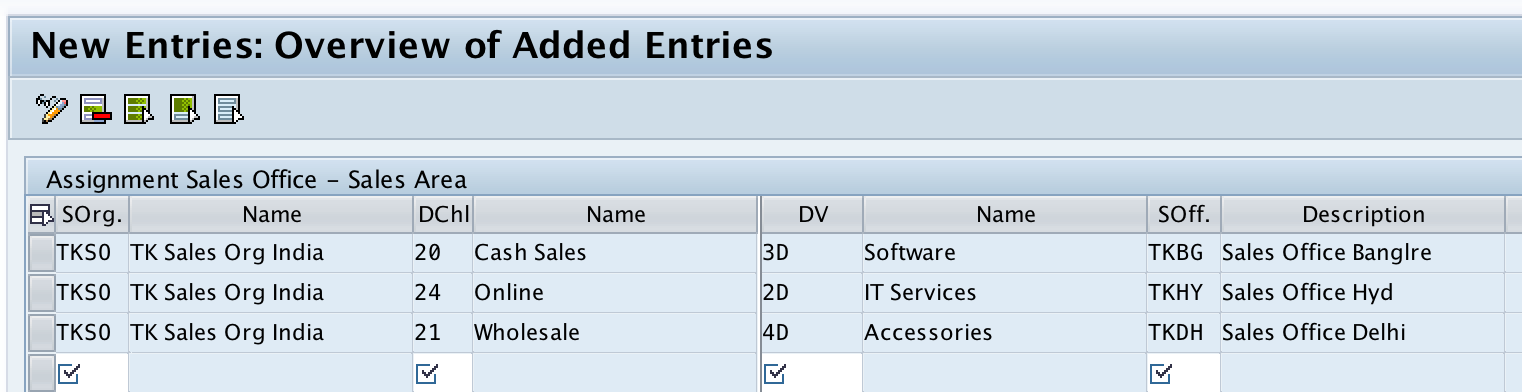
- On the New Entries screen, enter the required organizational values:
- SOrg (Sales Organization): Enter the Sales Organization key.
- Dchl (Distribution Channel): Enter the Distribution Channel key.
- Dv (Division): Enter the Division key.
- SOff (Sales Office): Enter the Sales Office key.
| Field on screen | What to enter | Configuration meaning |
|---|---|---|
| SOrg | Sales Organization key | Identifies the selling organization in the Sales Area |
| Dchl | Distribution Channel key | Identifies the route or channel used for selling |
| Dv | Division key | Identifies the product or service division |
| SOff | Sales Office key | Assigns the office or branch to that Sales Area |
Use the F4 help on each field if you are not sure about the available keys. The Sales Organization, Distribution Channel, and Division should form a valid Sales Area before the Sales Office is assigned.
Step 6: Save the Sales Office Assignment in a Customizing Request
- After entering the assignment details, choose Save.
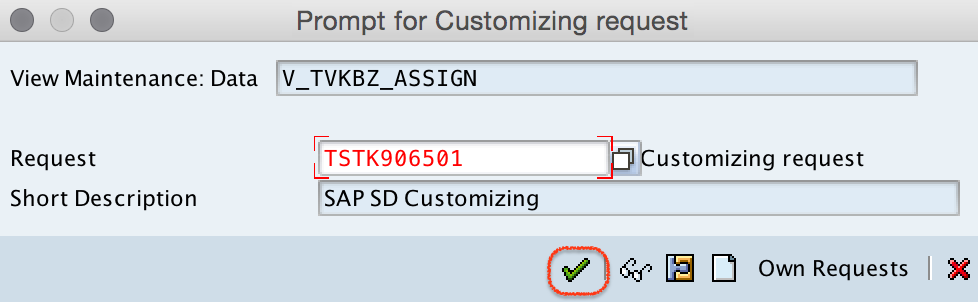
- When SAP asks for a Customizing Request, select the correct transport request and confirm the save.
The entry is now part of the SAP customizing configuration. In a development-to-quality-to-production landscape, the transport request is normally moved through the system landscape according to your project process.
How to Verify Sales Office to Sales Area Assignment in SAP
After saving the entry, verify that the assignment exists and can be used in downstream SD processes.
- Return to the Assignments Sales Office – Sales Area Overview screen and search for the same Sales Organization, Distribution Channel, Division, and Sales Office combination.
- Check table TVKBZ in display mode if your role permits table display. This table stores the Sales Office assignment to the organizational unit combination used for the Sales Area.
- Test with customer master or sales document processing only after confirming that the related Sales Area and Sales Office master configuration is complete.
If the Sales Office does not appear during customer or document maintenance, first check whether the correct Sales Area has been selected. Then check whether the Sales Office was assigned to that exact Sales Organization, Distribution Channel, and Division combination.
SAP Tables Related to Sales Office and Sales Area Assignment
The following SAP tables are commonly checked when reviewing Sales Office and Sales Area configuration. Use them carefully in display mode unless you are working through an approved customizing activity.
| SAP table | Purpose in SD enterprise structure | How it helps in this topic |
|---|---|---|
| TVKBZ | Sales Office assignment to organizational unit | Main table to check Sales Office to Sales Area assignment |
| TVBUR | Sales Office master/customizing data | Confirms that the Sales Office exists |
| TVKO | Sales Organization customizing data | Confirms Sales Organization setup; it is not the Sales Office assignment table |
| TVTA | Sales Area combinations | Helps verify valid Sales Organization, Distribution Channel, and Division combinations |
| TVBVK | Sales Group assignment to Sales Office | Useful after Sales Office assignment when Sales Groups are also configured |
A frequent confusion is between TVKO and TVKBZ. TVKO is related to Sales Organization configuration, while TVKBZ is the table you normally check for the Sales Office assignment to the Sales Area combination.
Common Issues When Sales Office Assignment Does Not Work
| Issue | Likely cause | What to check |
|---|---|---|
| Sales Office value is not accepted | Sales Office is not defined or wrong key is entered | Check Sales Office definition before assignment |
| Sales Office is missing for a Sales Area | Assignment was created for a different Distribution Channel or Division | Compare SOrg, Dchl, Dv, and SOff values exactly |
| Duplicate-looking assignment appears | Same Sales Office is assigned to multiple Sales Areas | Confirm whether the business process requires multiple assignments |
| Sales Group configuration fails later | Sales Office setup is incomplete | Complete Sales Office assignment before assigning Sales Group |
| Entry saved in development but not available in another system | Transport request is not moved or imported | Check the customizing request status with the SAP Basis or transport team |
Sales Office to Sales Area Configuration Checklist
Use this checklist before closing the configuration task or moving the customizing request to another SAP system.
- The Sales Organization, Distribution Channel, and Division form the correct Sales Area.
- The Sales Office key exists and matches the business naming convention used in the project.
- The Sales Office is assigned to every required Sales Area, not only to one default combination.
- No unnecessary duplicate assignments were created for unused Sales Areas.
- The entry is saved in the correct Customizing Request.
- The assignment is visible on the overview screen or in table TVKBZ display.
FAQs on Assigning Sales Office to Sales Area in SAP
Where do we assign a Sales Office in Sales and Distribution?
You assign a Sales Office under SPRO > SAP Customizing Implementation Guide > Enterprise Structure > Assignment > Sales & Distribution > Assign Sales Office to Sales Area. This links the Sales Office to a Sales Organization, Distribution Channel, and Division combination.
Which SAP table stores Sales Office to Sales Area assignment?
The main table used to check this assignment is TVKBZ. It stores the Sales Office assignment against the organizational unit combination used for the Sales Area.
What is the TVKO table in SAP SD?
TVKO is related to Sales Organization customizing data. It helps when checking Sales Organization setup, but it is not the main table for the Sales Office to Sales Area assignment. For this assignment, check TVKBZ.
Can one Sales Office be assigned to multiple Sales Areas?
Yes. A Sales Office can be assigned to more than one Sales Area when the business needs the same office to support different distribution channels, divisions, or sales organizations. Each required combination must be maintained separately.
What should I check if the Sales Office is not available in customer or sales document processing?
Check whether the selected Sales Area is exactly the same combination for which the Sales Office was assigned. Also confirm that the Sales Office is defined, the Sales Area is valid, and the customizing request has been moved to the system where you are testing.
Summary of Assign Sales Office to Sales Area in SAP
Assigning a Sales Office to a Sales Area connects the office or branch-level sales responsibility with a specific Sales Organization, Distribution Channel, and Division. The configuration is maintained from the SAP SD enterprise structure assignment path in SPRO and can be verified on the overview screen or through table TVKBZ.
For related SAP SD enterprise structure configuration, refer to these tutorials: