 TutorialKart.com
How to Define Risk Categories in SAP Credit Management
In this SAP FICO tutorial, you will learn what a risk category is in SAP Credit Management and how to define risk categories step by step by using transaction code OB01. Risk categories are used in classic credit management to group customers by credit risk, such as low risk, medium risk, and high risk, so that credit checks and blocking rules can be applied consistently.
This configuration is normally used with a credit control area. After defining the risk category, you can assign it in customer credit master data and use it in automatic credit control settings. The exact checks depend on the credit management design configured for your SAP system.
What Is Risk Category in SAP Credit Management?
A risk category in SAP is a three-character key assigned to a customer for a specific credit control area. It classifies the customer’s credit risk and helps the system decide how strictly credit exposure should be checked during business transactions.
For example, a customer with regular payments and low overdue exposure may be assigned a low-risk category. A customer with delayed payments or higher exposure may be assigned a medium-risk or high-risk category. When credit checks are configured accordingly, the system can warn users, block sales documents, or stop further processing until the receivable or credit issue is reviewed.
How Risk Category Works with Credit Control Area
Risk category is not maintained as an isolated value. It is created against a credit control area, so the same customer can be evaluated under the credit control structure used by the company code or sales area. In classic SAP credit management, the risk category is commonly used together with credit control area, credit limit, credit exposure, and automatic credit control rules.
- Credit control area defines the organizational area for credit management.
- Risk category groups customers by credit risk level inside that credit control area.
- Customer credit master data stores the assigned risk category for the customer.
- Automatic credit control can use the risk category to determine the type of credit check and document blocking behavior.
Sample SAP Risk Categories for OB01 Configuration
The following values are examples only. Replace the credit control area and risk category descriptions with the values approved for your project.
| Risk Category | Credit Control Area | Name | Typical Use |
|---|---|---|---|
| T01 | 1000 | Low Risk | Customers with stable payment history and lower credit concern |
| T02 | 1000 | Medium Risk | Customers that need closer monitoring during credit checks |
| T03 | 1000 | High Risk | Customers that may require stricter checking or blocking rules |
Navigation Path to Define Risk Categories in SAP
You can define risk categories in SAP by using either the direct transaction code or the SAP IMG menu path.
| SAP R/3 Role Menu | Define risk categories |
| Transaction Code | OB01 |
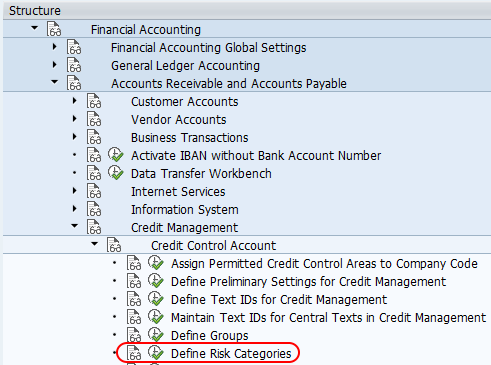
| SAP IMG Path | SPRO (Tcode) > Implementation Guide for R/3 Customizing => Financial Accounting => Accounts Receivable & Accounts Payable => Credit Management => Credit Control Accounting => Define Risk Categories |
Note: This OB01 procedure applies to classic SAP credit management configuration. In SAP S/4HANA projects that use SAP Credit Management, the configuration approach and menu names may differ based on the activated credit management scope.
Steps to Define Risk Categories in SAP Using OB01
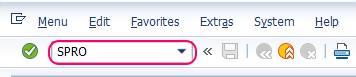
Step 1: Execute transaction code SPRO from the SAP command field.
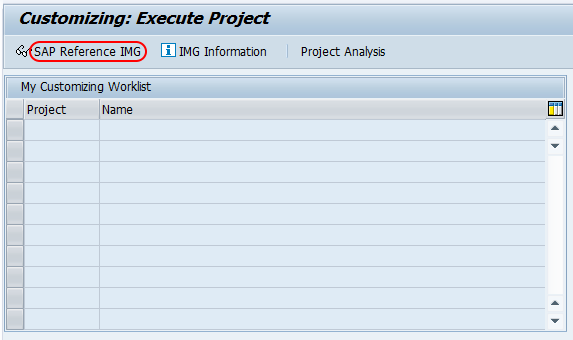
Step 2: Choose SAP Reference IMG to open the customizing menu.
Step 3: Follow the IMG path for credit management and click the IMG activity Define Risk Categories.
Step 4: On the Change View “Credit Management: Risk Categories”: Overview screen, click New Entries to create the required risk category records for the client.

Step 5: On the new entries screen for credit management risk categories, update the required fields.
- Risk Category: Enter a three-character key that identifies the risk category in SAP, for example T01, T02, or T03.
- CCAr: Enter the credit control area key. This links the risk category to the credit control area.
- Name: Enter a clear description of the risk category, such as Low Risk, Medium Risk, or High Risk.
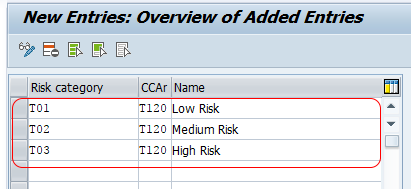
Step 6: Click Save or press Ctrl + S. If prompted, assign the change to a customizing transport request so that it can be moved to the required SAP landscape.
After saving, the risk categories are available for use in classic SAP credit management configuration and customer credit master data.
Where the SAP Risk Category Is Used After OB01 Setup
Defining risk categories in OB01 only creates the category keys. To make them useful in credit management, the categories must be used in related credit processes.
- Customer credit master data: Assign the appropriate risk category to the customer for the relevant credit control area.
- Automatic credit control: Maintain credit check rules so that different risk categories can be checked with different controls.
- Sales order processing: Depending on credit control settings, the system may allow, warn, or block processing when the customer exceeds the permitted credit condition.
- Credit review process: Credit teams can use the risk category as one input when reviewing payment behavior, exposure, and overdue items.
Common Mistakes While Defining Risk Categories in SAP
- Creating only the OB01 entry and stopping there: OB01 defines the key, but credit checks require additional master data and credit control configuration.
- Using unclear descriptions: Names such as “Category 1” and “Category 2” make maintenance difficult. Use descriptions that business users can understand.
- Maintaining the wrong credit control area: The risk category must be created for the credit control area used by the customer credit process.
- Assigning every customer to the same category: If all customers are assigned the same risk category, credit control rules cannot distinguish between lower-risk and higher-risk customers.
- Not testing sales document behavior: Always test with sample customers to confirm that warning, blocking, and release behavior matches the approved design.
Example Business Design for Low, Medium, and High Risk Customers
A simple project design may use three SAP risk categories. This is not a mandatory structure, but it is easy to understand and maintain for many implementations.
| Risk Category | Business Meaning | Possible Credit Control Approach |
|---|---|---|
| Low Risk | Customer generally pays on time and has limited overdue exposure | Standard credit check with normal monitoring |
| Medium Risk | Customer needs closer review because of payment delays or higher exposure | Stricter check or warning based on credit exposure |
| High Risk | Customer has higher credit concern or repeated overdue items | Strict check, block, or manual release based on company policy |
The actual behavior is controlled by your credit management configuration. The risk category itself does not automatically block a customer unless the related credit check rules are configured to do so.
FAQ on SAP Risk Categories and OB01
How do you define a risk category in SAP?
You define a risk category in SAP by using transaction code OB01 or by following the IMG path under Financial Accounting, Accounts Receivable and Accounts Payable, Credit Management, Credit Control Accounting, and Define Risk Categories. Enter the risk category key, credit control area, and description, then save the entry.
What is the purpose of risk category in SAP credit management?
The purpose of a risk category is to classify customers by credit risk within a credit control area. It helps the credit management configuration apply suitable credit checks for low-risk, medium-risk, or high-risk customers.
Is OB01 enough to block high-risk customers in SAP?
No. OB01 only defines the risk category values. Blocking behavior depends on customer credit master data and automatic credit control configuration. A high-risk category must be used in the relevant credit check rules before it can affect sales document processing.
Can one credit control area have multiple SAP risk categories?
Yes. A credit control area can have multiple risk categories, such as low risk, medium risk, and high risk. This allows different groups of customers to be handled with different credit control rules.
Can the same customer have different risk categories in SAP?
A customer’s risk category is maintained in relation to credit management data. The assignment depends on the credit control area and the design used in the SAP system. In projects with more than one credit control area, the customer’s credit setup should be reviewed for each relevant area.
Editorial QA Checklist for SAP Risk Category OB01 Configuration
- Confirm that the tutorial states OB01 is for defining risk category keys in classic SAP credit management.
- Check that every sample risk category includes a credit control area and a clear business description.
- Verify that the article does not imply OB01 alone blocks customers; blocking depends on the related credit control configuration.
- Confirm that the existing SAP screenshots, image URLs, and internal links remain unchanged.
- Review the steps in SAP GUI to ensure the SPRO path, New Entries action, required fields, and Save action are covered.
Successfully, we have defined risk categories in SAP using transaction code OB01.