 TutorialKart.com
Learn what is credit group in SAP SD and how to define credit groups step by step using transaction code OVA6. A credit group is used in SD credit management to decide which document processing stage is relevant for a credit check, such as sales order, delivery, or goods issue.
What is credit group in SAP?
Credit group determines which transaction are to be blocked for processing if the credit limits are exceeded. Credit groups are used to group various business documents like sales order, quotations, deliveries, and goods issue documents. The credit limit check is processed on the basis of data available in these documents and helps in determining whether the document can continue in the sales and distribution process.
In practical SAP SD configuration, the credit group is not the customer credit limit itself. It is a control key that identifies the document stage where the credit check is relevant. The customer credit limit and exposure data are maintained separately, while the credit group helps the system apply the check during document processing.
Where credit groups fit in SAP SD credit management
In a typical order-to-cash process, a customer may place an order, receive delivery, and then receive goods through post goods issue. SAP can perform a credit check at one or more of these stages depending on configuration. Credit groups are used to classify these stages so the credit control settings can be assigned correctly.
- Sales order stage: checks whether the order value can be accepted for the customer.
- Delivery stage: checks whether delivery processing should continue.
- Goods issue stage: checks whether goods issue can be posted when credit exposure is relevant.
The exact credit management behavior depends on the company code, credit control area, risk category, document type, and credit check configuration used in the SAP system. In newer SAP S/4HANA projects, Advanced Credit Management may be used instead of classic SD credit management, so confirm the project scope before changing configuration in a live system.
Configuration values
We are going to define the following credit groups in SAP
| CG | Document credit grp | Typical use in SAP SD |
| T1 | Credit group for Sales order | Used when the sales order is checked for credit exposure. |
| T2 | Credit group for delivery | Used when delivery processing is checked for credit exposure. |
| T3 | Credit group for goods issue | Used when post goods issue is checked before stock leaves the business process. |
How to define credit groups in SAP SD using OVA6
You can define or create credit groups in SAP using one of the following navigation method.
Navigation
| SAP R/3 Role Menu | Create credit groups |
| Transaction code | OVA6 |
| SAP IMG Path | SPRO => IMG => Sales and distribution => Basic functions => Credit management and risk management => Credit management => Define credit groups |
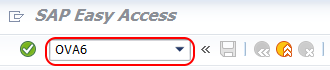
Step 1 : – Execute Tcode “OVA6”
Step 2 : – On change view “Credit groups transaction types overview screen, choose new entries button for defining new credit groups in SAP as per the requirements of client and project.

From credit group new entries screen, update the following details.
- CG : –Update the two digits key that defines as credit group in SAP
- Document credit group : – Update the descriptive text of credit group key that displays in SAP system.
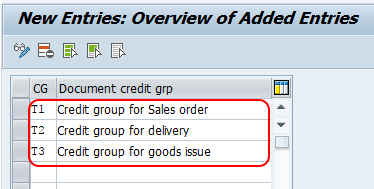
After creation of all required credit groups, choose save button for saving the details. Now the system prompts for the customizing request, choose customizing request ans save the configured details in SAP system.
Field details for SAP credit group configuration in OVA6
The credit group maintenance screen is simple, but the values should be chosen carefully because they may be assigned later in credit management configuration. Keep the key short, meaningful, and aligned with the client naming convention.
| Field | What to enter | Configuration note |
|---|---|---|
| CG | Two-character credit group key. | Use a stable key because changing it later may affect dependent configuration. |
| Document credit group | Description of the credit group. | Write a clear description such as Sales order, Delivery, or Goods issue. |
| Customizing request | Transport request selected during save. | Use the correct project transport so the setting can move from development to quality and production. |
How credit group is used after defining it in SAP SD
After a credit group is created in OVA6, it must be used in the relevant credit management settings. Defining the credit group alone does not automatically block a sales order, delivery, or goods issue. The system performs credit checks only when the related SD credit management configuration is maintained.
- Assign credit control settings according to the customer and sales area process.
- Maintain credit limit and risk-related data as required by the credit management design.
- Use the correct credit group for the document stage where the business wants the credit check.
- Test the process with sample sales orders and deliveries before moving the transport to production.
For SAP reference material, you can review SAP Help documentation on credit management and SAP Learning content for advanced credit management configuration.
FD32, VKM3, and VKM5 transaction codes related to SAP credit groups
Credit groups are often discussed together with SAP credit management transaction codes. The following table explains commonly searched transactions at a high level.
| Transaction code | Use in credit management | Important note |
|---|---|---|
| OVA6 | Define credit groups. | This is the configuration transaction covered in this tutorial. |
| FD32 | Change customer credit management data in classic credit management. | Availability and usage depend on the SAP version and credit management scope. |
| VKM3 | Review and release sales documents blocked for credit, depending on configuration. | Used by authorized users for credit block processing. |
| VKM5 | Review credit-related document lists for release or analysis, depending on system setup. | Menu text and exact behavior can vary by SAP release and configuration. |
These transaction codes should be tested in the project client because authorization, menu paths, and credit management design can differ between SAP ECC, SAP S/4HANA compatibility scenarios, and SAP S/4HANA Advanced Credit Management.
Common SAP credit group configuration mistakes
- Creating a credit group but not assigning it: OVA6 only defines the key. Dependent credit check settings must also be configured.
- Using unclear descriptions: descriptions such as “Test group” make support and transport review difficult.
- Changing keys after dependent configuration exists: this may create confusion during testing and transport comparison.
- Mixing classic and advanced credit management assumptions: confirm whether the project uses classic SD credit management or SAP S/4HANA Advanced Credit Management.
- Skipping end-to-end testing: test sales order, delivery, and goods issue scenarios with realistic customer credit exposure.
SAP credit group FAQ
What is the credit group in SAP?
A credit group in SAP SD is a configuration key used to identify the document processing stage where credit checking is relevant. Common examples are credit groups for sales order, delivery, and goods issue.
What are credit groups used for in SAP SD?
Credit groups are used to group business document stages for credit management control. They help the system determine whether credit checking should apply when a sales order, delivery, or goods issue is processed.
What is the transaction code to define credit groups in SAP?
The transaction code to define credit groups in SAP SD is OVA6. You can also reach the setting through SPRO under Sales and Distribution, Basic Functions, Credit Management and Risk Management, Credit Management, Define Credit Groups.
What is FD32 tcode in SAP credit management?
FD32 is used in classic SAP credit management to change customer credit management data, such as credit limit-related information. In SAP S/4HANA projects, check whether classic credit management or Advanced Credit Management is being used before relying on FD32.
What is VKM3 transaction in SAP?
VKM3 is commonly used to display and process sales documents blocked for credit, depending on system configuration and user authorization. The exact list and release behavior should be verified in the project system.
Editorial QA checklist for SAP credit group tutorial
- Verify that transaction code OVA6 is shown as the configuration transaction for defining credit groups.
- Confirm that the IMG path matches the SAP system version used for screenshots and training.
- Check that the tutorial does not confuse credit group with customer credit limit master data.
- Review whether the project uses classic SD credit management or SAP S/4HANA Advanced Credit Management before applying the steps.
- Ensure the configured credit groups are tested in sales order, delivery, and goods issue scenarios before production transport.
Conclusion on defining credit groups in SAP SD
Credit groups in SAP SD help control where credit checks are applied in the order-to-cash process. Using transaction code OVA6, you can define credit group keys and descriptions for document stages such as sales order, delivery, and goods issue. After saving the entries in a customizing request, complete the related credit management configuration and test the credit check process end to end.