 TutorialKart.com
In SAP classic credit management, you can maintain credit limit for customers with transaction code FD32. The credit limit is maintained for a customer within a credit control area, along with related credit master data such as risk category, review dates, payment history view, total limit and individual limit.
This tutorial explains how to set or change the customer credit limit in SAP using FD32. The steps apply to SAP ECC and SAP R/3 classic SD credit management. In SAP S/4HANA systems using FSCM Credit Management, the same business requirement may be handled through Business Partner credit segment data, SAP Credit Management apps, or UKM transactions depending on the system configuration.
Maintain credit limit for customers in SAP using FD32
In this activity, you specify the customer for whom the credit limit is to be maintained and enter the credit control area of the customer. SAP uses this credit master data during credit checks, based on the credit management settings configured for the sales and distribution process.
FD32 navigation for customer credit management in SAP
| SAP R/3 Role Menu | Master data for customer credit management |
| Transaction Code | FD32 |
| SAP Path | SAP Menu => Logistics => Sales and Distribution => Credit Management => Master Data => FD32 – Change. |
What you need before setting a customer credit limit in SAP
Before you maintain a credit limit for a customer, check the following master data and configuration points. These checks help avoid common errors where FD32 opens but the customer, credit control area or risk category cannot be maintained as expected.
- The customer master record should already exist.
- The relevant credit control area should be defined and assigned in your SAP configuration.
- The customer should be relevant for credit management in the company code or sales area process used by your organization.
- The currency, risk category and review interval policy should be known before you enter the values.
- You should have authorization to change customer credit management master data.
Set credit limit for customer in SAP – configuration steps
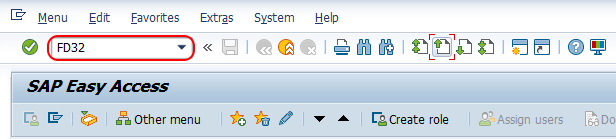
Step 1 : – Execute Tcode “FD32” from SAP easy access screen.
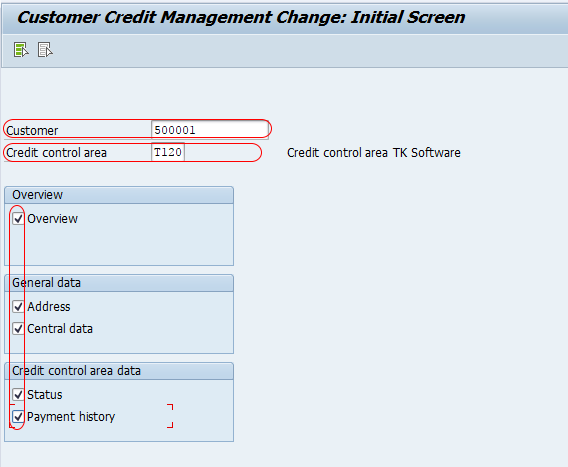
Step 2 : – On the customer credit management change initial screen, enter the required details such as customer number and credit control area. Select the required views such as address, central data, status and payment history.
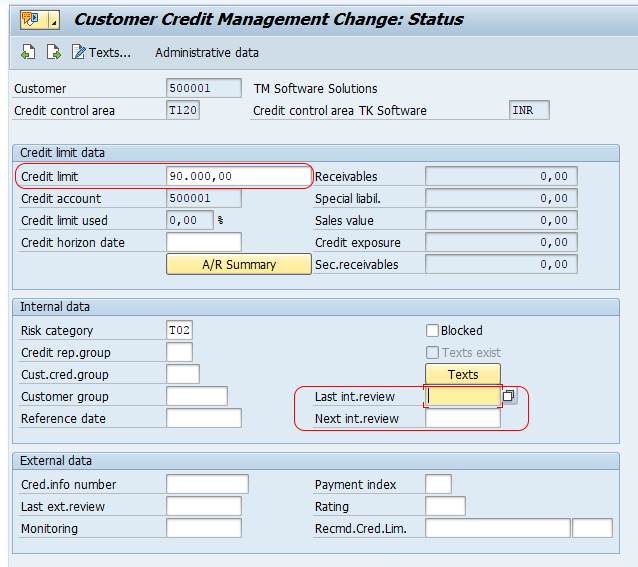
Step 3 : – Choose next screen option (Shift+F1) to go to the customer credit management status screen. On the customer credit management change status screen, update the following details.
- Credit Limit : – Specify the maximum credit amount allowed for the customer in the selected credit control area.
- Risk Category : – Specify the risk category of the customer.
- Last interval review : – Specify the date on which the customer credit limit was last reviewed.
- Next Interval review : – Specify the date on which the customer credit limit should be reviewed again.
The credit limit amount should match the business-approved exposure allowed for that customer in the selected credit control area. The risk category is not the credit limit itself; it classifies the customer for credit control rules, checks and reporting. Review dates help the credit team track when the credit limit was last checked and when it should be reviewed again.
Check payment history while maintaining SAP customer credit limit
Payment history : –
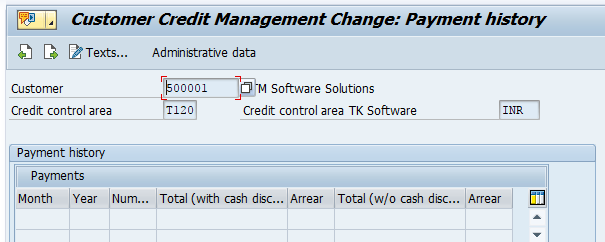
On customer credit management : payment history screen, the system displays the payment history of customer. You can check all the payment history details in this screen. However we have not done any payment with this customers, so system displays as blank payment details.
Payment history is useful when deciding whether the credit limit entered in FD32 is reasonable. If the customer has no cleared payments or no relevant accounting history in the selected environment, this section may remain blank. A blank payment history screen does not always mean that the FD32 credit limit entry is incorrect; it may simply mean that no payment data is available for that customer in the system.
Maintain central data for total and individual credit limits in SAP
Central Data
From the menu > Goto => Generaldata => Central data.
- Total Amount : – Enter the amount that specifies the overall credit limit the customer may receive in all credit control areas.
- Individual Limit: – Enter the amount that specifies the maximum credit limit the customer may receive within a credit control area.
The total amount is used as an overall ceiling for the customer across credit control areas. The individual limit restricts the amount that can be maintained within a single credit control area. In many implementations, these two values are reviewed together so that the customer’s total exposure does not exceed the approved overall limit.
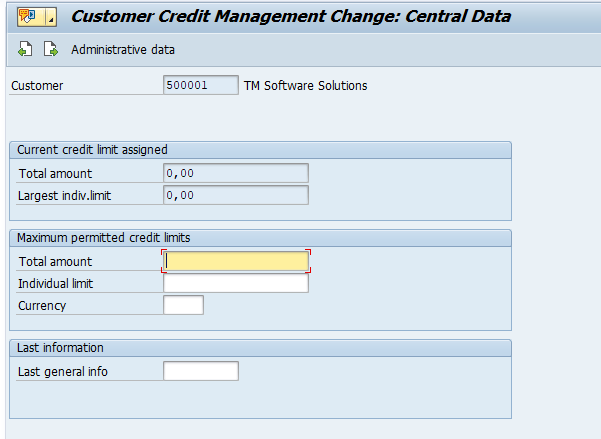
Click on save button and save the details.
Successfully we have maintained credit limit for customers in SAP.
What FD32 updates in SAP customer credit master data
| FD32 area | What you maintain | Why it matters in credit management |
|---|---|---|
| Status | Credit limit, risk category and review dates | Controls the customer limit and supports credit check decisions. |
| Payment history | Display of payment-related information | Helps review past payment behavior before changing the customer limit. |
| Central data | Total amount and individual limit | Defines overall and credit-control-area-level limits for the customer. |
| Address | Customer address information | Provides reference information while maintaining the credit master record. |
Common issues when maintaining credit limit for customers in SAP
- Customer is not accepted in FD32: Check whether the customer master record exists and whether you entered the correct customer number.
- Credit control area is not accepted: Verify the credit control area definition and assignment in configuration.
- Risk category field cannot be maintained: Check whether risk categories are configured and whether your user has authorization to change credit master data.
- Payment history is blank: Confirm whether any payment history exists for the customer in the relevant accounting data.
- Credit limit is saved but credit check result does not change: Review the sales document credit check configuration, update groups and open exposure values used by your system.
FD32 in SAP ECC and credit limit maintenance in SAP S/4HANA
FD32 is the classic transaction used for customer credit management master data in SAP ECC and older SAP R/3 environments. Many SAP S/4HANA implementations use SAP Credit Management based on business partner credit data and credit segments instead of the older FD32-based process. Therefore, if FD32 is unavailable or not used in your S/4HANA system, check the project design for Business Partner credit profile, credit segment data, SAP Credit Management configuration and the relevant Fiori apps or UKM transactions.
For training systems and classic SD credit management tutorials, FD32 remains the common transaction for explaining how customer credit limits are maintained by customer and credit control area.
FAQs on maintaining credit limit for customers in SAP
How to set credit limit for customers in SAP?
Use transaction code FD32 in classic SAP credit management. Enter the customer number and credit control area, select the required views such as status, central data and payment history, enter the credit limit and related credit master data, and save the record.
What is the Tcode for credit limit in SAP?
In classic SAP SD credit management, the transaction code for changing customer credit management master data is FD32. FD33 is commonly used to display customer credit management data.
What is FD32 Tcode in SAP?
FD32 is the transaction used to change customer credit management master data in classic SAP credit management. It allows you to maintain the customer credit limit, risk category, review dates, central credit data and view payment history for a selected credit control area.
What is the difference between total amount and individual limit in FD32?
Total amount is the overall credit limit allowed for the customer across credit control areas. Individual limit is the maximum credit limit allowed for the customer within one credit control area.
Why is payment history blank in SAP FD32?
Payment history can be blank when the customer has no relevant payment records in the system or in the selected environment. It can also be blank in a training client where invoices and payments have not been posted for that customer.
Editorial QA checklist for this SAP FD32 credit limit tutorial
- Confirm the tutorial is positioned for SAP ECC or classic SAP SD credit management, not only for S/4HANA FSCM Credit Management.
- Verify that FD32 is described as the change transaction for customer credit management master data.
- Check that customer number, credit control area, credit limit, risk category and review dates are explained in the correct context.
- Ensure total amount and individual limit are not described as the same field.
- Keep the S/4HANA note because credit limit maintenance may differ in systems using Business Partner credit segment data.