 TutorialKart.com
How to Define Tolerance Group for Customers and Vendors in SAP using OBA3
A tolerance group for customers and vendors in SAP controls how payment differences are handled while clearing open items. It defines the permitted gain or loss amount, permitted percentage, and cash discount adjustment rules that the system can accept during incoming or outgoing payment processing.
In this SAP FICO tutorial, you will learn how to define tolerance group for customers and vendors in SAP systems by using transaction code OBA3. This configuration is used in Accounts Receivable and Accounts Payable when payment differences need to be posted automatically within the permitted limits.
Customer and Vendor Tolerance Group Meaning in SAP FICO
Customer and vendor tolerance groups are company-code-level settings. They help SAP decide whether a small short payment, overpayment, residual amount, or cash discount difference can be accepted while clearing customer or vendor open items.
For example, if the permitted payment difference is maintained as an amount and a percentage, SAP checks both values during clearing. A payment difference is accepted only when it is within the configured tolerance. If the difference is above the permitted limit, the system does not allow automatic posting of that difference as configured.
OBA3 Transaction Code for Customer and Vendor Tolerance Groups
Use the following configuration path to define tolerances for customers and vendors in SAP.
- Transaction code: – OBA3
- Menu Path: – SPRO > SAP Reference IMG > SAP Customizing Implementation guide –> Financial Accounting (New) —> Accounts Receivable & Accounts Payable —-> Business Transactions —–> Outgoing Payments ——> Manual Outgoing Payments ——-> Define Tolerances for customers and vendors.
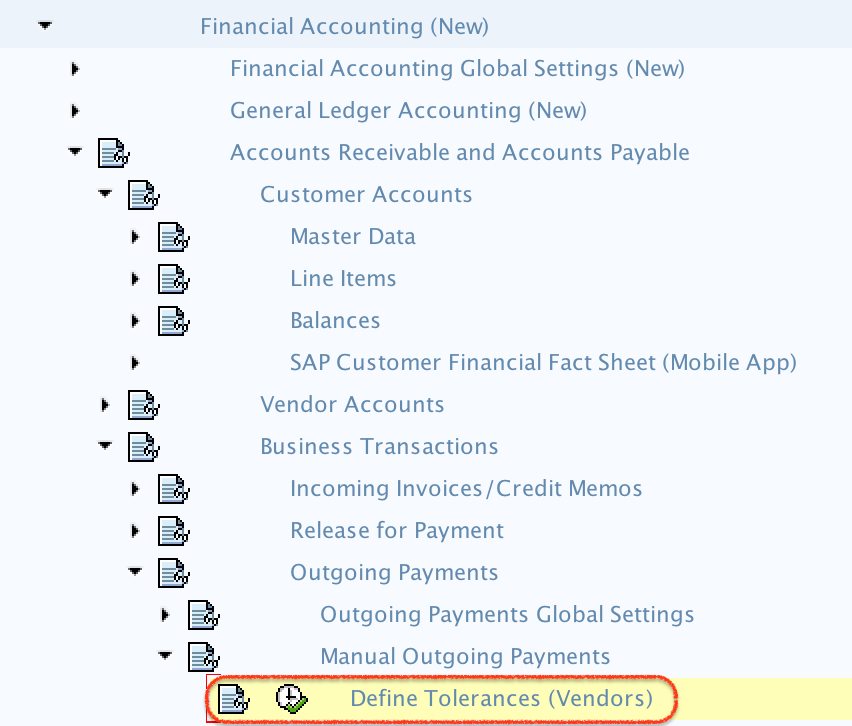
Steps to Define Tolerance Group for Customers and Vendors in SAP
Follow these steps to create or maintain the tolerance group for customers and vendors.
Step 1) Enter T- code “OBA3” in the SAP commend field and enter.

Step 2) On change view Customers/Vendors tolerances overview screen, click on “New Entries” button to define new tolerance groups for vendors and customers as per the requirements.

Step 3) On new entries customer and vendor tolerances screen, update the following details.
- Company Code: – Update the company code for which you would like to define tolerance groups.
- Tolerance group: – It is not required to update the tolerance group key, just update the description text of tolerance group.
- Permitted payment difference: – Update the payment differences of gain & loss with amount and percentage i.e 500 percentage and 1% adjustment by 100.
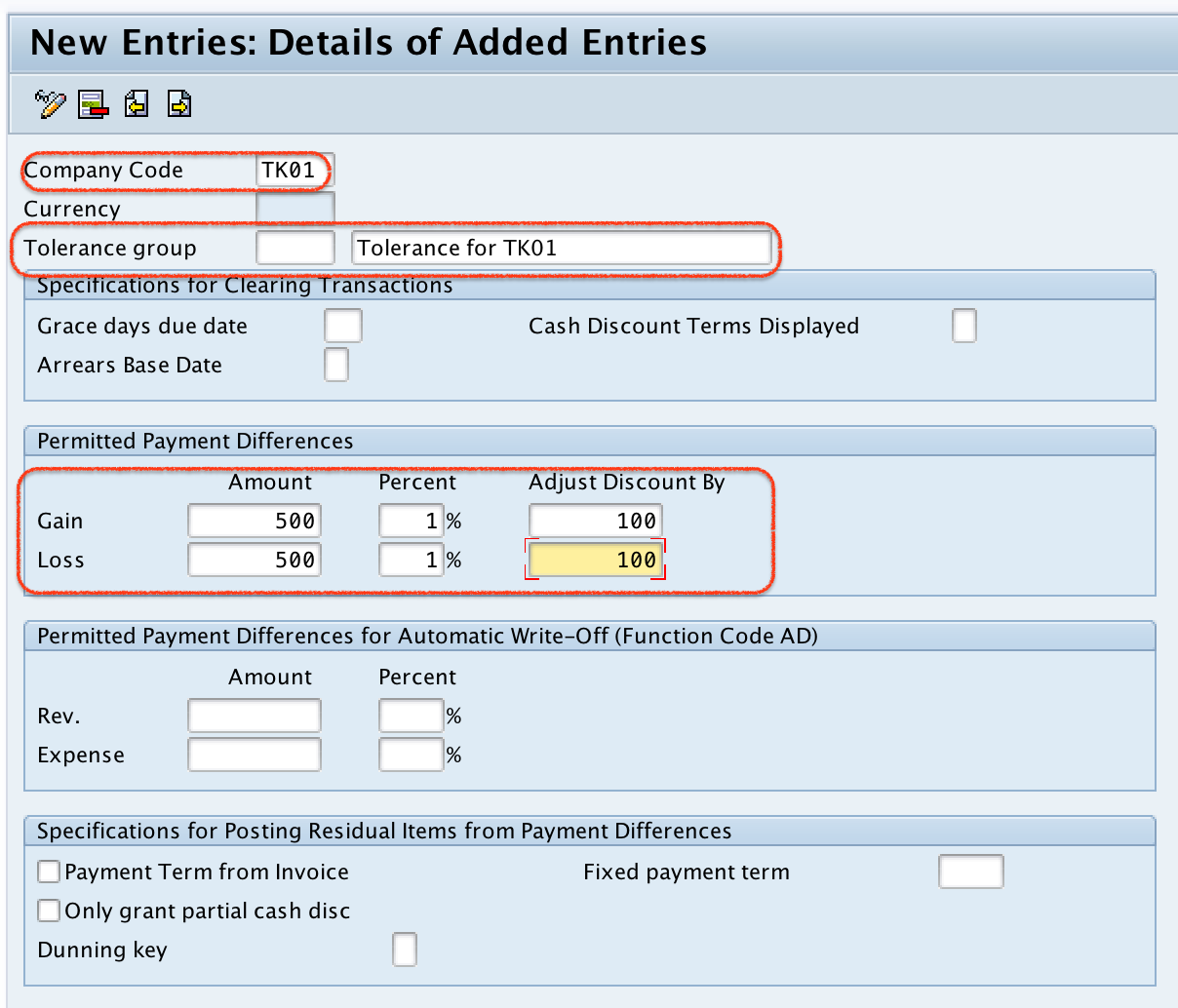
This means the user can process the business transaction with the payment difference of 500 with gain or loss of 1 percentage. The SAP system doesn’t allow to process the transaction above the payment differences amount.
After maintaining all the required details of customer and vendor tolerances, click on save button and save the implemented tolerance group details.

Successfully we have defined tolerance group for customers and vendors in SAP.
Important Fields in SAP Customer and Vendor Tolerance Group Configuration
The exact field names can vary slightly by SAP release and screen layout, but the purpose of the fields remains the same. The following table explains the common fields used while maintaining customer and vendor tolerance groups.
| Field | Purpose in customer/vendor tolerance configuration |
|---|---|
| Company Code | Specifies the company code for which the tolerance settings are valid. |
| Tolerance Group | Identifies the tolerance group. A blank tolerance group can be used as the default tolerance group for the company code when no specific group is assigned. |
| Name / Description | Provides a meaningful text for the tolerance group, such as customer payment tolerance or vendor payment tolerance. |
| Permitted Payment Difference – Amount | Defines the maximum absolute payment difference that can be accepted. |
| Permitted Payment Difference – Percentage | Defines the maximum payment difference as a percentage. |
| Cash Discount Adjustment | Controls the permitted adjustment related to cash discount differences. |
How SAP Checks Payment Difference Tolerance During Clearing
During open item clearing, SAP compares the payment difference with the configured customer or vendor tolerance. The payment difference must be within the allowed amount and percentage limit. If the difference is within tolerance, it can be posted according to the payment difference settings. If it exceeds the limit, the user must process it differently, such as by posting a residual item or correcting the payment amount, depending on the business process.
For a simple example, assume that the invoice amount is 50,000 and the payment received is 49,700. The payment difference is 300. If the customer tolerance permits a payment difference up to 500 and the percentage check is also within the configured limit, the difference can be accepted. If the difference is above the configured limit, SAP blocks that difference from being automatically accepted under this tolerance rule.
Difference Between Customer/Vendor Tolerance, User Tolerance, and G/L Tolerance in SAP
Customer and vendor tolerance groups are often confused with other SAP FI tolerance settings. They are related, but they are not the same configuration.
| Tolerance setting | Common transaction code | What it controls |
|---|---|---|
| Customer / Vendor tolerance group | OBA3 | Permitted payment differences and cash discount differences for customers and vendors. |
| User / Employee tolerance group | OBA4 | Posting authorizations such as permitted posting amount and payment difference limits for users. |
| G/L account tolerance group | OBA0 | Clearing differences for G/L account open item clearing. |
When troubleshooting payment difference issues, check both the customer/vendor tolerance and the user tolerance. Even if the customer or vendor tolerance allows a difference, the user must also have the required tolerance authorization for the posting scenario.
When to Use a Blank Tolerance Group for Customers and Vendors
In many SAP FI configurations, a blank tolerance group is maintained for a company code as the default tolerance group. This default setting is used when no specific tolerance group is assigned to the customer or vendor master data. If your business needs different limits for different categories of customers or vendors, create specific tolerance groups and assign them according to the required business rules.
Common Issues While Defining Customer and Vendor Tolerance Groups in SAP
- Payment difference is not accepted: Check whether the amount and percentage limits are both within the configured tolerance.
- User still cannot post the difference: Verify the user or employee tolerance group settings in addition to the customer/vendor tolerance group.
- Wrong company code updated: Tolerance groups are company-code-specific, so maintain the correct company code.
- No specific tolerance group assigned: Check whether the blank default tolerance group is maintained for the company code.
- Cash discount difference not handled as expected: Review the cash discount adjustment fields along with the permitted payment difference fields.
FAQs on Tolerance Group for Customers and Vendors in SAP
What is a tolerance group for customers and vendors in SAP?
A tolerance group for customers and vendors in SAP defines the permitted limits for payment differences and cash discount differences during customer or vendor open item clearing.
How do you create a tolerance group for a vendor in SAP?
To create a vendor tolerance group, use transaction code OBA3 or follow the IMG path for defining tolerances for customers and vendors. Enter the company code, maintain the tolerance group details, update the permitted payment difference limits, and save the configuration.
What is the transaction code for customer and vendor tolerance groups in SAP?
The transaction code for defining customer and vendor tolerance groups in SAP is OBA3.
What is the transaction code for user tolerance groups in SAP FI?
The transaction code for defining user or employee tolerance groups in SAP FI is OBA4. It is different from OBA3, which is used for customer and vendor tolerance groups.
Can one company code have more than one customer or vendor tolerance group?
Yes. A company code can have a default blank tolerance group and additional specific tolerance groups if different payment difference limits are required for different customers or vendors.
Editorial QA Checklist for SAP OBA3 Customer and Vendor Tolerance Tutorial
- Confirm that OBA3 is described only for customer and vendor tolerance groups.
- Confirm that OBA4 is mentioned only for user or employee tolerance groups.
- Confirm that OBA0 is mentioned only for G/L account tolerance groups.
- Check that the company-code-specific nature of the tolerance group is clearly stated.
- Verify that the payment difference explanation includes both amount and percentage checks.
- Ensure that all existing screenshots remain relevant to the OBA3 configuration flow.