 TutorialKart.com
In this SAP tutorial, you will learn how to define schedule line categories in SAP SD step by step using transaction code VOV6. Schedule line category configuration is used in sales documents to control delivery relevance, requirements transfer, availability check, movement type, and purchase requisition creation where applicable.
What a schedule line category controls in SAP SD
The schedule line category controls the data and business functions that must be processed at schedule line level in a sales document. While the sales document item stores the product and item category logic, the schedule line stores the confirmed quantity and date-related information that later supports delivery, procurement, and requirements planning.
What is schedule line?
A schedule line in a sales document helps you specify the date and quantity of items to be delivered on a specific date. For example, if a customer orders 100 products and the business can deliver 50 products on one date and the remaining 50 on another date, SAP creates separate schedule lines to represent those confirmed quantities and delivery dates. Based on the assignment of item category and schedule line category, the SAP system determines whether the item is relevant for delivery, availability check, transfer of requirements, or procurement processing.
Schedule line category vs item category in SAP sales documents
The item category and schedule line category work together, but they do not control the same level of a sales document. The item category controls item-level behavior, such as pricing relevance, billing relevance, completion rules, and whether an item is standard, free-of-charge, text, third-party, or service-related. The schedule line category controls schedule-line-level behavior, such as delivery relevance, movement type, availability check, transfer of requirements, and purchase requisition creation.
| Configuration object | Controls mainly | Typical business question it answers |
|---|---|---|
| Item category | Item-level sales document processing | How should this sales order item behave for pricing, billing, and completion? |
| Schedule line category | Date, quantity, delivery, requirements, and procurement behavior | Can this confirmed quantity be delivered, checked for availability, or passed to MRP/procurement? |
Purpose of defining schedule line categories in VOV6
In this configuration step, you define different schedule line categories with the corresponding functions required for sales document processing. You normally create a new schedule line category by copying a standard category that is close to the required business process, then changing only the fields that are needed for the requirement. This reduces the risk of missing dependent settings.
After a schedule line category is defined in VOV6, it must also be assigned for determination, commonly by using the combination of item category and MRP type. Without the correct assignment, the schedule line category may not be determined automatically when a sales document is created.
Schedule line category configuration path for VOV6
Navigation path
| SAP R/3 Role Menu | Maintain schedule line category |
| Tcode | VOV6 |
| SAP IMG Path | SPRO ? SAP Reference IMG ? Sales and Distribution ? Sales > Sales Documents ? Schedule lines ? Define schedule line categories. |
How to create schedule line categories in SAP using VOV6
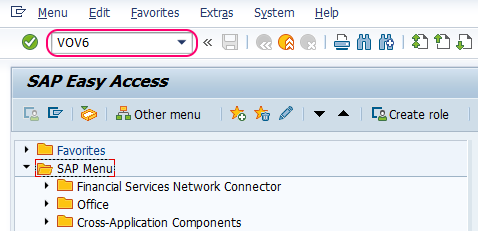
Step 1: – Enter transaction code VOV6 in the SAP command field and press Enter.
Step 2 : – A new window, Change View “Maintain Schedule Line Categories”: Overview, opens on the screen. Click the New Entries button to create a new schedule line category as per the client requirement. If you are creating a category similar to an existing standard category, you can also copy the existing entry and adjust the required fields.

Step 3 : – On the New Entries schedule line categories screen, update the required details for the schedule line category.
- Sched.line cat : – Update the two-character key that identifies the schedule line category in SAP.
- Description : – Update the description of the schedule line category so that users can understand the business purpose.
- Delivery block : – Specify whether the schedule line should be blocked for delivery processing.
- Movement type : – Enter the movement type that should be used for goods movement when the item is delivered, if the process is relevant for goods movement.
- Item relevant for delivery : – Select this option when the schedule line quantity should be relevant for delivery creation.
- Order Type : – Enter the purchase requisition document type, such as NB, when the schedule line category is used for a process that creates a purchase requisition.
- Requirement/ Assembly : – Select this field when requirements should be transferred from SD to materials planning or inventory-related processing.
- Availability : – Select this option when SAP should carry out an availability check for the item in the sales document.
- Product allocation : – Select this option when product allocation should be activated for the relevant sales document items.
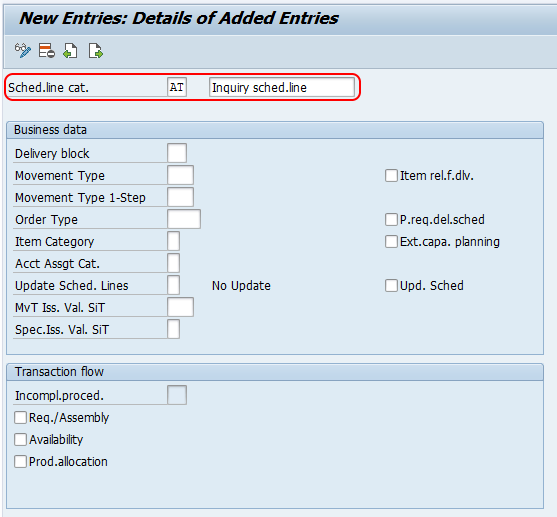
After maintaining all the required details, click the Save button and save the configured schedule line categories in SAP. If the system requests a customizing request, assign the change to the appropriate transport request as per your project procedure.
Important VOV6 fields for SAP schedule line category configuration
The fields maintained in VOV6 should match the business process for the sales document item. A standard stock item, a text item, a third-party item, and a returns item normally require different schedule line behavior. Before saving a new category, confirm whether the schedule line should create a delivery, transfer requirements, run ATP, or create a purchase requisition.
| VOV6 field | Why it matters in SAP SD | Check before saving |
|---|---|---|
| Delivery relevance | Controls whether the confirmed schedule line can be copied into delivery processing. | Use it only when the item should actually be delivered. |
| Movement type | Controls the goods movement posting connected to delivery, where relevant. | Confirm the correct movement type with the logistics process owner. |
| Transfer of requirements | Allows the requirement from the sales document to be passed to planning. | Switch it on only when demand should be visible to MRP or related planning. |
| Availability check | Triggers availability checking for the sales document item. | Use it when stock or receipt confirmation should influence the confirmed quantity/date. |
| Purchase requisition settings | Supports procurement-related sales processes such as third-party or individual purchase processing. | Maintain the correct order type and item category only for relevant procurement scenarios. |
How schedule line category is determined in SAP SD
Schedule line category determination is not completed only by defining the category in VOV6. SAP determines the schedule line category in a sales document based on schedule line determination settings, commonly using the item category and the MRP type from the material master. This is why a schedule line category can appear differently for different materials or item categories even within similar sales processes.
For example, a standard stock material and a third-party material may use different schedule line categories because one process delivers from stock while the other may create a purchase requisition. After you define a schedule line category in VOV6, check the assignment settings so the required category is selected automatically in sales order processing.
SAP schedule line category QA checklist before saving or transporting
- Confirm that the schedule line category key and description clearly represent the business process.
- Check whether the schedule line should be relevant for delivery; do not activate delivery relevance for non-deliverable text or information-only items.
- Validate the movement type with the delivery and goods movement process before assigning it.
- Review whether transfer of requirements and availability check are both needed for the item category and material type.
- For third-party or procurement-related scenarios, confirm the purchase requisition order type and item category settings.
- Test the schedule line category determination in a sales order before moving the configuration to the next system.
Common issues after defining schedule line categories in SAP
If the expected schedule line category is not appearing in the sales order, the issue is usually not in VOV6 alone. Check whether the schedule line category has been assigned correctly for determination, whether the material master has the expected MRP type, and whether the item category in the sales document is the one used in the assignment.
- No delivery is created: Check whether the schedule line category is relevant for delivery and whether the sales order item has confirmed schedule line quantity.
- Availability check does not run: Check the Availability field in the schedule line category and the related checking controls in the material and configuration.
- Requirements are not passed to planning: Check whether transfer of requirements is active for the schedule line category and whether the sales document type and item category support it.
- Purchase requisition is not created: Check the order type and item category settings for the schedule line category and confirm that the sales process is designed for procurement integration.
Reference points for SAP schedule line category customizing
For project work, compare your VOV6 settings with the corresponding SAP S/4HANA Sales customizing guidance and with the assignment step for schedule line categories. SAP also provides learning material on configuring and assigning schedule line categories in sales. Use these references to validate the configuration concept, then apply the settings according to your company template and transport process.
- SAP Help: Schedule line categories in SAP S/4HANA Sales customizing
- SAP Learning: Configuring schedule line categories
- SAP Learning: Assigning schedule line categories
FAQs on SAP schedule line categories
How do I create a schedule line category in SAP?
Use transaction code VOV6 or follow the IMG path for defining schedule line categories. Create a new entry or copy a similar existing category, maintain the required fields such as delivery relevance, movement type, requirements transfer, availability check, and purchase requisition settings, then save the configuration in a customizing request.
How is the schedule line category determined in SAP SD?
In SAP SD, the schedule line category is determined through schedule line category assignment settings. The determination commonly uses the item category from the sales document and the MRP type from the material master. Therefore, defining the category in VOV6 is only one part of the setup; the assignment must also be maintained.
What is the difference between item category and schedule line category in SAP?
The item category controls item-level processing such as pricing, billing relevance, and item behavior in the sales document. The schedule line category controls schedule-line-level processing such as delivery relevance, confirmed quantity/date handling, availability check, transfer of requirements, movement type, and procurement integration.
Why is movement type maintained in a schedule line category?
The movement type in the schedule line category is used when the schedule line is connected to a delivery and goods movement process. It helps determine how stock is posted during delivery-related processing. The exact movement type should match the business process and should be checked before transport.
Do I need to assign a schedule line category after creating it in VOV6?
Yes. Creating the schedule line category in VOV6 defines its behavior, but assignment settings are required so that SAP can determine it automatically in a sales document. If the assignment is missing or incorrect, the expected schedule line category may not appear during sales order creation.