 TutorialKart.com
In this SAP SD tutorial, you will learn how to define shipping point in SAP using transaction code OVXD, maintain shipping point address details, and understand how a shipping point is used in delivery processing.
In this SAP SD tutorials you will learn how to crate shipping point in SAP step by step. In our previous training class we have learned how to define sales office and sales group in SAP.
What is shipping point in SAP SD?
Shipping point is an independent organizational unit in SAP Logistics Execution and SAP SD. It represents the place or processing unit from where deliveries are created, picked, packed, and shipped to customers.
“Shipping point is a place or location where the goods and services are delivered to the customers”.
Shipping point is an independent organizational unit in SAP SD module and it is responsible for processing inbound and outbound deliveries. So shipping point plays an major role in delivery of goods and services.
In practical SAP SD configuration, the shipping point is important because delivery documents are created for a shipping point. During sales order processing, the system can determine the correct shipping point automatically based on the plant, shipping condition, and loading group. You can also review SAP documentation on shipping point configuration in SAP S/4HANA for official reference.
Shipping point use in SAP delivery processing
A shipping point is not only a name in the enterprise structure. It controls or supports several activities in delivery processing. Before creating a new shipping point, confirm why it is required and how it will be used by the business.
- Outbound delivery processing: deliveries are created and processed for a shipping point.
- Picking and packing: the shipping point can represent the warehouse or dispatch location where goods are prepared.
- Loading and goods issue: shipping activities are planned and executed from the assigned shipping point.
- Working times: factory calendar and working hours help determine loading and pick/pack times.
- Shipping documents: address and text details maintained for the shipping point can be used in output and shipping communication.
Prerequisites before creating shipping point in SAP
Before you define shipping point in SAP, keep the following configuration details ready. This avoids rework after saving the organizational unit.
- A short shipping point key, usually up to four characters, that follows your project naming convention.
- A clear description that identifies the dispatch location or shipping unit.
- Factory calendar and working times for the shipping point.
- Loading time, pick/pack time, and rounding settings if these are used in scheduling.
- Complete address details for the shipping point location.
- A customizing request to save and transport the configuration.
Transaction code and IMG path to define shipping point in SAP
Shipping point Implementation process in SAP
You can define a shipping point in SAP through the following navigation method.
- Transaction code: – OVXD
- Path: – SPRO > Implementation Guide > Enterprise Structure -> Definition > Logistics Execution > Define copy, delete, check shipping point.
The transaction code generally used to define or maintain shipping points is OVXD. The IMG path is used when you want to navigate through the SAP Implementation Guide and understand where this setting belongs in Enterprise Structure configuration.
How to define shipping point in SAP using OVXD
Step 1) Enter T-code OVXD in the sap command field and enter.

You can also open the same configuration from SPRO by following the Enterprise Structure path given above. Using the transaction code is faster when you already know the configuration activity.
Step 2) On change view shipping points overview screen, click on new entries button for creation of new shipping point in SAP systems.
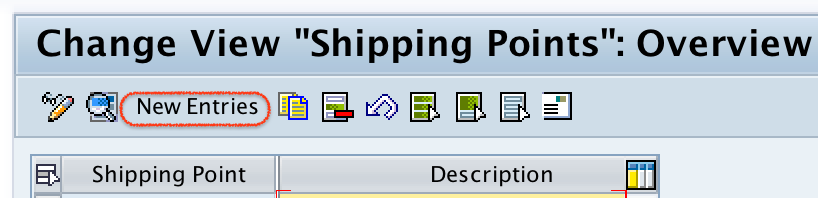
The overview screen displays existing shipping points in the client. Use New Entries only when you want to create a new shipping point. If you want to correct an existing shipping point, select the relevant row and change the required fields instead of creating a duplicate entry.
Step 3) On new entries shipping point screen, update the following details.
- Shipping point: – Enter the key that identifies the shipping point in SAP.
- Description: – Update the text that describes about the shipping point.
- Times: – Update the Factory calendar and working times of shipping point.
- Determine Time: – Update the determining load time, pick/pack time and round working days..
- Form. text names: – Under this field you can update texts for header, footer, greetings, etc.
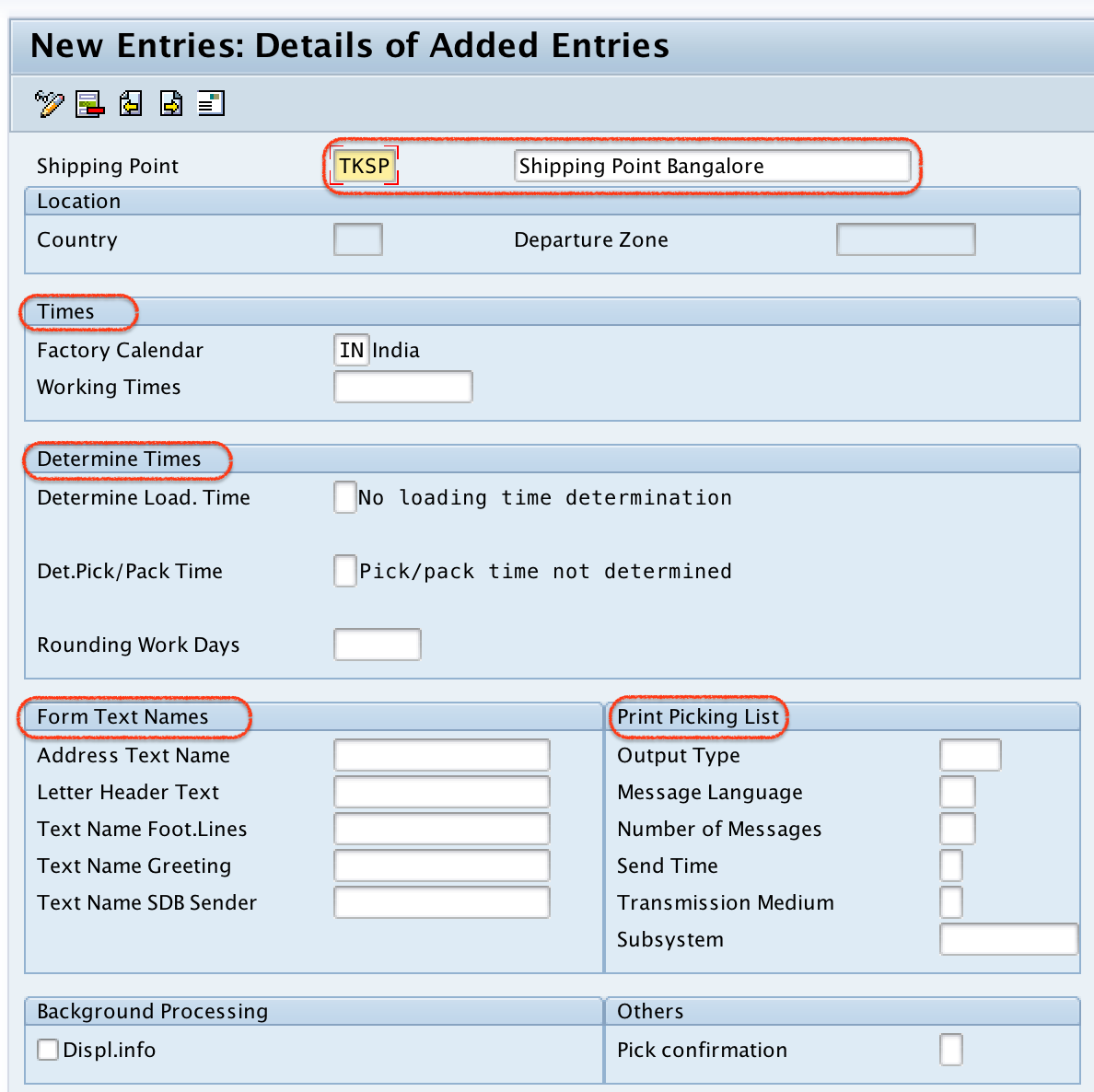
Shipping point field values to maintain in OVXD
The exact fields visible on the screen can vary by SAP release and project settings, but the following fields are commonly reviewed while creating a shipping point.
| Field in shipping point configuration | Purpose in SAP SD delivery processing |
|---|---|
| Shipping Point | Unique key that identifies the shipping point. |
| Description | Readable name of the dispatch location or shipping unit. |
| Factory Calendar | Defines working days and holidays used for scheduling. |
| Working Times | Maintains operating times for shipping activities. |
| Determine Time | Controls how loading time and pick/pack time are determined. |
| Text Names | Maintains text references that may be used in shipping documents. |
After maintaining all the required details of shipping point, click on save button and save the configured details of shipping point SAP.

Now you are required to update the address details of shipping point location, update the correct address details of shipping point and press enter to continue.
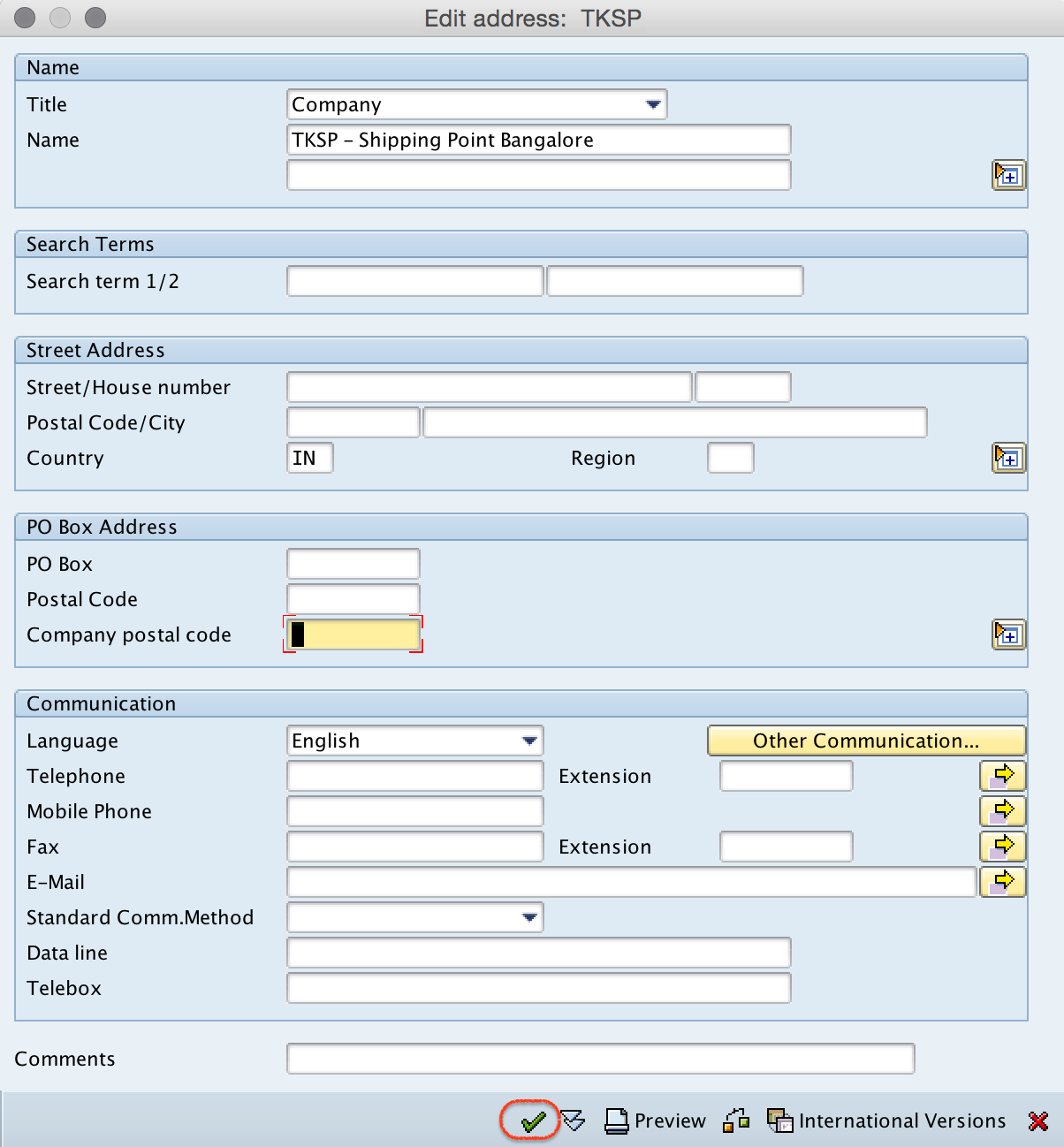
The address should match the actual shipping location. Maintain postal address, country, region, and other required communication details according to your project requirement. Incorrect address data may affect printed delivery documents, output forms, and shipping communication.
Now choose your customizing request number and save the shipping point configuration data.
Successfully we have defined shipping point in SAP.
Assign shipping point to plant after defining shipping point
Defining the shipping point creates the organizational unit. In most SAP SD projects, the next step is to assign the shipping point to one or more plants. Without the correct plant assignment, shipping point determination may not work as expected during sales order and delivery processing.
You can maintain the assignment through the IMG path under Enterprise Structure assignment for Logistics Execution. In many systems, transaction code OVXC is used to assign shipping points to plants. This assignment is separate from the definition step explained above.
How shipping point determination works in SAP SD
After the shipping point is defined and assigned to a plant, SAP can determine the shipping point automatically in the sales document. Standard shipping point determination commonly uses the following combination:
- Shipping condition from the customer master or sales document.
- Loading group from the material master.
- Delivering plant from the sales order item.
For example, the same plant can have more than one shipping point. One shipping point may handle standard dispatches, while another may handle express dispatches or a separate loading area. In that case, shipping point determination is configured so that the system chooses the correct shipping point based on the shipping condition, loading group, and plant.
Can one plant have two shipping points in SAP?
Yes, one plant can be assigned to more than one shipping point. This is common when a plant has different warehouses, loading bays, transport processes, or shipping conditions. The important point is that the assignment alone is not enough. You must also maintain shipping point determination so that SAP can select the correct shipping point in the sales order.
If the wrong shipping point is appearing in the sales order, check the shipping condition, loading group, plant, and the shipping point determination table entries. Also confirm that the customer master and material master values are maintained correctly.
Common mistakes while defining shipping point in SAP
- Creating a shipping point without plant assignment: the shipping point exists, but the system cannot use it correctly for the required plant.
- Using unclear shipping point keys: short keys should still be meaningful for support and configuration review.
- Incorrect factory calendar: scheduling results can be wrong if working days and holidays are not aligned with the shipping location.
- Incomplete address data: delivery outputs and shipping documents may show incomplete or wrong location details.
- Missing determination settings: a shipping point may be defined but not automatically determined in the sales order.
- Duplicate shipping points for the same purpose: create a new shipping point only when there is a genuine process or location difference.
Difference between defining shipping point and shipping point determination
Defining a shipping point and determining a shipping point are related but different configuration tasks in SAP SD.
| Configuration task | What it does | Typical result |
|---|---|---|
| Define shipping point | Creates the shipping point organizational unit. | A shipping point key and description are available in SAP. |
| Assign shipping point to plant | Links the shipping point to a plant. | The plant can use the shipping point for delivery processing. |
| Shipping point determination | Maintains rules for automatic selection. | SAP proposes the shipping point in the sales order item. |
FAQs on shipping point in SAP SD
How to define shipping point in SAP?
To define shipping point in SAP, use transaction code OVXD or follow the IMG path: SPRO > Enterprise Structure > Definition > Logistics Execution > Define copy, delete, check shipping point. Choose New Entries, maintain the shipping point key, description, calendar, working times, address details, and save the entry in a customizing request.
What is the T code for shipping point in SAP?
The common transaction code to define or maintain a shipping point is OVXD. For related configuration, projects may also use separate transactions or IMG activities for assigning shipping points to plants and maintaining shipping point determination.
How is shipping point determined in SAP SD?
Shipping point determination commonly depends on the shipping condition, loading group, and delivering plant. SAP checks the maintained determination settings and proposes the relevant shipping point in the sales order item.
Can one plant have multiple shipping points in SAP?
Yes, one plant can have multiple shipping points. This is useful when the same plant has different loading areas, warehouses, or dispatch processes. The shipping point determination settings decide which shipping point should be proposed for a sales order item.
What does shipping point mean in SAP delivery processing?
In SAP delivery processing, a shipping point is the organizational unit responsible for outbound delivery activities such as picking, packing, loading, and goods issue. Deliveries are processed with reference to a shipping point.
Editorial QA checklist for SAP shipping point configuration
- The tutorial uses transaction code OVXD for defining the shipping point.
- The IMG path is specific to Enterprise Structure definition for Logistics Execution.
- The article clearly separates shipping point definition, plant assignment, and shipping point determination.
- The explanation includes the standard determination inputs: shipping condition, loading group, and delivering plant.
- The screenshots and existing links are retained without changing their URLs.
- The FAQ answers are specific to shipping point configuration in SAP SD.
Summary of defining shipping point in SAP
In this tutorial, you learned how to define shipping point in SAP using transaction code OVXD. A shipping point is an independent organizational unit used in SAP SD and Logistics Execution for delivery processing. After creating the shipping point, maintain address details, save the configuration request, assign the shipping point to the relevant plant, and maintain shipping point determination if the system should propose it automatically in sales orders.