 TutorialKart.com
How to define purchase order types in SAP SD for customer sales orders
In SAP SD, purchase order types are used to classify how a customer places a sales order with an organization. The value can represent a channel or transmission method such as email, written order, online order, telephone order, EDI order, or any project-specific order source.
This SAP SD configuration is part of sales document header customization. It is different from purchase order document types in SAP Materials Management, which control procurement documents such as standard purchase orders, stock transport orders, or framework orders. In SD, the purchase order type is mainly used for customer-order reporting and classification.
Purpose of purchase order type configuration in SAP SD
In this activity, you define a four-character key that identifies the purchase order type used in sales processing. The key helps business users analyze how customers send orders, compare order volumes by source, and maintain consistent reporting across sales documents.
For example, if customer orders are received through email, website, EDI, and written purchase orders, each method can be maintained as a separate purchase order type. Users can then enter the relevant value in sales order processing where the field is available in the customer purchase order data.
Example purchase order type keys for SAP SD sales documents
| Purch. Ord. Type | Description | Typical usage in SAP SD |
|---|---|---|
| EMAI | Customer sends the order through email | |
| WRI | Written | Customer sends a written purchase order |
| ONLD | Online Orders | Customer places the order through an online channel |
| EDI | EDI Order | Customer order is received through electronic data interchange |
| TEL | Telephone Order | Customer places the order by phone |
The values in the table are examples. In a real implementation, use short keys that match the organization’s naming standards and are easy for sales users to understand.
Navigation path to define purchase order types in SAP SD
| SAP R/3 Role Menu | Define purchase order types |
| Transaction Code | SPRO |
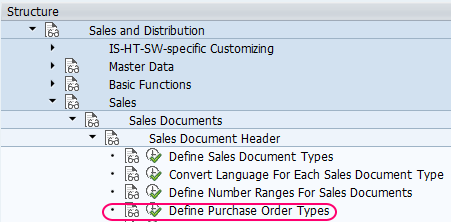
| SAP IMG Path | SPRO > IMG > Sales and Distribution > Sales > Sales Documents > Sales Document Header > Define Purchase Order Types |
You can also reach this activity through the SAP Reference IMG. The exact screen layout can vary slightly by SAP ECC or SAP S/4HANA release, but the IMG activity name remains focused on defining purchase order types for sales document header processing.
Steps to create purchase order types in SAP SD
Step 1 : – Enter Tcode “SPRO” in the command field and enter.

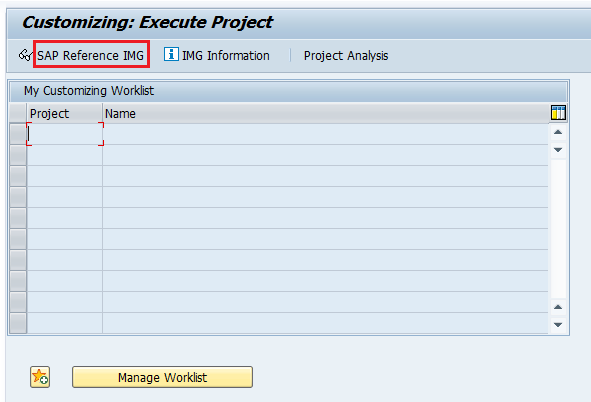
Step 2 : – On customizing execute project screen, choose SAP Reference IMG.
Step 3 : – From display IMG screen, follow the path and choose img activity “define purchase order types”.
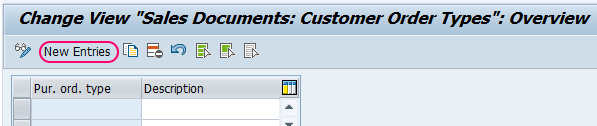
Step 4 : – On change view sales documents customer order types overview screen, click on new entries button for creation new purchase order types in SAP as per requirements of project.
Step 5 : – On new entries purchase order types screen, update the following details.
- Pur. ord. type : – Enter the key that identifies the purchase order type in SAP. You are allowed to maintain up to four digits alphanumeric key. In our case, the purchase order type in EMAI
- Description : – Update the descriptive text of purchase order type. In our case, the purchase order type description is E-Mail.
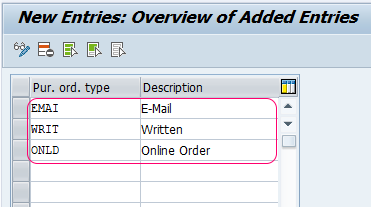
Click the save icon in the standard toolbar or press ctrl+s to save the configured purchase order type in SAP SD. You can view newly created purchase order type in the change view sales documents customer order types overview screen.
Field details to maintain while creating SAP SD purchase order types
| Field | What to enter | Configuration note |
|---|---|---|
| Pur. ord. type | Four-character alphanumeric key | Keep the key short and meaningful, such as EMAI for email orders |
| Description | Text description of the purchase order type | Use a clear label that sales users can recognize during order entry |
Before saving a new value, check whether an equivalent key already exists. Duplicate or unclear values can reduce the usefulness of sales order reports because the same order source may be recorded under multiple names.
How SAP SD purchase order types are used in sales order reporting
The purchase order type is normally entered as part of customer purchase order information in a sales document. Once sales orders contain this value, reporting teams can analyze customer order intake by channel or method. For example, the organization may compare how many orders came through email, online ordering, EDI, telephone, or written purchase orders.
This configuration does not replace sales document types such as OR, quotation types, delivery types, billing types, or procurement purchase order document types. It is a classification value used with sales document header data.
Difference between SAP SD purchase order type and MM purchase order document type
| Point of comparison | SAP SD purchase order type | SAP MM purchase order document type |
|---|---|---|
| Business area | Sales and Distribution | Materials Management / Purchasing |
| Main purpose | Classifies how a customer order was received | Controls procurement purchase order behavior |
| Configuration area | Sales document header customization | Purchasing document type customization |
| Example values | EMAI, WRI, ONLD, EDI | Standard PO, stock transport order, framework order |
| Typical reporting use | Customer order source analysis | Procurement document analysis |
This distinction is important because many users search for “purchase order types” expecting procurement document types, while this SAP SD activity defines customer order type values for sales documents.
Best practices for naming purchase order types in SAP SD
- Use a key that clearly represents the customer order source, such as EMAI for email or ONLD for online orders.
- Avoid creating multiple values for the same source, such as EMAIL, EMAI, and MAIL, unless the business has a clear reporting reason.
- Keep descriptions business-friendly because sales users and reporting users may rely on them.
- Confirm the naming convention with the SAP SD functional consultant, reporting team, and business process owner before transporting the configuration.
- Test the value in sales order entry and verify that it appears correctly in reports or extracts where required.
Common mistakes while defining purchase order types in SAP SD
- Confusing SD purchase order types with MM purchase order document types.
- Creating too many similar keys without a reporting requirement.
- Using unclear descriptions that sales users cannot interpret during order processing.
- Saving the configuration in the wrong client or transport request.
- Skipping testing in a sales order after maintaining the new value.
QA checklist for SAP SD purchase order type configuration
- Confirm that the new purchase order type key is four characters or fewer and follows the project naming standard.
- Check that the description clearly identifies the order source or transmission method.
- Verify that the value is visible in the customer purchase order data area of the relevant sales document process.
- Create or change a test sales order and confirm that the purchase order type can be selected or entered as expected.
- Run the required sales order report or table extract and confirm that the value supports the intended order-source analysis.
FAQs on defining purchase order types in SAP SD
What are purchase order types in SAP SD?
Purchase order types in SAP SD are customer order classification keys used in sales documents. They identify how the customer placed the order, such as by email, written order, online channel, telephone, or EDI.
How many characters are allowed for a purchase order type key in SAP SD?
The purchase order type key can be maintained as an alphanumeric key of up to four characters. The description should explain the meaning of the key in plain business language.
Is SAP SD purchase order type the same as MM purchase order document type?
No. SAP SD purchase order type classifies the customer order source in sales documents. SAP MM purchase order document type controls procurement purchase orders and belongs to purchasing configuration.
Which transaction code is used to define purchase order types in SAP SD?
Use transaction code SPRO and follow the IMG path: Sales and Distribution > Sales > Sales Documents > Sales Document Header > Define Purchase Order Types.
Why should purchase order types be maintained carefully in SAP SD?
They affect the quality of order-source reporting. If duplicate or unclear values are created, sales analysis by customer order method becomes less reliable.