 TutorialKart.com
In this SAP SD tutorial, you will learn how to define sales order reasons in SAP using transaction code OVAU. Sales order reasons are maintained at sales document header level and help an organization record why a customer placed an order, such as a newspaper advertisement, television advertisement, discount campaign, replacement order, or other business reason.
What is sales order reason in SAP SD?
A sales order reason is a reason code assigned to a sales document to explain the business reason behind the order. It is commonly used for sales analysis, marketing campaign tracking, reporting, and internal classification of sales orders.
For example, if a customer places an order after seeing a television advertisement, the sales team can enter an order reason such as TDV – Television Advertisement. Later, the business can analyze how many orders were created because of that advertisement source.
Purpose of defining sales order reasons in SAP
In this configuration activity, you create order reason codes and descriptions that can be used in sales documents. Sales order reasons in SAP help users classify orders and generate sales statistics based on reasons such as advertisements, promotions, customer requests, returns, or other internal business categories.
Order reasons are master configuration values. Once they are defined, users can select the relevant reason while creating or changing a sales order, depending on the screen layout and sales document process used by the organization.
Configuration values for SAP sales order reasons
For this tutorial, we will create the following sales order reason values in SAP SD.
| Order Reason | Description | Business Meaning |
| TDV | Television Advertisement | Order received because of a television campaign |
| NAV | News Advertisement | Order received because of a newspaper or news advertisement |
You can create order reason keys based on your project requirement. Keep the descriptions clear because end users normally identify the correct reason by reading the description in the sales order screen.
Navigation path to define order reasons in SAP SD
| SAP R/3 Role Menu | Define Order Reasons |
| Transaction Code | OVAU |
| SAP IMG Path | SPRO > IMG > Sales & distribution > Sales > Sales documents > Sales document header > Define order reasons |
You can open the configuration directly with transaction code OVAU, or you can follow the SAP IMG path from SPRO. In most implementation projects, this configuration is maintained in the development client and then transported to quality and production systems.
How to define sales order reasons in SAP using OVAU
Follow these steps to create a new sales order reason in SAP SD.
Step 1: Open SAP order reason configuration with Tcode OVAU
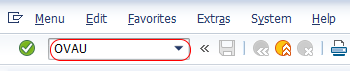
Enter Tcode OVAU in the SAP command field and press Enter.
Step 2: Choose New Entries for SAP sales document order reasons
On the change view Sales documents: order reasons overview screen, choose the New Entries button to create a new order reason as per the business requirement.

Step 3: Enter the SAP order reason key and description
On the new entries screen, update the following details.
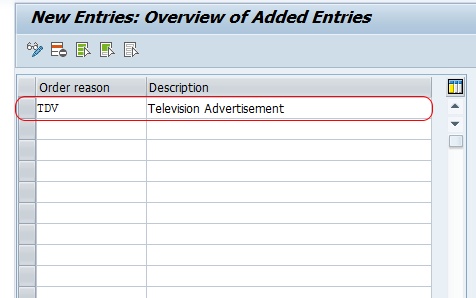
- Order reason: Enter the key that identifies the sales order reason in SAP. In this example, the order reason is TDV. The order reason key must be unique.
- Description: Enter the descriptive text for the order reason. In this example, the description is Television Advertisement.
- R: If the order reason is relevant for retro-billing, select the appropriate key from the available list based on the project requirement.
Step 4: Save the new sales order reason in SAP
Click the Save button in the standard toolbar to save the created order reason in SAP. If prompted, assign the configuration change to a customizing request.
You can now see the newly created sales order reason in the change view Sales documents: order reasons overview screen. In this example, the sales order reason TDV has been created successfully in the SAP system.
Where sales order reasons are used in SAP sales documents
After configuration, order reasons can be used while creating or changing sales documents such as sales orders. The field is generally maintained at the sales document header level. Depending on your SAP screen layout and document configuration, users can select an order reason from the available list of configured values.
The selected reason can then be used by business teams for reporting and analysis. For example, a company can compare sales orders received from television advertisements, newspaper advertisements, special discounts, or other campaigns.
OVAU and VOV8 difference for sales order reason configuration
OVAU is used to define sales order reason codes. VOV8 is used for sales document type configuration in SAP SD. If the requirement is only to create or maintain order reason values, use OVAU. If the requirement is related to sales document type behavior, then VOV8 may be relevant, but it is not the transaction for creating order reason codes.
Best practices for SAP sales order reason codes
- Use short and meaningful order reason keys that are easy for support teams to recognize.
- Keep descriptions business-friendly because end users select reasons based on description text.
- Avoid creating duplicate reasons with similar meanings, such as separate codes for the same campaign.
- Confirm reporting requirements before finalizing the list of order reasons.
- Test the reason code in a sales order before moving the configuration to production.
Common issues while maintaining order reasons in SAP SD
| Issue | Possible Reason | What to Check |
| Order reason is not available for selection | The reason code may not be saved or transported | Check OVAU entries and transport status |
| Users select the wrong reason | Description is unclear or too similar to another reason | Review reason descriptions with business users |
| Reporting output is inconsistent | Users may leave the field blank or use different reasons for the same scenario | Define usage guidelines and validate reporting rules |
| Confusion between OVAU and VOV8 | Both are SAP SD configuration transactions | Use OVAU for order reasons and VOV8 for sales document types |
QA checklist for SAP sales order reason configuration
- Verify that each SAP sales order reason key is unique.
- Check that the description clearly explains the business reason.
- Confirm whether the retro-billing indicator is required for any reason code.
- Create a test sales order and confirm that the new order reason is available for selection.
- Validate that reports or sales statistics capture the order reason correctly.
- Confirm that the configuration is included in the correct transport request.
Frequently asked questions on SAP sales order reasons
What is a reason code in a sales order?
A reason code in a sales order is a configured value that explains why the order was created. In SAP SD, this is commonly called an order reason and can be used for reporting, analysis, and business classification.
What is order reason in SAP?
Order reason in SAP is a sales document header value used to identify the reason for an order. Examples include television advertisement, newspaper advertisement, special discount, campaign order, or customer-specific business reason.
How to create a reason code in SAP SD?
To create a reason code in SAP SD, use transaction code OVAU. Choose New Entries, enter the order reason key, maintain the description, update the retro-billing indicator if required, and save the configuration.
What is VOV8 Tcode in SAP SD?
VOV8 is used to configure sales document types in SAP SD. It is different from OVAU. Use OVAU to define order reason codes, and use VOV8 when you need to maintain sales document type settings.
Can sales order reasons be used for sales reporting?
Yes. Sales order reasons can help classify orders for sales statistics and reporting. The usefulness of the report depends on whether users maintain the correct reason consistently while creating or changing sales documents.