 TutorialKart.com
What is customer master record in SAP?
Definition – Both financial accounting module (SAP FI) and sales & distribution module (SAP SD) use customer master record in SAP. The customer master database contains information about the customers, and this information is stored in individual customer master records in SAP. For each customer, we specify a customer number and maintain the corresponding business, accounting, shipping, billing, and sales details of the customer.
The data in customer master records controls how sales documents, deliveries, billing documents, payments, credit-related checks, and accounting postings are processed for a customer. During sales transactions, the SAP system automatically determines customer details from the customer master record, so it is important to maintain the master data correctly before using the customer in business transactions.
Customer master records are divided into the following major areas.
- General data – name, address, communication details, tax-related details, and customer classification that are valid across company codes and sales areas.
- Company code data – reconciliation account, payment terms, payment methods, dunning procedure, and accounting-related controls for a specific company code.
- Sales area data – sales, shipping, billing, partner functions, pricing, and delivery-related controls for a specific sales organization, distribution channel, and division.
Customer master data areas in SAP FI and SAP SD
A customer master record is shared by different SAP components, but each area has a different purpose. The general data identifies the customer. The company code data tells SAP FI how customer receivables should be posted. The sales area data tells SAP SD how orders, deliveries, and billing should be processed for that customer.
| Customer master area | Typical fields maintained | Used mainly by |
|---|---|---|
| General data | Name, address, telephone, email, tax details, language, customer classification | FI and SD |
| Company code data | Reconciliation account, payment terms, payment methods, dunning, tolerance group | SAP FI |
| Sales area data | Sales office, sales group, customer pricing procedure, shipping conditions, delivering plant, billing terms, partner functions | SAP SD |
In SAP S/4HANA systems, customer master data is commonly maintained through the Business Partner approach. However, many SAP ECC and SAP training systems still use classic customer master transactions such as VD01 and XD01. This tutorial explains the classic SAP SD method, while also noting where the data is used in FI and S/4HANA environments.
VD01, XD01, XD03, and BP transaction codes for customer master data
Before creating customer master data, choose the correct transaction code. Using the wrong transaction can create only part of the customer master record or open the record in display mode instead of create mode.
| Transaction code | Purpose | When to use it |
|---|---|---|
| VD01 | Create customer master data for sales and distribution views | Use when the customer is required mainly for SAP SD sales processing. |
| XD01 | Create customer master data centrally | Use when you need general data, company code data, and sales area data together. |
| XD02 / VD02 | Change customer master data | Use when an existing customer record needs correction or extension. |
| XD03 / VD03 | Display customer master data | Use for viewing customer data without changing it. |
| BP | Maintain Business Partner master data | Use in SAP S/4HANA where customer and vendor master data are handled through Business Partner roles. |
For this tutorial, we use VD01 because the focus is to create the customer master record for sales and distribution processing. If your organization requires FI data at the same time, use XD01 or maintain the required company code data after creating the SD views.
Prerequisites before creating a customer master record in SAP
The customer creation screen depends on the configuration already maintained in the system. Keep the following items ready before you start creating customer master data in SAP.
- Customer account group and its number range assignment.
- Company code, if accounting data is required.
- Sales organization, distribution channel, and division.
- Sales area combination created for the sales organization, distribution channel, and division.
- Reconciliation account and payment terms, if company code data is maintained.
- Shipping conditions, delivering plant, pricing procedure, and partner function requirements, if applicable.
If the account group uses internal number assignment, leave the customer number blank and SAP will generate the customer number after saving. If the account group uses external number assignment, you must enter a valid customer number manually.
How to create customer master data in SAP using VD01
Customer master data in SAP can be created using a menu path or transaction code. For creating a customer for sales and distribution, use transaction code VD01. For central customer creation including FI views, use transaction code XD01.
Navigation
| SAP R/3 Role Menu | Create customer master record |
| Transaction Code | VD01, XD01 |
| SAP menu path | SAP Menu => Logistics =>Sales & Distribution => Master data => Business partner => Customer => Create => VD01 – Sales and Distribution |
- Transaction code VD01 creates the general data and sales & distribution views of customer master data. If you create customer master data using tcode VD01, it is mainly used for SD processing.
- Transaction code XD01 creates general and central customer master views of the customer master data. It can be used in SD as well as in Finance.
Configuration Steps
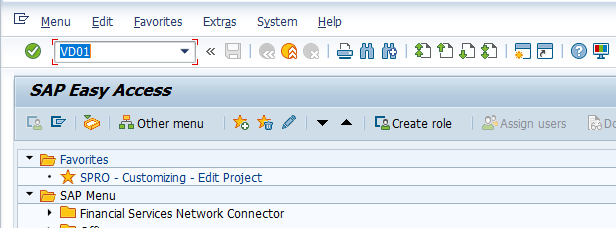
Step 1: – Execute tcode “VD01” on SAP easy access screen.
Step 2 : – The initial screen of customer create appears. Update the account group, customer number if required, company code, and sales area details based on your system configuration.
Account group : – It controls the number range, customer category, screen layout, required fields, and partner function behavior. Specify the customer account group key.
Customer : – You can keep this field as blank when the account group is configured for internal number assignment, so the system automatically generates the customer number on basis of customer number range interval. If the account group uses external number assignment, enter the customer number manually.
Company Code : – Update the company code with which the customer executes business transactions. Company code data is required when customer accounting postings are needed.
Sales Org : – Specify the sales organization code with which the customer executes the sales transactions.
Dist_Channel : – Specify the distribution channel code with which the customer executes the sales transactions.
Division : – Update the division code with which the customer executes the sales transactions.
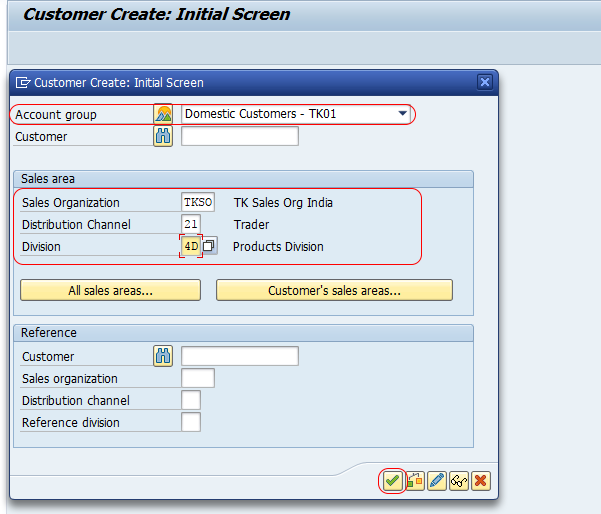
Note : – If you get an error as sales area is not defined for customers, define sales area with the combination of sales organization, distribution channel and division.
Maintain general data for the SAP customer master record
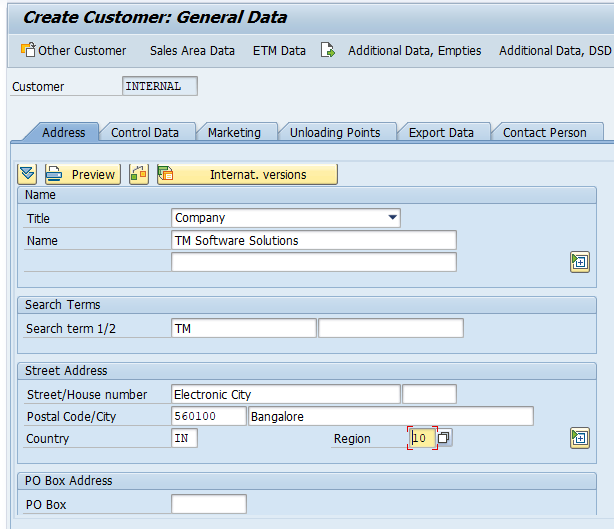
Step 3 : – On create customer: general data screen, update the following details. General data is valid for the customer across company codes and sales areas.
Address : – Update customer title, name of customer, address details and communication details like mail id, telephone number, fax number, etc. The address details are used in sales documents, deliveries, billing documents, forms, and correspondence.
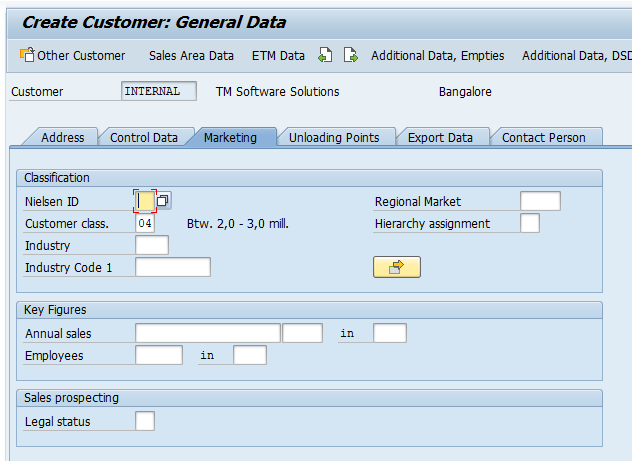
Marketing : – Update the required details of customer like customer classification, industry type, and other analysis fields. These values can be useful for reporting, segmentation, and sales analysis.
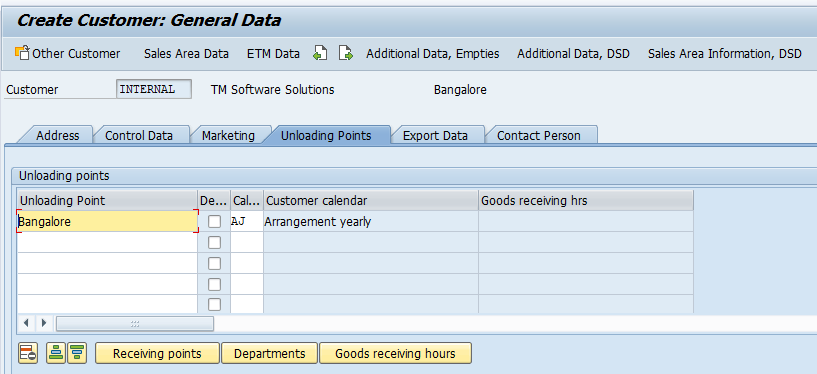
Unloading Points : – Specifies the location at which the goods are to be unloaded for the customer. This is useful when deliveries are sent to a particular receiving point, warehouse gate, plant entrance, or unloading location maintained by the customer.
Maintain sales area data in the SAP customer master record
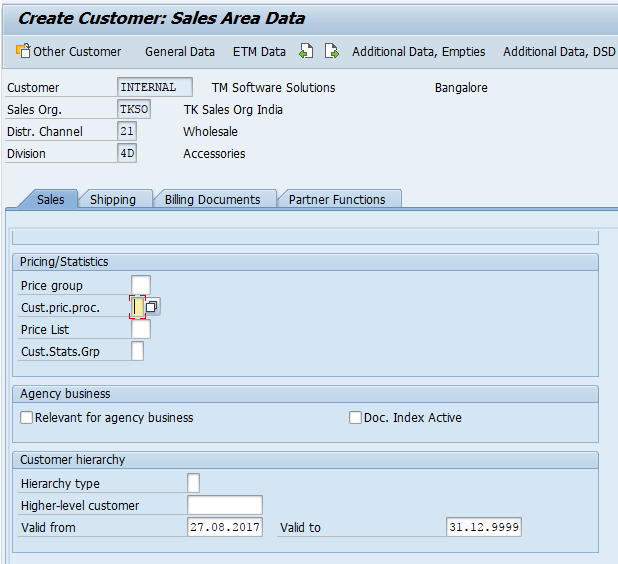
Step 4 : – Click on sales area data and update the following details. Sales area data is specific to the combination of sales organization, distribution channel, and division entered on the initial screen.
Sales : – Under this sales area, update the required details of sales order, price group, customer pricing procedure, customer statistics group, sales office, sales group, and customer hierarchy, if used in your system.
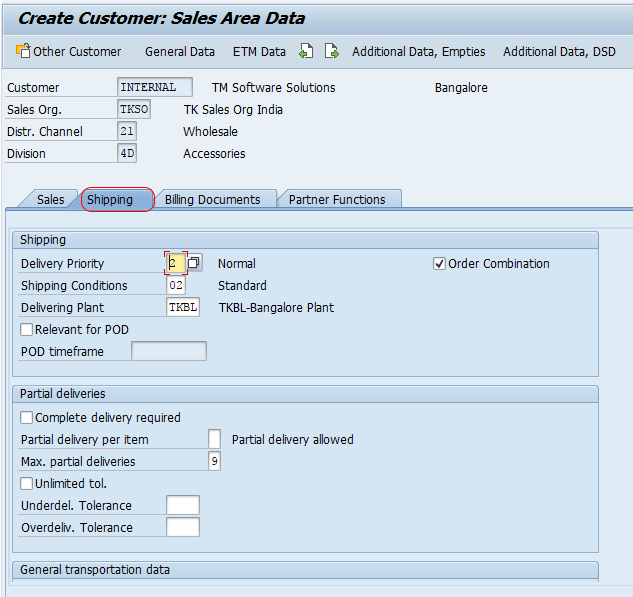
Shipping : – Under shipping, update delivery priority, shipping conditions, delivering plant, order combination indicator, partial delivery settings, and delivery-related controls as required by the business process.
Billing document and accounting-related sales data : – Maintain payment terms, Incoterms, tax classification, account assignment group, and billing-related controls if those tabs are available in your customer master screen. These values affect pricing, billing, tax determination, revenue account determination, and payment processing.
Partner functions : – Check partner functions such as sold-to party, ship-to party, bill-to party, and payer. In many account groups, standard partner functions are proposed automatically, but they should still be verified before saving the customer master record.
Maintain company code data for the SAP customer master when required
If you create the customer with XD01 or extend the customer for accounting, maintain company code data. The most important company code field is the reconciliation account, because customer receivables are posted to reconciliation accounts in the general ledger. Payment terms, payment methods, dunning procedure, interest calculation, and correspondence details may also be required depending on the FI configuration.
- Reconciliation account – links customer subledger postings to the correct general ledger account.
- Payment terms – controls due dates and cash discount conditions for customer invoices.
- Dunning procedure – controls reminder notices for overdue receivables.
- Payment methods – controls permitted payment methods for customer transactions.
Save and verify the customer master record in SAP
After updating all the details for customer master data, click on save button and save the details. SAP checks mandatory fields based on account group, company code, and sales area configuration. If any required field is missing, the system displays an error message and you must correct the field before saving.

Successfully we have created Customer Master Record in SAP. Note the customer number shown in the status message, because this number is required for sales orders, deliveries, billing, accounting postings, and future customer master changes.
To verify the record, use XD03 or VD03 and display the customer with the same company code and sales area. Check the address, sales area data, partner functions, payment terms, tax classification, and account assignment group before using the customer in sales transactions.
Important SAP customer master tables and related transaction codes
For troubleshooting, reporting, and support discussions, the following tables and transaction codes are commonly used with customer master data.
| Item | Meaning | Use |
|---|---|---|
| KNA1 | General customer master data table | Stores customer-level general data such as name and address-related identifiers. |
| KNB1 | Customer master company code data table | Stores company code data such as reconciliation account and payment details. |
| KNVV | Customer master sales area data table | Stores sales organization, distribution channel, and division-specific data. |
| KNVP | Customer master partner functions table | Stores partner function assignments for the customer. |
| VD51 / VD52 / VD53 | Customer-material information record transactions | Create, change, or display customer-material information records when customer-specific material numbers or descriptions are required. |
| FD06 | Mark customer master record for deletion | Used to set deletion flags for a customer master record, based on authorization and business rules. |
Do not change database tables directly. Customer master data should be maintained through approved SAP transactions, Fiori apps, Business Partner maintenance, or authorized data migration tools.
Common errors while creating customer master data in SAP
Most customer creation errors occur because required configuration or mandatory field values are missing. The following checks help resolve common issues quickly.
| Error or issue | Likely reason | What to check |
|---|---|---|
| Sales area is not defined for customers | The sales organization, distribution channel, and division combination is not maintained. | Define the sales area and ensure the entered combination is valid. |
| Customer number is required | The selected account group uses external number assignment. | Enter a valid customer number within the assigned number range. |
| Customer number cannot be entered | The selected account group uses internal number assignment. | Leave the customer field blank and allow SAP to generate the number. |
| Reconciliation account is required | Company code data is being maintained and FI fields are mandatory. | Enter the correct reconciliation account in company code data. |
| Partner function error | Required partner functions are missing or inconsistent. | Check sold-to, ship-to, bill-to, and payer partner functions. |
Customer master record editorial QA checklist
Use this checklist before publishing or updating a tutorial on SAP customer master data.
- Confirm that VD01 is explained as SD customer creation and XD01 as central customer creation.
- Do not describe XD03 as a create transaction; XD03 is used to display customer master data.
- Include the three customer master data areas: general data, company code data, and sales area data.
- Explain the role of account group, customer number range, company code, sales organization, distribution channel, and division.
- Mention S/4HANA Business Partner maintenance without confusing it with classic ECC transaction flow.
- Preserve every existing tutorial image and existing internal link while improving the surrounding explanation.
FAQs on creating customer master record in SAP
What is the difference between VD01 and XD01 in SAP customer master?
VD01 is used to create customer master data mainly for sales and distribution views. XD01 is used for central customer creation, where general data, company code data, and sales area data can be maintained together. Use VD01 for SD-focused creation and XD01 when FI data must also be created or extended.
What is the KNA1 table in SAP customer master?
KNA1 is the general customer master data table in SAP. It stores customer-level general information. Company code-specific data is stored in KNB1, and sales area-specific customer data is stored in KNVV.
What is FD06 tcode in SAP?
FD06 is used to mark a customer master record for deletion. Marking a record for deletion does not mean that users should delete database entries directly. The deletion flag and later cleanup depend on the organization’s SAP configuration, authorization, and data retention process.
What is the transaction code for customer-material information record in SAP?
Customer-material information records are commonly maintained with VD51 to create, VD52 to change, and VD53 to display. These records are used when a customer has its own material number, description, or delivery-related preferences for a material.
How do I create a customer master record in SAP S/4HANA?
In SAP S/4HANA, customer master data is usually maintained through Business Partner transaction BP or related Fiori apps, with the relevant customer roles assigned. Some systems may still provide access to classic transactions for compatibility, but the recommended process depends on the S/4HANA setup and business partner configuration.