 TutorialKart.com
How to Create sales group in SAP
In this SAP SD tutorial, you will learn how to define sales group in SAP SD step by step. A sales group is a lower-level sales organizational unit that helps represent a team, branch, territory, or group of sales employees. In previous training, we learned how to set up sales area in SAP.
What is Sales Group in SAP SD?
A sales group in SAP SD represents a group of sales employees or a small selling unit within the sales structure. It can be used to identify the sales team, branch-level responsibility, or employee group responsible for a customer or transaction.
A sales office can have a number of sales groups, so a sales group should be assigned to the relevant sales office after it is created. This assignment helps keep the SAP SD enterprise structure aligned with the company sales organization.
In practical SAP SD use, sales groups may appear in customer master data, sales documents, sales reporting, and responsibility-based analysis. The exact use depends on how the company has designed its SD enterprise structure and reporting requirements.
Sales Group Position in SAP SD Enterprise Structure
Sales group is usually understood below the sales office level in the SAP SD sales structure. A sales organization can have sales offices, and each sales office can have one or more sales groups.
| SAP SD unit | Meaning | Example use |
|---|---|---|
| Sales Organization | Main selling unit responsible for sales and distribution activities | Domestic Sales, Export Sales |
| Sales Office | Regional or office-level selling unit | South Region Office, Mumbai Office |
| Sales Group | Smaller team or group of sales employees under a sales office | Team A, Branch Sales Team, Territory Group |
For SAP S/4HANA enterprise structure reference, you can also review the sales-related organizational unit documentation on SAP Help Portal.
Before You Maintain Sales Group in SAP
Before defining a sales group in SAP SD, decide how the sales teams should be represented in the system. A sales group should not be created only because a code is available; it should match a real business responsibility or reporting need.
- Decide whether the group represents a branch, territory, team, or sales employee group.
- Use a clear three-character key because the sales group field allows a maximum of three alphanumeric characters.
- Keep the sales group description easy to identify for users and consultants.
- Check whether the sales group must be assigned to a sales office after creation.
- Avoid duplicate sales groups that describe the same team in different words.
SAP IMG Path to Define Sales Group
You can define sales group through the following SAP IMG navigation method.
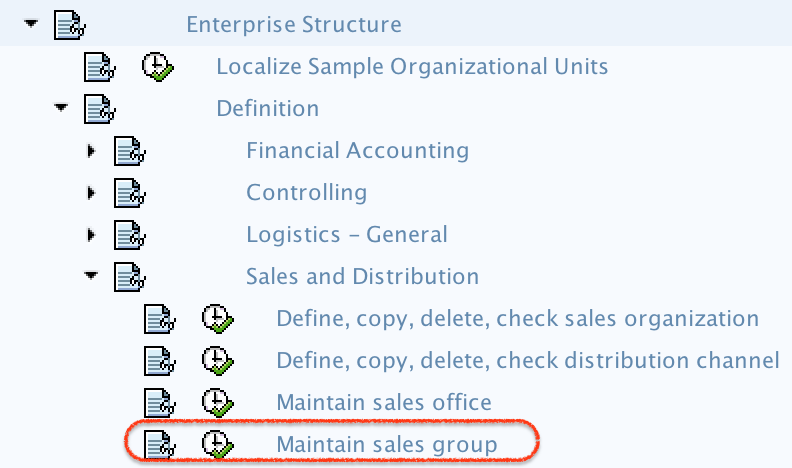
- SPRO -> IMG -> Enterprise Structure –> Definition –> Sales and Distribution –> Maintain Sales Group.
This configuration activity creates the sales group key and description. The assignment of sales group to sales office is a separate activity in the SAP SD enterprise structure assignment area.
How to Define Sales Group in SAP SD Step by Step
Step 1) Enter T-code “SPRO” in the SAP command field and enter.

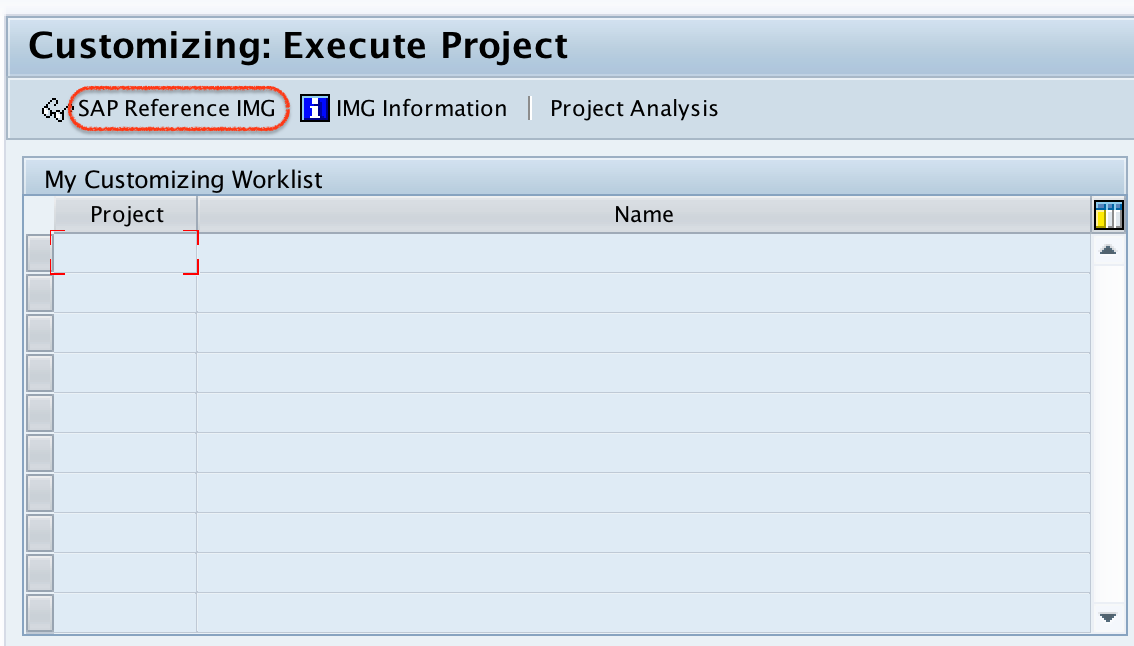
Step 2) On execute project screen, click on “SAP Reference IMG“
Step 3) On display IMG screen, navigate the menu path and click on sales group.
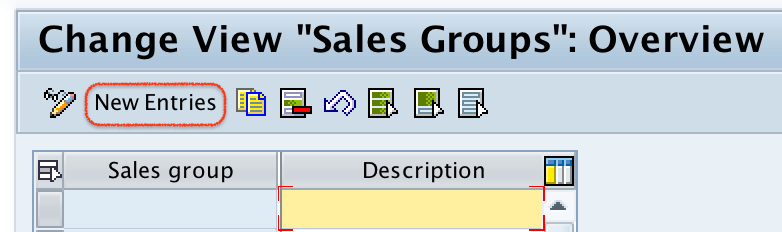
Step 4) On change view sales groups overview screen, click on “New entries” button to create new sales group in SAP as per company requirements.
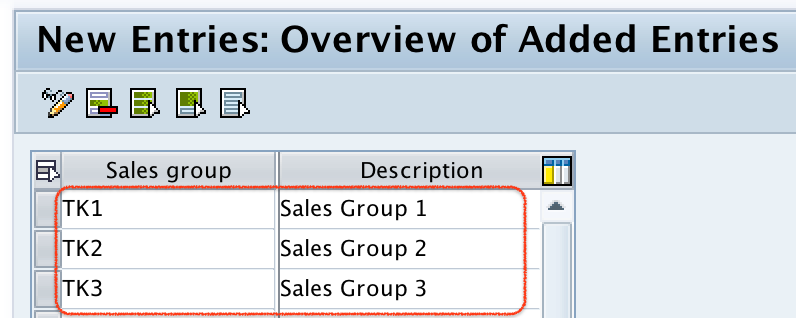
Step 5) On new entries sales group screen, update the following details.
- Sales Group: – Enter the key that identifies the sales group in SAP. You are allowed to enter maximum three alphanumeric digits.
- Description: – Update the descriptive text of sales group.
Step 6) After maintaining all the required details of sales group, click on save button choose customize request and save the configured sales group details.

Successfully we have defined sales group in SAP.
Example Sales Group Codes in SAP SD
The following examples show how sales group keys and descriptions can be maintained. These are sample values only; use codes that match your project naming standards.
| Sales Group | Description | Possible business meaning |
|---|---|---|
| 001 | North Sales Team | Sales employees responsible for the north region |
| 002 | South Sales Team | Sales employees responsible for the south region |
| WEB | Online Sales Group | Team handling online or web sales transactions |
A numeric key is common in many projects, but alphanumeric keys may also be used if the project follows that naming pattern. The important point is to keep the code short, consistent, and easy to maintain.
Assign Sales Group to Sales Office After Creation
After maintaining a sales group, the next configuration step is usually to assign the sales group to a sales office. This is important because a sales group is generally used as part of the lower-level sales structure under a sales office.
For example, if sales office 1000 represents a regional office, you may assign sales groups 001 and 002 to that office. This helps users select the correct sales responsibility when working with customer and sales transaction data.
Where Sales Group is Used in SAP SD
Sales group is useful when the business wants to track or control sales activity by team or group. It can support reporting and responsibility assignment without creating unnecessary higher-level enterprise structure objects.
- Customer master data: Sales group can help identify the sales team responsible for a customer.
- Sales documents: Sales group can be used in sales-related documents depending on configuration and master data.
- Sales reporting: Management can analyze sales performance by sales group.
- Internal responsibility: Sales group helps separate accountability between different sales teams.
- Enterprise structure control: Sales group supports a more detailed structure below sales office.
Difference Between Sales Office and Sales Group in SAP
Sales office and sales group are related, but they do not mean the same thing. A sales office usually represents a location, region, or office-level selling unit. A sales group represents a smaller team or group of sales employees under that sales office.
| Point | Sales Office | Sales Group |
|---|---|---|
| Meaning | Office, region, or sales location | Team or group of sales employees |
| Level | Higher than sales group | Usually assigned below sales office |
| Example | South Region Office | Team A or Territory Group 1 |
| Configuration use | Defines office-level sales structure | Defines team-level sales responsibility |
Common Checks After Defining Sales Group in SAP
After saving the sales group, review the configuration before moving to the next SAP SD assignment step. Small naming and assignment mistakes can create confusion later in customer master data and sales reporting.
- Check that the sales group key is within the allowed three-character length.
- Confirm that the description clearly identifies the sales team or group.
- Verify that the sales group is not a duplicate of an existing group.
- Assign the sales group to the correct sales office where required.
- Save the change under the correct customizing request.
Editorial QA Checklist for SAP Sales Group Tutorial
- Does the article clearly explain that sales group represents a group of sales employees or a lower-level selling unit?
- Does the SAP IMG path show Maintain Sales Group under Enterprise Structure definition for Sales and Distribution?
- Are the sales group fields, especially the three-character key and description, explained clearly?
- Does the tutorial distinguish sales group from sales office instead of treating both as the same object?
- Does the article mention that sales group assignment to sales office is normally maintained after creating the sales group?
FAQs on How to Define Sales Group in SAP
How do you add a sales group in SAP SD?
You can add a sales group in SAP SD by using the IMG path: SPRO > SAP Reference IMG > Enterprise Structure > Definition > Sales and Distribution > Maintain Sales Group. Then choose New Entries, enter the sales group key and description, and save the configuration.
What is the maximum length of a sales group key in SAP?
The sales group key can have a maximum of three alphanumeric characters. The description field should clearly explain the sales team, branch, or group represented by the key.
Is sales group the same as sales office in SAP SD?
No. A sales office usually represents an office, region, or location-level selling unit, while a sales group represents a smaller team or group of sales employees. A sales office can have multiple sales groups.
Should sales group be assigned to sales office in SAP?
Yes, in a typical SAP SD enterprise structure, a sales group is assigned to a sales office. This keeps the lower-level sales responsibility connected to the correct office or region.
Is VOV7 used to define sales group in SAP SD?
No. VOV7 is related to sales document item category configuration. To define a sales group, use the SAP IMG activity Maintain Sales Group under Enterprise Structure definition for Sales and Distribution.