 TutorialKart.com
How to Create Number Ranges for Customer Account Groups in SAP
This SAP tutorial explains how to create number ranges for customer accounts in SAP using transaction code XDN1. Customer number ranges control the number interval from which customer master records receive their customer numbers. In the previous tutorial, we learned how to create customer account groups in SAP.
Creating a number range interval is the first part of the setup. After the interval is created, it must be assigned to the relevant customer account group so that SAP knows which customer number range to use during customer master creation.
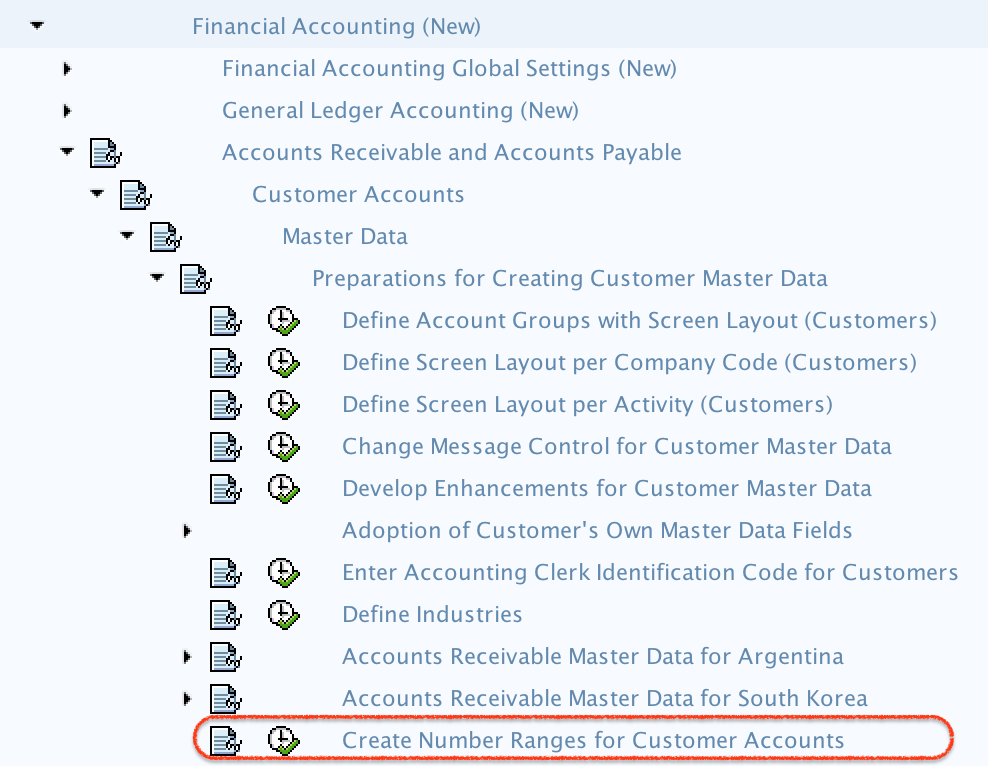
SAP Customer Number Range T-Code and IMG Menu Path
- Transaction code: – XDN1
- Menu Path: – SPRO > Financial Accounting (New) -> Accounts Receivable and Accounts Payable –> Customer Accounts —> Master Data —-> Preparations for creating customer master data —-> Create number ranges for customer accounts.
What Customer Number Ranges Control in SAP
Customer number ranges define the allowed customer numbers for customer master records. A number range interval contains a range number, a starting number, an ending number, and an internal or external assignment setting.
| Customer Number Range Setting | Meaning in SAP |
|---|---|
| No. | The two-character number range interval key used to identify the interval. |
| From No. | The first customer number allowed in the interval. |
| To Number | The last customer number allowed in the interval. |
| Ext. | Controls whether the customer number is entered manually from outside the interval or assigned internally by SAP. |
Internal and External Customer Number Assignment in SAP
Before creating customer number ranges, decide whether the customer number should be generated automatically by SAP or entered manually by the user or an external system.
| Assignment Type | How Customer Number Is Created | When to Use |
|---|---|---|
| Internal number assignment | SAP automatically assigns the next available number from the interval. | Use when SAP should control customer numbering consistently. |
| External number assignment | The user or external system enters the customer number manually. | Use when customer numbers come from an external source or legacy numbering rule. |
If the Ext. checkbox is not selected, the interval is used for internal number assignment. If the Ext. checkbox is selected, the interval is used for external number assignment.
Step 1: Open Customer Number Range Maintenance with T-Code XDN1
Enter Transaction code XDN1 in the SAP command field and press Enter to continue.

Step 2: Choose Intervals for SAP Customer Number Range Maintenance
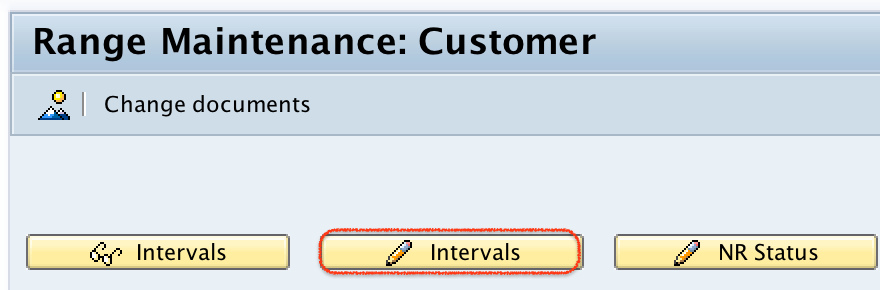
On the Range Maintenance: Customers screen, click the Intervals button to maintain customer number range intervals in SAP.
Step 3: Insert a New Customer Number Range Interval
Click the + button, also called the Insert Interval button, to add a new customer number range interval.

Step 4: Enter Customer Account Number Range Interval Details
Now update the following details for the customer number range interval.
- No: – Update the two-character key that defines the customer account number range interval.
- From No: – Enter the starting number of the customer account number range interval.
- To Number: – Enter the last number of the customer account number range interval.
- Ext: – Select this checkbox only when the interval should be used for external number assignment. Leave it blank when SAP should assign customer numbers automatically.

Click the Save button and save the configured details in the appropriate customizing request.

Successfully, the customer number range interval has been created in SAP.
After XDN1: Assign Customer Number Range to Account Group
Creating the number range in XDN1 does not by itself decide which customer account group will use that interval. The customer account group must also be assigned to the correct number range. This is usually maintained in customer account group configuration, where the number range interval is linked to the relevant account group.
For example, if domestic customers and export customers need different customer number sequences, create separate number range intervals and assign each interval to the correct customer account group. If multiple account groups can share the same customer numbering sequence, they may be assigned to the same interval, provided that the business rule allows it.
Customer Number Range Example for Account Groups
The following example shows how a company may plan customer number ranges before entering them in SAP. These numbers are only sample values and should be replaced with the company-specific numbering design.
| Account Group | Customer Type | Number Range No. | From Number | To Number | Assignment |
|---|---|---|---|---|---|
| TK01 | Domestic Customers | 01 | 100000 | 199999 | Internal |
| TK02 | Export Customers | 02 | 200000 | 299999 | Internal |
| TK03 | One-Time Customers | 03 | 900000 | 999999 | Internal or external, based on business requirement |
Important Checks Before Saving SAP Customer Number Ranges
- Do not create overlapping number intervals for customer accounts.
- Use a number range design that has enough capacity for future customer master records.
- Confirm whether each interval should be internal or external before selecting the Ext. checkbox.
- Keep customer number intervals easy to identify and document the business purpose of each interval.
- After saving the interval, test customer creation with the assigned customer account group.
Common Mistakes in SAP Customer Number Range Configuration
- Creating the interval but not assigning it: The number range must be assigned to the customer account group before it can be used correctly.
- Selecting external assignment by mistake: If the Ext. checkbox is selected, SAP expects the customer number to be entered manually.
- Using a small interval: A narrow interval may be exhausted quickly if many customer master records are created.
- Mixing unrelated customer types in one interval: This can make reporting and master data review more difficult.
- Changing number range logic without testing: Always test customer master creation after changing number range settings.
SAP Customer Number Range FAQs
What is the T-code for customer number range in SAP?
The T-code for maintaining customer number ranges in SAP is XDN1. It is used to create and maintain number range intervals for customer accounts.
How do you create number ranges for customer accounts in SAP?
Use transaction code XDN1, choose Intervals, insert a new interval, enter the range number, from number, to number, and external assignment setting if required, and then save the configuration.
Is creating a customer number range the same as assigning it to an account group?
No. Creating the number range defines the interval. Assigning the number range links that interval to a customer account group so that SAP can use it during customer master creation.
What is the difference between internal and external customer number range in SAP?
In internal number assignment, SAP automatically assigns the next available customer number. In external number assignment, the customer number is entered manually by the user or supplied by an external system.
Can two customer account groups use the same number range in SAP?
Yes, two or more customer account groups can use the same number range if the business numbering design allows it. However, separate intervals are preferred when customer types need separate numbering control.
Editorial QA Checklist for Customer Number Ranges in SAP
- Confirm that XDN1 is used for creating customer account number range intervals.
- Check that the IMG path leads to customer master data preparation under Accounts Receivable and Accounts Payable.
- Verify that the tutorial explains No., From No., To Number, and Ext. fields clearly.
- Ensure the article distinguishes between creating number ranges and assigning number ranges to customer account groups.
- Confirm that the internal versus external number assignment explanation matches the Ext. checkbox behavior.