 TutorialKart.com
How to Assign Number Ranges to Customer Account Groups in SAP
In this SAP tutorial, you will learn how to assign number ranges to customer account groups by using transaction code OBAR. This assignment tells SAP which customer account number interval should be used when a customer master is created for a particular account group. In our previous training tutorial, we have learned how to create customer account groups in SAP.
OBAR is used after the customer account group and the customer number range interval are already available. It does not create the number interval itself; it only links the interval key with the account group. In many SAP systems, the related configuration steps are maintained through customer master data settings in Financial Accounting, and release-specific menu names may vary slightly. You can also refer to the SAP Help Portal guidance for assigning customer account groups and number ranges.
Where OBAR Fits in Customer Account Group Number Range Configuration
Before assigning number ranges to customer account groups in SAP, it is useful to understand the three configuration objects involved.
| Configuration object | Purpose in customer master setup |
|---|---|
| Customer account group | Controls the grouping of customers, field status, and number range assignment for that group. |
| Customer number range interval | Defines the allowed customer account numbers, such as a starting number and ending number. The interval may be internal or external. |
| OBAR assignment | Maps the account group to the correct number range interval key. |
If the number range interval is internal, SAP proposes or generates the next available customer number during customer creation. If the interval is external, the user enters the customer number manually, and SAP checks whether it falls within the assigned interval.
Prerequisites Before Assigning Customer Account Group Number Ranges in OBAR
- The customer account group must already be defined in SAP, for example by using the account group configuration activity covered in the previous tutorial.
- The customer number range interval must already be created. In many systems, this is maintained with the customer account number range transaction such as XDN1 or the matching IMG activity.
- You should know whether the account group requires internal numbering or external numbering.
- You should have authorization to change customizing settings and save the change in a customizing transport request.
SAP OBAR Navigation for Assigning Number Ranges to Customer Account Groups
You can assign number range intervals to customer account groups by using one of the following navigation methods.
- Transaction code: – OBAR
- Menu Path: – SPRO > Financial Accounting (New) -> Accounts Receivable and Accounts Payable –> Customer Accounts —> Master Data —-> Preparations for creating customer master data —–> Assign number ranges to customer account groups.
The direct transaction code is usually faster when you already know the customer account group key and number range key. The IMG path is helpful when you want to review nearby configuration activities, such as defining account groups and maintaining customer number ranges.
Step-by-Step OBAR Assignment Procedure for Customer Account Groups
Step 1) Enter T-Code “OBAR” in the SAP command field and press enter.

Step 2) On change view “Assign Customer Acct Groups –> Number Range overview screen, click on position button and enter customer account group key in the given field. So the customer account group key displays on top of the screen.
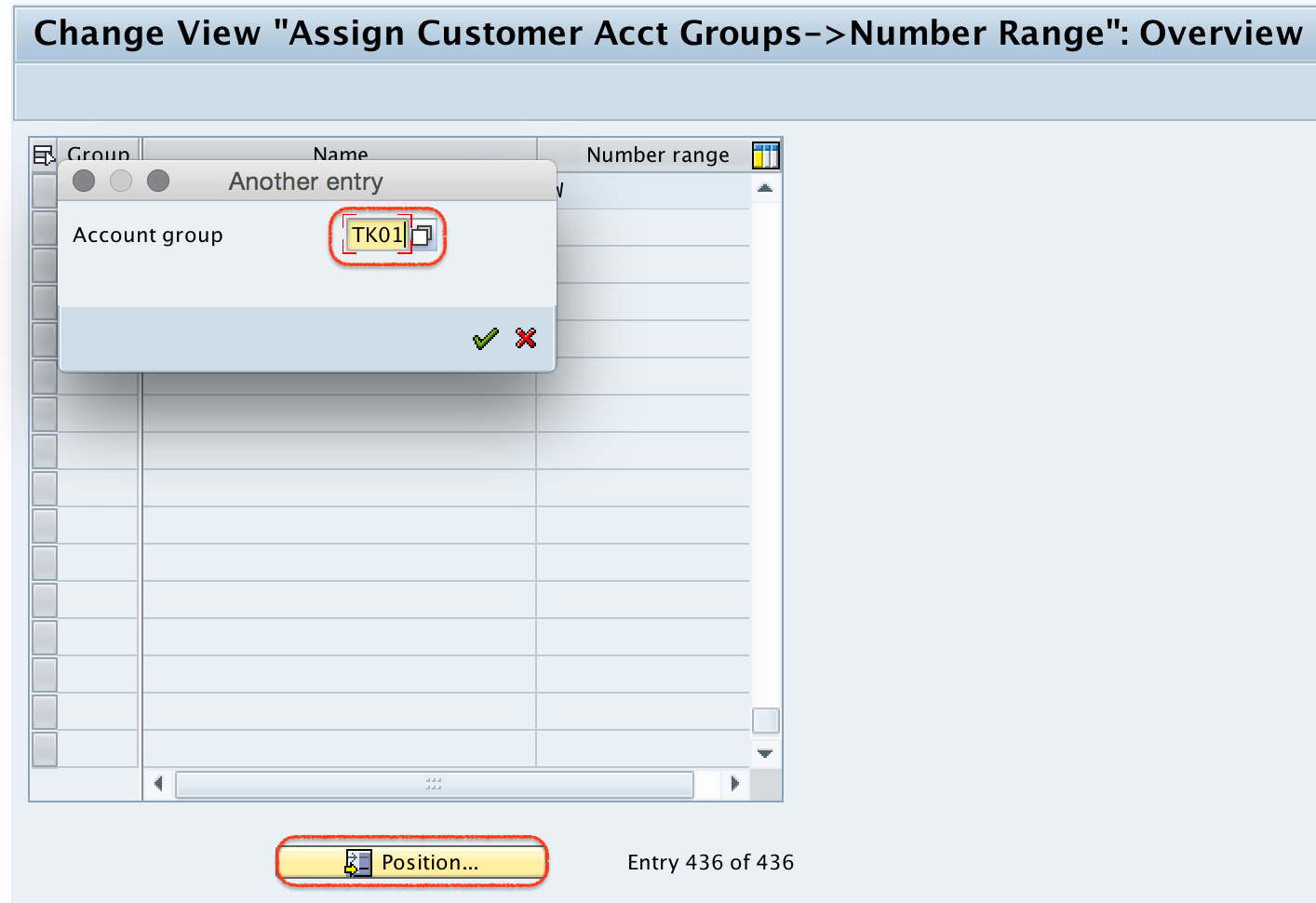
Step 3) Now update the customer account group number range interval “TK” in the field number range as shown below.
Here, “TK” is the number range interval key used in this example. In your SAP system, enter the interval key that was created for the required customer number range. Do not enter the from-number or to-number in OBAR; enter only the number range interval key.

Click on save button to save the details.

Step 4) Now you are prompted for customizing request number, choose the request and save the assigned details.
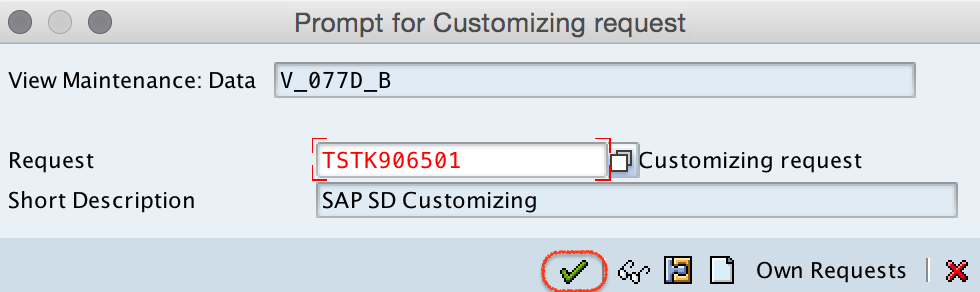
Successfully we have assigned number ranges to customer account groups in SAP.
How to Verify the Customer Account Group Number Range Assignment
After saving the OBAR assignment, verify the setting before it is moved to another client or system. Reopen transaction code OBAR, position the required customer account group, and check that the number range key appears in the Number range field. If your project process allows testing, create a test customer master with that account group and confirm that SAP uses the expected customer number behavior.
- For internal numbering, SAP should generate the next number from the assigned interval.
- For external numbering, SAP should allow only a manually entered customer number that lies within the assigned interval.
- If the wrong interval is used, check whether the selected account group is correct and whether the OBAR assignment was saved in the correct client.
Common OBAR Issues While Assigning Customer Number Ranges
| Issue in SAP | Likely cause | What to check |
|---|---|---|
| Number range key is not accepted | The interval key may not exist for customer accounts. | Check the customer number range interval configuration before assigning it in OBAR. |
| Customer account group is difficult to find | The overview list may contain many account groups. | Use the Position button and enter the exact account group key. |
| Customer number is not generated automatically | The assigned interval may be external, or the account group may not be using the expected interval. | Review the internal/external setting of the interval and the OBAR assignment. |
| Change is not available in another system | The customizing request may not have been transported. | Confirm that the correct transport request was saved and released as per your project process. |
Best Practices for Customer Account Group Number Range Assignment
- Use meaningful number range planning for customer groups such as domestic customers, export customers, one-time customers, or intercompany customers.
- Avoid changing number range assignments in a live system without checking existing customer master data and business process impact.
- Do not assign the same interval to multiple account groups unless the business deliberately wants those groups to share one customer number sequence.
- Document the account group key, number range key, internal or external setting, and transport request for audit and support reference.
- Test customer creation after the assignment, especially when the account group is used by sales, finance, or integration processes.
FAQ on Assigning Number Ranges to Customer Account Groups in SAP
What is the use of OBAR in SAP customer account group configuration?
OBAR is used to assign a customer number range interval to a customer account group. After this assignment, SAP knows which number interval to use when a customer master is created with that account group.
Does OBAR create the customer number range interval?
No. OBAR assigns an existing number range interval to an account group. The interval itself must be created or checked separately in the customer account number range configuration.
Can one customer number range be assigned to more than one account group?
Technically, the same interval key may be assigned to more than one account group in some configurations. However, this should be done only when the business wants those account groups to share the same customer number sequence.
What is the difference between internal and external customer numbering?
In internal numbering, SAP automatically assigns the next available customer number from the interval. In external numbering, the user manually enters the customer number, and SAP validates that it belongs to the assigned interval.
Why is a customizing request required after assigning a customer number range?
The OBAR assignment is a customizing change. SAP prompts for a customizing transport request so the configuration can be recorded and moved to other systems according to the project transport process.
Editorial QA Checklist for This SAP OBAR Tutorial
- Confirm that the tutorial clearly separates creating a customer number range from assigning it to an account group in OBAR.
- Check that every SAP navigation path and transaction code mentioned is relevant to customer account group number range assignment.
- Verify that the example interval key “TK” is described as a sample key, not as a mandatory SAP standard value.
- Ensure the saved configuration and customizing request step is retained because OBAR is a customizing activity.
- Keep screenshots aligned with the OBAR flow: command field, account group overview, number range field, save, and transport request.