 TutorialKart.com
In this SAP SD pricing procedure determination tutorial, you will learn how SAP Sales and Distribution determines the correct pricing procedure for a sales document and how to maintain the assignment using Transaction Code OVKK. Pricing procedure determination links the sales area, document pricing procedure, and customer pricing procedure to the pricing procedure that should be used during sales order pricing.
This configuration does not create the pricing procedure itself. It tells SAP which already-defined pricing procedure should be selected for a particular sales organization, distribution channel, division, sales document type, and customer pricing category.
What is Pricing Procedure Determination in SAP SD?
Pricing procedure determination is the SAP SD configuration that decides which pricing procedure is used in a sales document. The system determines the pricing procedure from a combination of three main inputs: sales area, document pricing procedure, and customer pricing procedure.
- Sales Area: Sales Organization, Distribution Channel, and Division from the sales document.
- Document Pricing Procedure: The pricing procedure indicator assigned to the sales document type.
- Customer Pricing Procedure: The pricing procedure indicator maintained in the customer master sales area data.
After SAP determines the correct pricing procedure, it reads the condition types maintained in that procedure, checks access sequences where applicable, finds valid condition records, and copies the pricing values into the sales document conditions screen.
For example, a domestic customer and an export customer may use different pricing procedures even when they order the same material. This can be handled by maintaining different customer pricing procedure values and assigning them to different pricing procedures in OVKK.
How SAP Determines Pricing Procedure in a Sales Document
When a sales document is created, SAP SD checks the determination record that matches the document data. The important determination logic can be understood as follows:
| Determination input | Where SAP gets the value | Why it matters |
|---|---|---|
| Sales Organization | Sales document header | Restricts pricing procedure selection to the relevant sales organization. |
| Distribution Channel | Sales document header | Allows different pricing logic for wholesale, retail, online, or other channels. |
| Division | Sales document header | Allows pricing procedure separation by product division where required. |
| Document Pricing Procedure | Sales document type configuration | Separates pricing logic by document type such as order, quotation, or returns. |
| Customer Pricing Procedure | Customer master sales area data | Separates pricing logic by customer category. |
| Pricing Procedure | OVKK assignment result | The actual procedure that controls condition type sequence and pricing calculation. |
If one of these values does not match the OVKK entry, the expected pricing procedure will not be determined. Therefore, troubleshooting pricing procedure determination usually starts by checking the sales area, sales document type, customer master, and OVKK assignment.
OVKK Navigation Path for Pricing Procedure Determination
| Role Menu | Pricing Procedure Determination |
|---|---|
| Transaction Code | OVKK |
| SAP IMG Path | SPRO → Sales and Distribution → Basic Functions → Pricing → Pricing Control → Define and Assign Pricing Procedure → Define Pricing Procedure Determination |
You can either execute OVKK directly or reach the same configuration activity through the SAP Reference IMG. In many projects, direct transaction code OVKK is the faster option when you already know the required activity.
Before You Assign a Pricing Procedure in OVKK
Before creating a pricing procedure determination entry, confirm that the supporting configuration and master data are ready. Otherwise, the assignment may be saved but pricing may still fail during sales order creation.
- Pricing procedure is already defined: The pricing procedure should be created and maintained with condition types before assignment.
- Document pricing procedure is assigned: Check the sales document type configuration and confirm the document pricing procedure value.
- Customer pricing procedure is maintained: Check the customer master under sales area data and confirm the customer pricing procedure value.
- Sales area is correct: Confirm the sales organization, distribution channel, and division used in the sales document.
- Condition records are available: Pricing procedure determination only selects the procedure; condition records are still required for automatic condition values.
Steps to Define Pricing Procedure Determination in SAP SD
Step 1: Open SAP Reference IMG for Pricing Procedure Determination
- Open the SAP GUI and execute Transaction Code SPRO.
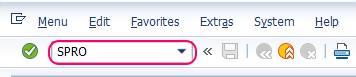
You can also enter OVKK directly in the command field if you want to open pricing procedure determination without navigating through SPRO.
Step 2: Choose SAP Reference IMG for SAP SD Pricing Control
- On the displayed screen, choose SAP Reference IMG (F5).
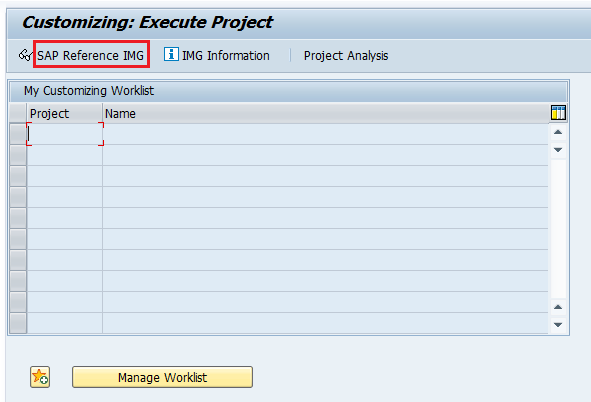
The SAP Reference IMG contains the customizing activities used to configure SAP SD pricing, including condition types, pricing procedures, and pricing procedure determination.
Step 3: Follow the IMG Path to Define and Assign Pricing Procedure
- Follow the IMG menu path:
SPRO → Sales and Distribution → Basic Functions → Pricing → Pricing Control → Define and Assign Pricing Procedure → Define Pricing Procedure Determination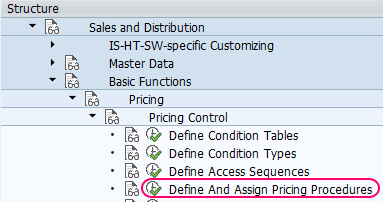
This path is used after the pricing procedure has already been created. If you still need to maintain the procedure and its condition type sequence, use the pricing procedure definition activity before assigning it here.
Step 4: Open Define Pricing Procedure Determination Activity
- On the activity screen, double-click on “Define Pricing Procedure Determination.”
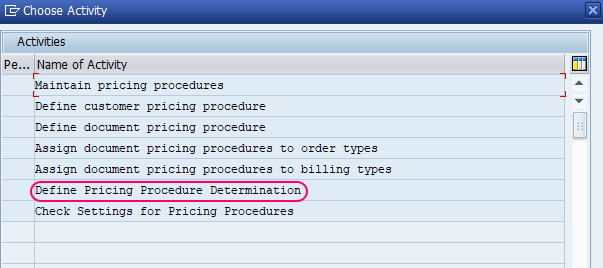
SAP opens the maintenance view where pricing procedures are assigned to sales document determination combinations.
Step 5: Create a New OVKK Pricing Procedure Determination Entry
- On the Change View: Pricing Procedures: Determination in Sales Docs screen, click on New Entries to create a new pricing procedure determination entry.

If you are changing an existing assignment, search for the sales area and procedure combination first. Avoid creating duplicate or overlapping entries without confirming the business requirement.
Step 6: Enter Sales Area, Customer Procedure, Document Procedure, and Pricing Procedure
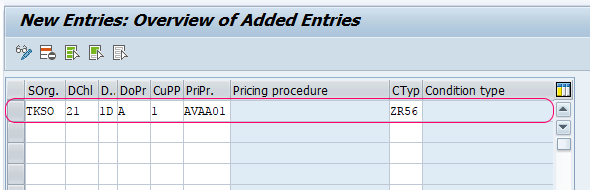
- Enter the following details:
- SOrg (Sales Organization): Specify the sales organization key.
- DChl (Distribution Channel): Enter the distribution channel key.
- DV (Division): Provide the division key.
- DoPr (Document Pricing Procedure): Enter the document pricing procedure assigned to the sales document type.
- CuPP (Customer Pricing Procedure): Enter the customer pricing procedure maintained in the customer master sales area data.
- PriPr (Pricing Procedure): Assign the pricing procedure that should be used for the matching combination.
- CTyp (Condition Type): Maintain this only if your configuration screen and business process require a condition type entry for the determination scenario. In many standard sales pricing setups, the pricing procedure itself controls the condition types.
Use naming and assignment rules consistently. For example, if your project uses one customer pricing procedure for domestic customers and another for export customers, maintain separate OVKK entries only where the pricing procedure logic actually differs.
Step 7: Save the SAP SD Pricing Procedure Determination Configuration
- After updating all required fields, click Save to save the configuration details.
When prompted, assign the change to the appropriate customizing transport request according to your project process. Then test the determination in a sales order before moving the change to a production system.
Example of Pricing Procedure Determination in SAP SD
The following simplified example shows how SAP SD may determine a pricing procedure for a domestic standard sales order:
| Field | Example value | Meaning |
|---|---|---|
| Sales Organization | 1000 | Domestic sales organization |
| Distribution Channel | 10 | Direct sales channel |
| Division | 00 | Common division |
| Document Pricing Procedure | A | Standard order pricing indicator |
| Customer Pricing Procedure | 1 | Standard customer pricing indicator |
| Pricing Procedure | ZPR001 | Custom domestic pricing procedure |
When a sales order is created for the same sales area, document pricing procedure, and customer pricing procedure, SAP selects the assigned pricing procedure. The condition types inside that procedure then control how base price, discounts, freight, taxes, and subtotals are processed.
Where Document Pricing Procedure and Customer Pricing Procedure Come From
Two important fields used in OVKK do not come directly from OVKK itself. They are maintained in separate configuration or master data areas.
| Field used in OVKK | Maintained in | Practical check |
|---|---|---|
| Document Pricing Procedure | Sales document type configuration | Check the sales document type used in the order, such as standard order, quotation, returns, or contract. |
| Customer Pricing Procedure | Customer master sales area data | Check the customer used in the sales order for the relevant sales organization, distribution channel, and division. |
If a sales order is not picking the expected pricing procedure, compare these values in the order with the corresponding OVKK entry. A mismatch in either field can cause a different pricing procedure to be selected.
SAP Table for Pricing Procedure Determination
In standard SAP SD, pricing procedure determination entries maintained through OVKK are commonly checked in table T683V. This table stores determination combinations such as sales organization, distribution channel, division, document pricing procedure, customer pricing procedure, and pricing procedure.
Functional consultants usually maintain this through OVKK rather than directly changing table entries. Table checks are mainly useful for display, troubleshooting, or technical analysis.
| Purpose | SAP object |
|---|---|
| Maintain pricing procedure determination | OVKK |
| Check pricing procedure determination table data | T683V |
| Define or maintain pricing procedure structure | V/08 |
| View pricing analysis in sales document | Sales order condition screen analysis |
Common Pricing Procedure Determination Issues in SAP SD
- Pricing procedure not determined: Check whether an OVKK entry exists for the exact sales area, document pricing procedure, and customer pricing procedure combination.
- Wrong pricing procedure determined: Verify the customer pricing procedure in the customer master and the document pricing procedure in the sales document type.
- Condition values missing after procedure is determined: Check condition records, access sequences, validity dates, and pricing date.
- Different result for the same customer: Confirm that the same sales area and sales document type are used in both test cases.
- Custom pricing procedure not appearing: Confirm that the procedure is created in V/08 and assigned in OVKK for the required determination combination.
For troubleshooting, create a test sales order and open the item condition screen. Use pricing analysis to see which procedure was selected and how the condition types were processed.
QA Checklist for SAP SD Pricing Procedure Determination Tutorial Review
- Confirm that the tutorial explains pricing procedure determination as an assignment activity, not as pricing procedure creation.
- Check that the determination inputs are clearly listed: sales area, document pricing procedure, and customer pricing procedure.
- Verify that the OVKK steps include the fields SOrg, DChl, DV, DoPr, CuPP, and PriPr.
- Ensure that the article explains where document pricing procedure and customer pricing procedure are maintained.
- Confirm that table T683V is mentioned as a check table and not recommended for direct manual changes.
- Make sure the article advises testing the assignment in a non-production system before production transport.
Key Checks Before Transporting OVKK Pricing Procedure Determination
- Custom Pricing Procedures: Assign custom pricing procedures only where a separate pricing calculation is required for the customer or document scenario.
- Sales Area Variations: Maintain separate determination entries for different sales organization, distribution channel, and division combinations only when needed.
- Document Type Testing: Test with the same sales document type that users will use in the actual process.
- Customer Master Check: Verify the customer pricing procedure in customer master sales area data before assuming the OVKK entry is wrong.
- Condition Record Check: Remember that OVKK determines the procedure, while condition records supply many of the actual prices, discounts, and other values.
SAP SD Pricing Procedure Determination FAQs
How to determine pricing procedure in SAP SD?
SAP SD determines the pricing procedure by matching the sales area, document pricing procedure, and customer pricing procedure with the assignment maintained in OVKK. The result of this assignment is the pricing procedure used in the sales document.
How to assign a pricing procedure in SAP SD?
Use transaction code OVKK or the IMG path under Sales and Distribution pricing control. Create an entry with the sales organization, distribution channel, division, document pricing procedure, customer pricing procedure, and the pricing procedure to be assigned.
What is the table to check pricing procedure determination in SAP?
In standard SAP SD, pricing procedure determination entries are commonly checked in table T683V. Consultants should normally maintain the assignment through OVKK instead of directly changing table records.
What is the T code for pricing procedure determination in SAP SD?
The transaction code for pricing procedure determination in SAP SD is OVKK. The transaction code for defining the pricing procedure structure is V/08.
Why is the wrong pricing procedure picked in a sales order?
The wrong pricing procedure is usually picked because the sales area, document pricing procedure, or customer pricing procedure does not match the expected OVKK entry. Check the sales document type, customer master sales area data, and the OVKK assignment for the same sales area.
Summary of Pricing Procedure Determination in SAP SD
Pricing procedure determination in SAP SD is maintained with OVKK to assign the correct pricing procedure to a sales document. The system checks the sales organization, distribution channel, division, document pricing procedure, and customer pricing procedure to determine which pricing procedure should be used.
After maintaining the assignment, test it with the correct customer, sales area, and sales document type. If the pricing procedure is determined correctly but condition values are still missing, check condition records, access sequences, validity dates, and pricing analysis in the sales document.
For more SAP tutorials, explore SAP Training Tutorials.