 TutorialKart.com
How to create distribution channel in SAP SD
In SAP, Distribution channels determines through which channel products and services of an organization to reach the customers.
In this SAP tutorials, you will learn how to define distribution channel in SAP SD step by step. In previous tutorials we have learned how to create sales organization in SAP.
A distribution channel is used with sales organization and division to form a sales area. It helps SAP SD identify how products or services are sold, for example through retail, wholesale, direct sales, online sales, or cash sales. The configuration is simple, but the value should be chosen carefully because it is used later in master data, sales documents, pricing, availability, delivery, billing, and reporting.
Distribution Channel Meaning in SAP SD Enterprise Structure
In SAP SD, a distribution channel represents the route or channel through which goods and services are sold to customers. It is not a physical route like a shipping lane. It is an enterprise structure element that separates sales processes by channel, such as wholesale sales, retail sales, direct sales, dealer sales, or online sales.
The same material can be sold through different distribution channels with different pricing, minimum order quantities, customer groups, or sales conditions. For example, a company may sell one product through a retail channel and a wholesale channel, but each channel may use different pricing or customer master data views.
For standard SAP terminology, you can also refer to the SAP Help Portal page for Distribution Channel.
Distribution Channel SAP Implementation Process
Distribution channel SAP implementation process
The following table shows sample distribution channel keys and descriptions. Your project may use different keys based on the enterprise structure design and naming convention.
| Distr. Channel | Name |
| 16 | Retail |
| 20 | Cash Sales |
| 21 | Whole Sales |
| 24 | Online Sales |
| 26 | Trader |
| 50 | Direct Sale |
Prerequisites Before You Define Distribution Channel in SAP
Before creating a new distribution channel in SAP, confirm how the sales process should be separated. Do not create a new channel only because a new sales team or region exists. In many cases, sales office, sales group, customer group, division, or pricing condition records may be more suitable.
- Two-character distribution channel key: Decide a stable key such as 10, 20, RE, WH, or ON based on the project naming standard.
- Channel description: Use a clear name that business users can understand in sales documents and reports.
- Sales organization assignment: Plan which sales organizations will be allowed to use the distribution channel.
- Division and sales area setup: Confirm the sales areas that should be available for sales order processing.
- Master data impact: Decide whether customer and material master data will be maintained separately by channel.
- Common distribution channel decision: Check whether common distribution channels can reduce duplicate master data maintenance in your project.
Transaction Code OVXI and SPRO Path for Distribution Channel in SAP
You can define new distribution channel in SAP by using any of the navigation method.
- Transaction code: – OVXI
- Menu Path: – SPRO -> SAP IMG -> Enterprise Structure –> Definition –> Sales and Distribution –> Define copy, delete, check distribution channel.
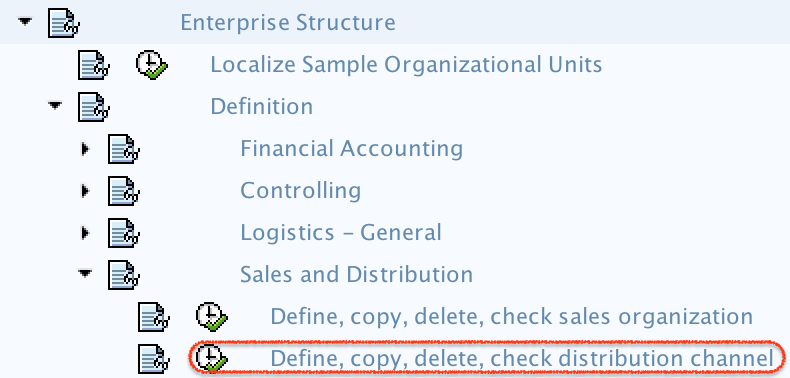
Step-by-Step Configuration to Define Distribution Channel in SAP Using OVXI
Step 1) Enter T-code “OVXI” in the SAP command field as shown below and press enter to continue.

Step 2) On change view distribution channel overview screen, click on new entries button to create a new distribution channels in SAP as per the organizational requirements.
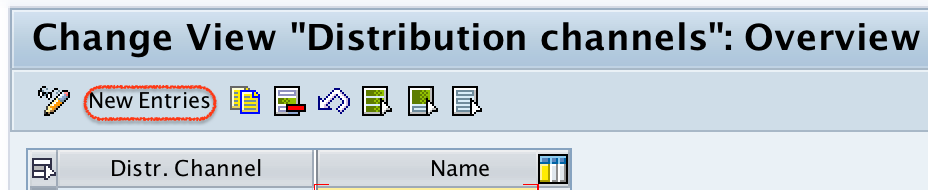
Step 3)- On new entries screen, update the following details.
- Distr.Channel: – Enter the two digits key that identifies the distribution channel in SAP.
- Name: – Update the descriptive text of distribution channel.
Use the distribution channel key consistently across the project. If your implementation uses numeric keys, enter a two-digit value. If your system design allows alphabetic keys, follow the agreed naming convention. The description should clearly show the channel purpose, such as Retail Sales, Wholesale Sales, Online Sales, or Direct Sales.
| Field in OVXI | What to maintain | Configuration note |
|---|---|---|
| Distr. Channel | Two-character channel key | Use a value that will remain stable after go-live. |
| Name | Distribution channel description | Use a business-friendly name for users and reports. |
| Customizing request | Transport request | Save the change in the correct implementation transport. |
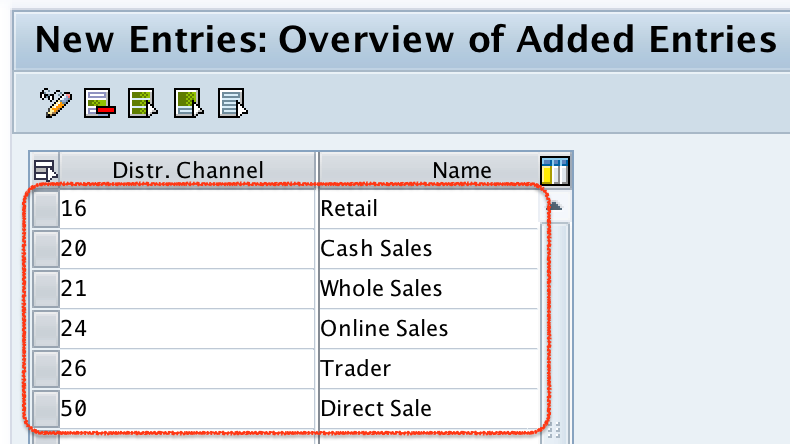
Step 4) After maintaining the required details, click on save button and save the configured details.

Successfully we have defined new distribution channels in SAP systems.
Assignment Required After Creating Distribution Channel in SAP SD
Defining the distribution channel creates the channel value, but it does not make the full SD structure ready by itself. After saving the distribution channel, complete the related assignments according to your project structure.
- Assign distribution channel to sales organization: This allows the sales organization to use the channel in sales processing.
- Assign division to sales organization: This supports the creation of valid sales areas.
- Set up sales area: Combine sales organization, distribution channel, and division for sales document processing.
- Assign sales organization and distribution channel to plant: This is required when delivery processing is linked to plant-based fulfillment.
- Maintain customer master sales area data: Customer sales data is maintained by sales organization, distribution channel, and division.
- Maintain material master sales views: Material sales data may also depend on sales organization and distribution channel.
If these assignments are missing, the distribution channel may exist in configuration, but users may not be able to create sales orders for the intended sales area.
Common Distribution Channel in SAP Master Data Maintenance
In many SAP SD projects, common distribution channel configuration is used to reduce duplicate master data maintenance. For example, if multiple distribution channels use the same customer master sales data or material master sales data, a common distribution channel can allow the system to refer to shared master data instead of requiring the same records to be maintained repeatedly.
This setting should be decided by the SD functional design team. It affects how customer and material master data is searched during sales processing, so it should be tested carefully before production use.
Technical Details for SAP Distribution Channel
The common SAP technical field name for distribution channel is VTWEG. You will see this field in many SD-related tables, master data records, sales documents, reports, and interfaces. Distribution channel configuration is commonly associated with customizing table TVTW, while assignment and sales area-related settings are stored in other SD customizing tables depending on the configuration activity.
Functional consultants should maintain distribution channels through transaction code OVXI or the SPRO path. Direct table changes are not recommended for normal customizing because they can bypass configuration checks and transport control.
Common Mistakes While Defining Distribution Channel in SAP
- Creating too many channels: Do not create a new distribution channel when the requirement can be handled by sales office, sales group, customer group, or pricing.
- Skipping sales organization assignment: A channel must be assigned to the relevant sales organization before it can be used in a sales area.
- Using unclear descriptions: Descriptions like Channel 1 or Domestic can confuse users if the project has several sales processes.
- Ignoring master data impact: A new distribution channel may require additional customer master and material master sales views.
- Not testing sales area creation: Always test the combination of sales organization, distribution channel, and division after configuration.
- Saving in the wrong transport: Enterprise structure changes should be captured in the correct customizing request.
QA Checklist for SAP Distribution Channel Configuration
- The distribution channel key follows the agreed SAP SD enterprise structure naming standard.
- The distribution channel description clearly explains the sales channel purpose.
- The channel is assigned to the correct sales organization.
- The sales area combination is available with the required sales organization and division.
- Customer master sales area data requirements are reviewed for the new channel.
- Material master sales views are reviewed for the sales organization and distribution channel combination.
- Common distribution channel settings are reviewed if master data sharing is required.
- Sales order creation is tested with the new distribution channel before moving changes to production.
- The configuration is saved in the correct customizing transport request.
FAQs on Defining Distribution Channel in SAP
How to add a distribution channel in SAP?
Use transaction code OVXI or go through SPRO > SAP IMG > Enterprise Structure > Definition > Sales and Distribution > Define copy, delete, check distribution channel. Choose New Entries, enter the distribution channel key and name, then save the configuration in a customizing request.
What is a distribution channel in SAP?
A distribution channel in SAP SD is an organizational unit that represents how goods or services reach customers. It can represent channels such as retail, wholesale, online sales, direct sales, dealer sales, or cash sales.
What is the transaction code to define distribution channel in SAP?
The transaction code to define a distribution channel is OVXI. Related assignment activities, such as assigning a distribution channel to a sales organization, are maintained through separate SPRO configuration nodes.
How do you assign distribution channel to sales organization in SAP?
After defining the distribution channel, use the relevant SPRO assignment path under Enterprise Structure > Assignment > Sales and Distribution to assign the distribution channel to one or more sales organizations. This assignment is required before the combination can be used in a valid sales area.
What is the field name for distribution channel in SAP?
The common technical field name for distribution channel in SAP is VTWEG. It is used in SD master data, sales document data, reports, interfaces, and many SAP tables.
Summary of SAP Distribution Channel Configuration
To define distribution channel in SAP, use transaction code OVXI or the SPRO enterprise structure path, create a two-character distribution channel key, maintain the channel name, and save the configuration in a customizing request. After that, assign the distribution channel to the required sales organization and complete the sales area setup with division so that the channel can be used in SAP SD transactions.