 TutorialKart.com
Login Salesforce – login.salesforce.com, Salesforce Sign in
Login Salesforce through the official customer login URL https://login.salesforce.com/ when you want to access a production Salesforce org. Salesforce sign in is done by entering your Salesforce username and password on the secure login page. Type the username and password exactly as provided, without adding extra spaces before or after them.
Salesforce login can also use a company-specific My Domain URL, Single Sign-On (SSO), sandbox login URL, OAuth, or an external tool such as Data Loader. The correct login method depends on whether you are accessing a production org, sandbox org, partner portal, developer org, Experience Cloud site, or an integration-connected application.
Official Salesforce login URLs for production, sandbox, and My Domain
Use the correct Salesforce login URL for the environment you are trying to access. If your company has enabled My Domain, your admin may ask you to sign in from a branded URL instead of the general Salesforce login page.
| Salesforce login requirement | Login URL or method | When to use it |
|---|---|---|
| Production org login | https://login.salesforce.com/ | Use this for a normal Salesforce production account unless your company uses My Domain or SSO. |
| Sandbox org login | https://test.salesforce.com/ | Use this for Salesforce sandbox environments used for testing and development. |
| My Domain login | https://yourdomain.my.salesforce.com/ | Use the custom domain provided by your Salesforce admin or company. |
| Salesforce account and billing | Salesforce Your Account | Use this when you need account, billing, or subscription access rather than the CRM app itself. |
| Partner access | Salesforce Partner login | Use this if you are signing in to the Salesforce Partner Community or partner tools. |
If the general login URL does not work for your account, check whether your organization requires a My Domain URL or SSO. Many companies disable direct username-password login for security reasons and route users through their identity provider.
How to Login Salesforce for first time?
After creating Salesforce account Salesforce.com will send welcome email to your registered email which includes detail about Salesforce site and SFDC login information.
- Login in to your Email and check your login information.
- Click on link provided in email and it will redirect to https://login.salesforce.com/ automatically.
- Now user must set Salesforce sign in password and Security question and Answer.
- Salesforce Security question can be used to verify user identity when login salesforce password is lost.
For a first-time Salesforce sign in, complete the setup from the welcome email as soon as possible. The email may contain a temporary link that expires. If the link has expired, use the password reset option or contact your Salesforce administrator.
Salesforce sign in steps at login.salesforce.com
- Open https://login.salesforce.com/ in a web browser.
- Enter your Salesforce username. In many orgs, the username is in email format, but it may not be the same as your mailbox address.
- Enter your Salesforce password exactly as set.
- Click Log In.
- Complete any additional verification step, such as email verification, authenticator app approval, or SSO authentication.
- If your org uses My Domain, follow the company-specific login URL provided by your admin.
Do not bookmark a password reset page or an old session page. Bookmark the Salesforce login page, your My Domain login URL, or the official internal link provided by your company.
How to login Salesforce when “Unable to login to Salesforce” ?
Some times every user will get difficulty logging in to Salesforce.com account. This is not a great issue by doing some troubleshooting steps we can login to salesforce.
Salesforce sign in Username and Password are case sensitive, and must be minimum 8 characters. Enter Username and password with out adding spaces and extra characters. If you lost or forgot your login.salesforce.com passwords click on “Forgot your password” link on customer login page. Now a Enter Username and click on Continue button.
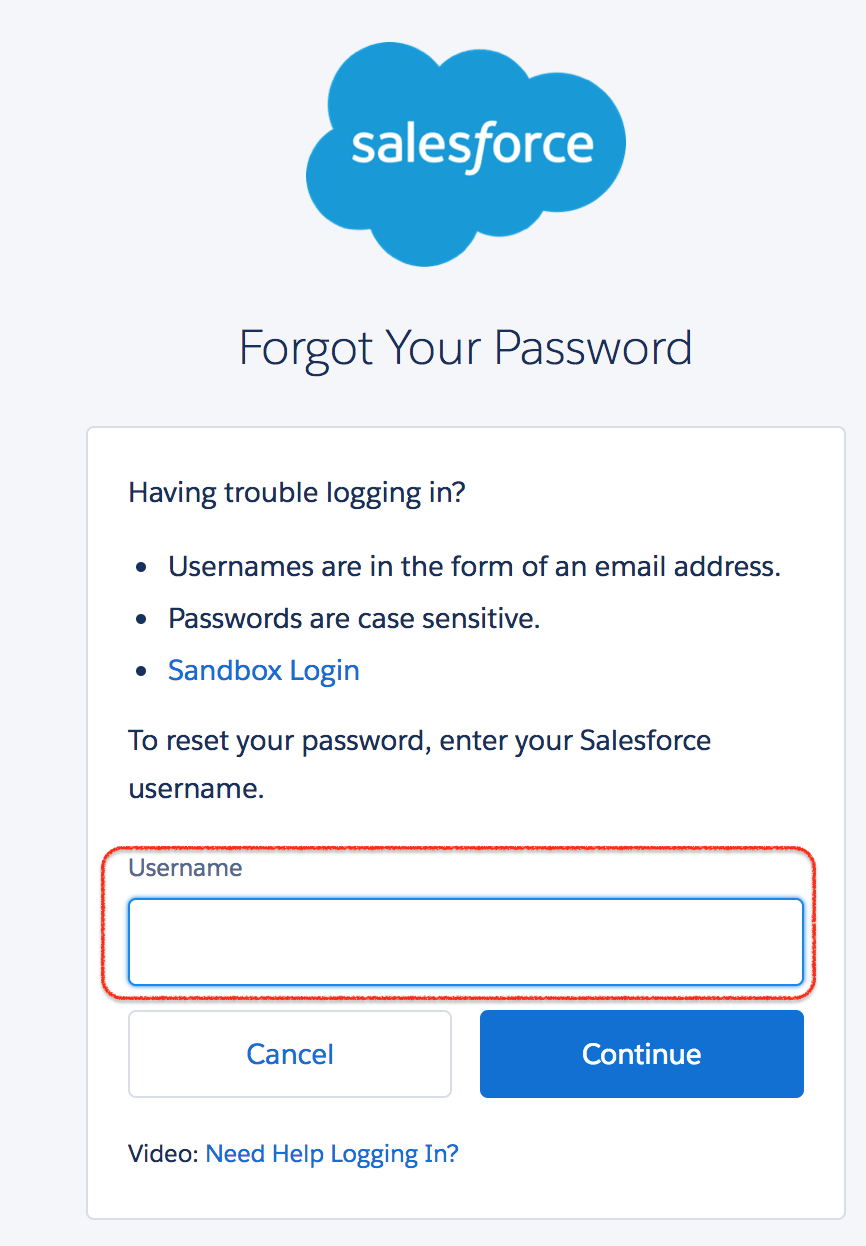
Now Salesforce.com will sent an email to reset your password. Click on the link within 24 hours as the link will expire in 24 hours.
- Now answer your Security Question to verify your identity.
- Click on Continue button.
- Now a verification code with 5 digits will be sent to your registered email.
- Enter your verification code and click on verify.
- Now Change your password. Your password must contain at least 8 characters, 1 letter and 1 number.
- Now go to https://login.salesforce.com/ and enter your Username and new password to login Salesforce.
Salesforce login troubleshooting checklist
If you are unable to login to Salesforce, check the login URL, username, password, network, and verification method before assuming the account is broken. Login failures often happen because the user is on the wrong environment URL or because the org requires SSO.
- Check the environment URL: use login.salesforce.com for production and test.salesforce.com for sandbox.
- Confirm your username: Salesforce usernames are unique and may be different from your email address.
- Remove spaces: copied passwords sometimes include a hidden space at the beginning or end.
- Use the correct My Domain: some orgs require a company-specific Salesforce login URL.
- Complete verification: approve the MFA prompt, verification code, or identity provider request if your org requires it.
- Check account status: an inactive, frozen, or locked user account must be handled by a Salesforce admin.
- Try another browser session: clear cookies or use a private window if the browser is redirecting to an old session.
If you repeatedly fail to sign in after using the correct URL and password reset flow, contact your Salesforce administrator. The admin can check whether your user is active, whether login hours or IP restrictions are applied, and whether SSO is required.
Different Salesforce.com Login methods.
There are different settings and salesforce.com login methods available for users. Some of the ways that user can login salesforce.com are
- Web Browser through https://login.salesforce.com/ URL.
- External API (Application Programming Interface) like Data loader.
- Single Sign On (SSO).
- OAuth.
Salesforce login url can define the which type of environment that we are logging. There are two types of Environments in Salesoforce.com they are
- Production Environment : User can login to Production using https://login.salesforce.com/url.
- Sandbox Environment : User can login in to Sandbox using https://test.salesforce.com/ url.
Salesforce login with SSO, OAuth, and external applications
Many Salesforce organizations do not rely only on direct username and password login. They may use SSO, OAuth, connected apps, or API-based authentication depending on the use case.
- Single Sign-On (SSO): the user signs in through a company identity provider. The Salesforce login page may redirect to the company login screen.
- OAuth: connected apps request access to Salesforce through an authorization flow instead of storing the user’s password.
- API login: tools such as Data Loader may use username, password, security token, OAuth, or SSO-supported flows depending on configuration.
- Experience Cloud login: community or portal users may sign in from a site-specific URL rather than the standard Salesforce login page.
For integrations, avoid hard-coding personal user passwords where possible. Use the authentication method approved by your Salesforce administrator, and review connected app permissions before granting access.
How can login salesforce using multiple usernames.
Single user can maintain multiple developer accounts and multiple sandboxes. Maintaining multiple accounts is not difficult but remembering their Salesforce.com login usernames and password are difficult. To overcome this issue Salesforce has introduced new feature in Spring’ 14 called “Multiple username login hints”. This feature is enabled by default and can be disabled by unchecking enable caching and auto complete on login page checkbox in Session settings.
When you work with many Salesforce usernames, label each org clearly in your browser profile, password manager, or internal notes. Use separate browser profiles for admin, developer, production, and sandbox work if your company policy allows it. This reduces the chance of changing records in the wrong org.
Can we login salesforce through google chrome extensions?
Yes, we can login Salesforce using different Google Chrome extensions. It is very difficult to remember multiple organizations and multiple login credentials. In this Salesforce tutorial we are going to list popular google chrome extensions that are used to login Salesforce organization.
- Salesforce ORGanizer.
- Salesforce.com Quick Login As by Kyle Peterson.
- Force.com Logins by takasu.biz.
- Last Pass.
- Salesforce login Helper.
How Salesforce.com login Google Chrome extensions are helpful?
- Keeps your Saleforce.com login credentials like Username, Passwords, Security tokens and description.
- Chrome extension can let users to login Salesforce in new Tab, new window and in Incognito.
- We can add multiple organisations and can save them.
- We can search for an organization.
- Export and Import the account information in XML format.
Use browser extensions carefully. Install only trusted extensions approved by your organization, review their permissions, and avoid storing Salesforce administrator credentials in unapproved tools. For sensitive accounts, use your company’s approved password manager or identity provider.
Salesforce password reset and verification tips
The Forgot Your Password link on the Salesforce login page sends a password reset email for the username you enter. If the email does not arrive, check whether you entered the correct Salesforce username and whether the message went to spam or quarantine.
- Use the username assigned to your Salesforce user record, not only your email address.
- Open the latest password reset email if you requested more than one reset link.
- Set a password that follows your org’s password policy.
- Keep your registered email account secure because reset links and verification codes may be sent there.
- Contact your Salesforce admin if your user is locked, frozen, inactive, or assigned the wrong login policy.
Salesforce login security practices for users and admins
Salesforce login security depends on both user behavior and admin configuration. Users should sign in only from trusted devices and official login pages. Admins should configure the login method, session settings, password policies, IP restrictions, and MFA requirements according to company policy.
- Use only official Salesforce login pages or company-provided My Domain URLs.
- Do not enter Salesforce credentials on unknown pages that resemble the login screen.
- Use SSO or MFA when required by the organization.
- Do not share passwords or verification codes with another user.
- Review connected apps before approving OAuth access.
- Log out from shared computers after completing Salesforce work.
FAQs on Salesforce login and Salesforce sign in
What is the Salesforce login URL for production?
The common production Salesforce login URL is https://login.salesforce.com/. Your company may also provide a My Domain URL that you must use instead of the general login page.
What is the Salesforce sandbox login URL?
The Salesforce sandbox login URL is https://test.salesforce.com/. Sandbox usernames may be different from production usernames, especially when a sandbox name is appended to the username.
Why does Salesforce redirect me to my company login page?
Salesforce may redirect you to your company login page when Single Sign-On is enabled. In that case, authenticate with your company identity provider and complete any verification step required by your organization.
Can I use the same username for production and sandbox Salesforce login?
Production and sandbox usernames are often related, but they are not always identical. A sandbox username may include the sandbox name after the production username. Check the sandbox welcome email or ask your Salesforce administrator.
What should I do if Forgot Your Password does not send a reset email?
Check that you entered the correct Salesforce username, then check spam or quarantine folders. If the reset email still does not arrive, contact your Salesforce administrator because the account may be inactive, locked, or configured for SSO-only login.
Editorial QA checklist for Login Salesforce article
- Verify that production login, sandbox login, My Domain login, SSO, OAuth, and API login are clearly separated.
- Check that the existing Salesforce login image and all existing links remain unchanged.
- Confirm that password reset guidance does not promise access when an admin action is required.
- Ensure browser extension advice includes security caution for credentials and admin accounts.
- Keep FAQ questions specific to Salesforce sign in, login.salesforce.com, sandbox login, SSO redirects, and password reset issues.