 TutorialKart.com
Styling Salesforce Lightning Application using Bootstrap means loading Bootstrap CSS in a Lightning Aura application and then applying Bootstrap classes or your own CSS rules to the component markup. In Salesforce Lightning, you normally choose from three styling options: the component’s own CSS file, Salesforce Lightning Design System (SLDS), or an uploaded third-party CSS framework such as Bootstrap.
This tutorial keeps the original Aura component example and explains the safer way to use Bootstrap today. The example uses firstlightning.app and an Aura component named tutorialkart. For new Salesforce UI work, start with SLDS and Lightning base components where possible; use Bootstrap only when you have a specific layout or existing design requirement that SLDS does not cover.
When to use CSS, SLDS, or Bootstrap in a Salesforce Lightning application
Before adding Bootstrap to a Salesforce Lightning application, decide whether the page really needs a third-party framework. Lightning runs inside an existing Salesforce user interface, so global CSS frameworks can affect spacing, fonts, buttons, and utility classes if they are not scoped carefully.
| Styling method | Best use in Salesforce Lightning | Important note |
|---|---|---|
| Component CSS file | Small layout changes, colors, borders, spacing, and custom classes for one Aura component | Use the .THIS selector in Aura component CSS. |
| Salesforce Lightning Design System | Salesforce-like buttons, grids, cards, forms, spacing, and accessible UI patterns | Recommended when the component should match Lightning Experience. |
| Bootstrap static resource | Existing Bootstrap snippets, custom public pages, prototypes, or layouts that must use Bootstrap classes | Upload the CSS as a Salesforce Static Resource and load it with <ltng:require>. |
Salesforce documents ltng:require for loading CSS and JavaScript static resources in Aura, and the Salesforce Lightning Design System provides Salesforce-aligned styling. If you are learning the older Aura approach in this tutorial, the Bootstrap method is still useful for understanding static resources and external CSS loading.
Styling Salesforce Lightning Application using local Aura CSS
Local Aura CSS is the simplest way to style one Lightning component. In Developer Console, open the component bundle and click the STYLE button in the sidebar. Salesforce creates a CSS resource for that component bundle, and the rules in that CSS file apply to the component markup.
In our previous Salesforce Tutorial, we created Salesforce Lightning Components and a Salesforce Lightning Application. In this tutorial, we add background color, borders, text color, and font size to the Salesforce Lightning app called firstlightning.app.
- Navigate to Developer Console and create a new Lightning component.
<aura:component >
    <h1> Welcome to Tutorialkart.com</h1>
    	<p> In this salesforce tutorials, we will learn about how to add stylling to lightning application. We have 5 salesforce user as shown below </p>
    	    <div>
    		<div class="red">Salesforce user1 - Red</div>
                <div class="green">Saleforce user2 - Green</div>
                <div class="blue">Saleforce user3 - Blue</div>
                <div class="white">Saleforce user4 - White</div>
                <div class="yellow">Saleforce user5 - Yellow</div>
            </div>

</aura:component>
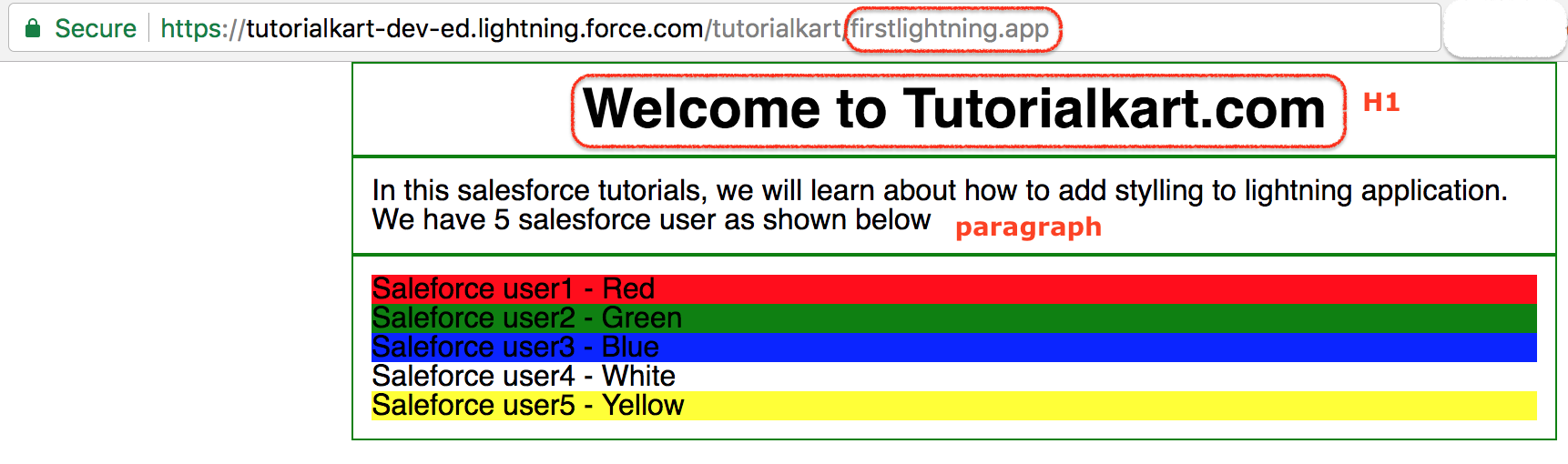
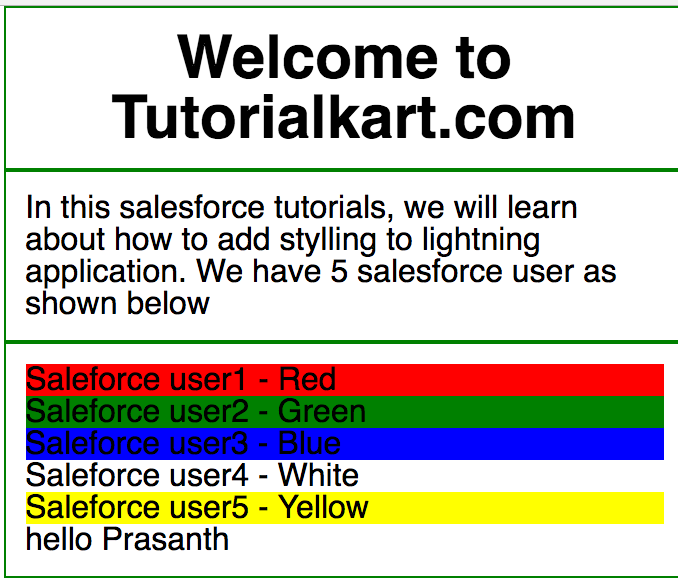
Here we created a component called tutorialkart. The component contains a heading, a paragraph, and five <div> elements. Each <div> has a class name such as red, green, or blue. Those class names are used later in the component CSS.
Now open the Lightning application and include the component inside the application markup.
<aura:application >
    <c:tutorialkart />
</aura:application>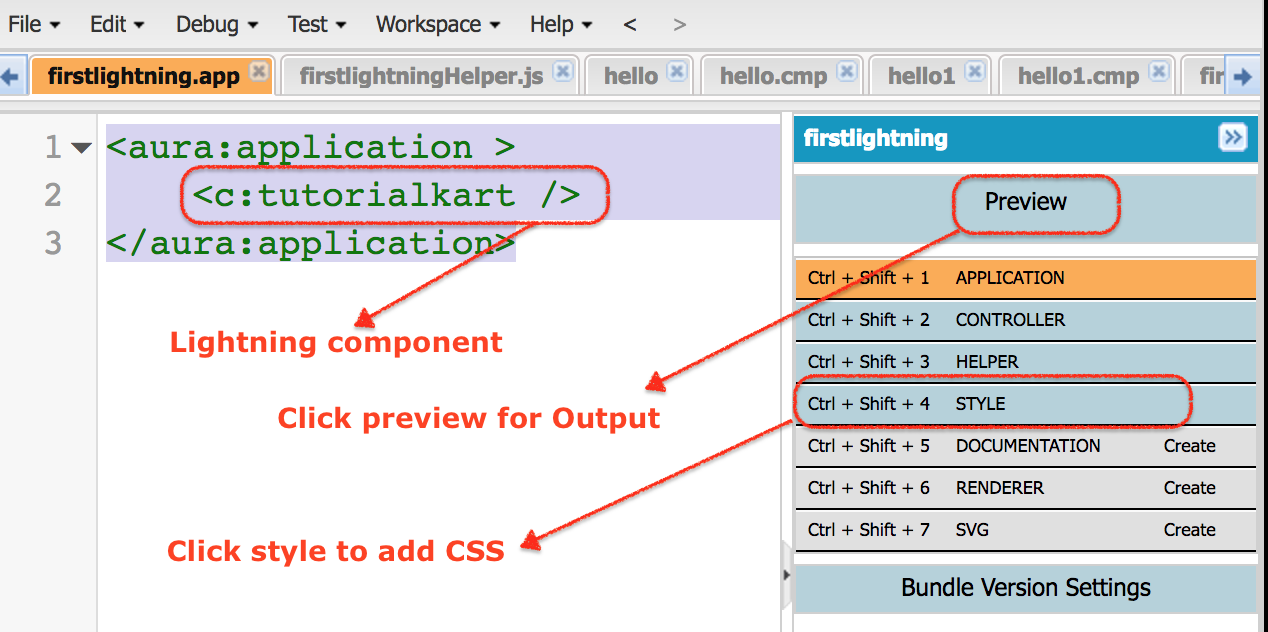
Now add a background color and border to this component. Click Style in the Developer Console bundle sidebar and add the component CSS shown below. In Aura CSS, .THIS represents the component root. For child elements inside the component, use a space after .THIS, as in .THIS .red.
.THIS {
    background-color:White;
    padding-top:10px;
    margin: auto;
    width: 50%;
    border: 1px solid green;
    padding: 10px;
    font-family:Arial, Helvetica, sans-serif;
}

h1.THIS {
    font-size:30px;
    margin: auto;
    font-weight:bold;
    padding-top:10px;
    text-align: center;
}
.THIS.white {
    background-color: white;
}

.THIS .red {
    background-color: red;
}

.THIS .blue {
    background-color: blue;
}

.THIS .green {
    background-color: green;
}
.THIS .yellow {
    background-color: yellow;
}
The first rule styles the component container with white background, padding, centered width, a green border, and a font family. The rules such as .THIS .red and .THIS .green target child elements inside the component and apply the background colors.
- Click the Preview button to check the output of the styled Lightning application.
Instead of writing every CSS rule yourself, you can use an existing CSS framework such as Bootstrap. In Salesforce Lightning, Bootstrap must be uploaded as a static resource first, and then loaded into the Aura component or Aura application.
Uploading Bootstrap CSS as a Salesforce Static Resource
A static resource is a file, such as a CSS file, JavaScript file, image, ZIP archive, or JAR file, that you upload to Salesforce and reference from your component code. Salesforce Help documents how to define static resources. For this tutorial, upload Bootstrap as either a single bootstrap.min.css file or a ZIP file that contains the Bootstrap CSS folder.
Download Bootstrap CSS for the Lightning application
External Static resource bootstrap Style Sheets can be downloaded at developer.salesforce.com form the following http://developer.salesforce.org/bootstrap-sf1/ Download to your local system and upload to Static resources as shown below.
For current Bootstrap versions, you can also download the compiled CSS from the official Bootstrap project and upload only the CSS file or ZIP archive you need. Avoid loading Bootstrap from an external CDN inside Lightning; use Salesforce Static Resources so the file is served from your org.
- Navigate to Setup | Static Resources. In newer Salesforce Setup, enter Static Resources in the Quick Find box.
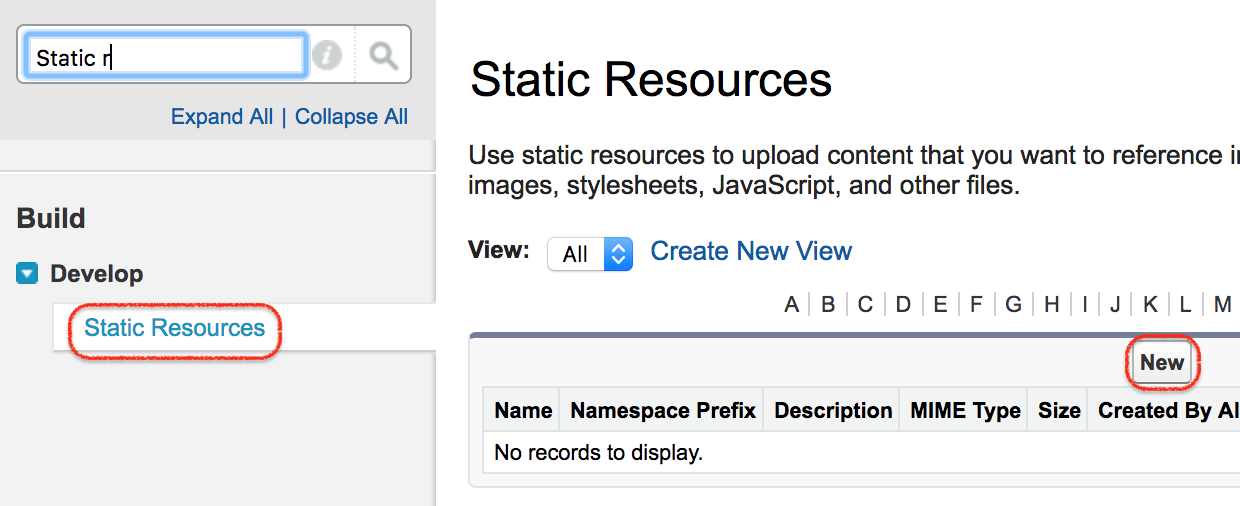
- Click the New button to add the Bootstrap CSS file as a static resource.
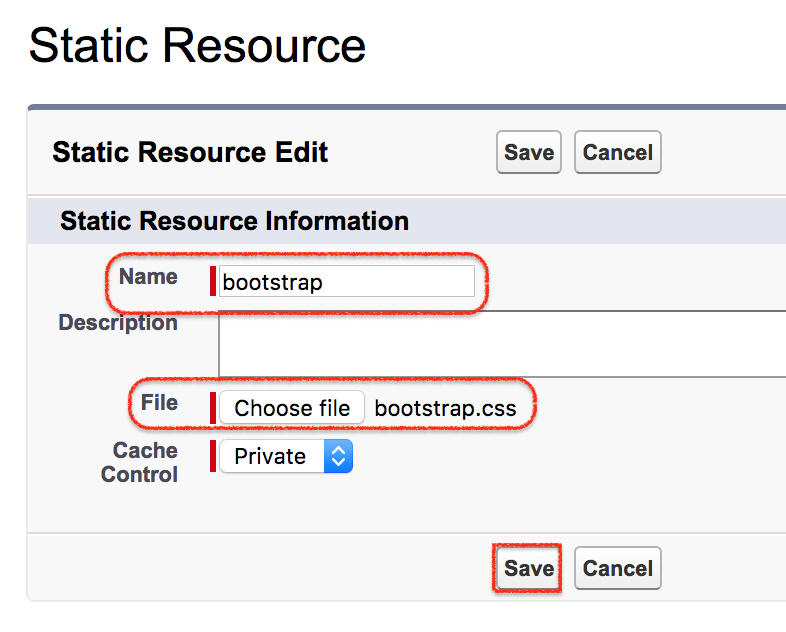
- Enter a resource name. This tutorial uses
Bootstrap. - Choose the Bootstrap CSS file or ZIP archive from your local system.
- Set the MIME type correctly when Salesforce asks for it. For a direct CSS file, use
text/css. - Click Upload and then Save.
Recommended Bootstrap static resource structure for Aura
The resource path you use in <ltng:require> depends on how you uploaded Bootstrap. If you upload a single CSS file named as the static resource Bootstrap, reference the resource directly. If you upload a ZIP archive, include the internal folder path to the CSS file.
<!-- If Bootstrap is uploaded as a single CSS static resource -->
<ltng:require styles="{!$Resource.Bootstrap}" />

<!-- If Bootstrap is uploaded as a ZIP static resource -->
<ltng:require styles="{!$Resource.Bootstrap + '/css/bootstrap.min.css'}" />
Use the exact static resource name you entered in Setup. Static resource names are referenced through the $Resource value provider in Aura. If your resource is named bootstrap instead of Bootstrap, update the expression accordingly.
Loading Bootstrap in a Salesforce Lightning Aura app with ltng:require
How to use Bootstrap CSS in Salesforce Lightning component
The ltng:require tag loads CSS and JavaScript libraries from Salesforce Static Resources. For Bootstrap CSS, use the styles attribute and provide the static resource path.

The above code is used to load the Bootstrap stylesheet into the Lightning component or Lightning application.
- ltng is short form and the tag called require is used.
- Resource is the path of the file.
- Bootstrap is the name of the file.
A clearer Aura example is shown below. Add <ltng:require> before the markup that uses Bootstrap classes.
<aura:component>
    <ltng:require styles="{!$Resource.Bootstrap + '/css/bootstrap.min.css'}" />

    <div class="container p-3 border rounded">
        <h1 class="h3 text-center">Welcome to Tutorialkart.com</h1>
        <p class="text-muted">This Lightning component uses Bootstrap utility classes from a Salesforce static resource.</p>

        <div class="row">
            <div class="col-sm-6 alert alert-primary">Salesforce user 1</div>
            <div class="col-sm-6 alert alert-success">Salesforce user 2</div>
        </div>
    </div>
</aura:component>
If the static resource is a direct CSS file and not a ZIP archive, use {!$Resource.Bootstrap} instead of adding /css/bootstrap.min.css. After saving the component, preview the Lightning application again.
Bootstrap class examples for the Tutorialkart Aura component
After Bootstrap is loaded, you can combine Bootstrap classes with your own Aura CSS classes. Keep the Bootstrap classes for layout and spacing, and keep Salesforce-specific styling in the component CSS file.
<aura:component>
    <ltng:require styles="{!$Resource.Bootstrap + '/css/bootstrap.min.css'}" />

    <div class="container mt-3">
        <div class="card">
            <div class="card-body">
                <h1 class="card-title h4">Salesforce Users</h1>
                <p class="card-text">Bootstrap styles this card, while Aura CSS can still style custom classes.</p>

                <ul class="list-group">
                    <li class="list-group-item red">Salesforce user 1 - Red</li>
                    <li class="list-group-item green">Salesforce user 2 - Green</li>
                    <li class="list-group-item blue">Salesforce user 3 - Blue</li>
                </ul>
            </div>
        </div>
    </div>
</aura:component>
Do not load several large CSS frameworks into the same Lightning page. If Bootstrap and SLDS define similar styles, check buttons, forms, spacing, and mobile behavior carefully in Lightning Experience and the Salesforce mobile app.
Using Bootstrap in Lightning Web Components
The original tutorial is for Aura components. In Lightning Web Components, the pattern is different: upload Bootstrap as a static resource, import the resource URL, and load the CSS with loadStyle from lightning/platformResourceLoader. This is useful when the search intent is “Can we use Bootstrap in LWC?”
import { LightningElement } from 'lwc';
import { loadStyle } from 'lightning/platformResourceLoader';
import bootstrapCss from '@salesforce/resourceUrl/Bootstrap';

export default class BootstrapExample extends LightningElement {
    bootstrapLoaded = false;

    renderedCallback() {
        if (this.bootstrapLoaded) {
            return;
        }

        this.bootstrapLoaded = true;
        loadStyle(this, bootstrapCss + '/css/bootstrap.min.css');
    }
}
If you uploaded Bootstrap as one CSS file instead of a ZIP archive, remove the + '/css/bootstrap.min.css' part. Then use Bootstrap classes in the LWC template.
<template>
    <div class="container p-3">
        <div class="alert alert-info">
            Bootstrap CSS is loaded from a Salesforce static resource.
        </div>
    </div>
</template>
For production LWC development inside Lightning Experience, prefer Lightning base components and SLDS first. Use Bootstrap in LWC only when the component design requires it, and test that the CSS does not create unexpected visual changes.
Common Bootstrap static resource issues in Salesforce Lightning
| Issue | Likely cause | Fix |
|---|---|---|
| Bootstrap classes do not apply | The static resource path is wrong, or the ZIP folder path is missing | Check the exact resource name and internal file path, such as /css/bootstrap.min.css. |
| Lightning page looks different after loading Bootstrap | Bootstrap global selectors are affecting Salesforce or SLDS elements | Use Bootstrap only inside a controlled container and test forms, buttons, and spacing. |
| CSS loads in one org but not another | The static resource name or file structure is different between orgs | Deploy the same static resource and verify the same resource name in Setup. |
| Old CSS appears after updating the file | Browser or Salesforce resource caching | Clear browser cache, hard refresh, and confirm that the static resource was saved with the latest file. |
| LWC example fails to load Bootstrap | loadStyle path does not match the uploaded resource | Use the direct CSS URL for a single file or append the ZIP internal path for an archive. |
Best practices for Bootstrap styling in Salesforce Lightning applications
- Prefer SLDS for Salesforce-like UI: SLDS and Lightning base components usually provide better consistency with Lightning Experience.
- Load only what you need: If you need only Bootstrap CSS, avoid loading Bootstrap JavaScript unless the component actually uses it.
- Keep custom overrides small: Put Salesforce-specific fixes in the component CSS file instead of editing the Bootstrap source file directly.
- Scope your layout: Wrap Bootstrap markup in a clear container so you know which part of the component depends on Bootstrap.
- Test in multiple contexts: Check the component in Lightning Experience, Salesforce mobile, and any Experience Cloud or Lightning Out context where it is used.
FAQ about styling Salesforce Lightning applications with Bootstrap
Can we use Bootstrap in Salesforce Lightning components?
Yes. In Aura components, upload Bootstrap as a static resource and load it with <ltng:require>. In Lightning Web Components, upload Bootstrap as a static resource and load the stylesheet with loadStyle.
Should I use Bootstrap or SLDS in a Salesforce Lightning application?
Use SLDS or Lightning base components when the UI should match Salesforce Lightning Experience. Use Bootstrap only when you need Bootstrap-specific layout classes, have existing Bootstrap markup, or are building a page where Bootstrap is an explicit design requirement.
Why is Bootstrap not working after I upload it to Static Resources?
The most common reason is an incorrect resource path. If Bootstrap is uploaded as a ZIP file, include the internal path to the CSS file. If it is uploaded as a single CSS file, reference the static resource directly.
Can Bootstrap CSS conflict with Salesforce Lightning Design System?
Yes. Bootstrap and SLDS can define styles for similar elements such as buttons, forms, grids, and spacing utilities. Test the page carefully and avoid applying Bootstrap globally across a full Lightning page unless you control all markup in that area.
Can I load Bootstrap from a CDN in a Lightning component?
For Salesforce Lightning development, upload Bootstrap to Static Resources and load it from there. This keeps the dependency inside your Salesforce org and avoids external loading issues caused by security settings or network restrictions.
Editorial QA checklist for this Bootstrap Lightning tutorial
- The tutorial clearly identifies the example as an Aura component and Aura application.
- The original Aura component, application, and CSS code blocks are preserved for continuity.
- The Bootstrap loading examples use
<ltng:require>for Aura andloadStylefor LWC. - The static resource path explains both direct CSS upload and ZIP upload.
- The tutorial warns readers to prefer SLDS and Lightning base components when they need Salesforce-native UI styling.
- The FAQ answers search-intent questions about Bootstrap in LWC, Bootstrap in Salesforce, and static resource loading problems.