 TutorialKart.com
Organization Wide Default (OWD) Sharing Settings in Salesforce
OWD stands for Organization Wide Default. In Salesforce, organization-wide defaults define the default record access for users who do not own a record. OWD is the foundation of record-level security: start with the most restrictive access that still supports the business process, then open access with role hierarchy, sharing rules, teams, manual sharing, or other sharing features.
OWD does not replace object permissions. A user must first have object-level permission from a profile or permission set. After that, Salesforce checks record-level access to decide whether the user can see, edit, transfer, or otherwise work with a specific record.
- Organization Wide Default settings can be opened up using Sharing rules, role hierarchy, teams, manual sharing, and other Salesforce sharing tools.
- One user can be assigned one primary profile, and extra permissions can be added through permission sets.
- One Role can be assigned to one user, and the role hierarchy can provide record access to managers when hierarchy access is enabled.
Salesforce security layers that work with OWD
Salesforce security is easier to understand when object-level and record-level access are separated. Profiles and permission sets answer the question, “Can this user use this object?” OWD, role hierarchy, and sharing rules answer the question, “Which records of this object can this user access?”
| Security layer | Salesforce feature | What it controls |
|---|---|---|
| Object-level access | Profiles and Permission Sets | Create, Read, Edit, Delete, View All, Modify All, and other object permissions. |
| Field-level access | Field-level security | Which fields are visible or editable for a user. |
| Record-level access | Organization wide Defaults | The default access users get to records they do not own. |
| Record-level access expansion | Role Hierarchy and Sharing Rules | Additional access granted above the OWD baseline. |
Profiles provide the object permission baseline. Nothing in OWD can let a user edit records if that user does not have Edit permission on the object. OWD is one of the most restrictive record-level settings in SFDC., and sharing features are used to open access where required.
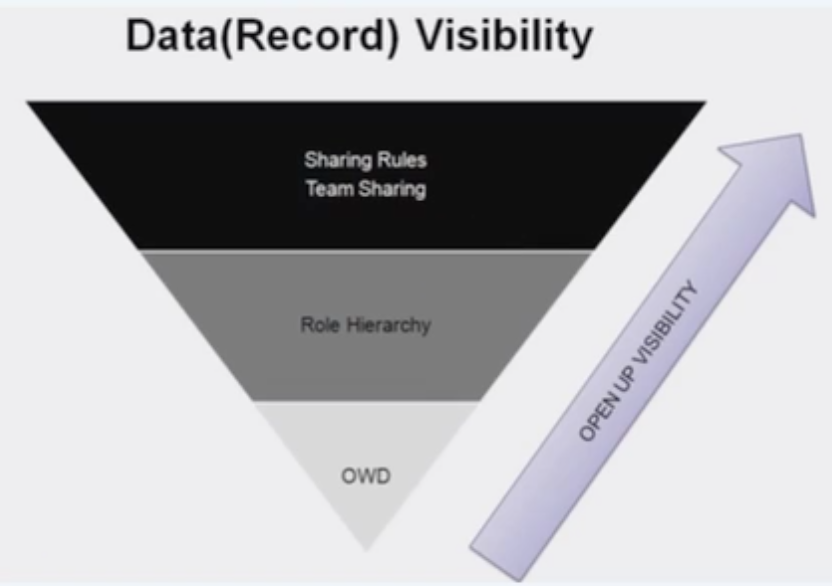
How OWD, role hierarchy, and sharing rules open Salesforce record access
Organization Wide Default settings define the baseline record visibility for each object. If the OWD is Private, users normally see only the records they own and records shared with them. Role hierarchy can allow users above the record owner to access records, and sharing rules can grant access to public groups, roles, roles and subordinates, or territories.
- OWD sets the default record access for an object.
- Role hierarchy can open access upward to managers and users above the owner in the hierarchy.
- Sharing rules open access laterally or to selected groups when business users need access outside ownership and hierarchy.
- Manual sharing, teams, territories, queues, and Apex sharing can add access for specific use cases.
OWD access levels available in Salesforce sharing settings
The available OWD values depend on the object. Standard objects, custom objects, child objects in master-detail relationships, and external user access can show different options. The most common access levels are listed below.
| OWD access level | Meaning in Salesforce | Typical use |
|---|---|---|
| Private | Users can access records they own, records shared with them, and records opened by hierarchy or other sharing features. | Use when records contain customer, sales, service, or operational data that should not be visible to everyone. |
| Public Read Only | Users can read all records for the object, but they cannot edit records they do not own unless another sharing feature gives edit access. | Use when company-wide visibility is needed, but updates must remain controlled. |
| Public Read/Write | Users can read and edit all records for the object, subject to object permissions and field-level security. | Use only when all users who have object access can safely edit each other’s records. |
| Public Read/Write/Transfer | Users can read, edit, and transfer ownership where this access level is available, commonly for objects such as Leads and Cases. | Use when ownership transfer is part of the process and broadly allowed. |
| Controlled by Parent | Access to the child record is inherited from the parent record. | Common for detail objects in a master-detail relationship. |
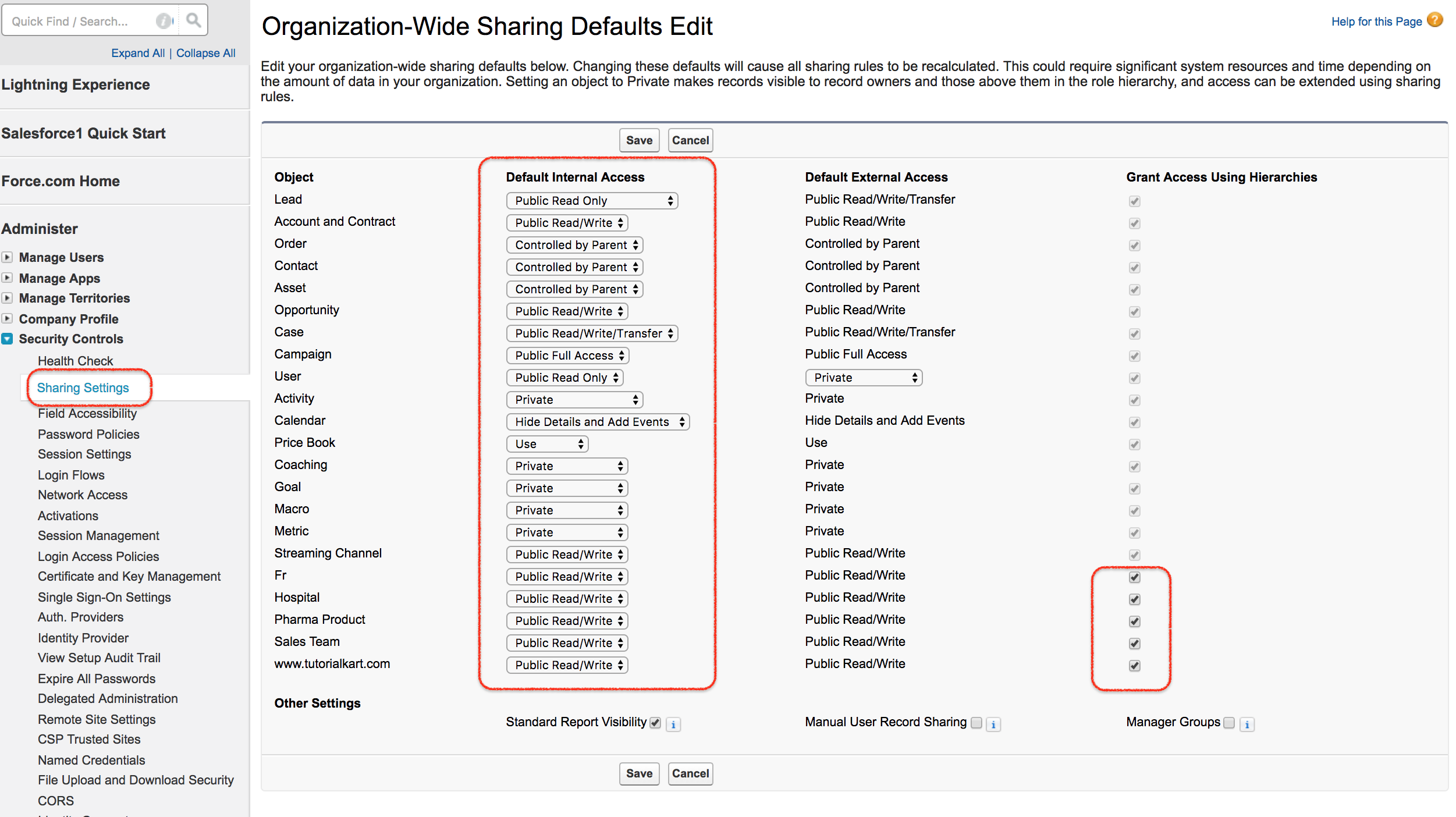
Correct meaning of Private, Public Read Only, Read/Write, and Transfer in OWD
- Private: Only the record owner, users above the owner in the role hierarchy when hierarchy access applies, and users who receive sharing access can access the record.
- Public Read Only: Every user with object Read permission can view records, but users cannot edit records they do not own unless edit access is granted separately.
- Public Read/Write: Every user with the required object permissions can view and edit records for that object. Delete, transfer, and field editing still depend on object permissions, ownership, full access, and field-level security.
- Read/Write & Transfer: A user can read, edit, and transfer record ownership where this option is available and the user has the required object permissions.
- Controlled by Parent: Salesforce does not calculate separate sharing for the child record; access comes from the parent record.
Example: profile permissions combined with OWD settings
To understand better about Organization Wide Default (OWD), compare object permissions with record access. In the table below, CRED means Create, Read, Edit, Delete, and CR means Create and Read.
| Profile object permission | OWD setting | Outcome for the user |
|---|---|---|
| CRED | Private | The user can create records and work with records they own. They cannot see another user’s records unless access is provided by role hierarchy, sharing rules, team access, manual sharing, or another sharing mechanism. |
| CR | Private | The user can create records and read records they own, but cannot edit or delete because the profile does not include Edit or Delete. |
| CRED | Public Read Only | The user can read all records. The user can edit records they own if profile and field permissions allow it. Records owned by others remain read-only unless edit access is shared. |
| CR | Public Read Only | The user can create and read records but cannot edit or delete any record because object-level Edit and Delete permissions are missing. |
| CRED | Public Read/Write | The user can create, read, and edit records for the object. Delete still depends on object permission and whether the user has ownership, full access, or a permission such as Modify All. |
| No object Read permission | Public Read Only or Public Read/Write | The user cannot access the object’s records because OWD cannot override missing object-level Read permission. |
To check object level permission, go to Profiles or Permission Sets and review the object permissions before changing OWD. If a user cannot even read an object, changing the organization-wide default for that object will not make the object visible.
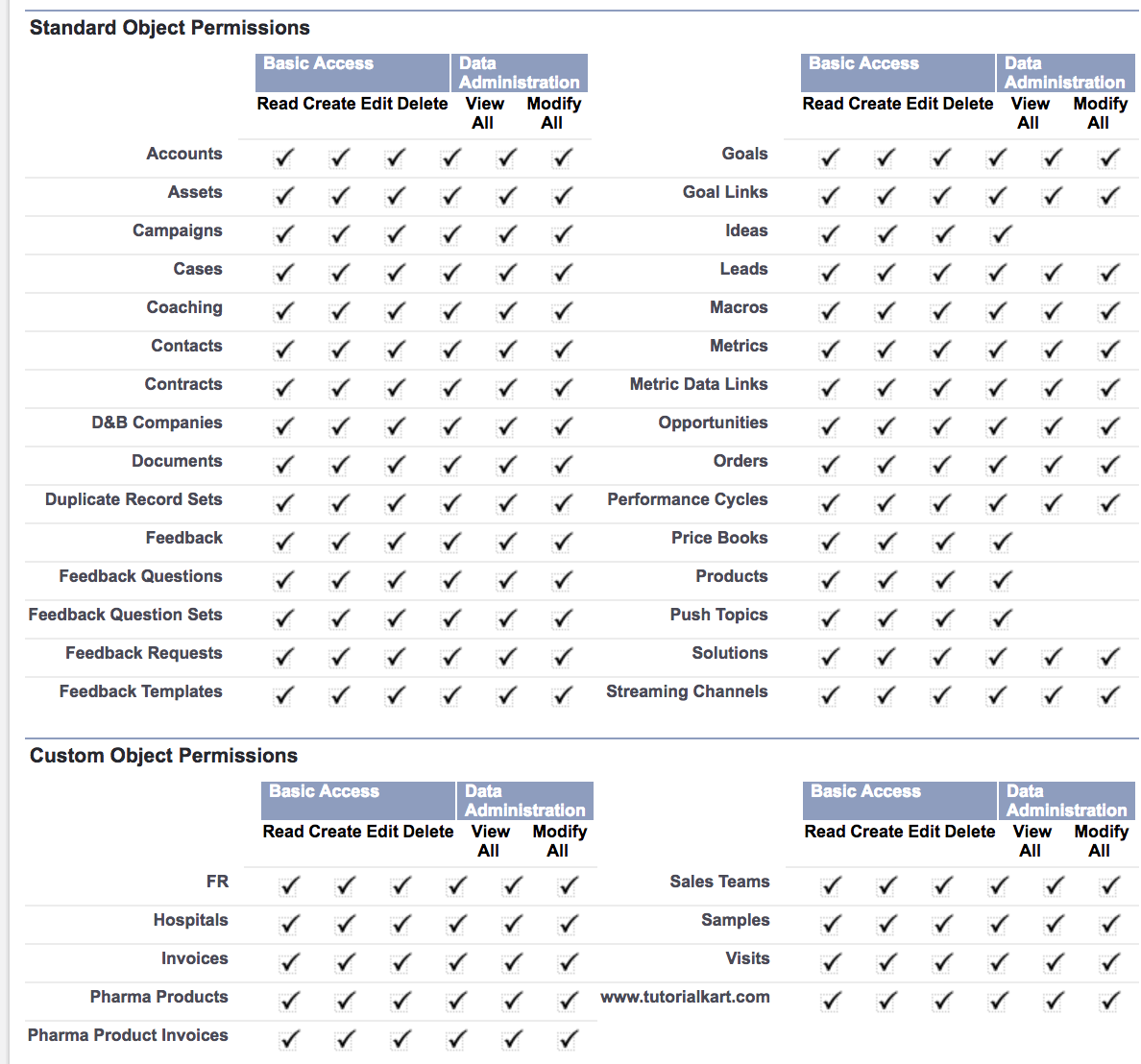
- CRED means CREATE, READ, EDIT, DELETE.
- Standard object and custom object permissions are available in profiles and permission sets.
- OWD controls record access after object access has already been allowed.
How to view or change Organization-Wide Defaults in Salesforce Setup
Use these steps to view OWD in Salesforce Lightning Setup. The exact options depend on your Salesforce edition, enabled features, and object relationships.
- Click the Setup gear icon.
- In Quick Find, enter Sharing Settings.
- Open Sharing Settings.
- Review the Organization-Wide Defaults section.
- Click Edit to change the default internal access or default external access for an object.
- Save the change and allow Salesforce to recalculate sharing if prompted.
When you reduce access, test with a real user profile or a test user before applying the change in production. When you open access, confirm that the change does not expose records beyond the intended users.
Default Internal Access and Default External Access in Salesforce OWD
For orgs that use Experience Cloud or external users, Salesforce can show separate OWD columns for internal users and external users. Default Internal Access applies to users inside the organization. Default External Access applies to external users, such as partner or customer users, where external sharing is enabled.
External OWD should be reviewed carefully because external users often need narrower access than employees. Use external sharing rules, sharing sets, account relationships, or other Experience Cloud sharing features when external users need specific record access.
Grant Access Using Hierarchies and OWD for custom objects
For most standard objects, access through the role hierarchy is built into the Salesforce sharing model. For custom objects, Salesforce provides the Grant Access Using Hierarchies setting. When enabled, users above the record owner in the role hierarchy can access the record. When disabled for a custom object, hierarchy access is not automatically granted for that object.
This setting is important for private objects. If a custom object is Private and hierarchy access is disabled, managers may not automatically see records owned by their team unless another sharing method grants access.
Common OWD mistakes in Salesforce security design
- Using Public Read/Write too early: This makes all records editable by users with object access, which can be broader than the business process requires.
- Expecting OWD to grant object permission: OWD cannot make an object visible if the profile or permission set does not grant Read permission.
- Confusing Public Read Only with edit access: Public Read Only means broad visibility, not broad editing.
- Ignoring field-level security: A user may have record access but still be unable to see or edit sensitive fields.
- Forgetting external users: Internal sharing settings and external sharing settings should both be checked when Experience Cloud users are involved.
- Not testing with real permission combinations: Always test OWD changes with profiles, permission sets, role hierarchy, and sharing rules together.
Official Salesforce references for OWD sharing settings
For implementation details, compare your setup with the official Salesforce documentation on sharing model fields, the security implementation guide for organization-wide defaults, and external organization-wide defaults.
Salesforce OWD FAQ
What is OWD in Salesforce?
OWD in Salesforce means Organization-Wide Default. It defines the default record access users receive for records they do not own. It is part of Salesforce record-level security.
Is OWD object-level security or record-level security?
OWD is record-level security. Object-level security is controlled by profiles and permission sets. A user needs object permission first, and then OWD and other sharing settings decide which records the user can access.
Can sharing rules make Salesforce access more restrictive than OWD?
No. Sharing rules open access beyond the OWD baseline. They do not reduce access. To make access more restrictive, change object permissions, field-level security, OWD, role hierarchy behavior, or other relevant security settings.
What is the difference between Public Read Only and Public Read/Write in OWD?
Public Read Only lets users with object Read permission view records. Public Read/Write lets users with the required object permissions view and edit records. Field-level security and other permissions still apply.
When should OWD be set to Private in Salesforce?
Set OWD to Private when records should be visible only to the owner and users who receive access through hierarchy, sharing rules, teams, manual sharing, territories, queues, or Apex sharing. Private is common for sensitive sales, service, HR, finance, or customer data.
OWD configuration QA checklist for Salesforce admins
- Confirm that the object permissions in profiles and permission sets match the intended Create, Read, Edit, and Delete access.
- Check whether the OWD value is Private, Public Read Only, Public Read/Write, Public Read/Write/Transfer, or Controlled by Parent for the specific object.
- Verify whether Grant Access Using Hierarchies is enabled for custom objects that managers need to review.
- Review sharing rules, teams, manual sharing, queues, territories, and Apex sharing that may open access beyond OWD.
- Check Default External Access separately when partner users, customer users, or Experience Cloud sites are used.
- Test the final setup with a user who has the same profile, permission sets, role, and sharing access as the real business user.
Salesforce OWD key takeaway
In this salesforce tutorial, we learned that Organization Wide Default (OWD) in Salesforce is the baseline record-level security setting for each object. Profiles and permission sets decide whether a user can use an object, while OWD, role hierarchy, and sharing features decide which records the user can access. In our upcoming Salesforce admin tutorial we are going to learn about Sharing Rules in Salesforce.