 TutorialKart.com
Salesforce Lightning Component Framework is the Salesforce UI framework used to build reusable components for Lightning Experience, Salesforce mobile app, Experience Cloud sites, and custom Lightning pages. A Salesforce Developer creates custom Lightning components, and a Salesforce administrator can assemble available components in Lightning App Builder to create a Lightning page, such as a record page, home page, or app page.
In this Salesforce tutorial, we will learn what Salesforce Lightning Component Framework means, how Aura components fit into it, how Lightning Web Components are related, why the framework is used, and how to create a simple Aura Lightning component using Developer Console.
Salesforce Lightning Component Framework definition for Aura and LWC
Salesforce Lightning Component Framework is a client-side UI framework for developing dynamic Salesforce applications for desktop and mobile users. In current Salesforce development, the term Lightning components can refer to two programming models: Aura Components, the original Lightning component model, and Lightning Web Components (LWC), the modern web standards-based model.
The original Lightning Component Framework is closely associated with Aura. Aura components use markup, JavaScript, Apex, CSS, and component metadata to create reusable user interface blocks. Lightning Web Components use standard JavaScript, HTML templates, and Salesforce platform services. Both can appear to admins and users as Lightning components on a page, but they are built differently.
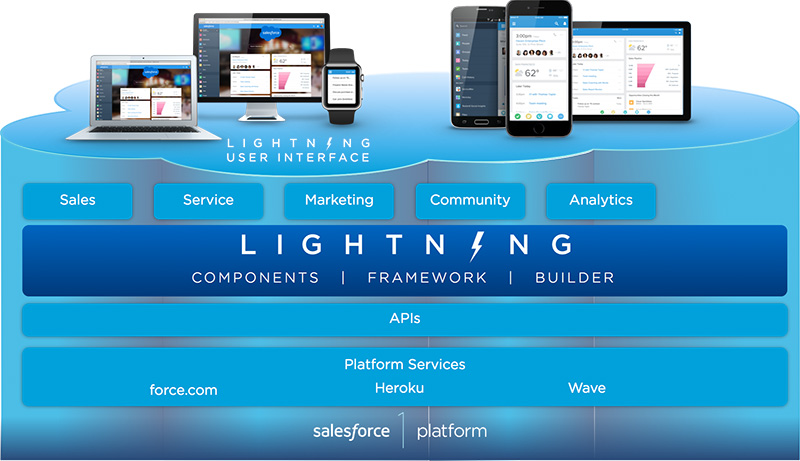
Why Salesforce Lightning Component Framework is used on Lightning pages
The Salesforce Lightning Component Framework is used because it lets developers build smaller reusable UI parts instead of creating every page from the beginning. Administrators can then place those components on Lightning pages using point-and-click tools, where the same component can often be reused across record pages, app pages, home pages, and utility areas.
- Reusable Salesforce UI components: A component can represent a simple field display, a search box, a related record panel, a chart, or a larger business process screen.
- Faster page assembly: Developers can create custom components, while admins can arrange standard and custom components in Lightning App Builder.
- Event-driven user experience: Components can react to browser events such as clicks, selections, and form changes, and can also communicate with other components.
- Salesforce data access: Components can use Apex, Lightning Data Service, and platform APIs to read or update Salesforce records based on the component design.
- Responsive desktop and mobile design: Components can be designed for Lightning Experience and Salesforce mobile app, using Salesforce Lightning Design System patterns where appropriate.
- Component sharing inside an org: Custom components can be packaged, reused, and placed in different parts of Salesforce depending on access, metadata, and page configuration.
Aura framework in Salesforce Lightning Component Framework
The Aura Framework is the original programming model behind Salesforce Aura components. When older tutorials say “Lightning Component Framework,” they usually mean Aura components. The open source Aura framework is available at https://github.com/forcedotcom/aura.
An Aura component is a self-contained and reusable unit of a Salesforce application. It can contain markup, attributes, event handlers, JavaScript controller logic, helper functions, Apex controller calls, CSS, and design metadata. Aura components commonly use the .cmp file extension for the component markup.
Salesforce Aura component bundle files and responsibilities
When you create an Aura Lightning component in Developer Console, Salesforce creates a component bundle. A bundle can contain several files, and each file has a specific responsibility.
| Aura bundle file | Purpose in the Lightning Component Framework |
|---|---|
ComponentName.cmp | Contains the Aura component markup, attributes, and references to base components. |
ComponentNameController.js | Handles client-side actions such as button clicks and field changes. |
ComponentNameHelper.js | Stores reusable JavaScript helper methods used by the controller. |
ComponentName.css | Adds component-specific styling when SLDS utility classes are not enough. |
ComponentName.design | Defines properties that admins can configure in Lightning App Builder. |
ComponentNameController.cls | Optional Apex server-side controller used when the component needs custom Salesforce data logic. |
Salesforce Lightning Component, Aura Component, and LWC comparison
A Salesforce Lightning component is a reusable UI building block. The important point is that Salesforce now has two Lightning component programming models. Aura is still used in many existing orgs, but Lightning Web Components are preferred for most new custom development because they use modern web standards and generally offer better performance and developer tooling.
| Topic | Aura Component | Lightning Web Component |
|---|---|---|
| Component file | Uses a .cmp markup file. | Uses an HTML template, JavaScript file, and metadata XML file. |
| Programming model | Salesforce Aura programming model. | Modern web standards-based Salesforce model. |
| Common use | Maintaining existing Lightning components and using Aura-only capabilities. | Building most new custom Lightning components. |
| Page usage | Can be exposed to Lightning pages, apps, and other supported containers. | Can be exposed to Lightning pages, apps, and other supported containers. |
| Interoperability | Can contain Lightning Web Components in supported scenarios. | Can work with Aura through Salesforce interoperability rules, but cannot contain Aura components directly. |
For a beginner, the practical rule is simple: learn the Lightning Component Framework concepts because they explain how Salesforce pages are assembled from components, but choose Lightning Web Components for new development unless your requirement specifically needs Aura.
How Salesforce admins place Lightning components on Lightning pages
Salesforce developers usually create custom components. Salesforce admins usually decide where those components appear. In Lightning App Builder, an admin can open a record page, home page, or app page, drag standard and custom components into page regions, configure component properties, and activate the page for users, apps, record types, or form factors.
This separation is one reason the Salesforce Lightning Component Framework is useful. Developers can focus on reusable logic and UI, while admins can control page composition without editing the component code every time a layout changes.
How to create a Salesforce Aura Lightning Component in Developer Console
To create Salesforce Lightning Components using the Aura model, log in to your Salesforce developer account and navigate to Developer Console. Developer Console is commonly used in older Aura tutorials. For larger projects and modern development, Salesforce DX and Visual Studio Code are usually a better workflow.
- Now go to File | New | Lightning Component.
- Enter the Lightning component name. Use a clear name such as
HelloLightningFramework. - Select the required component configuration options if you want the component to be available for Lightning pages.
- Click the Submit or Save button, depending on the Developer Console dialog shown in your org.
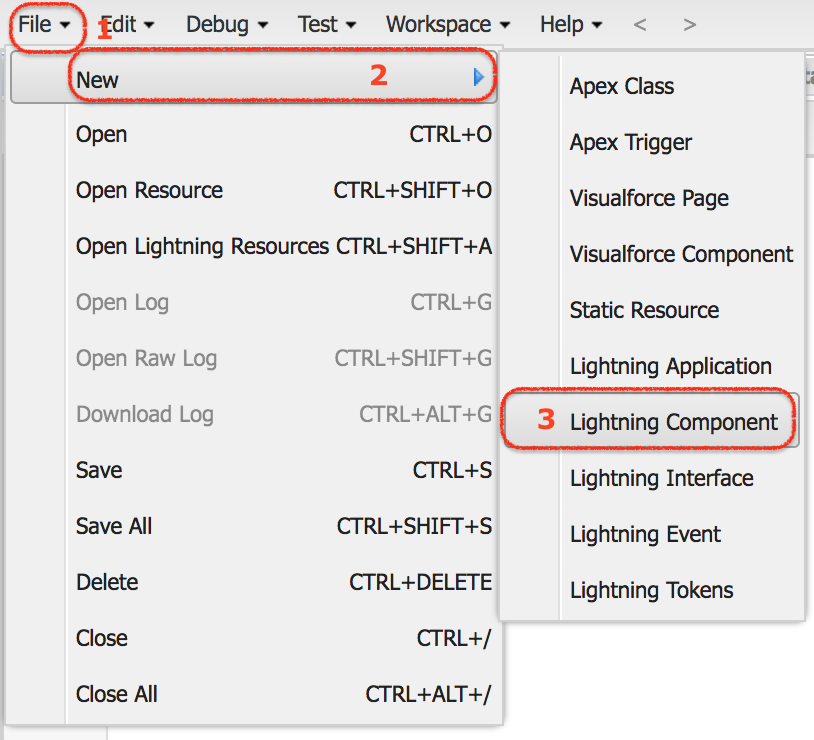
After the component is created, you can add simple Aura markup. The following example creates a reusable component that can be placed on Lightning page types when the correct interface is included.
<aura:component implements="flexipage:availableForAllPageTypes" access="global">
    <aura:attribute name="message" type="String" default="Ready to use the Lightning Component Framework" />

    <lightning:card title="Hello Lightning Component Framework">
        <div class="slds-p-horizontal_small">
            <p>{!v.message}</p>
            <lightning:button label="Update Message" onclick="{!c.handleClick}" />
        </div>
    </lightning:card>
</aura:component>
In the component bundle controller file, add a small JavaScript action for the button click.
({
    handleClick : function(component, event, helper) {
        component.set("v.message", "Button clicked in the Aura Lightning component");
    }
})
This example shows the basic structure of an Aura component: component markup, an attribute, a Lightning base component, and a client-side controller method. In a real Salesforce project, you may also add Apex, validation, permissions, error handling, and tests depending on the business requirement.
Common mistakes while learning Salesforce Lightning Component Framework
- Calling every Lightning component an Aura component: Aura is one Lightning component model. LWC is another model.
- Using Aura for all new work: For most new custom components, check whether LWC meets the requirement before choosing Aura.
- Ignoring page exposure metadata: A component must implement the right interface or metadata target before admins can place it on a Lightning page.
- Putting all logic in the component file: Keep markup, client-side actions, helper logic, Apex, and styling organized in the correct bundle files.
- Skipping security and sharing checks: Component access to Salesforce data must respect user permissions, field-level security, sharing, and Apex security patterns.
Official Salesforce references for Lightning Component Framework
For current Salesforce guidance, refer to the official Salesforce documentation while practicing this tutorial: Introducing Aura Components, Lightning Web Components introduction, Lightning base components, and the Lightning Component Reference.
Salesforce Lightning Component Framework FAQs
What is the Lightning Component Framework in Salesforce?
The Lightning Component Framework in Salesforce is a UI framework for building reusable components that run in Lightning Experience, Salesforce mobile app, and other supported Salesforce containers. In older usage, it mainly refers to Aura components. In modern Salesforce development, Lightning components can be built with Aura or Lightning Web Components.
What is a benefit of the Salesforce Lightning Component Framework?
A main benefit is reuse. A developer can build a component once, and an admin can place it on different Lightning pages when the component is exposed for those page types. This reduces repeated UI work and helps teams build consistent Salesforce pages.
Is the Lightning Component Framework the same as Aura?
Not exactly. Aura is the original component model used by the Lightning Component Framework. Salesforce now also supports Lightning Web Components, which are based on modern web standards. Many older Lightning Component Framework tutorials focus on Aura because LWC did not exist when those tutorials were first written.
Should I create Aura components or Lightning Web Components now?
For most new Salesforce custom UI development, start with Lightning Web Components. Use Aura when you are maintaining existing Aura components or when a specific requirement still needs Aura behavior or an Aura-only capability.
Is LWC similar to React?
LWC and React are both component-based frontend approaches, but they are not the same framework. LWC is Salesforce’s component model built for the Lightning Platform, while React is a general JavaScript library. Some ideas, such as reusable components and reactive UI updates, may feel familiar to developers who know React.
Editorial QA checklist for this Salesforce Lightning Component Framework tutorial
- Does the tutorial clearly distinguish Aura components from Lightning Web Components?
- Does the page avoid implying that Aura is the only way to build Lightning components today?
- Are Developer Console steps limited to Aura component creation and not presented as the only modern workflow?
- Are component file extensions and bundle responsibilities described accurately?
- Do examples use Salesforce-specific Aura markup, correct JavaScript controller syntax, and PrismJS language classes?
- Are official Salesforce documentation links included for readers who need current platform details?
Next step after learning Salesforce Lightning Component Framework
You have learned what Salesforce Lightning Component Framework is, why Aura matters, how Lightning components are reused, and how Aura compares with Lightning Web Components. In the next Salesforce tutorial, we will create a Salesforce Lightning component and connect it to a simple Lightning application or Lightning page so that the component can be tested in a real Salesforce UI.