 TutorialKart.com
In this SAP FICO tutorial, you will learn how to assign chart of depreciation to company code in SAP. This configuration links the asset accounting depreciation structure with the company code. In the example below, chart of depreciation TKCD is assigned to company code TK01.
The assignment is maintained in Asset Accounting customizing by using transaction code OAOB or by following the SAP IMG path through SPRO. After this assignment, the company code can use the depreciation areas, posting rules, and valuation settings that are defined under the selected chart of depreciation.
Chart of Depreciation and Company Code Assignment Rule in SAP FI-AA
How many charts of depreciation can be assigned to a company code?
In SAP Asset Accounting, a company code is assigned to one chart of depreciation. The chart of depreciation is an important organizational object in asset accounting in SAP because it contains depreciation areas that control how assets are valued and depreciated for different purposes, such as book depreciation, tax depreciation, or group reporting.
A single chart of depreciation can be reused for multiple company codes when those company codes follow the same depreciation structure. However, one company code should not be assigned to multiple charts of depreciation in the standard FI-AA organizational assignment.
Prerequisites Before Assigning Chart of Depreciation to Company Code
Before you assign the chart of depreciation to a company code in SAP, make sure the basic enterprise structure and asset accounting configuration are ready.
- The company code, such as TK01, must already be defined in SAP.
- The chart of depreciation, such as TKCD, must already exist.
- Depreciation areas should be copied or configured under the chart of depreciation.
- The related chart of accounts and account determination settings should be reviewed for the company code.
- You should have authorization to maintain SAP IMG configuration and save the change in a customizing request.
Assign Chart of Depreciation to Company Code in SAP Using OAOB
Transaction code: – OAOB
SAP IMG Path: – SPRO > SAP Reference IMG > Financial Accounting > Asset Accounting > Organizational Structures > Assign chart of depreciation to company code.
You can go directly to the assignment screen by entering transaction code OAOB. You can also open the same activity from the SAP Reference IMG by using the steps below.
Step 1: Open SAP Reference IMG from SPRO
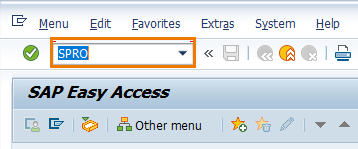
Step 1: – Enter transaction code “SPRO” in the SAP command field and press enter to continue.
Step 2: Choose SAP Reference IMG for FI-AA Customizing
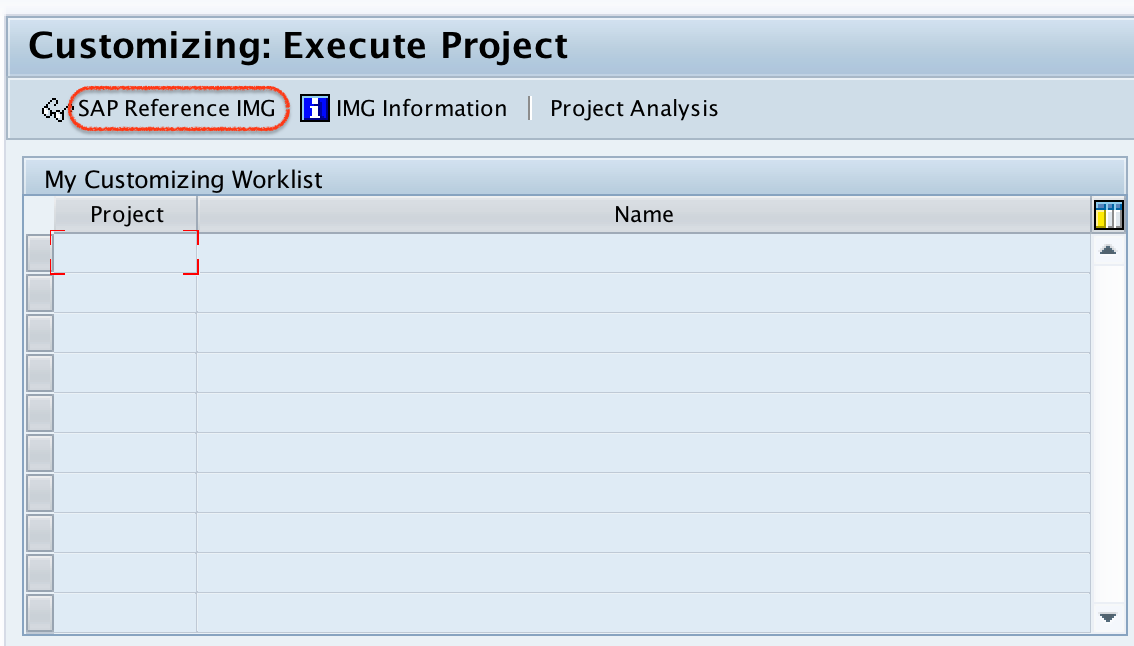
Step 2: – On customizing execute project screen, click on “SAP Reference IMG”
Step 3: Open Assign Chart of Depreciation to Company Code Activity
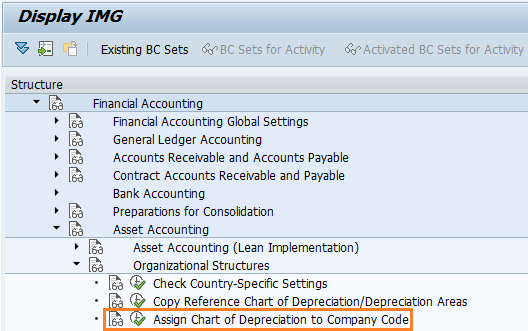
Step 3: – On display IMG screen, follow the menu path financial accounting – Asset accounting – organizational structures and click on img activity “assign chart of depreciation to company code”
Step 4: Position the Required Company Code in OAOB
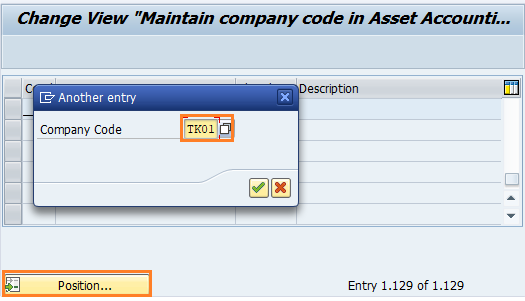
Step 4: – To find out our company code “TK01” in the given list, click on position button and enter company code and press enter to continue.
Step 5: Enter Chart of Depreciation Key for Company Code TK01
Step 5: – On change view maintain company code in asset accounting overview screen, our company code TK01 displays on top of the screen. Now enter chart of depreciation key “TKCD” in the given field Chrt dep and press enter.
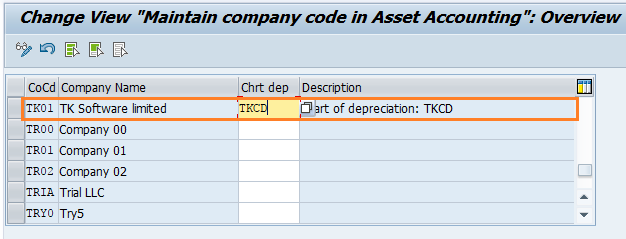
After assignment of chart of depreciation to company code, click on save button and save the configured details in SAP.
What Happens After Chart of Depreciation TKCD Is Assigned to Company Code TK01
After saving the assignment, the company code is connected with the depreciation areas available in chart of depreciation TKCD. This does not complete the full asset accounting setup by itself. You still need to check the related FI-AA settings before creating and posting asset transactions.
| Configuration area | Why it matters after OAOB assignment |
|---|---|
| Depreciation areas | They decide the valuation views used for asset depreciation and reporting. |
| Account determination | It controls the G/L accounts used for asset acquisitions, depreciation, retirements, and transfers. |
| Number ranges | They are required for creating asset master records. |
| Posting rules | They decide how asset transactions flow into Financial Accounting. |
| Asset classes | They group assets and link master data with account determination. |
Common Issues While Assigning Chart of Depreciation to Company Code in SAP
If the chart of depreciation cannot be assigned or the company code does not behave as expected in Asset Accounting, check the following points first.
- Company code not found: Confirm that the company code is already created and available in enterprise structure configuration.
- Chart of depreciation not accepted: Check whether the chart of depreciation key exists and is active for your configuration client.
- Depreciation areas missing: Review whether the chart of depreciation was copied from a reference chart and whether required depreciation areas were maintained.
- Save request required: This is a customizing change, so SAP may ask for a transport request when you save.
- Asset posting errors after assignment: Verify account determination, asset classes, depreciation keys, and G/L account settings before testing postings.
Difference Between Assigning Chart of Accounts and Chart of Depreciation to Company Code
Assigning a chart of accounts to a company code is part of Financial Accounting organization setup. It controls the list of G/L accounts used by the company code. Assigning a chart of depreciation to a company code is part of Asset Accounting setup. It controls the depreciation areas and asset valuation structure used by the company code.
Both assignments are important, but they are not the same configuration. For asset postings to work correctly, the company code needs a chart of accounts for G/L accounting and a chart of depreciation for asset accounting.
Configuration QA Checklist for OAOB Chart of Depreciation Assignment
- Confirm that company code TK01 is selected on the OAOB overview screen before entering the chart of depreciation.
- Confirm that chart of depreciation TKCD is the intended chart and not a copied reference key left unchanged.
- Save the assignment and record the customizing request number for transport tracking.
- Review depreciation areas under the assigned chart of depreciation before creating asset masters.
- Test with one asset class and one asset master before continuing with bulk legacy asset uploads or production postings.
FAQs on Assigning Chart of Depreciation to Company Code in SAP
How do I assign a chart of depreciation to a company code in SAP?
You can assign a chart of depreciation to a company code by using transaction code OAOB or by following the IMG path SPRO > SAP Reference IMG > Financial Accounting > Asset Accounting > Organizational Structures > Assign chart of depreciation to company code. Select the company code, enter the chart of depreciation key, and save the configuration.
Can one company code have more than one chart of depreciation in SAP?
No. In the standard Asset Accounting organizational assignment, one company code is assigned to one chart of depreciation. The same chart of depreciation can be used by more than one company code if the same depreciation structure is suitable for those company codes.
What is the transaction code to assign chart of depreciation to company code?
The transaction code is OAOB. You can also reach the same configuration activity through SPRO and the SAP Reference IMG path for Asset Accounting organizational structures.
Is assigning chart of depreciation the same as assigning chart of accounts?
No. The chart of accounts controls the G/L account list for Financial Accounting, while the chart of depreciation controls depreciation areas and asset valuation settings for Asset Accounting. A company code needs both settings to support asset accounting postings properly.
What is AS91 in SAP and is it used for this assignment?
AS91 is used for creating legacy asset master records during asset data transfer activities. It is not the transaction used to assign a chart of depreciation to a company code. For the assignment covered in this tutorial, use OAOB.